To create a certificate in Microsoft Word, start with an online template or a blank document, add the award details, and check the print preview before printing. A template is the quicker route; a blank page gives you more control over the layout.
Choose a template or start with a blank page
In desktop Word, select File > New. Search the template gallery for “certificate” and choose a result if one suits your needs, or select a blank document. Word supports keyword searches for online templates, but a particular certificate design may not always be available. Microsoft’s instructions for creating a document cover Word for Microsoft 365 and listed desktop Windows versions.
As an Amazon Associate I earn from qualifying purchases.
| Starting point | Best when | Trade-off |
|---|---|---|
| Online template | You want a quick design to customize. | You are limited to the available designs and their starting layouts. |
| Blank document | You want more control over the certificate’s structure and appearance. | You will need to arrange and format the elements yourself. |
Set the page orientation and plan the content
A horizontal layout is common for certificates, but it is not required. In desktop Word, choose Layout > Orientation > Landscape to use a wider page. Portrait can work if the content and design suit a taller page. The exact steps vary by platform; Microsoft’s landscape and printing instructions provide separate Windows and Mac guidance for desktop Word.
Free tools Windows power users keep installed
One-click scans. No signup required.
Before formatting, decide what the certificate needs to say. A clear hierarchy helps the recipient identify the award and its recipient at a glance:
#1 Best Overall
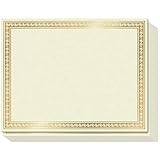
- CUSTOMIZABLE GLORY: Accolades won’t always be Certificates of Achievement, Excellence or Recognition. Because for teachers and corporates there are many other things to celebrate! Like that 1st Grade Graduation, Sales Person of the Month, Participation and Courage, or even those funny, but meaningful end-of-year awards. So we created a Printable Certificate Paper 50 Pack, to let praise flow free!
- PRINTABLE PRAISE: Our printable award certificates are on thick 180gsm certificate paper 8.5 x 11” with Border margins of 5/8”. This standard letter size and thickness is suitable for regular inkjet or laser jet printers without smudging or getting stuck! Choose a theme from Microsoft Templates or Canva (like Certificates of Participation), or make your own, print and even add your own gold seal!
- THICK PAPER QUALITY: Regular copy paper is 80gsm, but did you know some certificates printable or otherwise are too!? Strange, right? Sweetzer & Orange Blank Certificate Paper is 180gsm for an award that feels important. ? The gold border is FOIL STAMPED quality with an easy to read off-white interior. And if you want less thickness, we also have 100gsm Blue Border Certificates available.
- NEED CERTIFICATE JACKETS? Matching awards and certificates covers always look better, wouldn’t you say? So visit our range of certificate sleeves - available in navy with gold foil border to match these gold certificates, or our blue range. Find them by searching Sweetzer & Orange Certificate Holders.
- WITH 12-MONTH GUARANTEE: Order this set of 50 Gold Border blank diploma paper to spread praise throughout the year! Everything will arrive luxury packed so you won’t find any bent corners. As Certificates for students, or employee awards, and everything else why not share the appreciation with a beautiful award certificate by the paper pros at Sweetzer & Orange
- Certificate heading: identify the document, such as “Certificate of Achievement.”
- Recipient’s name: make this one of the most prominent elements.
- Award or achievement: state what is being recognized.
- Issuing organization: name the school, team, business, or other issuer.
- Date: include when the recognition was issued.
Keep supporting details smaller than the heading and recipient’s name. These are practical design choices, not a Microsoft-prescribed certificate standard.
Format the text and add a border if you want one
Use Word’s text formatting controls to distinguish the heading, recipient, and supporting details. Choose sizes and styles that remain easy to read at the page size you intend to use. A border is optional; it can frame the content without taking attention away from the recipient’s name.
Rank #2

- Premium Resume Paper Set (100 Sheets): Elevate your professional documents with our exclusive Parchment Resume Paper. This set includes100 sheets of 8.5x11-inch paper, meticulously crafted from 100gsm parchment. Imbue your resumes, certificates, and important documents with a touch of sophistication.
- Versatile Elegance for Various Occasions: Beyond being an ideal choice for resumes, this parchment paper is versatile enough for certificates, diplomas, and any document where an elegant touch is desired. Each sheet is designed to add a timeless and refined aesthetic to your important paperwork.
- Exceptional Print Quality for Professional Impact: Tailored for printing, our Parchment Resume Paper guarantees exceptional print quality. The 8.5x11-inch size provides ample space for clear and detailed presentations, ensuring that your printed resumes and certificates make a bold and professional statement.
- Smooth Texture for Writing and Printing Perfection: Whether you prefer the precision of printing or the personal touch of writing by hand, our parchment paper offers a smooth and consistent surface. The subtle texture enhances the visual appeal of your documents, ensuring they stand out with classic sophistication.
- Professionalism Redefined in Every Sheet: Make a lasting impression with our Parchment Resume Paper, designed to reflect professionalism and meticulous attention to detail. Ideal for personal and professional use alike, this paper offers versatility with an elegant touch. Upgrade your documents today with the timeless sophistication of Parchment parchment.
To put a border around selected text or a paragraph, select the relevant content and open Home > Borders > Borders and Shading. Choose the border style, color, and width, then check Apply to so the border is applied to the text or paragraph as intended. Microsoft’s border instructions describe this selected-text feature; a border around a page is a separate option.
Do these 3 things before closing this tab:
1Scan for outdated or missing drivers - takes under a minute2Clear out junk files and repair common Windows errors3Fix the driver behind crashes, sound loss and screen glitchesCheck the preview before printing
- Open File > Print.
- Inspect the preview and confirm that the page orientation matches your design.
- Choose print settings only after checking that the certificate fits and looks as expected.
Microsoft’s Word printing guidance covers previewing pages from File > Print. If the certificate is intended to be shared digitally, save and review the document in the format you plan to send; for a physical presentation, use the preview to catch layout issues before printing.
Rank #3

- ELEGANT GOLD FOIL BORDER:Enhance every recognition with our premium certificate paper featuring a metallic gold foil border. The ornate metallic edge adds a touch of prestige and elegance, making your official documents, diplomas, and awards look truly distinguished and memorable.
- PREMIUM THICK PAPER QUALITY:Crafted from heavyweight, premium specialty stock, this 8.5 x 11 inch blank award paper feels thick and durable. Unlike flimsy copy paper, our sturdy standard letter size sheets resist bleeding and show through, ensuring your printed awards present a professional, lasting impression.
- PRINTER FRIENDLY & EASY TO CUSTOMIZE:Designed for seamless performance with most standard inkjet and laser printers. Enjoy smooth, jam-free printing with fast-drying results. Easily personalize text, fonts, and layouts using Word, Canva, or popular software templates to create custom award certificates in minutes.
- VERSATILE FOR ALL OCCASIONS:Ideal for schools, offices, businesses, and organizations! Perfect for printing school diplomas, student honor roll awards, employee of the month appreciation, graduation documents, citizenship certificates, and sports tournament achievements.
- GREAT VALUE 50-SHEET PACK:Includes 50 sheets of blank certificate paper with gold foil design. Generously packed in protective packaging to arrive crisp, flat, and free of bent corners—giving you plenty of high-quality sheets to celebrate milestones and honor achievements all year round.
Save the design for reuse
If you expect to create multiple certificates with the same layout, save the document as a Word template. Microsoft documents the .dotx and .dotm formats; use the macro-enabled .dotm format only if the template contains macros. The cited save-as-template steps apply to Word desktop on Windows, and the menu path may differ on Mac or Word for the web. See Microsoft’s instructions for saving a document as a template.
What a Word certificate does—and does not—establish
Word helps you lay out and print a certificate, but its appearance does not establish that the document is an accredited credential, legally valid, or accepted by a particular institution. If a certificate must meet an organization’s requirements, check those requirements with the organization that will issue or receive it.
Quick Recap
Best Value

- CERTIFICATE PAPER SET: Create polished awards certificates with gold certificate paper designed for printing. Includes 25 sheets of award certificate paper for printing and matching gold seal stickers for a complete presentation.
- EASY CUSTOM PRINTING: This certificate printing paper works with inkjet and laser printers, copiers, or hand calligraphy. Customize each certificate using an online template or your own layout for school or office events.
- PROFESSIONAL PRESENTATION: Translucent parchment style certificate paper with gold seal adds a refined touch to recognition events. Ideal for graduations, achievements, and formal ceremonies that require a classic look.
- STANDARD LETTER SIZE: Each sheet measures 8.5 x 11 in. for convenient use as 8.5x11 award paper in most home or office printers. Gold seals measure 1.75 in. and adhere securely without covering important text.
- QUALITY PARCHMENT STOCK: Crafted from 24 lb. parchment paper for a substantial feel. The smooth surface helps text and graphics stand out clearly, making every certificate suitable for display or framing.
Rank #4

- BULK CERTIFICATE PAPER: 100 sheets of 8.5" x 11" specialized paper with classic blue floral baroque border design.
- QUALITY: Each identical certificate is made of 100 gsm specialty paper with a high-quality border print
- "BLANK": A faint, artistic background design completes the classic look of the certificate, lending a polished appearance to printed, personalized awards
- PRINTER-FRIENDLY: Compatible with inkjet and laser printers: just determine your print margins, create your design, and print!
- VERSATILE: Can be used in horizontal or vertical format, with black and white ink and/or colored designs
Product prices and availability are accurate as of the date/time indicated and are subject to change. Any price and availability information displayed on Amazon at the time of purchase will apply.
Quick wins for a faster PC:
Repair Windows errors before they cause bigger problemsFix Now →Fix the driver behind crashes, sound loss and screen glitchesFind Drivers →



