Free tools Windows power users keep installed
One-click scans. No signup required.
To convert GB to GiB, multiply the number of GB by 0.9313225746. To convert Mbps to MB/s, divide by 8. These conversions use decimal GB and Mbps, binary GiB, and the fact that one byte equals eight bits; they convert units, not a promise of actual download speed.
GB and GiB measure storage differently
GB uses the decimal prefix giga, while GiB uses the binary prefix gibi. Under the definitions used by the National Institute of Standards and Technology (NIST), 1 GB is 1,000,000,000 bytes and 1 GiB is 1,073,741,824 bytes. The prefixes are not interchangeable: SI prefixes refer to powers of 10, while binary prefixes explicitly refer to powers of 2. NIST’s references are available in its binary-prefix definitions and SI prefix guidance.
As an Amazon Associate I earn from qualifying purchases.
Convert GB to GiB
Divide the number of bytes represented by the decimal GB value by the number of bytes in a GiB:
Recommended Free Tools
GiB = GB × 1,000,000,000 ÷ 1,073,741,824
For a convenient rounded factor, use:
GiB ≈ GB × 0.9313225746
- 1 GB ≈ 0.9313 GiB
- 100 GB ≈ 93.1323 GiB
Convert GiB to GB
For the reverse conversion, multiply by the exact factor:
#1 Best Overall

- CONVERT MORE THAN 70 UNITS: Convert U.S. Imperial, metric and other units of measure for reliable data input and conversion; enter measurements just like you say them; you can enter data in various formats and change solutions to preferred read out; you can enter feet, inch, fraction or decimal inch, other units are entered in whole or decimal numbers
- GIVES YOU OVER 500 CONVERSION COMBINATIONS: No need for complex scientific calculators or memorizing conversion formulas.
- EASILY WORK IN AND CONVERT BETWEEN MEASUREMENT FORMATS: Press the conversion key and then the desired unit key for easy and accurate results; you can add, subtract, multiply and divide your results to get to the solution you need
- TIME-SAVING BUILT-IN CONVERSIONS: All the most common units you need to complete your job in an accurate fashion; whether it's a linear, area or volume dimensional item, weight, temperatures, velocity, flow rate, pressure, torque, energy, power or another calculation you can convert it so it matches your workflow and project requirements
- VALUABLE TOOL FOR DAILY USE: Reduces headaches, saves time, improves conversion accuracy and prevents expensive errors on all your calculations from large to nano units; comes with a protective slide cover, easy-to-follow quick reference guide and handy pocket reference guide, long-life battery and a full one-year limited warranty
GB = GiB × 1.073741824
So 1 GiB equals 1.073741824 GB. The two directions use different factors because the units contain different numbers of bytes.
Mbps and MB/s measure different things
Mbps means megabits per second; MB/s means megabytes per second. The lowercase b denotes bits and uppercase B denotes bytes. Because one byte contains eight bits, converting between these rates requires dividing or multiplying by 8. NIST defines a byte as 8 bits and notes that telecommunications engineers use megabit per second for 106 bits per second; see its definitions of binary prefixes and related units.
Rank #2

- Metric conversions.
- Sized and powered for calculations anywhere.
- Protective wallet case for carry-with convenience.
- Metric converter
- 10-Digits with punctuation
Convert Mbps to MB/s
With decimal mega prefixes for both units:
MB/s = Mbps ÷ 8
- 8 Mbps = 1 MB/s
- 100 Mbps = 12.5 MB/s
- 500 Mbps = 62.5 MB/s
- 1,000 Mbps = 125 MB/s
Convert MB/s to Mbps
Multiply the MB/s value by 8:
Mbps = MB/s × 8
For example, 12.5 MB/s corresponds to 100 Mbps under the same decimal-prefix convention.
Why a download may be slower than the converted rate
Dividing an advertised Mbps figure by 8 gives its equivalent in MB/s; it does not predict the speed a particular download will reach. The result is a unit conversion, not a throughput guarantee. A real transfer can differ because of network and protocol effects, and the conversion alone does not account for them.
Quick Recap
Best Value
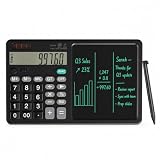
- 【All-in-One Desk Tool: Calculate & Write Without Paper】: Solve math and take notes on the same device! The built-in erasable LCD writing pad supports over 100,000 rewrites—eliminating sticky notes, scratch paper, and clutter. Ideal for accountants, engineers, teachers, and students.
- 【One-Click Clear + Lock to Protect Critical Calculations】: Erase your notes instantly with the dedicated clear button. Press “Lock” to freeze important numbers during audits, exams, or client meetings—no more accidental wipes when you need accuracy most.
- 【Integrated Pull-Out Stylus – Never Lose Your Pen Again】: The smooth-sliding stylus stores inside the calculator body for instant access. No magnets—just reliable, secure storage that keeps your workspace tidy and your tool always ready.
- 【12-Digit Wide Screen & Dual Power for All-Day Reliability】: Large, high-contrast digits reduce errors in complex calculations. Solar-powered with a CR2032 backup battery, it works flawlessly in bright offices, dim classrooms, or during power outages.
- 【Professional Design for Office Desks, Classrooms & Home Use】: Sleek black finish with anti-slip base stays stable during use. Compact enough for backpacks or briefcases—perfect for business professionals, remote workers, and families managing budgets or homework.
Rank #4

- 10 digit large angled LCD display
- Durable plastic keys
- Functions include: currency conversion functions, automatic tax keys, percent key, backspace key, 3 key independent memory, extra-large plus key, sign change, and automatic power down
- Sleek dark blue design
- Opertes on twin power (solar/battery backup)
Rank #3
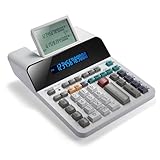
- PAPERLESS DIGITAL TAPE: An editable digital scrolling tape replaces paper entirely, saving space and reducing waste while a large 12-digit LCD display delivers professional-level performance.
- RESPONSIVE FULL-SIZED KEYS: Full-sized keys provide a responsive touch for quick, precise input.
- CHECK AND CORRECT: Review up to 300 entries and correct errors instantly without starting over, using the editable digital scrolling tape to adapt to different scenarios.
- QUIET OPERATION:This calculator operates with far less noise than typical printing calculators, and an adjustable tilt helps reduce glare.
- TRUSTED BY WORKPLACES FOR DECADES: Sharp has been a dependable name in office calculation for generations — practical tools built around the way people actually work.
Check the units before comparing numbers
- Prefix: GB is decimal; GiB is binary. Do not treat GB and GiB as equivalent labels.
- Bit or byte: Mbps uses bits; MB/s uses bytes. The capitalization changes the unit.
- Time: The “per second” denominator remains present in both Mbps and MB/s.
- Precision: Conversion factors or results may be rounded. Label approximate values accordingly.
Product prices and availability are accurate as of the date/time indicated and are subject to change. Any price and availability information displayed on Amazon at the time of purchase will apply.




