Free tools Windows power users keep installed
One-click scans. No signup required.
A home VPN server is reachable from the internet only when there is an inbound path to it. If your ISP gives you a routable public IPv4 address, reserve the server’s LAN address, forward its VPN listener port, and use dynamic DNS (DDNS) to follow address changes. If your ISP places you behind carrier-grade NAT (CGNAT), your router’s port-forward rule cannot cross the ISP’s NAT layer; use an overlay network, a publicly reachable relay or VPS, or an ISP plan that supplies a public address instead.
What CGNAT changes for a home VPN
Carrier-grade NAT is an ISP-level form of IPv4 address sharing. Your router still performs its own NAT, but the ISP places another translation device upstream and gives multiple customers access through a smaller pool of public addresses. The address block reserved for this purpose is 100.64.0.0/10, covering 100.64.0.0 through 100.127.255.255, as defined by RFC 6598 and IANA and documented by Tailscale in 2026.



As an Amazon Associate I earn from qualifying purchases.
Port forwarding controls only the NAT function in your home router. A rule can send traffic arriving at the router’s WAN address to a VPN server on your LAN, but it cannot create a rule in equipment owned by the ISP. When the router itself has no public address, unsolicited traffic from the internet stops at the ISP’s outer NAT.
PC Slower Than It Used to Be?
A free scan shows the junk files, broken settings and background clutter dragging Windows down - then fixes them in one click.Free scan · Windows 10 & 11Crashes, No Sound, or Screen Glitches?
Random freezes, missing sound and display glitches usually trace back to one bad driver. Find and replace yours safely.Free scan · under a minuteThis is why a VPN connection may work from home to an outside server while a connection from your phone back to the house fails. Outbound sessions create a state that NAT can track; an unsolicited inbound session has no corresponding mapping unless every NAT layer permits it.
#1 Best Overall
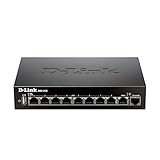
- High speed router with integrated VPN tunnel support for secure remote network access
- (8) Gigabit LAN Ports plus (1) Gigabit WAN Port; 20,000 Concurrent Sessions
- Policy based service management allows for easy configuration of firewall rules
- Supports (5) SSL VPN tunnels and (10) Generic Routing Encapsulation (GRE) tunnels
- Simultaneously supports up to (25) IPsec VPN tunnels plus (25) additional PPTP/L2TP tunnels
How to confirm whether you are behind CGNAT
Check the WAN or internet IPv4 address shown in your router’s status page, then compare it with the IPv4 address reported by an external “what is my IP” service. The comparison matters more than the label your router uses.
- Open the router status page. Look for a field named WAN IP, Internet address, IPv4 address, or similar.
- Record that address. A private address such as 192.168.x.x, 10.x.x.x, or 172.16.x.x through 172.31.x.x indicates another NAT device upstream. An address in 100.64.0.0/10 is the specific shared range reserved for carrier NAT.
- Compare with the external address. If the address shown online differs from the router’s WAN address, the router is behind CGNAT or another upstream NAT.
- Check for double NAT. If you own a modem/router and a second router, put both devices in view. The first device may be doing NAT even when the ISP is not using CGNAT.
- Ask the ISP to confirm. Support can tell you whether the connection uses CGNAT and whether a public IPv4 address is available on your plan. Confirm this before buying a new router or changing VPN settings.
A mismatched address does not by itself identify which upstream arrangement exists. It proves that your router does not directly hold the address visible on the public internet; the ISP can distinguish CGNAT from a second customer-owned router.
When port forwarding and DDNS work
The traditional home-server design works when the ISP delegates a routable public IPv4 address to your router. The address may be dynamic; it does not have to be permanently static if a DDNS name is updated whenever the address changes.
Do these 3 things before closing this tab:
1Repair Windows errors before they cause bigger problems2Fix the driver behind crashes, sound loss and screen glitches3Clear out junk files and repair common Windows errors1. Give the VPN host a stable LAN address
Create a DHCP reservation for the computer, NAS, or appliance running the VPN server. A reservation keeps the same private address after reboots while allowing the router to manage the lease. If you configure a static address directly on the host instead, keep it outside the router’s automatic DHCP pool and document the gateway and DNS settings.
2. Configure the VPN listener
Install and harden the VPN software, then note the exact listener protocol and port it uses. Forward only that protocol and port from the router’s WAN interface to the reserved LAN address. Do not forward an entire range or expose the server’s administration interface just to make troubleshooting easier.
Rank #2
3. Turn on DDNS updates
Register a hostname with a DDNS provider and enter the account details in the router’s DDNS page if the firmware supports that provider. OpenVPN documentation describes two common methods: a router-integrated updater and a client such as ddclient running on a host. The updater tells the provider which public address currently belongs to your hostname.
4. Use the hostname in client profiles
Put the DDNS name, rather than a hard-coded IPv4 address, in each remote client configuration. OpenVPN’s documentation notes that clients using a hostname can resolve it again after reconnecting when the address changes. A cached DNS answer may remain valid for a while, so a change is not always visible instantly.
The Tool Desk
Outbyte PC Repair FREEClear out junk files and repair common Windows errorsFree Scan →Outbyte Driver Updater FREEScan for outdated or missing drivers - takes under a minuteDriver Scan →5. Test from outside the home network
Test with a phone on cellular data or another genuinely external connection. Testing from inside the same LAN can be misleading because some routers do not support NAT loopback. Verify that the VPN handshake completes, then verify access to the intended LAN resources.
What dynamic DNS can and cannot do
DDNS is a naming system, not a connectivity service. It keeps a hostname pointed at the public address currently associated with your connection. It does not request a public address from the ISP, punch through CGNAT, configure the ISP’s NAT, or open a blocked port.
If the router’s WAN address is in 100.64.0.0/10 or another private range, a DDNS provider may faithfully publish that non-routable address or the ISP’s shared public address. Neither result gives an outside client a usable path to your VPN server. Fix the addressing problem first by obtaining a public address or choosing a design that works through outbound connections.
Options when the ISP uses CGNAT
Overlay mesh with direct and relayed paths
An overlay network places an agent on the home VPN host and on each remote device. Tailscale, for example, uses WireGuard encryption and attempts a direct UDP path first. If NAT rules prevent a direct connection, traffic can use a DERP relay; a peer relay can also provide a path in supported network conditions. Direct paths usually have lower latency and higher throughput than relays because they avoid an intermediate forwarding point.
The overlay assigns stable 100.x.y.z addresses from the RFC 6598 shared space. These are tailnet addresses, not public internet addresses. If your ISP network or another VPN also uses 100.64.0.0/10, overlapping routes can create ambiguity; choose non-conflicting routes or adjust the other network’s addressing.
This approach avoids inbound port forwarding and usually requires less router configuration, but it introduces dependence on the overlay’s control and relay infrastructure. Keep device keys, identity rules, and access policies under review just as you would with a self-hosted VPN.
Publicly reachable relay or VPS
Place a server with a public address on the internet and have the home node establish an outbound tunnel to it. Remote clients connect to the public server, which forwards traffic through the established tunnel. This works through CGNAT because the home connection initiates the session. It adds a server to patch, monitor, and secure, and relay bandwidth and latency depend on the server’s location and capacity.
Ask the ISP for a public address
Some providers offer a public IPv4 address as an option, sometimes as a business feature or add-on. Ask whether it is truly routable to your router, whether inbound traffic is filtered, and whether the address is static or dynamic. Once confirmed, use the port-forwarding and DDNS procedure above.
Recommended Free Tools
Subnet routing for access to the whole home LAN
A VPN endpoint on one computer is enough when you need only that computer. If remote users must reach several devices—such as a printer, storage server, or home-automation controller—run a subnet-router function on an always-on node inside the LAN.
- Choose the node. It must remain powered on and be able to route between the overlay or tunnel interface and the home LAN.
- Enable IP forwarding. Turn on forwarding in the operating system and permit the required traffic in its host firewall.
- Advertise only required prefixes. Publish the specific home subnet, such as the LAN range, rather than broad routes that could expose management networks.
- Approve and restrict routes. In the overlay control plane, approve the advertised subnet and apply access rules so only intended identities can use it.
- Document source NAT. Record whether the subnet router translates remote source addresses. Without source NAT, LAN devices may need a return route for the overlay subnet; with it, logs may show the router’s address instead of the original client.
Route approval and policy should be narrow. A subnet router extends network reach, so a compromised remote device could otherwise gain access to more services than intended.
When a service tunnel is a better fit
Cloudflare Tunnel is designed to map a public hostname to a selected local service through an outbound connection. It is useful for publishing a web application or another supported application without opening an inbound port.
That is a different scope from a general-purpose home VPN. A routed VPN or subnet router gives an authenticated client network-level access to chosen prefixes. A service-specific tunnel publishes named applications and keeps the rest of the LAN out of scope. Choose the tunnel when the requirement is “make this one application reachable”; choose a VPN or subnet router when the requirement is “reach several private devices or networks.”
Router and VPN settings checklist
- Confirm whether the router WAN address is public, private, or in 100.64.0.0/10.
- Reserve a stable LAN address for the VPN host or subnet-router node.
- Forward only the configured VPN listener port and protocol when a public address exists.
- Enable router-integrated DDNS or run a maintained updater such as
ddclient. - Use the DDNS hostname in client profiles and test from an external network.
- Disable unused remote-administration interfaces and do not expose the router’s management page.
- Keep the VPN server, router firmware, and overlay agents updated.
- Use strong authentication, protect private keys, and revoke keys for devices or people that no longer need access.
- For subnet routing, advertise only necessary prefixes and review route-approval and access-control rules.
- Record whether source NAT is enabled so return routing and audit logs are predictable.
Performance, exposure, and maintenance trade-offs
| Design | Inbound reachability | Access scope | Typical path | Main trade-off |
|---|---|---|---|---|
| Self-hosted VPN plus port forwarding and DDNS | Requires ISP support for a routable public address | Routed access to the VPN server or LAN | Direct connection to the home router | Most direct control, but you maintain forwarding, updates, keys, and exposure |
| Overlay mesh | Works through CGNAT using outbound negotiation | Device-to-device access; subnet routing can extend selected LAN prefixes | Direct UDP when possible; DERP or peer relay when necessary | Less router work, with dependency on overlay coordination and possible relay performance |
| Public relay or VPS | Works through CGNAT after the home node dials out | Whatever routes and services you configure | Home node to public server, then to remote client | Requires an internet server, patching, monitoring, and bandwidth planning |
| Cloudflare Tunnel | Works through an outbound tunnel | Selected published applications | Client to public hostname, then tunnel to local service | Not a substitute for broad routed-LAN VPN access |
Direct paths generally provide lower latency and more throughput than relays. A relay may be the correct and only path when hard NAT prevents endpoint negotiation, so test from the networks your users actually have rather than assuming every connection will be direct.
Best Value

- 𝐍𝐞𝐱𝐭-𝐆𝐞𝐧 𝐖𝐢-𝐅𝐢 𝟕 𝐰𝐢𝐭𝐡 𝟒-𝐒𝐭𝐫𝐞𝐚𝐦 𝐃𝐮𝐚𝐥-𝐁𝐚𝐧𝐝 𝐮𝐩 𝐭𝐨 𝟑.𝟔 𝐆?𝐩𝐬 - Designed with the latest Wi-Fi 7 technology, featuring Multi-Link Operation (MLO), Multi-RUs, and 4K-QAM, The Deco 7 BE23 delivers full speeds of up to 2882 Mbps on the 5GHz band, 688 Mbps on the 2.4GHz band with 4 streams and achieve optimized performance on latest WiFi 7 laptops and devices, like the iPhone 16 Pro, and Samsung Galaxy S24 Ultra.
- 𝐖𝐢𝐝𝐞 𝐂𝐨𝐯𝐞𝐫𝐚𝐠𝐞 𝐰𝐢𝐭𝐡 𝐒𝐭𝐫𝐨𝐧𝐠 𝐂𝐨𝐧𝐧𝐞𝐜𝐭𝐢𝐨𝐧 - Enjoy seamless max Wi-Fi coverage up to 2,500 sq. ft (1-Pack) and 150 devices without compromising performance. 4x high-gain antennas per node and 4x high-power FEMs deliver far-reaching, reliable signals for remote workers, gamers, students, and more.
- 𝐔𝐥𝐭𝐫𝐚-𝐅𝐚𝐬𝐭 𝟐.𝟓 𝐆𝐛𝐩𝐬 𝐖𝐢𝐫𝐞𝐝 𝐏𝐞𝐫𝐟𝐨𝐫𝐦𝐚𝐧𝐜𝐞 - Each Deco 7 BE23 unit is equipped with two 2.5 Gbps WAN/LAN ports, offering warp-speed connectivity for high-performance wired devices. Integrate with a multi-gig modem for gigplus internet.
- 𝐎𝐮𝐫 𝐂𝐲𝐛𝐞𝐫𝐬𝐞𝐜𝐮𝐫𝐢𝐭𝐲 𝐂𝐨𝐦𝐦𝐢𝐭𝐦𝐞𝐧𝐭 - TP-Link is a signatory of the U.S. Cybersecurity and Infrastructure Security Agency’s (CISA) Secure-by-Design pledge. This device is designed, built, and maintained, with advanced security as a core requirement.
- 𝐒𝐭𝐫𝐨𝐧𝐠𝐞𝐫, 𝐌𝐨𝐫𝐞 𝐑𝐞𝐥𝐢𝐚𝐛𝐥𝐞 𝐁𝐚𝐜𝐤𝐡𝐚𝐮𝐥 - The Deco 7 BE23 enhances stability with simultaneous wireless and wired backhaul, leveraging Wi-Fi 7 MLO for stronger, more stable connections.
Troubleshooting common failures
The port-forward rule tests closed
Recheck the router WAN address. If it is private or in 100.64.0.0/10, the router cannot receive a new internet connection directly. If the WAN address is public, verify the reserved LAN address, listener protocol, host firewall, and that the VPN service is running. Test from cellular data, not from inside the same LAN.
DDNS resolves to the wrong address
Check the updater’s last-success time and compare the hostname result with the router’s current public address. A router may update DDNS with its WAN address even when that address is not public. Correct the upstream addressing first; lowering DNS time-to-live does not bypass CGNAT.
The overlay connects but LAN devices do not respond
Confirm that the subnet route is advertised and approved, IP forwarding is enabled, and host and LAN firewalls allow the traffic. Check whether the LAN has a return route to the overlay addresses or whether source NAT is intentionally enabled on the subnet router. Avoid advertising overlapping prefixes.
A relay connection is slow
Inspect whether the session is using a relay rather than a direct UDP path. Restrictive NAT, symmetric NAT, or firewall policy can force relaying. Improve the network path where possible, but retain the relay as a fallback for networks that cannot negotiate direct connectivity.
Do you need a static IP for a WireGuard home server?
No. A static public IPv4 address is convenient but not mandatory. With a dynamic public address, DDNS provides a stable name that clients can resolve after the address changes. You still need the forwarding rule to target a stable LAN address and the VPN listener to remain on the expected port.
Static addressing also does not solve CGNAT by itself. If the static address is assigned only to the ISP’s shared NAT pool and not routed to your router, inbound traffic remains impossible. Confirm the service’s routing and inbound policy with the ISP.
Bottom line for choosing an architecture
Start with the WAN-address comparison. A public address points to the conventional VPN, port-forwarding, and DDNS design. A private or 100.64.0.0/10 WAN address means the router rule cannot cross CGNAT; use an overlay, an outbound tunnel to a public relay, or an ISP option that supplies a routable address. DDNS solves changing names, not missing reachability, and the narrowest access scope that meets your need is the safest one to operate.
What’s actually slowing this PC down?
Pick the symptom - the matching free tool is one click away.
Quick Recap
Product prices and availability are accurate as of the date/time indicated and are subject to change. Any price and availability information displayed on Amazon at the time of purchase will apply.

