Not exactly: the project is called prosper, and it does not boot the PlayStation 5’s full operating system, Prospero, on a PC. It is an experimental compatibility layer intended to run selected PS5 game binaries on Linux or Windows. Its results are title-specific, and reaching a menu or seeing a rendered scene does not mean a game is fully playable.
What prosper runs—and what it does not
Sony’s PS5 system software, known internally as Prospero, is not what the project claims to bring to a regular PC. The maintainers describe prosper as a user-space compatibility layer: it aims to run selected PS5 game modules on a host operating system rather than reproduce the entire console or boot its OS. The project README describes its architecture and scope.
As an Amazon Associate I earn from qualifying purchases.
The distinction matters. A complete console emulator models a whole machine, while prosper’s documented approach loads game modules and recreates or translates the services they need. That does not make it a general-purpose way to play a PS5 library on a computer.
How the compatibility layer works
PS5 uses an x86-64 processor architecture, so prosper’s stated approach does not require CPU emulation for guest code: the code can run natively on a compatible host CPU. The project instead has to bridge the console’s software and graphics environment to facilities available on Linux or Windows.
#1 Best Overall
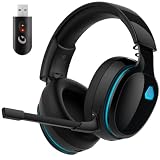
- Zero-Latency Audio for Competitive Edge: Dominate your matches with the AOC wireless gaming headset. Featuring ultra-fast 2.4GHz lossless technology (≤20ms latency), this ps5 headset ensures your audio is always perfectly synced with the action. Tuned 50mm drivers deliver clear gaming sound for footsteps, reloads, dialogue, and in-game effects in FPS, action, and open-world games. The closed over-ear design helps keep you focused during Fortnite, Call of Duty, Roblox, Discord chat, online classes, and movie watching.
- Crystal-Clear Squad Communication: Coordinate strategies flawlessly using the detachable, omni-directional noise-canceling microphone. Whether you are gaming in a lively dorm room or a busy living room, this ps5 headset wireless filters out background distractions, transmitting your voice with absolute clarity. The flexible mic can be adjusted to your preferred angle or completely removed when playing solo campaigns. For best voice pickup, insert the mic firmly, make sure mute is off, and select the headset as your input device in system settings.
- Seamless Multi-Platform Connectivity: Transition effortlessly from intense console battles to casual daily usage. This versatile 3-in-1 bluetooth gaming headset includes a low-latency USB dongle, a stable Bluetooth 6.0 connection, and a 3.5mm audio cable. Use the 2.4GHz USB dongle for low-latency gaming audio on PS5, PS4, PC, Mac, and Switch. Switch to Bluetooth mode for phones, tablets, and everyday listening. Note: PS5 and PS4 do not support Bluetooth audio for this gaming headset; Xbox series works through 3.5mm wired mode only.
- Marathon Comfort & Long-Lasting Battery: Say goodbye to ear pain and clamping fatigue and mid-game battery deaths. Featuring premium, ultra-soft breathable memory-protein earmuffs and an extended adjustable headband. This wireless gaming headphones comfortably accommodates adult gamers and eyeglass wearers for 8+ hours of continuous gaming sessions. Enjoy massive gaming sessions with up to 45 hours of battery life (20 hours with the dynamic RGB lighting turned on), and get back to full power with a quick 3-hour recharge.
- Premium Aesthetics for Any Scene: Elevate your desktop gaming setup and your everyday style. Crafted with high-quality materials and a sleek mirror surface finish, this gaming headset looks as premium as it sounds. Detach the microphone, and it instantly transforms into a stylish pair of everyday headphones perfect for your daily commute or relaxing with music at home. Backed by AOC’s industry-leading engineering, this wireless gaming headphones comes with 24/7 customer support, a 60-day hassle-free return policy, and 1-year free replacement or repair—worry-free gaming starts here.
- Loads game modules: prosper loads Sony SELF/ELF modules into a host process address space.
- Reimplements system libraries: it provides PS5-facing library behavior using host facilities and translates differences in application binary interfaces.
- Translates graphics work: it translates AGC GPU command streams to Vulkan and includes an RDNA2-to-SPIR-V shader recompiler.
In practical terms, native CPU execution does not mean a game simply runs as-is. The system-library and graphics translation work is substantial, and each title can depend on behavior that is not yet implemented or may differ between game revisions.
What the compatibility figures mean
The maintainers’ compatibility overview, dated October 1, 2026, tracks 61 titles and reports these results. The figures describe specific user-supplied game dumps tested primarily on Linux; they are not a promise that other revisions or setups will behave the same. See the official compatibility overview for title-level routes and limitations.
Rank #2

- Comfort is King: Comfort’s in the Cloud III’s DNA. Built for gamers who can’t have an uncomfortable headset ruin the flow of their full-combo, disrupt their speedrun, or knocking them out of the zone.
- Audio Tuned for Your Entertainment: Angled 53mm drivers have been tuned by HyperX audio engineers to provide the optimal listening experience that accents the dynamic sounds of gaming.
- Upgraded Microphone for Clarity and Accuracy: Captures high-quality audio for clear voice chat and calls. The mic is noise-cancelling and features a built-in mesh filter to omit disruptive sounds and LED mic mute indicator lets you know when you’re muted.
- Durability, for the Toughest of Battles: The headset is flexible and features an aluminum frame so it’s resilient against travel, accidents, mishaps, and your ‘level-headed’ reactions to losses and defeat screens.
| Reported status | Titles | What it establishes |
|---|---|---|
| Gameplay reached with the scene rendering | 28 | A gameplay scene rendered in the documented route; the maintainers say this milestone is deliberately loose and can include a degraded scene. |
| Title screen/menu or gameplay without a rendered world | 19 | The title reached a menu or gameplay state, but the world was not rendered. |
| Below a title screen | 2 | The tested route did not reach a title screen. |
| Booted without a frame containing content | 12 | The route booted, but no frame with content was produced. |
| Tracked but not yet attempted | 0 | All titles in this tracker had been attempted. |
| Total tracked | 61 | The tracker’s reported total. |
These categories are progress markers, not a simple playable-versus-unplayable score. In particular, “gameplay reached” means the scene rendered, not that controls, performance, progression, audio, or the full game were verified as complete. To assess a particular title, check its exact revision, documented route, and listed limitations rather than extrapolating from the aggregate totals.
Windows requirements and game files
The official Windows guide lists 64-bit Windows 10 or Windows 11 on an x86-64 CPU, plus a graphics driver capable of Vulkan 1.1. It describes an unpacked title directory conventionally named <TITLE_ID>-app0 containing eboot.bin and other title files. Follow the Windows guide for its current setup details.
Rank #3

- Personalize your Logitech wireless gaming headset lighting with 16.8M vibrant colors. Enjoy front-facing, dual-zone Lightsync RGB with preset animations—or create your own using G HUB software.
- Total freedom - 20 meter range and Lightspeed wireless audio transmission. Keep playing for up to 29 hours. Play in stereo on PS4. Note: Change earbud tips for optimal sound quality. Uses: Gaming, Personal, Streaming, gaming headphones wireless.
- Hear every audio cue with breathtaking clarity and get immersed in your game. PRO-G drivers in this wireless gaming headset with mic reduces distortion and delivers precise, consistent, and rich sound quality.
- Advanced Blue VO CE mic filters make your voice sound richer, cleaner, and more professional. Perfect for use with a wireless headset on PC and other devices—customize your audio with G HUB.
- Enjoy all-day comfort with a colorful, reversible suspension headband designed for long play sessions. This wireless gaming headset is built for gamers on PC, PS5, PS4, and Nintendo Switch.
The project does not bundle PS5 software, firmware, keys, or game files. Its README says users supply their own legally obtained dump and that the project operates on module segments that are already unencrypted. This is not a tool for downloading commercial games or bypassing the need to obtain game files lawfully.
Independent reader supportYour contribution helps us test, update, and keep practical guides available for everyone.Experimental project, not a supported release
The README characterizes prosper as an experiment in organizing AI-assisted reverse engineering, with humans setting direction and reviewing results. It says the repository contains no game files, keys, or Sony code, and that the project is independent of and not affiliated with Sony Interactive Entertainment.
Rank #4

- 【Amazing Stable Connection-Quick Access to Games】Real-time gaming audio with our 2.4GHz USB & Type-C ultra-low latency wireless connection. With less than 30ms delay, you can enjoy smoother operation and stay ahead of the competition, so you can enjoy an immersive lag-free wireless gaming experience.
- 【Game Communication-Better Bass and Accuracy】The 50mm driver plus 2.4G lossless wireless transports you to the gaming world, letting you hear every critical step, reload, or vocal in Fortnite, Call of Duty, The Legend of Zelda and RPG, so you will never miss a step or shot during game playing. You will completely in awe with the range, precision, and audio quality your ears were experiencing.
- 【Flexible and Convenient Design-Effortless in Game】Ideal intuitive button layout on the headphones for user. Multi-functional button controls let you instantly crank or lower volume and mute, quickly answer phone calls, cut songs, turn on lights, etc. Ease of use and customization, are all done with passion and priority for the user.
- 【Less plug, More Play-Dual Input From 2.4GHz & Bluetooth】 Wireless gaming headset adopts high performance dual mode design. With a 2.4GHz USB dongle, which is super sturdy, lag<30ms, perfectly made for gamers. Bluetooth mode only work for phone, laptop and switch. And 3.5mm wired mode (Only support music and call).
- 【Wide Compatibility with Gaming Devices】Setup the perfect entertainment system by plugging in 2.4G USB. The convenience of dual USB work seamlessly with your PS5,PS4, PC, Mac, Laptop, Switch and saves you from swapping cables.
The maintainers also state: “This is not a product. There is no support, no release schedule, and no claim that any title works beyond the specific route documented for it.” The README further says no license file exists yet and no license is granted by default; anyone considering use or redistribution should check the repository’s current terms rather than assume permission.
What’s actually slowing this PC down?
Pick the symptom - the matching free tool is one click away.
Quick Recap
Product prices and availability are accurate as of the date/time indicated and are subject to change. Any price and availability information displayed on Amazon at the time of purchase will apply.




