It depends on the exact headset. A documented internal battery replacement procedure exists for Meta Quest 2, but Meta’s Quest 3 safety guidance says its battery is not user-replaceable or serviceable. Before considering repair, check basic power settings and charging; a short runtime alone does not prove the battery is degraded.
Check your exact headset model first
Find the model and, where applicable, revision in the headset’s settings or product documentation, then follow that model’s current manufacturer service and safety instructions. Do not apply a Quest 2 teardown to a Quest 3, Quest 3S, or another brand’s headset: internal design and service guidance differ.
As an Amazon Associate I earn from qualifying purchases.
Rule out settings and charging issues
Make sure the headset sleeps when you take it off
Meta’s developer documentation says disabling the proximity sensor can prevent the headset from sleeping and reduce battery life. Check that the headset is powering down or sleeping as expected when it is not being worn. Meta’s headset-management documentation describes the sensor setting.
Try Battery Saver if it is available
On supported software, look under Settings > General > Power for Battery Saver. Meta says this mode reduces power use, including by reducing brightness and refresh rate; the exact controls may change with OS updates. See Meta’s Battery Saver documentation.
#1 Best Overall

- ✅【COMPATIBLE MODEL & WHAT IT FIXES】: Engineered as an internal battery replacement for Meta Quest 2 / Oculus Quest 2 VR only. Solves the most common Quest 2 power failures—headset won't charge past ~55%, shuts down mid-session, dies completely, or refuses to boot. Verify your model before ordering.
- 🔋【3.85V 3640mAh — SPEC-MATCHED FORM FACTOR】: Rate capacity ~13.9Wh. Built with fresh-date Grade-A Battery cells sized to fit the original battery bay—no bulging, no forcing the front cover back on, no external straps or dangling USB cables. Restores per-charge runtime closer to when your headset was new.
- 🛡️【BUILT-IN SAFETY & MULTI-STAGE QC】: Protection PCB integrates overcharge, over-discharge, over-current, over-temperature & short-circuit safeguards. Every battery is functionally tested before shipment for correct voltage, connector alignment, and stable charge/discharge behavior—so it plays nice with Quest 2's power management.
- 🔧【INCLUDES TOOLS (READ BEFORE YOU BUY)】: Comes with the precision Screwdriver, pry tools needed to access the bay. Fair warning: the battery sits above the screen/lens assemblyand requires significant disassembly (ribbon/ZIF handling, multiple screw types). This is NOT plug-and-play — moderate DIY skill recommended.
- 💬【SELLER SUPPORT — WE BACK WHAT WE SHIP】: If your pack arrives with a bent connector, doesn't seat properly, or you hit a snag during install, contact us through Amazon Buyer-Seller Messaging. We'll troubleshoot step-by-step or arrange a replacement—your VR time matters.
Check the charger and cable
An older Meta Community Forums support reply suggested charging for two hours and trying another cable or charger if possible. Treat that as basic historical troubleshooting, not a current manufacturer policy or a battery-health test. The forum thread does not establish a universal diagnostic threshold.
If the headset still loses charge unusually quickly, contact the manufacturer or an authorized service provider for your exact model. The available guidance does not establish a universal battery-health test or a numeric point at which a VR battery is officially considered degraded.
Rank #2
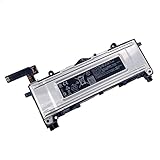
- Battery Info.:Voltage:3.85V, Capacity: 3640mAh /14Wh;
- Compatible With Device Model: For Meta Quest 2 VR Headset.
- Instructions: Please install the battery correctly, this battery is not easy to replace;
- Warranty: 30 days payment back, 12 months of warranty; Support: Welcome to email us if you have any issues, questions or concerns, we will response to solve the problem within 24 hours.
- Security Certified: Certified by CE, FCC and RoHS for safety. Every battery has passed factory testing, built-in circuit protection ensures both safety and stability. More than 500 recharge cycles over the life of the battery.
What the available guidance says by model
Meta Quest 2: a documented but involved repair
iFixit’s Meta Quest 2 battery replacement guide documents an internal repair. It involves removing the facial interface and straps and substantial disassembly to reach the battery above the screen and lens assembly. Recessed screws require a long PH00 driver or bit, and the face-sensor interconnect cable must be moved to the replacement battery.
This is not a quick battery swap. The guide also calls for battery calibration after installation and recycling electronic waste through an R2- or e-Stewards-certified recycler. A published repair procedure does not, by itself, establish that Meta authorizes the repair, that it is risk-free, what it means for warranty coverage, or whether replacement parts are currently available.
Rank #3

- 2*20000mWh Battery Pack for Oculus Quest 2: With a capacity of 20000mWh, for oculus quest 2 battery pack provides an extra 2-4 hours of playtime. Having 2 Pack oculus quest 2 charger, it means you can have one for playing, another for charging, providing unlimited VR gaming time, no more worrying about the quest 2 running out of power, bringing you immersive VR gaming fun
- Charging Quest 2 & Battery Together: With the smart chip, Kinwin vr battery pack for oculus quest 2 supports charging Quest 2 and battery at the same time. It will charge the meta quest 2 headset first, and then charge the Kinwin battery pack. It is very convenient to avoid charging Quest 2 and battery separately. Perfect vr meta quest 2 accessories
- Safe and Fast Charging: UL 2056, CE, RoHS, FCC certified. Built-in low-temperature IC ice core, intelligent monitoring of voltage and current, actively avoid over-charge, over-discharge, short circuit, high temperature, creating a safe charging environment for you. With 10W input, charging for this meta quest 2 battery pack about 3hours
- Lightweight and Portable: Only 100g/3.5once, for vr oculus quest 2 accessories battery pack is super lightweight and portable, which is essential for VR headsets to avoid adding extra weight for your head
- Wide Compatibility: Designed specifically for the Meta Quest 2, the vr headset oculus quest 2 headphone jack is exposed but does not affect its normal use; it is installed with a sliding buckle, which is not easy to fall off and ensures safe use. Also suitable for charging other type-c devices
Meta Quest 3: do not open or replace the battery yourself
Meta’s Quest 3 Safety and Warranty Guide states: “The rechargeable Lithium-Ion battery in your headset is not user replaceable or serviceable.” It instructs users not to access, open, repair, or replace the battery. For this model, seek guidance from Meta or an authorized service provider rather than attempting an internal replacement. Meta’s health and safety guidance is the appropriate place to check current instructions.
Quest 3S and other headsets
The Quest 2 procedure and Quest 3 guidance do not establish repairability for Quest 3S or any other VR headset. Some enterprise headsets use removable battery packs, while others have sealed internal cells. Check the manual and service guidance for the exact model and revision before buying parts or opening a device.
Rank #4
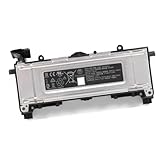
- Battery Type: Voltage: 3.85V Capacity: 3640mah 14Wh
- replace for 345-00550-A
- fit for Quest 2 VR Headset
When short runtime is—and is not—evidence of battery wear
A headset that stays awake between sessions or runs without Battery Saver may use more power, so fast drain on its own does not prove battery degradation. For context only, Meta’s developer device comparison, updated September 3, 2026, lists approximate battery life of about two hours for Quest 3 and about 2.5 hours for Quest 3S. Those are model-level estimates, not a guaranteed runtime for an individual headset or a battery-health test. See Meta’s device comparison.
The Tool Desk
Outbyte PC Repair FREERepair Windows errors before they cause bigger problemsFix Now →Outbyte Driver Updater FREEFix the driver behind crashes, sound loss and screen glitchesFind Drivers →Stop using a damaged or abnormally warm headset
Do not charge or use a headset if it is damaged or abnormally warm, or if its battery appears swollen, leaks liquid, or emits smoke. These are safety warnings in the Quest 3 guidance; do not try to resolve them by opening the headset or continuing to charge it. Follow the manufacturer’s instructions and contact its support or an authorized service provider.
Best Value

- This battery pack is designed for the quest 2 handle controller to be able to charge at the charging dock.
- 1800mAh rechargeable AA batteries, Can be Recharged up to 500 times. Notice: There are some charing docks need USB-C AA rechargeable batteries as their charging batteries, these batteries are NOT USB-C AA rechargeable batteries,
- Batteries Only, Battery Charging Covers and Charging Dock Not Included. Notice: There are some charing docks need USB-C AA rechargeable batteries as their charging batteries, these batteries are NOT USB-C AA rechargeable batteries,
- Rechargeable batteries need to be recharged regularly to ensure long battery life. We recommend that charging and discharging be completed at least once every three months.
- Waht You Get: 2 1800mAh Rechargeable AA batteries for Oculus Quest 2 Controller.
Need more time between charges?
A compatible USB-C power bank or battery-powered head strap may extend a session, but it does not replace the internal battery or repair a fault. Verify compatibility with the exact headset and follow its approved charging guidance before using an external power accessory.
Quick Recap
Product prices and availability are accurate as of the date/time indicated and are subject to change. Any price and availability information displayed on Amazon at the time of purchase will apply.




