Yes—if you choose the mini PC around the workload rather than the size. A model with integrated graphics can replace a conventional desktop for office work, media playback, light editing and many 1080p games. A mini PC with a discrete RTX GPU can also handle demanding games, creator applications and many local-AI tasks. The limits appear with sustained 4K/8K exports, high-refresh ray-traced gaming, very large AI models, upgradeability and cooling. The GPU class, memory capacity, sustained power limit and expansion ports matter more than the words “mini PC” on the box.
What decides whether a mini PC can replace your desktop?
Start with the graphics processor. Integrated graphics share system memory and are efficient, quiet and adequate for lighter games, playback and ordinary editing. A discrete GPU has its own high-speed memory and much greater graphics throughput, which changes the answer for modern games, GPU effects, 3D rendering and AI inference.
As an Amazon Associate I earn from qualifying purchases.
Then check the parts that determine sustained performance rather than a short benchmark burst: the CPU’s long-term power limit, cooler and fan profile; RAM capacity and bandwidth; NVMe storage; display outputs; and whether memory, storage or the graphics subsystem can be upgraded. A fast mobile processor in a tiny chassis may slow down during a long export if heat accumulates. Conversely, a well-cooled discrete-GPU model can outperform a much larger office tower in a smaller footprint.
| Workload | Integrated-graphics mini PC | Discrete-GPU mini PC | What to verify |
|---|---|---|---|
| Office, web, streaming | Comfortable for normal multitasking and multiple displays | More capability than necessary | Memory, display outputs and quiet operation |
| Esports and older games | Usually suitable at 1080p with sensible settings | Higher frame rates and more headroom | Game resolution, refresh rate and cooling |
| AAA gaming | Usually requires reduced resolution and settings | Preferred; RTX 5060–5080 configurations target this class | GPU model, VRAM, ray tracing performance and power limit |
| 4K video editing | Timeline work can be workable, but GPU effects and exports may be slower | Better for effects, color, denoising and fast delivery | Hardware encode/decode, RAM, storage and application support |
| Local AI | Limited by shared memory and software support | Safer for CUDA-based tools and GPU-heavy generation | VRAM or unified memory, bandwidth, model size and sustained cooling |
Gaming: from integrated graphics to high-refresh AAA
When integrated graphics are enough
A current integrated GPU can replace a desktop for esports, older releases, strategy games and many indie titles at 1080p. Expect to tune texture quality, shadows and effects, and do not assume that a small computer can drive a high-refresh 1440p monitor in every game. Integrated graphics borrow system RAM, so two matched memory modules and adequate capacity can materially improve frame rates.
#1 Best Overall

- Hardcore Gaming Power: Powered by Intel Core Ultra processor (Series 2) and up to 200+ Platform TOPS, the ROG NUC blends AI-driven performance with future-ready efficiency, delivering up to 18% generation-over-generation improvement for a seamless gaming experience.
- AI-Powered Graphics: NVIDIA GeForce RTX 50-Series mobile GPU with DLSS technology takes gaming and realism to the next level, leveraging the power of RTX GPUs to deliver breathtaking visuals.
- QuietFlow Cooling: ROG NUC’s three fans and dual Vapor Chamber ensure effective cooling and quiet operation, letting you truly hear the game.
- Effortless Upgrades in 3L size: Thumb screw enable quick, 3L size and too-free access for memory and storage upgrades.
- Premium ROG Aesthetics with RGB: Personalize with Aura Sync, featuring a sleek design and convenient top-mounted power button.
What a discrete GPU changes
ASUS lists the ROG NUC (2025) in configurations with NVIDIA RTX 5060, RTX 5070, RTX 5070 Ti or RTX 5080 graphics. Its 3-liter chassis is positioned for gaming, multimedia creation and AI computing. Those options span very different performance levels, so compare the exact GPU rather than treating every ROG NUC configuration as equivalent.
The ROG GR70 pairs a Ryzen 9 9955HX3D processor with an RTX 5070 carrying 8GB of graphics memory. ASUS targets it at demanding games and 1440p-class use, while its output configuration can support up to five 4K displays. That makes it a plausible desktop replacement for a player who wants a small system without giving up a discrete GPU, provided the cooling system can sustain the chosen performance mode.
Match the GPU to your monitor and games
- For 1080p esports, an integrated GPU or entry discrete GPU may be sufficient; prioritize stable frame times and low noise.
- For high-refresh 1440p, choose a discrete RTX configuration and check the manufacturer’s power limit, not only the GPU name.
- For ray-traced AAA games, upscaling and frame-generation support can matter as much as raw raster performance. Confirm that the specific GPU and game support the features you intend to use.
- For 4K gaming, the GPU, its VRAM capacity and thermal headroom become the dominant constraints. A compact system may need reduced settings or an external GPU to maintain smooth performance.
Mini PCs also vary in display connectors. Check whether the built-in HDMI or DisplayPort outputs support your target resolution and refresh rate simultaneously, and whether all outputs are wired to the discrete GPU. A system that advertises several displays may still have limits on which ports can run at maximum bandwidth.
The Tool Desk
Outbyte PC Repair FREERepair Windows errors before they cause bigger problemsFix Now →Outbyte Driver Updater FREEFix the driver behind crashes, sound loss and screen glitchesFind Drivers →Video editing: can a mini PC handle 4K footage?
Timeline editing versus heavy effects
Integrated graphics can handle ordinary 4K timeline editing when the software uses hardware decode and the footage is stored on a fast NVMe drive. Cutting, transitions and basic grading are realistic, especially with proxy media. GPU-dependent effects, noise reduction, multicam playback, complex motion graphics and rapid final exports benefit from a discrete GPU.
Rank #2
- Hardcore Gaming Power: Powered by Intel Core Ultra processor (Series 2) and up to 200+ Platform TOPS, the ROG NUC blends AI-driven performance with future-ready efficiency, delivering up to 18% generation-over-generation improvement for a seamless gaming experience.
- AI-Powered Graphics: NVIDIA GeForce RTX 50-Series mobile GPU with DLSS technology takes gaming and realism to the next level, leveraging the power of RTX GPUs to deliver breathtaking visuals.
- QuietFlow Cooling: ROG NUC’s three fans and dual Vapor Chamber ensure effective cooling and quiet operation, letting you truly hear the game.
- Effortless Upgrades in 3L size: Thumb screw enable quick, 3L size and too-free access for memory and storage upgrades.
- Premium ROG Aesthetics with RGB: Personalize with Aura Sync, featuring a sleek design and convenient top-mounted power button.
In a 2025 TechRadar review of the Minisforum MS-02 Ultra, 4K Premiere Pro editing was described as workable with integrated graphics, while GPU-heavy workflows were identified as a reason to add an eGPU. The reviewed system recorded 4,657 in 3DMark Fire Strike and 2,315 in 3DMark Time Spy. Those are results for that tested configuration and workload, not a universal score for every mini PC.
Specifications that matter for editors
- Hardware encode/decode: Confirm support for the codecs and chroma formats used by your cameras. ASUS ProArt GR1X advertises RTX technologies and hardware-accelerated 4:2:2 video editing.
- Memory: 32GB is a practical starting point for many 4K projects; larger timelines, high-resolution stills and compositing benefit from more. Verify whether the RAM is replaceable or soldered.
- Storage: Use a fast NVMe SSD for the operating system and active media, with separate capacity for cache and project backups when possible. A compact chassis may provide only one or two internal drive positions.
- CPU sustained performance: More cores help with decoding, effects and exports, but only if the cooler can maintain clocks for the entire render.
- GPU memory and software support: Effects and color tools can fail, spill to system memory or become very slow when VRAM is insufficient. Check the editor’s supported APIs before buying.
For long 4K or 8K exports, measure the complete workflow: ingest, proxy generation, timeline playback, effect rendering and final delivery. A mini PC that feels quick for a five-minute project may throttle during a two-hour export. Look for fan profiles, sustained power information and independent testing rather than relying on a peak boost-clock specification.
Local AI: memory capacity is often the limiting factor
Running a model locally depends on more than processor speed. The model must fit in VRAM or unified memory, and the system needs enough bandwidth and cooling to process tokens or generate images at a useful rate. Quantization reduces memory requirements but can affect quality and software compatibility. CUDA and RTX support remain the safer path for many GPU-accelerated AI tools; integrated solutions vary by framework and driver.
Free tools Windows power users keep installed
One-click scans. No signup required.
Discrete RTX for broad software compatibility
ASUS says the ROG GR70 is suitable for “building a personal AI agent or running local LLM models.” Its RTX 5070 provides a dedicated 8GB pool, which is useful for models and image-generation workflows that fit within that capacity. Larger models may require quantization, CPU offload or a higher-memory GPU; those options generally reduce speed.
Rank #3
- Hardcore Gaming Power: Powered by Intel Core Ultra processor (Series 2) and up to 200+ Platform TOPS, the ROG NUC blends AI-driven performance with future-ready efficiency, delivering up to 18% generation-over-generation improvement for a seamless gaming experience.
- AI-Powered Graphics: NVIDIA GeForce RTX 50-Series mobile GPU with DLSS technology takes gaming and realism to the next level, leveraging the power of RTX GPUs to deliver breathtaking visuals.
- QuietFlow Cooling: ROG NUC’s three fans and dual Vapor Chamber ensure effective cooling and quiet operation, letting you truly hear the game.
- Effortless Upgrades in 3L size: Thumb screw enable quick, 3L size and too-free access for memory and storage upgrades.
- Premium ROG Aesthetics with RGB: Personalize with Aura Sync, featuring a sleek design and convenient top-mounted power button.
Unified memory for larger models
MSI’s PRO MAX EDGE AI+ illustrates a different design. Its product specifications list 16 CPU cores and 32 threads, up to 128GB of LPDDR5X memory, and up to 96GB allocatable to graphics. The large shared pool can accommodate models that would not fit in a conventional 16GB or 32GB mini PC, although allocation, bandwidth, drivers and application support determine the real result. “Up to” figures describe the maximum configuration, not every unit.
Before purchasing for AI, identify the exact model family, quantization, context length and framework you plan to run. A 7B model, a 30B model and an image-generation pipeline have very different memory and compute requirements. Also reserve memory for the operating system and application: a nominal 16GB graphics allocation is not the same as 16GB available exclusively to the model.
Do you need an eGPU?
An eGPU is useful when the mini PC is strong enough in CPU, memory and storage but lacks graphics performance. It is not a free upgrade: you need a compatible enclosure or graphics module, a desktop GPU, a power supply and a high-bandwidth connection. Bandwidth overhead means an external GPU can be slower than the same card installed internally, particularly at lower resolutions or when data constantly crosses the link.
What’s actually slowing this PC down?
Pick the symptom - the matching free tool is one click away.
Check for USB4, Thunderbolt or OCuLink support and confirm the port’s actual lanes and firmware support. Khadas documents its Mind Graphics 2 module with a 40Gbps USB-C link and an external RTX 5060 Ti, describing it as a way to “Turn your Mind into a graphics workhorse for demanding gaming, creation, and AI model training.” Treat that configuration as an upgrade path only when your mini PC exposes a compatible high-bandwidth port and the module’s operating-system support matches your software.
Rank #4
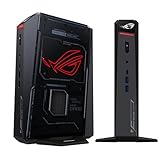
- POWERFUL PROCESSOR: Intel Core Ultra 7 processor with up to 200+ Platform TOPS delivers 18% better performance over previous generation for seamless gaming
- ADVANCED GRAPHICS: GeForce RTX 5060 mobile GPU with DLSS technology provides cutting-edge gaming visuals and AI-enhanced performance
- INNOVATIVE COOLING: Triple-fan design with dual Vapor Chamber technology ensures optimal thermal management and quiet operation during intense gaming sessions
- EXPANDABLE MEMORY: Supports up to 96GB DDR5 RAM with tool-free access for easy memory and storage upgrades in a compact 3L chassis
- PREMIUM DESIGN: Features Aura Sync RGB lighting customization and convenient top-mounted power button in a sleek, space-efficient form factor
- Verify the mini PC’s port specification, not just the USB-C shape.
- Check whether the operating system and graphics driver support hot-plugging and the chosen GPU.
- Budget for the module or enclosure, GPU, power supply and cables.
- Place the eGPU where its fans have unobstructed airflow; the compact host still needs adequate cooling.
- Use the eGPU for workloads that benefit from it, and test whether your editor or AI framework actually selects the external device.
Upgradeability, noise and ownership trade-offs
Space savings come with compromises. Many mini PCs use soldered memory, mobile processors and compact cooling assemblies. Internal GPU replacement is uncommon. Before buying, inspect the service manual or manufacturer specifications for:
- RAM type, maximum capacity and whether modules are replaceable.
- M.2 slot count, supported SSD sizes and access to the drive without voiding warranty.
- CPU power modes and whether performance or quiet profiles reduce sustained speed.
- Fan behavior under a long game session or export, not only at idle.
- Display outputs, networking and the number of USB ports needed for your peripherals.
- Warranty terms for opening the chassis and for using an external GPU.
- Total system cost, including memory, storage, operating system, monitor, dock, enclosure and GPU accessories.
Compact systems can draw less power than a tower, but a discrete-GPU mini PC may approach desktop-class consumption under load. Measure noise from your seating position and consider whether a higher fan mode is acceptable during recordings, meetings or overnight renders.
A practical buying framework
| Your priority | Minimum direction | Why |
|---|---|---|
| Small, quiet general-purpose PC | Modern integrated graphics, dual-channel RAM and NVMe storage | Avoids paying for GPU capacity you will not use |
| 1080p gaming and esports | Integrated GPU or entry discrete GPU with adequate cooling | Frame-rate needs are moderate at this resolution |
| 1440p AAA gaming | Discrete RTX graphics, preferably with generous thermal headroom | GPU throughput and VRAM dominate performance |
| 4K editing and creator work | Hardware codec support, 32GB or more expandable memory, fast NVMe and discrete GPU for effects | Playback, cache and export workloads use different resources |
| Local AI experimentation | As much VRAM or unified memory as your target model requires, plus supported drivers | Models fail to load or become impractically slow when memory is insufficient |
| Staged upgrade plan | Mini PC with USB4, Thunderbolt or OCuLink and confirmed eGPU support | Lets you add graphics later, at extra cost and with bandwidth overhead |
When a full-size desktop remains the better choice
Choose a tower when you need multiple internal GPUs or drives, frequent component upgrades, very large VRAM, the quietest sustained cooling, or long 4K/8K production sessions every day. A tower also makes it easier to replace a failed power supply, add capture cards and expand memory without replacing the entire computer. The mini PC wins when desk space, portability and lower installation complexity outweigh those expansion benefits.
Bottom line for each workload
- Gaming desktop replacement: Yes for esports and older games with integrated graphics; yes for demanding 1440p gaming when you select a properly cooled discrete RTX model such as an RTX 5060–5080 configuration. High-end 4K and ray-traced play require especially careful GPU and thermal selection.
- Video-editing desktop replacement: Yes for ordinary 4K editing with suitable codecs, fast storage and enough memory. Add discrete graphics or an eGPU for intensive effects, color work and faster exports; verify sustained cooling for long renders.
- Local-AI desktop replacement: Yes for models that fit the available VRAM or unified memory and have compatible software. Large models favor high-memory designs such as systems offering up to 128GB total and 96GB graphics allocation; CUDA-oriented workflows generally favor discrete RTX graphics.
A mini PC can therefore replace a desktop, but only after you specify the games, footage and AI models you will run. Buy the GPU and memory capacity first, then confirm cooling, ports and upgrade options. The enclosure size is the final consideration, not the deciding specification.
Quick Recap
Product prices and availability are accurate as of the date/time indicated and are subject to change. Any price and availability information displayed on Amazon at the time of purchase will apply.

