Quick wins for a faster PC:
Repair Windows errors before they cause bigger problemsFix Now →Scan for outdated or missing drivers - takes under a minuteDriver Scan →For a Chromecast with Google TV or Google TV Streamer, the best-documented replacement is Google’s own Google TV Streamer Voice Remote. Google lists it as compatible with both streaming-device families and provides replacement pairing instructions. A generic “universal” remote may control your TV’s power or volume, but that alone does not mean it can navigate Google TV, launch apps, or use voice search.
Which replacement remote works with an old Google TV streamer?
Google’s replacement guidance covers a Chromecast with Google TV or Google TV Streamer that has already been set up. The Google TV Streamer Voice Remote is the clear physical replacement: Google’s specifications list compatibility with Chromecast with Google TV and Google TV Streamer (4K). It uses Bluetooth for streamer control and IR to control a TV, soundbar, or receiver.
As an Amazon Associate I earn from qualifying purchases.
The remote has a directional pad, Home and Back buttons, volume and power controls, a customizable button, YouTube and Netflix buttons, mute, and microphone/voice control. Those are the controls to look for if you want more than basic television functions.
Recommended Free Tools
Does a universal remote replace all Google TV remote functions?
Not necessarily. Universal remotes can be designed to control a television, receiver, or soundbar without offering the navigation and voice functions needed to operate the Google TV interface. Google’s documentation supports its own replacement remote; it does not establish that an unspecified third-party universal remote is a full replacement.
#1 Best Overall

- 【Compatibility】Replacement for white Google-Chromecast-Remote, for Snow Chromecast with Google TV HD/4K & Google TV Streamer 4K.
- 【Voice Search】Pressing the voice button on the remote, not only can you use voice search to find your favourite entertainment, but you can also use voice to control the volume, switch inputs, play music, and get answers on-screen
- 【EASY TO PAIR】Pair your new remote in just two steps: ①. Press the pairing button on your device; ②. Press and hold the Back and Home buttons simultaneously for 10 seconds until the LED on your new remote starts flashing
- 【BATTERIES COMPATIBLE】Insert 2 * AAA batteries. (Package not included batteries)
- 【FEATURES】32ft Range, 0.2s Response, 120K+ Clicks Tested. Features Anti-Slip Dot Design & Multi-Angle Control for Stable Operation.
Before choosing another brand, confirm compatibility for your exact streaming-device model and the specific functions you need: D-pad navigation, Home and Back, app controls, voice search, and any TV or audio-device controls. Google documents pairing Bluetooth accessories under Settings > Remote & Accessories > Pair remote or accessory, but that general process is not proof that every Bluetooth remote supports Google TV navigation or voice behavior.
How to pair Google’s replacement remote
- On the streaming device, hold the pairing button on its back for 5–10 seconds to start pairing mode.
- Insert two AAA batteries into the replacement remote and follow the on-screen directions.
- If pairing does not begin automatically, hold the remote’s Back and Home buttons together for three seconds.
These steps are Google’s instructions for pairing a replacement Voice Remote with a Chromecast with Google TV or Google TV Streamer that has already been set up. See Google’s replacement remote setup guide if you need device-specific help.
Rank #2

- Voice search function:Press the for Google Assistant button on the remote to use your audible to find your favorite content, control volume, switch inputs, play music, and get answers, quickly search thousands of popular channels, and play entertainment by voice.
- Sensing Distance: Excellent response between the new G9N9N remote control and the TV with an optimal distance of 5 meters. Maximum length is 10 meters.
- High quality:The G9N9N Replacement telecontrol Control is made of high quality ABS with no odor, lightweight and ergonomic design makes it very comfortable with soft and very responsive buttons. Combining the functionality and performance of the original remote control, with all the basic buttons and functions you can easily control your for Google Chromecast 4K Snow with a stable signal and comfortable grip.
- Easy pairing:Press the Chromecast button to turn on pairing mode and notify you via the TV screen. Next press and hold the BACK and HOME buttons at the same time until the light on the remote starts blinking, release the buttons when the light comes on and the remote pairing is complete.
- Applicable models:G9N9N Replacement telecontrol for Chromecast (for Google TV), Chromecast for Google TV, for GA01409-US, GA01920-US, GA01923-US, GA01919-US, GA02463-Us, GA02464-US requires Chromecast (for Google TV).
Set up control of your TV, soundbar, or receiver
The Google remote can be configured to control power, volume, and input on a TV, receiver, or soundbar through the streamer’s settings. Google notes that input control may not work with some device models, so test the functions you rely on after setup.
HDMI-CEC is another way supported HDMI devices can share control. Google describes it this way: “CEC (Consumer Electronics Control) allows for HDMI devices to be controlled with one remote control.” Depending on the TV, CEC may switch the television to the streamer’s HDMI input, and certain TVs may power on when casting. For the CEC behavior Google describes, the streaming device must be powered from a wall outlet rather than the TV’s USB port.
Rank #3

- 【Compatibility】Voice replacement for white Google-Chromecast-Remote, for Chromecast with Google TV Remote, for Google TV HD/4K Streaming Stick, for Google TV Streamer (4K). Only for Snow Chromecast Google!!
- 【Incompatible Devices】NOT Compatible with Google Chromecast lst Gen, NOT for Google Chromecast 2nd Gen, NOT for Google Chromecast 3rd Gen, NOT for Chromecast Ultra, NOT for Chromecast Audio
- 【Easy to Pair】Pair your new remote ①Press the pairing button on your device; ②Press and hold the"Back" and "Home" buttons simultaneously for 10 seconds until the LED on your new remote starts flashing
- 【Voice Control】Pressing the voice button on the remote, you can use voice to search for specific shows, or by mood, genre, actress, and more. Talk to Google and say, "What should I watch?" And use the remote to control the volume switch inputs, play music, and get answers on-screen
- 【Preferred Features】The replacement remote for Google Chromecast TV has 2 shortcut buttons for popular streaming channels,and needs to install new 2*AAA batteries to use(batteries are NOT included in package)
CEC settings may use a brand-specific name. Common labels include Anynet+ on Samsung TVs, BRAVIA Link or BRAVIA Sync on Sony, SimpLink on LG, and EasyLink on Philips. Check the TV’s settings or manual; available functions and behavior vary by model.
Independent reader supportYour contribution helps us test, update, and keep practical guides available for everyone.Use your phone if you need a remote right away
If you do not have a working physical remote, Google says the Google Home app or Google TV app can control a Chromecast with Google TV or Google TV Streamer. In the Google TV app, select the device, enter the code shown on the TV, and complete pairing. This is a no-purchase fallback while you arrange a replacement.
Quick Recap
Best Value
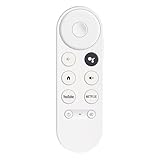
- 【Compatibility】This voice remote is compatible with Chromecast devices that have Google TV built-in. It does NOT work with the Google Streamer TV Box or with Chromecast models that do not include Google TV. Please note: the package includes only the remote control and user manual—Chromecast device is not included.
- 【Voice Control Enabled】Easily find your favorite content with built-in voice functionality. Just press the microphone button to search shows, adjust volume, switch inputs, or play music using simple voice commands.
- 【Simple Pairing Process】On Chromecast, press the "Auto Pairing" button. Press and hold the BACK and HOME buttons on the remote until the LED light starts flashing. When “Chromecast Remote” appears on the TV screen, press the “Auto Pairing Button” on the Chromecast device to select the “Chromecast Remote”; then press and hold the “Auto Pairing Button” for 4 seconds until the TV screen shows “Pairing”. If pairing fails, repeat the previous steps until the pairing is successful.
- 【1-Year Warranty Coverage】Your purchase includes a full 1 year warranty. Backed by over 30 years of expertise, we’re committed to delivering high-quality, affordable remotes to millions across the U.S.
Rank #4
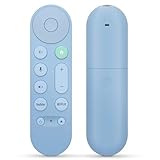
- 【Compatibility】Voice replacement for pink Google-Chromecast-Remote, for Chromecast with Google TV Remote, for Google TV HD/4K Streaming Stick, for Google TV Streamer (4K). Only for Snow Chromecast Google!!
- 【Easy to Pair】Pair your new remote ①Press the pairing button on your device; ②Press and hold the"Back" and "Home" buttons simultaneously for 10 seconds until the LED on your new remote starts flashing
- 【Voice Control】Pressing the voice button on the remote, you can use voice to search for specific shows, or by mood, genre, actress, and more. Talk to Google and say, "What should I watch?" And use the remote to control the volume switch inputs, play music, and get answers on-screen
- 【Preferred Features】The replacement remote for Google Chromecast TV has 2 shortcut buttons for popular streaming channels,and needs to install new 2*AAA batteries to use(batteries are NOT included in pakage)
- 【Excellent After-Sales Service】If you have any questions about your order, please contact us directly
What to check before buying
- Exact streamer compatibility: Look for explicit support for your Chromecast with Google TV or Google TV Streamer model.
- Google TV navigation: Confirm D-pad, Home, and Back operation rather than assuming TV power or volume support is enough.
- Voice and app controls: Check whether voice search and any dedicated app buttons you want are supported.
- TV and audio controls: Verify which devices and functions—power, volume, and input—the remote can control.
- Pairing instructions: Prefer a product with a documented pairing process for your streamer, not merely a claim that it uses Bluetooth or IR.
Product prices and availability are accurate as of the date/time indicated and are subject to change. Any price and availability information displayed on Amazon at the time of purchase will apply.
What’s actually slowing this PC down?
Pick the symptom - the matching free tool is one click away.




