There is no single best long-range Wi-Fi antenna for every home or property. Choose an omnidirectional antenna when devices need coverage around the access point, a directional antenna when you need to focus coverage toward a known area, and an outdoor wireless bridge for a fixed building-to-building connection. Before buying, verify that your router or access point supports external antennas and that the antenna matches its connector, bands, antenna ports and authorized configuration.
First decide what kind of coverage you need
All-around coverage: omnidirectional
An omnidirectional antenna is the more natural fit when clients are distributed around the router. A higher-gain directional antenna is not a general-purpose upgrade: it focuses energy into a narrower area and can provide less coverage elsewhere. If coverage is poor throughout a home, changing access-point placement may be more useful than pointing an antenna at one side of the property.
As an Amazon Associate I earn from qualifying purchases.
Coverage toward a known area: directional
A directional panel or sector antenna concentrates coverage toward a selected area. You need to mount and aim it appropriately, and its beamwidth matters as much as its gain rating. Cisco’s Wireless RF Reference Guide explains that an antenna redirects energy rather than adding transmitter power; as directional gain rises, the radiation angle usually narrows. Antennas with the same gain can still cover different areas.
What’s actually slowing this PC down?
Pick the symptom - the matching free tool is one click away.
Fixed link between buildings: outdoor bridge
For a fixed outdoor connection, compare purpose-built bridge equipment rather than assuming a replacement antenna is the right solution. A bridge is designed for a point-to-point or point-to-multipoint link and may integrate directional antennas. Evaluate line of sight, alignment, weather exposure, mounting, power and what equipment is needed at each endpoint.
#1 Best Overall

- Tri band WiFi: 2.4g(2400-2500MHz)/5g(5150-5850MHz)/6g(5900-7125MHz); Support 802.11 b/g/n/ac/ax/wifi 6/wifi 6e; Connector: RP-SMA Male
- Application: wireless network router, PCIe network card, notebook PC desktop computer external USB network adapter, WLAN AP & Hotspot wireless range extender,security IP cameras
- Support Wi-Fi 6E: the new 6 GHz band can bring more bandwidth, faster speeds, lower latency and less interference; perfect for online gaming and streaming 4K/8K video
- Improve Signal Reception: Enhance the speed and stability of your Wi-Fi/Bluetooth connection, ensuring no network drops even when using multiple devices simultaneously
- Long Cable & Magnetic Base: With 6.5ft cords, you can position the antenna in a better signal spot, while the strong built-in magnet securely attaches the base to any steel surface
Examples: different antennas for different jobs
These are manufacturer-described examples, not independently tested or ranked products. Specifications and distance claims below come from the vendors’ product pages; actual results depend on the full installation and environment.
| Example | Pattern and bands | Specification or claim | Fit and caveat |
|---|---|---|---|
| TP-Link TL-ANT2409A | Directional panel; 2.4 GHz | TP-Link specifies 9 dBi gain, 60° horizontal and 76° vertical beamwidth, and a one-meter CFD-200 cable. | RP-SMA female connector; pole or wall mount. TP-Link describes use with devices that have removable external antennas. Its page also gives estimated ranges at specified data rates; treat those as vendor estimates, not general range guarantees. TP-Link product specifications. |
| DrayTek ANT-2520 | Directional replacement aerial; 2.4 and 5.8 GHz | DrayTek specifies 7.5 dBi horizontal gain at 2.4 GHz and 10 dBi at 5.8 GHz. | For compatible DrayTek routers and access points; sold singly. DrayTek recommends matching aerial types where possible in multi-antenna routers. DrayTek product specifications. |
| D-Link DAP-3711 | Integrated directional antennas; 5 GHz outdoor bridge | D-Link specifies 15 dBi antennas and claims links up to 5 km. | Designed for point-to-point or point-to-multipoint use; the product page lists IP66 housing and PoE. The distance is D-Link’s claim for the intended deployment, not a general Wi-Fi range guarantee. D-Link product specifications. |
| NETGEAR ANT7000P | Omnidirectional replacement antennas; dual-band | NETGEAR specifies 2 dBi. | NETGEAR lists compatible router models and recommends replacing all antennas. This is an example of an all-around replacement path, not a directional long-range upgrade. NETGEAR product specifications. |
Check compatibility before comparing gain
An antenna’s gain rating is useful only if the antenna can be used correctly with your device. Check the router or access point’s documentation for:
Rank #2

- 𝐒𝐮𝐩𝐞𝐫𝐢𝐨𝐫 𝐒𝐩𝐞𝐞𝐝𝐬 𝐰𝐢𝐭𝐡 𝐍𝐨 𝐖𝐚𝐢𝐭: 23 dBi Directional 2 × 2 MIMO Antenna, 256 QAM and an 80 MHz bandwidth boosts overall speeds up to 867 Mbps.
- 𝐋𝐨𝐧𝐠-𝐑𝐚𝐧𝐠𝐞 𝐖𝐢𝐫𝐞𝐥𝐞𝐬𝐬 𝐓𝐫𝐚𝐧𝐬𝐦𝐢𝐬𝐬𝐢𝐨𝐧: Excellent beam directivity, improved latency, and noise immunity makes CPE710 an ideal choice and cost-effective solution for outdoor long-distance wireless networking applications.
- 𝐒𝐭𝐚𝐛𝐥𝐞 𝐒𝐭𝐫𝐮𝐜𝐭𝐮𝐫𝐚𝐥 𝐃𝐞𝐬𝐢𝐠𝐧 𝐚𝐧𝐝 𝐅𝐥𝐞𝐱𝐢𝐛𝐥𝐞 𝐈𝐧𝐬𝐭𝐚𝐥𝐥𝐚𝐭𝐢𝐨𝐧: Snap-lock parts make assembly simple and convenient. Pole mount kits and the freedom of three-axis alignment facilitate flexible installation. Sturdy design ensures stability in windy conditions.
- 𝐏𝐡𝐚𝐫𝐨𝐬 𝐂𝐨𝐧𝐭𝐫𝐨𝐥 – 𝐂𝐞𝐧𝐭𝐫𝐚𝐥𝐢𝐳𝐞𝐝 𝐌𝐚𝐧𝐚𝐠𝐞𝐦𝐞𝐧𝐭 𝐒𝐲𝐬𝐭𝐞𝐦: CPE710 comes equipped with Pharos Control centralized management software, the web-based PharOS provides an alternative management method and allows professionals to access more detailed configurations.
- 𝐈𝐏𝟔𝟓 𝐖𝐞𝐚𝐭𝐡𝐞𝐫𝐩𝐫𝐨𝐨𝐟: Durable IP65 weatherproof enclosure along with 15kV ESD and 6kV lightning protection ensures all-weather suitability.
- External antenna support: Confirm that the device has removable antenna ports and that replacement antennas are permitted. A connector that physically fits does not prove that the combination is supported.
- Connector type: Match the exact connector and gender. For example, the TP-Link panel above uses RP-SMA female; do not assume that every router uses RP-SMA.
- Radio bands: Match the antenna to the bands your device actually uses. The TP-Link example is 2.4 GHz only; the DrayTek example lists 2.4 and 5.8 GHz. Do not assume that an antenna supports every band simply because the router is dual-band.
- Antenna ports and radio chains: Check how many antennas the device uses and whether all ports need antennas of a matching type. DrayTek advises matching aerial types where possible on multi-antenna routers.
- Approved antenna configuration: Follow device-specific limits and authorized antenna configurations, including any maximum-gain restrictions.
- Mounting and exposure: Verify that the antenna and its mounting arrangement suit indoor or outdoor use. A replacement antenna and an outdoor bridge are different kinds of equipment.
Account for aiming, cable loss and the installation
A directional antenna must face the intended area or endpoint. Compare beamwidth and mounting options, and make sure the antenna can be aligned and secured in its final position. Cisco notes that cable adds RF loss, so a long feed cable can reduce the benefit of an antenna with a higher gain rating. Keep the cable run short where practical and use the cable and connectors appropriate for the equipment.
For an outdoor bridge, assess whether the endpoints have a viable line of sight and whether the hardware, mounting and power arrangement are suitable for the site. The product’s advertised distance should not be treated as a promise for a different terrain, obstruction, alignment or network setup.
Rank #3
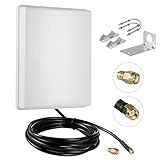
- FEATURES: High-Gain 15dBi Panel Antenna/ Long-Range/ Outdoor Waterproof/Dual-Band;
- COMPATIBILITY:Support Wlan ISM 802.11 b / g / n / ac signal, Compatible with all Wireless Network Router, Wifi Router, WiFi Repeater, Wifi Security Camera, Wireless Video Surveillance DVR Recorder, PCI WiFi adapters Wireless Access Points;
- DATA: Dual Band WiFi: 2.4GHz (2400 - 2485 MHz),5GHz/5.8GHz (5150 - 5850 MHz); Gain: 15dBi; Direction: directional; Antenna Connector: RP-SMA Male Connector; Cable: 10FT RG58 Cable;
- PERFORMANCE:This 15 dBi dual band directional outdoor panel antenna with 10ft cable is a great way to boost your WiFi signal over a long distance. A directional antenna concentrates its gain all in the direction it is aimed;
- LONG RANGE: It will do a better job covering open distance in that direction. ensuring no network drops, and enhancing the smooth performance of videos and games, Say goodbye to Wi-Fi dead zones and weak signals. stream play and work seamlessly;
Check applicable radio rules for your location
Permitted power and antenna configurations can depend on frequency band, use case, equipment authorization and jurisdiction. In the United States, U-NII requirements differ across bands and applications; do not infer that a high-gain antenna is lawful with any device. Check the current official rules and the equipment’s authorized antenna configuration for your intended installation. The cited reproduction of 47 CFR § 15.407 is a secondary source, so consult the current official rule when making a compliance decision.
Quick Recap
Rank #4

- Superior Speeds with MU-MIMO: Equipped with the latest 802.11ac Wave 2 MU-MIMO technology, the EAP225-Outdoor easily delivers dual-band Wi-Fi speeds of up to 1200 Mbps to multiple devices at the same time. Wireless Functions include Reboot Schedule, Enable/Disable Wireless Radio, Multiple SSIDs (Up to 16 SSIDs, 8 for each band). Environment: Operating Temperature: -3070 (-22158 ), Storage Temperature: -4070 (-40158 ), Operating Humidity: 1090% RH non-condensing, Storage Humidity: 590% RH non-condensing
- Indoor/Outdoor Use: The durable, weatherproof enclosure protects the access point against harsh outdoor conditions and provides stable wireless coverage up to 200m+ range at 2.4GHz and 300m+ at 5GHz in outdoor settings. Discreet appearance can also fit with any indoor scenarios
- Integrated into Omada SDN: Omada's Software Defined Networking (SDN) platform integrates network devices including access points, switches and gateways with multiple control options offered - Omada Hardware controller, Omada Software Controller or Omada cloud-based controller. Standalone mode also applies
- Cloud Access: Remote Cloud access and Omada app brings centralized cloud management of the whole network at different sites-all controlled from a single interface anywhere, anytime
- SDN Compatibility: For SDN usage, make sure your devices/controllers are either equipped with or can be upgraded to SDN version. SDN controllers work only with SDN Access Points, Switches and Gateways. Non-SDN controllers work only with non-SDN APs
Product prices and availability are accurate as of the date/time indicated and are subject to change. Any price and availability information displayed on Amazon at the time of purchase will apply.




