For one laptop to handle demanding work and modern games, start with a 16-inch performance model: the ASUS ROG Zephyrus G16 (2026) and MSI Stealth A16 AI+ put more emphasis on portability, while the MSI Raider 16 HX is built around higher power and cooling. Choose the 18-inch MSI Titan 18 HX A2W if you value a larger desktop-replacement system over easy travel. None is a universal best: the exact configuration, your applications, IT requirements, budget, and tolerance for weight and fan noise should decide.
How to choose one laptop for business and gaming
A powerful gaming GPU can also help with GPU-accelerated professional software, but many business workloads depend more on the processor, memory, storage, or software compatibility. Begin with the applications you actually use, then check the exact laptop configuration rather than relying on a model-family name.
| # | Preview | Product | Price | |
|---|---|---|---|---|
| 1 |
|
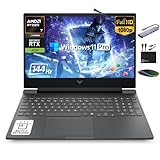
HP Victus 15.6" Gaming Laptop 144Hz 2025-2026 Business, AI Computer, Lifetime Office, Ryzen 7... | $1,158.56 | Buy on Amazon |
As an Amazon Associate I earn from qualifying purchases.
- Performance under sustained load: Check the processor and GPU model, GPU power limit, cooling design, and credible whole-laptop reviews. An RTX 5090 Laptop GPU label alone does not guarantee identical performance in different laptops. NVIDIA’s examples use stated test settings, including 150W GPU TGP and 1440p maximum settings in one comparison; those results do not describe every laptop configuration. See NVIDIA’s RTX 50 Series laptop information.
- Work software and IT rules: Confirm that the applications run on the offered Windows edition and hardware, and check your organization’s requirements for device management, security, warranty, and support. MSI recommends Windows 11 Pro for business on its Raider, Stealth A16, and Titan pages; that recommendation does not itself establish enterprise support or override your employer’s requirements.
- Screen and input: Match size, resolution, refresh rate, brightness, color coverage, and panel type to your work as well as games. High refresh rates can make games feel smoother, but are not a substitute for checking color and brightness needs in creative or office work. Verify that the desired panel is included in the particular SKU.
- Travel and battery use: Gaming laptops are generally most useful for demanding games when plugged in. ASUS cautions on its G16 page: “Gaming on battery is possible, but will significantly reduce runtime and performance.” Vendor video-playback claims, battery capacity, and measured gaming runtime are different kinds of evidence and should not be compared as though they were one test.
- Desk setup and meetings: Check the actual ports, webcam privacy features, keyboard, and fan behavior. A USB-C or Thunderbolt dock can simplify connecting desk displays and peripherals, but verify the laptop’s port generation, display modes, and power delivery alongside the dock’s capabilities.
Shortlist by the trade-off you prefer
| Model | What the published specifications indicate | Best fit to investigate |
|---|---|---|
| ASUS ROG Zephyrus G16 (2026) GU606 | ASUS lists Windows 11 Pro, Intel Core Ultra 9 386H, up to an RTX 5090 Laptop GPU, up to 160W maximum TGP in manual mode, a 2.5K OLED 240Hz display, and a 1.85 kg aluminum chassis. ASUS claims up to 20+ hours of video playback and warns that gaming on battery significantly reduces runtime and performance. ASUS product page | A portable high-performance hybrid. Treat the playback figure as a vendor claim, not a promise of gaming or all-day work runtime. |
| MSI Stealth A16 AI+ | MSI lists configurations up to AMD Ryzen AI 9 HX 370 and RTX 5090 Laptop GPU, a 99.9 Whr battery, 2.1 kg weight, Wi-Fi 7, and an optional QHD+ 240Hz OLED display. MSI recommends Windows 11 Pro for business. MSI product page | A slimmer work, creation, and gaming option. Verify the exact model number, GPU, and panel. |
| MSI Raider 16 HX B2W | MSI lists configurations up to Intel Core Ultra 9 275HX and RTX 5090 Laptop GPU with 24GB GDDR7, 250W total power, advanced cooling, an optional QHD+ OLED 240Hz panel, and dual SSD and RAM upgrade design. MSI recommends Windows 11 Pro for business. MSI product page | A high-power 16-inch choice for plugged-in gaming and demanding multitasking. The 250W figure is MSI’s product-page disclosure, not a directly comparable benchmark against another manufacturer’s power figure. |
| MSI Titan 18 HX A2W | MSI positions this 18-inch family for gaming, creation, professional use, and intensive workloads; listed options include an RTX 5090 Laptop GPU and 240Hz Mini-LED display. Check configuration and availability for your market. MSI product page | A large desktop replacement for buyers who accept reduced portability. |
Review-tested alternatives and what the reviews establish
Razer Blade 16 (2026)
TechRadar’s September 2026 review recorded 1 hour 41 minutes in its PC Mark Gaming battery test. That is a result for the review’s tested unit and method, not an estimate of office battery life for every Blade configuration. The reviewer presents it as a choice for people seeking to combine professional and gaming use. TechRadar also names the Alienware 16 Area-51 as an alternative, describing a similar RTX 5090 and 2560×1600/240Hz profile, a lower price, and weaker battery life; check the review and exact current SKU before relying on that comparison. Read TechRadar’s review.
Recommended Free Tools
Lenovo Legion Pro 7i
PC Gamer calls the Legion Pro 7i the most powerful gaming laptop it has tested from that generation, while noting weaker portability and battery life than the Blade 16. This is PC Gamer’s assessment, not a result established by a direct comparison here. See PC Gamer’s gaming-laptop roundup.
Quick Recap
#1 Best Overall
- 【16GB RAM + 1TB Storage (512GB SSD + 500GB Ext)】Reams of high-bandwidth 16GB DDR5 RAM to smoothly run your games and video-editing applications, as well as numerous programs and browser tabs all at once. Get up to 30x faster performance than a traditional hard drive with 512GB PCIe NVMe SSD. Enjoy additional portable storage with 500GB external drive.
- 【HIGH PERFORMANCE AMD Ryzen 7 7445HS + NVIDIA RTX 4050】Featuring up to 4.7 GHz Max Boost Clock, 16 MB L3 Cache, 6 cores, and 12 threads, the AMD Ryzen 7 delivers fast, efficient multitasking. Paired with the NVIDIA GeForce RTX 4050 powered by the Ampere architecture, you get game-ready drivers, accelerated ray tracing, and AI-enhanced performance for smooth, immersive gameplay and creative work.
- 【15.6" FHD IPS 144Hz display】Reduce frustrating lag and image ghosting with a display that combines a 144Hz refresh rate and 1080p Full High Definition resolution for smooth, crisp gameplay. The 88-degree, wide-angle field of view lets you video chat with the entire family or group of friends in crystal clear detail.
- 【Windows 11 Pro Operating System】Windows 11 Pro delivers a powerful, streamlined user experience that helps you stay focused and get more done – wherever your office might be. Safeguard data and access anywhere with hardware-based isolation, encryption, and malware protection built in. For Home, Student, Professionals, Small Business, School Education, and Commercial Enterprise.
- 【Authorized MarxsolAccessory with Lifetime MS Office】Bundle includes 6-in-1 USB-C Docking Station Hub (with USB 3.0, 4K-HDMI, USB C Connection, SD/TF Card Reader), HDMI cable, USB cable, mouse pad, wireless mouse, and 500GB portable external drive for your daily work and life. Free lifetime Microsoft Office included. Online Class, Google Classroom, Remote Learning, Zoom Ready.
Check the exact configuration before buying
- Write down your requirements: List business applications, workload intensity, required Windows edition, employer security or management rules, and any mandatory ports or support terms.
- Compare exact SKUs: Confirm the processor, laptop GPU, GPU power limit where published, memory, storage, screen, operating system, and included ports. Options listed on a family page may not all be available together in the unit on sale.
- Decide where it will be used: Consider carrying weight, charger and dock needs, available power, and whether fan noise matters in meetings. If long gaming sessions or maximum plugged-in performance are the priority, a larger, heavier design may be a better fit than a thin hybrid.
- Confirm local terms: Check current local price and stock, warranty and service coverage, and any enterprise support commitments directly with the seller or manufacturer. Availability and terms vary by market.
- Check your desk connections: If you plan to use a dock or external monitor, verify supported display resolution and refresh rate, USB-C or Thunderbolt generation, and power delivery for the specific laptop.
Product prices and availability are accurate as of the date/time indicated and are subject to change. Any price and availability information displayed on Amazon at the time of purchase will apply.




