The best case or screen protector cannot be chosen from the color “green” alone. First open Settings → About phone and copy the complete Redmi model name, including words such as Pro, Plus, Max, and the 4G or 5G suffix. Then buy a case and protector whose listing names that exact model. A clear case shows the green back, while a green or contrasting case changes the appearance; none of those color choices can correct a size or cut-out mismatch.
For most owners, the sensible combination is a model-specific TPU or hybrid case with a raised screen rim and camera protection, paired with a case-friendly tempered-glass, non-tempered, or electrostatic-film protector. Avoid liquid-UV adhesive unless you fully understand the installation risk: Xiaomi warns that glue can seep into keys, ports, speaker openings, or the battery cover.
As an Amazon Associate I earn from qualifying purchases.
Why the exact Redmi model matters more than the green finish
Redmi uses similar names across phones with different dimensions and layouts. A case for one generation can leave the buttons, microphone, charging socket, or cameras partly covered on another. Even phones sold under a shared family name may have different 4G and 5G bodies. Camera islands can also change between standard, Pro, Plus, and Max versions.
Color is therefore an appearance choice, not a compatibility specification. Treat “green Redmi phone” as a starting description and use the model identifier for every purchase.
#1 Best Overall
![Anvzle for Xiaomi Redmi 15C Case with [2 Pack] Tempered Glass Screen Protector, for Redmi 15C 4G/5G [Military-Grade] Protective,with Lens Protects Magnetic Kickstand Car Mount Holder Case](https://m.media-amazon.com/images/I/41N2PpE-n7L._SL160_.jpg)
- 【Compatible With】Specially designed for Xiaomi Redmi 15C - 171mm,[Also come with 2pcs tempered glass screen protectors. Please Attention! Please confirm your phone model before buying, Please feel free to contact us if you have any questions.
- 【Ugraded 360° Full Body Protection】This phone case is made of anti-scratch hard rigid PC bumper and shock resistance soft TPU, Military-Grade Protection with Air-Cushion Technology for all corners and the raised TPU bezel design, provide all around double protection of your phone from drops, scratches and bumps.
- 【360° Rotable Magnetic Kickstand】 Metal kickstand can rotate 360°, easy to rotate and sturdy on the case. Built in kickstand gives you the convenience to watch videos and movies hands-free with desired comfort and stability. Built-in metal magnetic sheet which can be directly adsorbed stably to the magnetic car mount holder. ( Not includes the magnetic car mount holder !)
- 【Unique Slide Camera Cover】The slide camera lens protects your phone camera from scratches, abrasions and shocks. It can slide smoothly left and right,perfect to hide the camera. Besides,the sliding cover is slightly locked on both sides and can not be slid at will,which will not affect the normal use of the phone lens.
- 【Tempered Glass Screen Protector】With 2 pack screen protector,HD clear scratch resistant tempered glass[9H Hardness]. No need to buy the screen protector.
Find the identifier on the phone
- Open Settings.
- Tap About phone. Xiaomi may show the device name near the top; open the detailed device-information entry if the full name is not visible.
- Copy the complete wording, including the Redmi family, number, Note designation, Pro/Plus/Max wording, and 4G or 5G suffix.
- Compare that text with the compatibility line in the case and protector listing. Do not rely on a photograph that merely looks similar.
If the listing does not state your full model, treat compatibility as unconfirmed. A seller grouping several models in one title is not proof that one mould fits all of them.
Choose the case after confirming the model
Once the model is known, compare protection design and handling before choosing a color. The most useful case specification is the one that describes the structure around the phone, not a marketing colour name.
TPU cases
Thermoplastic polyurethane (TPU) cases are flexible and usually easier to put on and remove than rigid shells. They can provide a grippy surface and absorb some everyday knocks. Check that the case has a raised lip around the display and a raised surround for the camera island. A very thin skin may preserve the phone’s shape but offer little edge or lens clearance.
What’s actually slowing this PC down?
Pick the symptom - the matching free tool is one click away.
Hybrid cases
A hybrid design combines a flexible inner layer with a harder outer panel or reinforced corners. It is a practical choice if the phone is often carried with keys, placed on a desk, or handled outdoors. Verify that the harder frame does not interfere with the side buttons and that the camera opening follows the complete camera island rather than only the individual lenses.
Flip and folio cases
A flip case adds a cover over the display and may include card compartments. It is bulkier and slower to open than a back case, but it protects the front when the phone is placed in a bag. Confirm that the flap closes without pressing the screen and that the interior does not leave debris against the display.
Clear, green, and contrasting finishes
| Finish | What it does | What it cannot do |
|---|---|---|
| Clear | Shows the phone’s green back and original graphics. | It does not make an incorrectly sized case fit. |
| Matching green | Coordinates with the handset and can create a uniform look. | “Green” does not identify a Redmi model or camera layout. |
| Contrasting colour | Makes the case a visible design element and may be easier to spot. | Colour has no bearing on button, port, or lens alignment. |
Case features worth checking in the listing
- Exact compatibility: the complete model and generation, including 4G or 5G where applicable.
- Screen clearance: a bezel that stands slightly above the display when the phone lies flat.
- Camera clearance: a raised rim around the whole camera module, not just decorative rings around lenses.
- Corner reinforcement: thicker or supported corners can reduce direct contact in a corner impact.
- Button moulding: buttons should remain easy to press rather than covered by a stiff, misaligned layer.
- Port openings: the USB port, speaker, microphones, and any infrared opening should be unobstructed.
- Case-friendly edges: the sidewall should not lift a screen protector from the corners.
- Grip and bulk: textured sides help handling, while thick constructions add pocket volume.
Descriptions such as “shockproof” or “military grade” are not substitutes for a stated model number or a clear description of the construction. No authoritative comparative drop-test or failure-rate statistic establishes that one case brand protects every Redmi model better than another.
Select a screen protector that suits the display and case
Screen protection is a choice among tempered glass, non-tempered protectors, and electrostatic films. The right option depends on fit, touch response, installation tolerance, and whether the phone already has a factory film.
Tempered glass
Tempered glass is a rigid cover that can resist scratches and take some abrasion that would otherwise reach the display. Look for the exact model, case-friendly edges, and a stated adhesive method. Hama’s catalog, for example, lists Clear Protect and Premium Crystal Glass products for Redmi 13, Redmi 14C, Redmi Note 14 4G/5G, and Redmi Note 14 Pro 4G/5G variants. The catalog includes products marked 9H and 10H hardness.
A 9H or 10H label is a product specification for hardness testing; it is not proof that one protector will prevent every crack or that a higher number guarantees better drop protection. Check the packaging for the precise variant rather than assuming that a protector for Redmi Note 14 4G fits the 5G model.
Rank #2
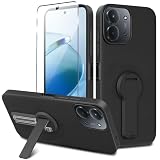
- ✅【Compatibility Fit】Designed for Xiaomi Redmi 15C / C85 2025, Please verify your phone model before purchase! Come with 1Pcs Tempered Glass Screen Protector And 1 x Phone Film Wipe Bag.
- ✅【Adjustable Kickstand】Built in a sturdy foldable kickstand. Excellent horizontal and vertical stand ways. Adjustable for different viewing angles makes you hands free to enjoy your games, videos.
- ✅【Lens Screen Heightening Design】Well made, Easy to use, covers and protects buttons while allowing for full use and wraps around the edge of the phone to protect your screen. Edge around the camera lens is 1.0 mm higher and the screen is 0.8 mm higher, provides a decent protection buffer structure to effectively absorb impact damage, these raised lips prevent your phone from scratches when putting your phone down on surfaces.
- ✅【High Quality Material】Premium flexible TPU rubber material provides ultimate non-slip grip,which provide a good drop protection, easy to take off and put on.
- ✅【Perfect Fit】Precise cutouts make all buttons, speakers and charging ports easily accessible.
Non-tempered protectors
Flexible non-tempered films can follow curved or unusually shaped display edges and are often thinner than glass. They may be less conspicuous under a case, but they can show scratches sooner. Confirm whether the film is intended to be replaced periodically and whether its edges are cut to remain clear of the case lip.
Electrostatic films
Electrostatic films adhere without a liquid glue layer. They can be useful when you want a thin, removable layer or when you are concerned about adhesive residue. Dust under a thin film is visible, so a clean installation area and careful alignment matter.
Official film and touch performance
For the Redmi Note 14 Pro+ 5G, Xiaomi says some thick third-party protective films can dampen the screen’s pressure sensitivity and recommends official protective film designed to preserve touch performance. That guidance is specific to the cited model context; do not generalize it to every Redmi phone without checking Xiaomi’s instructions for your exact device.
Why to avoid liquid-UV adhesive unless you accept the risk
Liquid-UV systems use a fluid adhesive that is spread over the display and cured with ultraviolet light. Xiaomi warns that the liquid can seep into physical keys, the charging port, speaker holes, or the battery cover. Such contamination may cause malfunctions and can create warranty concerns.
Xiaomi recommends considering alternatives such as tempered glass, non-tempered protectors, or electrostatic films that do not require liquid UV-based glue. If a product listing insists on liquid installation, read the phone maker’s support guidance first and decide whether the potential handling risk is justified. A protector that is difficult to install safely is not a good default purchase for routine use.
Check whether your phone already has a factory film
Some Redmi phones are supplied with a thin protective film. Inspect the display edge and packaging before adding another layer. A second protector can create extra thickness, reduce touch response, trap dust, or prevent a case from seating correctly.
Do these 3 things before closing this tab:
1Clear out junk files and repair common Windows errors2Scan for outdated or missing drivers - takes under a minute3Repair Windows errors before they cause bigger problemsIf the existing film is undamaged and touch works normally, keeping it may be reasonable. If you replace it, remove the old layer completely, clean the display, and use only one new protector. Do not stack glass over a wrinkled or lifting film.
Installation procedure for a case-friendly protector
Most installation failures come from dust, hurried alignment, or a case that presses the protector’s edge. Use the following sequence for glass or film that does not require liquid UV glue.
- Prepare the area. Work on a clean, well-lit surface away from fans and fabric that sheds fibres. Wash and dry your hands.
- Test the fit dry. Without removing the backing, place the protector on the display and confirm the camera, earpiece, sensors, and rounded corners line up. Put the case on briefly to check that its rim does not overlap the protector.
- Power down if practical. A dark screen makes dust easier to see and prevents accidental touches during alignment.
- Clean the display. Use the supplied wet wipe, then the dry cloth. Remove every visible fibre; do not use household solvent or spray directly onto the phone.
- Align before exposing adhesive. Use the speaker or camera opening as a reference. Keep the protector parallel to the phone rather than correcting a large angle after contact.
- Apply gradually. Expose only the leading section of the adhesive, set that edge, and lower the rest slowly. For electrostatic film, follow its included squeegee or hinge method.
- Chase bubbles. Push small bubbles toward the nearest edge with the supplied card. A persistent speck usually indicates dust and may require lifting that section carefully.
- Recheck the case. After the adhesive settles, reinstall the case and run a finger around the perimeter. If the case lifts a corner, stop using that combination and choose a slimmer or more case-friendly protector.
Touch and fingerprint checks after installation
Open several apps and swipe from each edge, type on the keyboard, and drag an icon across the display. Test the fingerprint reader if your model uses an in-display sensor. A protector that causes missed taps, delayed pressure response, or repeated fingerprint failures is not functioning acceptably even if it looks perfectly aligned.
Rank #3

- 【Fit For】Specially Designed for Xiaomi redmi Note 13 4G phone
- 【Multi Function】360 Degree Rotating Metal Ring Kickstand supports to work with magnetic car mountand .The Ring at back cover can also work as kickstand to hold up your redmi Note 13 4G Phone while you are warching movie or video.
- 【Premium Material】Dual-layer hard PC + Flexible TPU bumper is with High quality Material.And it provides great grip in hand and can protect your redmi note 13 4g phone from dust, dirt, scratches,shocks and accidental drops.
- 【Precise Cutouts】Precise cutouts for all buttons and ports, exactly fit, easy to use all buttons and ports, opening mould using the original physical phone of Redmi Note 13 4G.Raised lips 0.2mm to protect Camera Lens from Scratch.
- 【Screen Protector Gift】Edge to Edge Tempered Glass Screen Protector for Xiaomi redmi Note 13 4G is with 9H Hardness ,HD Clear,Anti-explosion, Anti-fingerprint, Shatterproof, Anti-glare, Sensitive touch and HD display
Remove any temporary shipping film from the protector itself. If touch problems began only after installation, first restart the phone and check for trapped debris or an edge under pressure. If the problem remains, remove the protector and compare touch response without it. Xiaomi specifically notes that thick third-party films can affect pressure sensitivity in the Redmi Note 14 Pro+ 5G context.
The Tool Desk
Outbyte PC Repair FREERepair Windows errors before they cause bigger problemsFix Now →Outbyte Driver Updater FREEFix the driver behind crashes, sound loss and screen glitchesFind Drivers →Buying combinations for common priorities
| Priority | Case direction | Protector direction | Trade-off |
|---|---|---|---|
| Show the green phone | Clear TPU or clear hybrid with a raised rim. | Clear, case-friendly glass or thin film. | Clear materials can show fingerprints and edge wear. |
| Maximum everyday coverage | Hybrid shell with reinforced corners and camera surround. | Model-specific tempered glass with case clearance. | More protection generally means more bulk; exact fit remains essential. |
| Minimum thickness | Thin TPU or low-profile shell. | Non-tempered or electrostatic film. | Thin materials may scratch or dent sooner than rigid glass. |
| Front protection in a bag | Flip or folio case with a secure closure. | Film or glass confirmed not to interfere with the flap. | Flip designs add weight and slow one-handed access. |
| Touch sensitivity | Case with a moderate, non-flexing bezel. | Official film where Xiaomi recommends it, or a thin case-friendly option. | Very thick films can reduce pressure sensitivity on some models. |
Compatibility checklist before paying
- Does the listing name the complete Redmi model copied from Settings → About phone?
- Does it distinguish 4G and 5G versions where your phone requires that distinction?
- Are the camera opening, buttons, speakers, microphones, and charging port visibly aligned?
- Is the protector labelled case-friendly, and does its stated shape match your display edges?
- Does the installation method avoid liquid UV adhesive if you want the lower-risk option Xiaomi recommends?
- Will the case colour or transparency give the appearance you want after fit is confirmed?
- Does the package identify the actual model rather than only saying “Redmi” or “Note series”?
Troubleshooting common fit problems
The case blocks a button or port
Remove it and compare the cut-outs with the bare phone. If the opening is consistently offset, the case is for a different model or generation; do not enlarge it with a knife, because that can weaken the frame and leave sharp edges. Replace it with a listing that states the complete model.
The protector lifts at the corners
First check for dust, an incompletely removed factory film, or a case pressing the edge. If the perimeter lifts only after the case is installed, the two products are incompatible in shape. A case-friendly protector or a case with a less aggressive inner lip is the appropriate fix.
Touch response is inconsistent
Remove bubbles and debris, confirm that the protector is not touching the bezel, and test with the case removed. If the problem persists, choose a thinner or official film recommended for the model. Do not assume a hardness rating will solve a pressure-sensitivity problem.
The camera looks hazy
Clean the protector and camera glass, then inspect whether the case rim or a separate lens cover overlaps the camera opening. A case should protect the camera island without placing a cloudy material over the lenses.
Recommended Free Tools
Liquid adhesive has entered an opening
Stop curing or operating the phone unnecessarily and follow Xiaomi’s support and warranty guidance. Do not push fluid farther into a port or speaker with a tool. Liquid-UV installation is avoidable with tempered glass, non-tempered protectors, or electrostatic films.
Product examples documented for Redmi models
The available compatibility guidance supports model-specific Redmi flip, TPU, and other cases, provided the exact model is confirmed before ordering. It also identifies Hama Clear Protect and Premium Crystal Glass products for the following catalogued variants:
| Catalogued phone variant | Product information stated in the catalog |
|---|---|
| Redmi 13 | Clear Protect/Premium Crystal Glass entries are listed; the catalog includes 9H and 10H products. |
| Redmi 14C | Clear Protect/Premium Crystal Glass entries are listed. |
| Redmi Note 14 4G | Entries are listed, including case-friendly designs and hardness specifications where stated. |
| Redmi Note 14 5G | Entries are listed; confirm the 5G model on the package. |
| Redmi Note 14 Pro 4G | Entries are listed; do not substitute a standard Note 14 protector. |
| Redmi Note 14 Pro 5G | Entries are listed; verify the exact Pro 5G wording. |
The catalog does not establish that a 10H product protects better in every real-world impact than a 9H product. Treat those figures as stated specifications, not as independent drop-test results.
Quick Recap
A practical decision in one minute
- Read the full model in Settings → About phone.
- Choose a clear case if you want the green finish visible, or choose green/contrasting colour for appearance only.
- Prefer TPU or hybrid construction with raised screen and camera edges, reinforced corners, and unobstructed ports.
- Choose tempered glass, non-tempered film, or electrostatic film made for that exact model and designed to work with a case.
- Follow the dry, dust-controlled installation process and test touch, swipes, and fingerprint recognition.
- If the phone is a Redmi Note 14 Pro+ 5G, pay particular attention to Xiaomi’s warning about thick third-party films and consider the official film guidance.
Product prices and availability are accurate as of the date/time indicated and are subject to change. Any price and availability information displayed on Amazon at the time of purchase will apply.
Quick wins for a faster PC:
Scan for outdated or missing drivers - takes under a minuteDriver Scan →Clear out junk files and repair common Windows errorsFree Scan →
