The right backup internet depends on where you need it, what must stay online, and whether a second connection can keep working during the same outage that takes down your main service. In the U.S., choices include using an eligible phone as a home fallback, a dedicated home backup plan, provider-managed business failover, or a compatible dual-WAN router with a separately arranged connection. Check address eligibility, usage limits, power backup, and total cost before relying on any option.
What backup internet can—and cannot—do
Backup internet is a secondary path for selected online work when the primary connection fails. Depending on the plan, it may use a cellular network and switch automatically or require manual activation. It should not be assumed to match primary broadband speed or capacity, or to be independent of every outage affecting the primary connection.
As an Amazon Associate I earn from qualifying purchases.
These examples are U.S. services, and availability and terms depend on the exact address and provider. Provider pages do not establish comparative independent performance or quantify the risk of two connections failing together. A different provider name alone is not proof of network diversity.
Home backup internet options
Use an eligible AT&T phone as the fallback
AT&T Internet Backup is for eligible AT&T Fiber customers. Its support instructions require Fiber service, a BGW320 or BGW620 All-Fi Hub, an eligible AT&T Wireless unlimited plan on a smartphone or tablet associated with the Fiber account, and the Smart Home Manager or AT&T app. During a fiber outage, the hub connects through the participating mobile device and returns to fiber automatically when service is restored. The instructions, last updated August 18, 2026, say this uses eligible plan unlimited data rather than the mobile hotspot allowance; wireless speed can vary and may slow when the network is busy. AT&T Internet Backup requirements and instructions.
#1 Best Overall

- Wide Carrier Compatibility: Works with major 4G providers including AT&T and T-Mobile with download speeds up to 150Mbps. Simply insert a SIM card and get all your Wi-Fi devices connected to the internet, convenient for places where cable internet is unavailable, such as holiday cabins or remote cameras. Fully supports 4G LTE Frequency Band: B2/B3/B4/B5/B7/B8/B12/B13/B17/B25/B26/B66/B41 WCDMA: B2/B4/B5/B8 (Verizon requires TTL set to 64 or 65 based on different data plan)
- High-Speed Connectivity: 4G LTE Cat4 with cellular download up to 150Mbps and N300 dual-band wireless speeds reaching 300Mbps for smooth streaming, lag-free online gaming, and quick file sharing
- Enhanced Signal Coverage: High-gain four antennas expand signal reach throughout houses, providing reliable internet connection for 32 smart home devices via wired LAN links with 4 fast Ethernet ports
- Advanced Security Features: Embedded L2TP, PPTP, OpenVPN, and WPA3 encryption safeguard data privacy, while Mesh capability allows seamless roaming network expansion across rooms
- Simple Setup Process: Built-in standard SIM card slot with plug-and-play functionality allows immediate cellular internet access without configuration, featuring user-friendly web interface for effortless management
This can be convenient if the household already meets those conditions, but it relies on the phone being present, charged, correctly associated with the account, and connected through the required equipment and app. It also relies on cellular coverage and can be affected by cellular congestion.
Choose a dedicated home backup plan
T-Mobile Home Internet Backup is described as automatically switching to T-Mobile’s network when the primary home connection goes down, with automatic failover or manual session control. Its plan page, accessed October 4, 2026, lists 100 hours per billing cycle and three Backup Passes per year, each adding 100 hours. After the monthly 100-hour allowance, speeds can be up to 600 Kbps. The page says the service is not available everywhere and is subject to congestion and data-prioritization terms. It lists no annual contract or equipment fees and a $35 device connection charge at sale. Check the address and current plan terms before depending on the service for video calls, point-of-sale traffic, or multiple users. T-Mobile Home Internet Backup.
For either home option, match the plan’s limits and likely cellular performance to the outage scenario. A low-speed fallback may be enough for selected essential tasks but unsuitable for normal household use.
Rank #2

- 5G FAST INTERNET from just about ANYWHERE! This travel router can achieve download speeds up to 3.4 Gbps on 5G NSA, ensuring rapid data transfer and seamless streaming.
- 5G ROUTER and BACKWARD COMPATIBLE with 4G LTE Cellular Networks. Supports standalone (SA) and non-standalone (NSA) 5G networks. Can be used as a 5G router with Sim card Slot, LTE router, or 4G router
- 4X MORE WIFI CAPACITY with the highest 4X4 5GHz MIMO radios, to deliver exceptional WiFi speeds of up to 5.4 Gigabits for unmatched coverage and bandwidth performance.
- CELLULAR FAIL-OVER CAPABILITY acts as a safeguard for uninterrupted connectivity for both residential and SOHO users when maintaining an Internet connection is crucial.
- CERTIFIED TO WORK with T-Mobile, AT&T and US Cellular. Requires a Nano SIM card from one of three certified carriers.
Small-business backup internet options
T-Mobile Small Business Internet Backup
T-Mobile describes its small-business plan as switching to its 4G LTE/5G network when the primary internet goes down. The plan page, accessed October 4, 2026, lists 130 GB per month and up to three additional 130 GB allotments per year. It has no annual contract or equipment fee, though taxes and fees may apply; speeds vary with cellular network conditions. Check current terms and coverage at the business address, then compare the allowance with the traffic your essential systems generate during an outage. T-Mobile Small Business Internet Backup.
Comcast Business Wireless Connect
Wireless Connect requires active Comcast Business Internet and a compatible leased router, with additional monthly charges and professional installation. Comcast says the service can switch among two cellular networks and Wi-Fi hotspots. Its page says there are no data caps, overage charges, or throttling. The device’s battery power is described as lasting up to 8–16 hours, but actual runtime varies with service and connected devices and is not guaranteed. The page also describes up to eight hours of wireless backup. Confirm the current offer, equipment, costs, and terms for the address. Comcast Business Wireless Connect.
Spectrum Business Wireless Internet Backup
Spectrum’s service integrates with Spectrum Fiber Internet Access and is described as providing automatic failover and failback to an encrypted 4G signal. Spectrum lists unlimited data without overage fees, included wireless hardware and battery backup, installation management, and 24/7/365 U.S.-based support. Confirm that the business has the required fiber service and that the backup is available at its address. Spectrum Business Wireless Internet Backup.
Rank #3
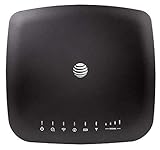
- AT&T Internet has 99% internet reliability. AT&T smart dual-band wireless router; Dual-band Wi-Fi network, Plug and play connectivity. Connect your phones, tablets, and computers with a single gadget. Dimensions -7.21Inches x 6.74Inches x 1.71Inches
- In case of power cut, the AT&T Wireless Internet can run on its backup battery for up to 29 hours in standby mode and provide up to 180 minutes of use time. Battery Capacity - 3000mAh Li-ion (removable); Processor Chipset - Qualcomm Snapdragon X16; Cores 1.2GHz quad-core; Memory RAM 512 MB
- Nano SIM Type supported; Linux 3.18.31 Operating System; 4G LTE Network.
- Keep fast speeds, even when the entire family is online. Stream on multiple devices at once.Up to 20 Devices via WiFi (10 per band) , More Via Ethernet can be Connected; Control Panel -att.wirelessinternet, or 192.168.0.1, ; MIMO Support -2x2; LTE Performance Category -Category 16; Cellular Antenna Ports -2 x SMA; Other Ports -1x Gigabit Ethernet (1000Mbps), 1x Analog Phone Jack.
AT&T Business Wireless Backup Advanced
This fixed wireless service is for qualified addresses and is intended for intermittent backup during outages of eligible primary internet service. AT&T’s product brief, approximately 2025, lists $30 per month, unlimited data, and speeds up to 3 Mbps after 30 GB; congestion can reduce speeds further. It offers automatic failover or manual activation and supports AT&T-sold or compatible customer-owned routers. The offer is not available at every address, requires adequate indoor cellular coverage, and is limited to temporary backup use. After seven days of continuous use, AT&T may move a customer to another plan or terminate service. A separately purchased battery backup is required for operation during a power outage. Confirm current price, eligibility, and restrictions before choosing it. AT&T Business Wireless Backup Advanced product information.
Do these 3 things before closing this tab:
1Repair Windows errors before they cause bigger problems2Scan for outdated or missing drivers - takes under a minute3Clear out junk files and repair common Windows errorsCox Business Net Assurance
Cox describes Net Assurance as automatically rerouting traffic to LTE during an outage. Its page says a surge-protected battery can provide up to four hours of connectivity and that the service is included with select plans. Ask Cox to confirm availability, plan eligibility, and equipment details for the business address. Cox Business Net Assurance.
Independent reader supportYour contribution helps us test, update, and keep practical guides available for everyone.When a customer-managed failover router makes sense
A dual-WAN failover router may suit a business or household that wants to choose its primary and backup services separately, or needs equipment designed to support more than one WAN connection. It does not provide a cellular plan or guarantee connectivity. Confirm router compatibility, SIM support, coverage, and failover behavior with the chosen service. AT&T says compatible customer-owned routers are supported for its business backup service; Comcast Wireless Connect instead requires a compatible leased router. Those terms do not mean every router works with either provider. AT&T Business Wireless Backup Advanced product information; Comcast Business Wireless Connect.
Rank #4

- 🏢【What is C910 4G LTE Router?】 This is a 4G LTE wireless router that can access the Internet through UMTS/HSPA/LTE. The 4g router with sim card slot has the function of converting 4G to WiFi hotspot, which can cover 300-500 meters at the same time, and can connect to 32 devices at the same time. The mobile wifi router is suitable for home/office use. The independent 12V / 2A power adapter can extend the continuous power supply time, bringing safety and stability. 4g router hotspot router
- 🌎【Network Frequency of Hotspot Router】VSVABEFV 4G Unlocked Wireless Wifi Router support 4G LTE FDD B2/B4/B5/B12/B13/B17/B18/B25/B26 Network Frequency for USA/CA/Mexico. Please you confirm whether your SIM card frequency band is compatible with it before buying this mobile router. The router is made of environmentally friendly ABS materials, wear-resistant, you don't have to worry about the external hard disk drive cabinet easily damaging the hard disk interface. unlocked hotspot sim router
- 🚀【Why Choose C910 Sim Card Wifi Router】The high-speed 4G lte modem has 4 high-performance non-detachable antennas, equipped with 2 LAN, 1 WAN port and 1 SIM card slot interface. The unlocked hotspot has a download speed of up to 150mbps, upload speed of up to 50mbps, and wireless transmission speed of 300mbps. The same frequency interference is effectively prevented, and the wifi signal transmission is stable. wifi router with sim card slot sim card wifi router router 4g lte unlocked sim card
- 【How to Use LTE Router with Sim Card Slot】The router 4g is easy to operate, you need to insert a SIM card compatible with the router's frequency band and turn on the router's power. If your SIM card is compatible with the router sim card but cannot be used, you need to disable the PIN code of the SIM card and modify the APN. Enter the router IP address: 192.168.10.1, and then click Network — APN — Enable. Modify APN. (Note: Roaming service, virtual SIM card and IoT SIM card are not supported)
- 【Several Working Modes】The wifi router with sim card slot supports Router Mode, AP Mode and Repeater Modes. Router/AP Mode is suitable for converting wired networks into wireless networks, Repeater Mode can amplify and extend WiFi coverage of existing wireless networks.
Ask whether the secondary connection uses a genuinely different access path from the primary. The providers’ pages do not quantify correlated-outage risk, so the specific networks and local infrastructure serving the address matter more than the provider names alone.
How to compare options for your address
- Availability: Confirm the precise service address qualifies. For cellular backup, check indoor signal where the modem, hub, or router will sit.
- Failure diversity: Identify the access network used by the backup and whether it shares likely points of failure with the primary. Do not assume independence.
- Failover behavior: Find out whether switching and return to the primary are automatic, manual, or app-controlled. Do not assume a specific switch time or seamless transition.
- Usage limits: Compare monthly data or hourly allowances, speed reductions, overages, congestion prioritization, and restrictions on continuous use.
- Equipment and prerequisites: List required primary service, gateway or leased router, compatible customer-owned equipment, phone or SIM, installation, and app or account requirements.
- Power resilience: Check whether every required modem, router, phone, and radio can stay powered. A cellular data path does not help if its equipment loses power. Some provider plans include battery equipment; others require a separately purchased battery. For a UPS, match capacity to equipment load and desired runtime.
- Total cost: Add the backup charge, any required primary subscription, device or router charges, installation, add-ons, and taxes or fees.
- Workload fit: Decide which tasks must remain online and how many users need them. Test the expected workload against the documented limits rather than treating backup service as equivalent to primary broadband.
Choose by outage scenario, not the word “backup”
For a household already meeting AT&T’s Fiber, hub, phone-plan, and account conditions, phone-linked backup avoids choosing a separate dedicated home plan, but depends on the mobile device and cellular service. A dedicated home plan such as T-Mobile’s has a defined hourly allowance and reduced speeds after it; consider how long outages might last and what the household needs to do online.
For a small business, provider-managed failover can simplify switching and may include equipment or battery features, but it can require the provider’s primary service and specified router. A self-managed router offers flexibility to select services separately, but puts compatibility and configuration on the customer. In all cases, verify address eligibility, power needs, and the actual usable allowance before deciding which connection is suitable for critical work.
Quick Recap
Product prices and availability are accurate as of the date/time indicated and are subject to change. Any price and availability information displayed on Amazon at the time of purchase will apply.




