The Tool Desk
Outbyte Driver Updater FREEFix the driver behind crashes, sound loss and screen glitchesFind Drivers →Outbyte PC Repair FREERepair Windows errors before they cause bigger problemsFix Now →There is no single Android keyboard that is best for every accessibility need. For TalkBack users, Google documents how to explore and select keys in Gboard; Microsoft SwiftKey adds resizing and its own TalkBack touch-exploration option, but Microsoft says it is not compatible with Android magnification. Android also includes a TalkBack braille keyboard, and a physical keyboard can be useful for some users. Choose by the feature you rely on, then check behavior on your device and Android version.
Choose a keyboard by the accessibility feature you need
“Accessible layout” can mean several different things: hearing keys announced, making keys larger, entering text in braille, speaking instead of typing, or controlling input with hardware. These options are not interchangeable. The documentation below describes supported features, not a comparative usability test or a universal ranking.
As an Amazon Associate I earn from qualifying purchases.
| Option | Documented accessibility value | Important caveat |
|---|---|---|
| Gboard with TalkBack | Google provides instructions for exploring keys by touch and selecting them; TalkBack 16.2 also documents a two-finger double-tap to start or stop voice typing while using Gboard. | Google cautions that a keyboard other than Gboard may or may not be compatible with TalkBack. Behavior can depend on device and software versions. |
| Microsoft SwiftKey | Microsoft documents keyboard resizing, TalkBack support, and Explore By Touch, plus voice-typing options. | Microsoft says SwiftKey is not currently compatible with Android magnification. Explore By Touch also disables some gestures and undocked mode. |
| TalkBack braille keyboard | A built-in, six-key on-screen braille input option for Android. | It requires TalkBack and setup. Check current language support and behavior on your device rather than assuming launch-era availability applies everywhere. |
| Physical keyboard | Can be used with TalkBack; external keyboard keys can also be assigned for Switch Access. | Requires additional hardware and configuration, and compatibility varies. |
Gboard: a documented starting point for TalkBack
Google’s TalkBack guide explains how to explore Gboard by touch: slide a finger across the keyboard until TalkBack announces the desired character, then lift to select it. Some keys, including Shift or Enter, may require a double tap. Google also warns that keyboards other than Gboard may or may not be compatible with TalkBack. Read Google’s TalkBack guide and check the instructions against your device.
Recommended Free Tools
For TalkBack 16.2 specifically, Google documents an enhanced physical-keyboard keymap and keyboard tutorial. The same version’s guidance describes a two-finger double-tap to start or stop voice typing while using Gboard. These directions are version-specific; look in your own TalkBack settings for the controls available on your device. See Google’s TalkBack 16.2 documentation.
#1 Best Overall
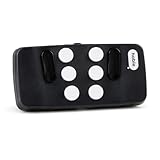
- Broad Smartphone & Tablet Compatibility: Connects easily to your iPhone and Android smartphones and tablets, allowing you to navigate and type accurately with its 8 tactile buttons.
- Intuitive & Easy to Learn: No prior Braille knowledge is needed to use the keyboard, and you get access to free onboarding calls and tutorials to help you master it quickly.
- Highly Portable & Private: The device is small, compact, and easy to carry, letting you type and access private information while your phone stays securely in your pocket or bag.
- Seamless Voice & Screen Reader Control: Enhances accessibility by working with your phone's built-in screen reader and allowing for easy use of voice commands like Siri or Dictation.
- Exceptional Battery Life: Features a long-lasting rechargeable battery with over one month of battery life on a single charge, ensuring reliable use for your on-the-go lifestyle.
SwiftKey: resize the keyboard or use Explore By Touch
Microsoft documents keyboard resizing and TalkBack support in SwiftKey and its settings. Its Explore By Touch mode uses a swipe-and-lift interaction: slide a finger until the desired key is found, then lift to enter it. Microsoft describes this mode as changing the keyboard interaction, not simply enlarging the keys.
There are trade-offs while Explore By Touch is on: Flow and other SwiftKey gestures are disabled, the keyboard cannot remain undocked, and language switching works differently. Microsoft’s support guide also states, “Microsoft SwiftKey is not currently compatible with Android’s magnification feature.” If you rely on Android magnification, that documented limitation is a significant reason to check your setup before switching keyboards. See Microsoft’s SwiftKey accessibility guide.
Rank #2

- Braille Keyboard with Large Print
- Bluetooth Wireless connection
- Scissors switch keys with superior tactile feedback
- Light form factor with only 78 keys
- Dimensions- 11.2 in x 4.7 in x 0.9 in
TalkBack braille keyboard: on-screen braille input
Android’s TalkBack braille keyboard provides six on-screen keys for braille typing in Android apps. It is a TalkBack feature that must be enabled and configured, rather than a separate keyboard app to install. Google’s launch announcement described grade 1 and grade 2 support and initial English availability; those launch details are not a guarantee of current support for every language or device. Check Google’s braille keyboard announcement and your device’s current settings.
Outdated Drivers Are Slowing You Down
One free scan finds every outdated or missing driver and matches the right update for your exact hardware.Free scan · exact hardware matchWindows Errors? Fix Them Before They Spread
Repair common Windows errors and clear accumulated junk for a smoother, more stable PC - no reinstall needed.Free scan · no reinstallVoice typing: SwiftKey and Gboard options
Microsoft describes SwiftKey’s multimodal voice typing as its default experience, allowing speech and manual typing at the same time. It can be disabled to restore Google Voice Typing under SwiftKey’s Rich input settings. Microsoft notes that the alternate method has Google app requirements. Its guide also says voice clips may be shared to improve recognition and documents an opt-out in SwiftKey settings. Review the current controls and requirements in Microsoft’s SwiftKey voice-typing guide.
Rank #3

- Braille Keyboard with Large Print
- Bluetooth Wireless connection
- Scissors switch keys with superior tactile feedback
- Light form factor with only 78 keys, macOS Sierra 10.12 or later versions
- Dimensions- 11.2 in x 4.7 in x 0.9 in
When a physical keyboard or switch control makes sense
A physical keyboard can be an alternative to on-screen keys for TalkBack users, and external keyboard keys can be assigned as switches for Switch Access. This is a hardware-and-configuration route, not another on-screen keyboard recommendation. Google notes that Switch Access experiences vary with the tools and software in use; see its Switch Access guide alongside the TalkBack keyboard instructions. If you choose to try a Bluetooth keyboard, confirm that it works with your device and the accessibility controls you use; Google’s documentation does not endorse a particular model.
Quick Recap
Best Value

- Perfect for Visually Impaired Individuals, Low Vision, or Low Light for Seniors and People with Vision Impairment
- Braille Keyboard Stickers for the Blind and Visually Impaired by DataCal.
- Transparent Braille stickers are a very economical option for creating a bilingual Braille keyboard.
- The stickers use an easy peel-and-stick method to install.
- The Braille stickers are printed on clear Lexan so the original key legend shows through; this allows you to add Braille stickers to your existing keyboard so that it becomes a bilingual keyboard (Braille) and the original language of your keyboard.
Rank #4

- Braille Logickeyboard with molded dots
- Bluetooth Wireless connection
- Scissors switch keys with superior tactile feedback
- Light form factor with only 78 keys
- Dimensions- 11.2 in x 4.7 in x 0.9 in
How to decide
- You use TalkBack and want keys announced: Start with Gboard’s documented touch exploration. If considering another keyboard, verify TalkBack behavior on your device rather than assuming compatibility.
- You need a larger on-screen keyboard: SwiftKey documents resizing. If you also depend on Android magnification, account for Microsoft’s stated incompatibility before choosing it.
- You type using braille: Look for the TalkBack braille keyboard in Android’s accessibility and keyboard settings, then confirm language availability and setup on your device.
- You prefer speech or mixed speech and typing: Compare SwiftKey’s multimodal voice typing with the available Google voice-input option and review voice-data controls.
- You prefer hardware keys or switch control: Consider an external keyboard and check the TalkBack or Switch Access setup required for your device.
Product prices and availability are accurate as of the date/time indicated and are subject to change. Any price and availability information displayed on Amazon at the time of purchase will apply.




