Short answer: Choose the Herman Miller Aeron if fit, breathable mesh and a long warranty matter most; the Steelcase Karman if you want a chair that reacts to movement without motors; the Herman Miller Vantum if one chair must cover gaming and office work; or the Autonomous ErgoChair Pro if you want extensive adjustments at a lower starting position. Keep the LiberNovo Omni Pro on your shortlist when motorized lumbar stretching, synchronized movement, five recline positions and seat cooling are the features you will actually use.
No chair in this comparison has been shown in a clinical trial to treat back pain. The evidence here is manufacturer documentation and Tom’s Guide product testing, so use the distinctions below to match a mechanism and fit to your work habits rather than treating any model as medical equipment.
As an Amazon Associate I earn from qualifying purchases.
Which Omni Pro alternative is best for you?
| Primary need | Best match | Why it fits that need |
|---|---|---|
| Breathable mesh, mature ergonomics and several size options | Herman Miller Aeron | Three sizes, weight-distributing mesh, broad adjustments, 350-lb limit and a 12-year warranty. |
| Movement that responds without powered components | Steelcase Karman | Its weight-activated mechanism reacts to small shifts, while the flexible Intermix textile moves with you. |
| Gaming and desk work in one chair | Herman Miller Vantum | Adjustable lumbar and thoracic support, a knit back and headrest, and a foam seat. |
| Many adjustments at a mid-range position | Autonomous ErgoChair Pro | Configurable foam-and-mesh or all-mesh construction with broad adjustment options. |
| Powered lumbar movement, deep recline and cooling features | Stay with LiberNovo Omni Pro | Its motorized OmniStretch cycle, cohesive moving backrest/seat/arms, 160-degree position and Active Airflow are not replicated by the alternatives listed. |
“Best alternative” therefore depends on what you mean by dynamic support. The Karman changes resistance as your weight shifts. The Aeron and Vantum provide adjustable or passive support through established ergonomic designs. The ErgoChair Pro emphasizes the number of settings you can tune. The Omni Pro is the outlier because its lumbar movement is powered and programmed.
Crashes, No Sound, or Screen Glitches?
Random freezes, missing sound and display glitches usually trace back to one bad driver. Find and replace yours safely.Free scan · under a minutePC Slower Than It Used to Be?
A free scan shows the junk files, broken settings and background clutter dragging Windows down - then fixes them in one click.Free scan · Windows 10 & 11What the LiberNovo Omni Pro does differently
The Omni Pro is a dynamic ergonomic chair built around LiberNovo’s Bionic FlexFit backrest and a dynamic support system. LiberNovo describes eight flexible backrest panels connected by 16 pivot points. The seat, backrest and armrests are intended to move cohesively as your posture changes instead of making the backrest the only moving part.
#1 Best Overall
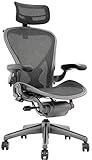
- 12-Year Service Warranty By Chairorama With 3-Year Additional Mechanical Replacement Warranty T&C Apply.
- Herman Miller Aeron Chair Renewed by Chairorama is a fully adjustable model with forward & Rear Tilt
- Size B Chair With Adjustable Arms
- Posture Fit Support for your back
Lumbar depth is adjusted with buttons on the armrests. Its OmniStretch feature is a programmed cycle that gently presses and releases the lumbar support for about five minutes. The manufacturer says the cycle works at any recline angle and feels deepest at 160 degrees. That is a guided movement routine, not a therapeutic treatment or a substitute for advice from a clinician.
The Pro has five listed recline positions:
- 105 degrees
- 115 degrees
- 125 degrees
- 135 degrees
- 160 degrees
Other listed features include Active Airflow, Gabriel Atlantic fabric and a reinforced aluminum-alloy base. The US product page listed a $1,109 price discounted from $1,299 at the time of the 2026 product information. That is a time-specific listing, not a guaranteed current price. Seat-depth choices are 45 cm and 48 cm, and the recommended height range is 5 feet 0 inches to 6 feet 1 inch. The listed BIFMA capacity is 300 lb.
LiberNovo does not establish a fixed Pro battery-runtime figure in its FAQ; it says runtime varies by model and directs owners to the model manual. Battery charging, electronics and eventual parts support are therefore part of the ownership decision in a way they are not for a conventional tilt mechanism.
Free tools Windows power users keep installed
One-click scans. No signup required.
Comparison at a glance
| Chair | Lumbar approach | Movement behavior | Capacity | Warranty | Price information available | Best use |
|---|---|---|---|---|---|---|
| LiberNovo Omni Pro | Motorized depth control and programmed OmniStretch | Eight flexible panels, 16 pivot points; seat, back and arms move together | 300 lb BIFMA rating | Not stated in the supplied product information | $1,109 sale from $1,299 in the US listing at research time in 2026 | Users who will use powered stretching, deep recline and cooling |
| Herman Miller Aeron | Adjustable ergonomic support; no powered stretch system identified | Conventional ergonomic tilt with weight distribution through mesh | 350 lb | 12 years | Tom’s Guide describes a premium price that rises with options; a single current configuration price was not stated | Long-term office use, airflow and precise sizing |
| Steelcase Karman | Optional lumbar bar; no motorized system identified | Weight-activated mechanism reacts to small movements | 350 lb | 12 years | $846–$1,578 configuration range in Tom’s Guide’s 2026 review | Movement-responsive sitting without electronics |
| Herman Miller Vantum | Adjustable lumbar and thoracic support | Conventional reclining design with knit back and headrest | 350 lb | 12 years | Tom’s Guide describes a premium price; a single current configuration price was not stated | Combined gaming and office setups |
| Autonomous ErgoChair Pro | Broad manual adjustment set | Conventional adjustable tilt; no powered lumbar routine identified | 300 lb | 2 years | Tom’s Guide positions it in the mid-range; a single current configuration price was not stated | Adjustability when a shorter warranty is acceptable |
Prices, stock, seller terms and warranty conditions can change. The figures above preserve the conditions reported by the cited 2026 sources rather than presenting them as permanent retail prices.
Herman Miller Aeron: the strongest established mesh alternative
The Aeron is the logical alternative when your definition of support starts with fit, airflow and a proven mesh platform rather than an active lumbar routine. Tom’s Guide lists three sizes, allowing a closer match between the chair and your body than a single-size model. Its large configuration has an 18.5-inch seat width, and the chair is rated for 350 lb.
Why choose it over the Omni Pro
- More documented sizing: three sizes can make seat width and overall proportions easier to match.
- Mesh weight distribution: the design spreads load without the foam-and-fabric feel of a padded seat.
- Long ownership horizon: the listed 12-year warranty is substantially longer than the two-year coverage reported for the ErgoChair Pro and provides a clear contrast with the Omni Pro information, which does not state a warranty term.
- Many adjustments: Tom’s Guide identifies extensive adjustment options, useful when more than one person uses the chair or when you change tasks during the day.
Trade-offs
The Aeron is a premium purchase, and optional configurations can raise the price substantially. It also does not provide the Omni Pro’s motorized five-minute lumbar cycle, armrest-button depth control or 160-degree stretch position. If you specifically want the chair to press and release the lower back on a schedule, the Aeron is an ergonomic mesh alternative, not a functional substitute for that feature.
Rank #2

- Aeron Size B provides optimal support for people 5'5" to 6'2" and 150 to 230 pounds, Posture Fit supports the base of the spine for healthy posture
- Patented Pellicle woven suspension textile weaves together two unique materials with elastic properties to make the seat
- Kinematic tilt mechanism allows the chair to move with your body, pivot points align with the hips, knees and ankles for a natural recline motion
- Features tilt limiter with seat angle adjustment, fully adjustable arms, adjustable lumbar, graphite base and frame
- An environmentally sensitive design, Aeron is made largely of materials that are recyclable at the end of its useful life
Steelcase Karman: the best non-motorized movement alternative
The Karman addresses the “moves with me” requirement through its construction and mechanism rather than batteries or motors. Tom’s Guide describes its Intermix textile as soft, supportive and flexible. Its weight-activated mechanism reacts to even small movements, so the resistance changes as your body shifts instead of requiring you to set a fixed recline tension for every posture.
What’s actually slowing this PC down?
Pick the symptom - the matching free tool is one click away.
Why choose it over the Omni Pro
- Natural movement: the chair responds to changes in body weight without a programmed lumbar cycle.
- Simpler system: there is no powered lumbar routine or battery-runtime question in the features described by Tom’s Guide.
- Long warranty and capacity: the listed 350-lb limit and 12-year warranty exceed the Omni Pro’s listed 300-lb capacity, although warranty terms and fit still need to be checked for the exact configuration.
- Optional lumbar bar: you can add a manual lumbar element if the standard back support does not give you enough lower-back contact.
Trade-offs
The Karman does not offer the Omni Pro’s motorized depth adjustment, guided stretch or five-position recline list. Its $846–$1,578 configuration range reported by Tom’s Guide also shows why you must compare like-for-like options; upholstery, arms and other selections can move the final price considerably. Choose it when continuous small movement matters more than active lumbar intervention.
Herman Miller Vantum: for a shared gaming-and-office setup
The Vantum is aimed at people who want one chair to cover focused desk work and gaming. Tom’s Guide lists adjustable lumbar and thoracic support, a knit back and headrest, and a foam seat. That combination is intended to provide a more familiar padded-seat feel while retaining adjustable upper- and lower-back support.
Why choose it over the Omni Pro
- Two-use design: a headrest, knit back and foam seat suit longer gaming sessions as well as ordinary office work.
- Upper-back control: adjustable thoracic support addresses an area the Omni Pro specifications do not separately identify.
- Capacity and warranty: the listed 350-lb capacity and 12-year warranty match the Aeron and Karman figures in Tom’s Guide’s guide.
Trade-offs
The Vantum’s premium price is a consideration, and Tom’s Guide reports that the arm pads can shift. It also lacks the Omni Pro’s motorized stretch cycle, cohesive panel system and stated 160-degree position. If you sit upright for work and recline for games but do not need powered lumbar movement, the Vantum’s configuration is the more relevant advantage.
Autonomous ErgoChair Pro: broad adjustment at a mid-range position
The ErgoChair Pro is the adjustment-first option. Tom’s Guide describes it as highly adjustable and says it can be configured with a foam seat and mesh back or as an all-mesh chair. That choice lets you prioritize cushioning or airflow before fine-tuning the settings.
Why choose it over the Omni Pro
- Configuration flexibility: choose between a foam-seat/mesh-back arrangement and an all-mesh design.
- Adjustment breadth: the chair is positioned for users who want to tune many settings rather than rely on a programmed routine.
- Lower commitment: Tom’s Guide places it in a mid-range position, below the premium tier occupied by several alternatives.
Trade-offs
The listed capacity is 300 lb, equal to the Omni Pro’s stated BIFMA rating and below the 350-lb ratings of the Aeron, Karman and Vantum. The warranty is two years. Tom’s Guide also identifies the armrest padding as a weakness. There is no documented motorized lumbar stretch or synchronized seat-back-arm movement, so its appeal rests on manual adjustability and configuration choice.
Rank #3

- 【Adjustable Lumbar Support】- The lumbar support of MOLENTS office chair can be adjusted up and down, forward and backward to deliver tailored support for your lower back.
- 【Adjustable 3D Armrests】- MOLENTS ergonomic office chair with 3D adjustable armrests offer tailored support for your arms and shoulders, reducing strain and enhancing comfort throughout the workday.
- 【Breathable and Comfortable Mesh Office Chair】- This computer chair is crafted from premium breathable and high elastic mesh material, without being stuffy, giving you a long time comfort.
- 【Tilt Back 90°-120°】- With a backrest that has three reclining positions from 90° to 120°, MOLENTS ergonomic chair allows you to easily switch from work mode to rest mode, making it a home office essential and perfect for executive offices and studies.
- 【Ergonomic Desk Chair】- Ergonomically designed to conform to the body's curves and pressure distribution, MOLENTS office desk chair helps promote healthy posture, making long hours of work easier and more productive.
How to choose by lumbar mechanism
“Lumbar support” describes several different experiences. Identify the mechanism before comparing brand names.
Motorized and programmed support
The Omni Pro is the only chair in this group with a documented motorized lumbar routine. OmniStretch lasts about five minutes, gently pressing and releasing the lumbar area, and can run at any recline angle. The manufacturer says the sensation is deepest at 160 degrees. This suits someone who wants a deliberate movement break without leaving the chair, provided charging and electronics are acceptable.
Manual adjustable support
The Vantum provides adjustable lumbar and thoracic support, while the ErgoChair Pro emphasizes a broad set of manual adjustments. The Karman can be ordered with an optional lumbar bar. Manual systems require you to set the support to your body and task, but they do not depend on a battery or software cycle.
Do these 3 things before closing this tab:
1Fix the driver behind crashes, sound loss and screen glitches2Clear out junk files and repair common Windows errors3Scan for outdated or missing drivers - takes under a minutePassive and weight-responsive support
The Aeron’s mesh and adjustment system and the Karman’s weight-activated mechanism support movement through material and mechanical response. These are preferable when you want the chair to accommodate frequent small shifts without a powered intervention.
Fit and movement: a practical selection process
Use this sequence before ordering. It prevents a sophisticated lumbar feature from masking a basic mismatch in seat depth or capacity.
- Check capacity first. The Omni Pro and ErgoChair Pro are listed at 300 lb; the Aeron, Karman and Vantum are listed at 350 lb. Treat those as product ratings, not a recommendation to sit at the limit continuously.
- Match seat dimensions to your legs. The Omni Pro offers 45 cm and 48 cm seat depths. The Aeron provides three sizes. For every other model, verify the exact configuration’s seat dimensions before purchase because the summary information does not establish a comparable depth range.
- Decide how much recline you actually use. Omni Pro users can select 105, 115, 125, 135 or 160 degrees. The other product descriptions establish reclining or tilt behavior but do not provide an equivalent five-angle list.
- Choose your thermal preference. The Omni Pro lists Active Airflow; the Aeron uses mesh; the Karman uses flexible Intermix textile; the Vantum uses a knit back with a foam seat; and the ErgoChair Pro can be configured with mesh or foam-backed construction.
- Test the support in your normal posture. Sit with feet supported, hips back and shoulders relaxed. Adjust lumbar contact until it supports the natural curve without forcing your pelvis forward. A stronger setting is not automatically a better setting.
- Evaluate ownership complexity. Compare price, warranty, return terms, replacement-part availability and, for the Omni Pro, charging and battery information in the model manual.
Which chair fits common work patterns?
Eight-hour spreadsheet, writing or coding days
Start with the Aeron if airflow, multiple size choices and a 12-year warranty are your priorities. Consider the Karman when you frequently shift position and prefer a weight-activated mechanism. The ErgoChair Pro is sensible when you need many manual adjustments and accept its two-year warranty and reported armrest-padding weakness.
Rank #4

- 【Your All-Day Comfort Solution】 Premium Ergonomic Desk Chair with Footrest featuring dynamic 3D lumbar support, 5D Flip-Up Armrests, and extra-wide 3D breathable headrest, 2-position angle foot-rest, perfect for home office chairs seeking ultimate comfort
- 【Engineered with Dynamic Spinal Alignment System】3D Synchro-Tilt Lumbar(Lockable ±1.6" depth spring-loaded auto-tracking/±2" height/15° rotation)with force-sensitive springs mimics natural spine curvature, certified by AEP* for 12hrs+ fatigue reduction in high back ergonomic chairs (*American Ergonomics Partnership)
- 【Smart Space-Saving Features】 5D Flip-Up Armrests with skin-friendly panels - 27% denser EVA foam padding achieves Zero-Pressure Contact, it can be adjusted at Height/width/forward/backward/rotate/flip function, a space-saving flip-up design that tucks neatly under standard desks
- 【Advanced Adjustability】 3-stage reclining mechanism pairs with an 18" extendable footrest (2-position angle adjustment) for seamless transition between work mode and relaxation in home office desk chairs, while 28cm³ 3D AirFloat Headrest with cervical curve mapping reduces 31% neck strain
- 【Breathe Easy with Premium Ventilated Mesh】The exclusive Dual-Stripe AirMesh technology offers 38% better airflow and 25% higher elasticity than standard mesh, making it a durable and breathable mesh office chairs.
Alternating work and gaming
The Vantum is the most purpose-built choice among these alternatives because its knit back, headrest, foam seat and adjustable lumbar and thoracic support address both use cases. The Omni Pro remains attractive if you value deep recline and the OmniStretch routine more than a gaming-oriented configuration.
Quick wins for a faster PC:
Clear out junk files and repair common Windows errorsFree Scan →Scan for outdated or missing drivers - takes under a minuteDriver Scan →Repair Windows errors before they cause bigger problemsFix Now →Frequent posture changes and active sitting
Choose the Karman for movement without motors, or the Omni Pro if you want the chair’s lumbar system to participate actively. The Karman’s response is driven by your weight shifts; the Omni Pro’s is built around articulated panels and a programmed cycle. Those are different sensations, so a return period is particularly important if available.
Hot room or long periods in light clothing
The Omni Pro’s Active Airflow and the Aeron’s mesh are the clearest airflow-focused specifications in this comparison. The ErgoChair Pro’s all-mesh configuration is another route. The Karman’s textile and the Vantum’s knit-back/foam-seat combination may feel different from open mesh, so material preference should be part of an in-person test.
Costs, warranty and electronics: what to verify before paying
The Omni Pro’s $1,109 sale price from $1,299 was the US listing captured in 2026; it may not be available at that price now. The Karman’s $846–$1,578 range is a configuration range from Tom’s Guide’s 2026 review, not a universal price for every build. Tom’s Guide describes the Aeron and Vantum as premium-priced and the ErgoChair Pro as mid-range, without establishing one comparable configuration price for each.
Warranty length also changes the risk calculation: 12 years are listed for the Aeron, Karman and Vantum, versus two years for the ErgoChair Pro. The supplied Omni Pro product information does not state a warranty term, so obtain the written terms for your region before ordering. Ask specifically about the battery, motor, control buttons, replacement parts and what happens if the powered stretch system stops working.
Return policies are equally important because dynamic movement is personal. Confirm the trial duration, return shipping responsibility, restocking fees, damage rules and whether a fully configured chair can be returned. Seller and stock information can change, especially when a product is sold through a marketplace.
Common pitfalls and how to avoid them
- Confusing recline with lumbar movement: a chair can recline smoothly without changing lumbar pressure. Only the Omni Pro is documented here with a programmed press-and-release lumbar cycle.
- Choosing by maximum recline alone: the Omni Pro’s 160-degree position is useful only if your desk, monitor and leg support allow a safe, comfortable posture.
- Ignoring seat depth: too much depth can press behind the knees; too little can leave the thighs unsupported. Use the Omni Pro’s two depth choices or the Aeron’s size system as prompts to verify dimensions on other models.
- Assuming a high weight rating guarantees fit: capacity is not the same as seat width, back height or armrest spacing.
- Over-tightening lumbar support: excessive pressure can push you forward and make the chair feel worse. Begin with light contact and increase it only if your neutral posture remains comfortable.
- Overlooking armrests: Tom’s Guide reports shifting arm pads on the Vantum and weak armrest padding on the ErgoChair Pro. Arm support affects shoulder load, so test it with your keyboard and mouse position.
- Forgetting power dependence: the Omni Pro’s battery-runtime figure is not fixed in the available FAQ. Read the model manual and plan for charging before treating powered features as essential.
Bottom-line recommendation
For most buyers seeking a direct Omni Pro alternative, the Steelcase Karman is the closest match to the idea of a chair that moves with you without adding motors. Pick the Aeron instead when sizing, mesh airflow and a 12-year warranty outweigh active lumbar motion. Pick the Vantum for a combined gaming-and-office seat, and the ErgoChair Pro when adjustment range and a mid-range position matter more than warranty length.
The Omni Pro remains the distinctive choice for powered lumbar stretching, articulated back support, synchronized movement, five selectable recline positions and stated Active Airflow. Those features justify choosing it only when they solve a problem you regularly experience; otherwise, a simpler weight-responsive or manually adjustable chair may deliver the movement you want with less electronic dependence.
Quick Recap
Product prices and availability are accurate as of the date/time indicated and are subject to change. Any price and availability information displayed on Amazon at the time of purchase will apply.

