Freedom251 › Audio Editing Software

Zrythm
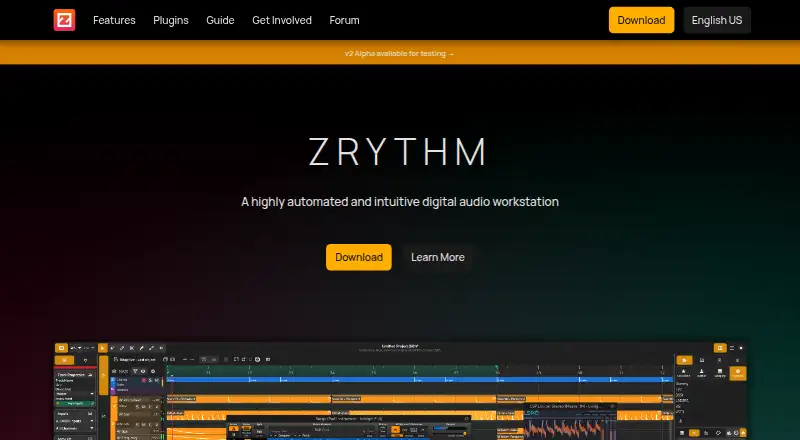
What Zrythm is
Zrythm is a digital audio workstation for GNU/Linux, Windows, and macOS, with multitrack editing, MIDI sequencing, recording, automation, and mixing. It records audio and MIDI from devices or other apps using JACK, and supports punch in/out and multiple takes. Automation can control parameters such as project BPM and time signature through lines, curves, CV signals, or envelopes. Mixing tools include group tracks, aux sends to FX tracks, plugin sidechain inputs, and in-context listening. Plugin support includes LV2, VST2, VST3, AU, CLAP, and JSFX, as well as SFZ and SF2 soundfonts. The select tool can move, resize, clone, link, loop, delete, and cut objects. Zrythm imports and exports audio formats supported by libsndfile, also imports MP3, and exports MIDI Type 0 or Type 1. Automatic project backups, undoable actions, and saved undo history help manage project work. It is released under the GNU Affero General Public License, version 3. A free plan is available; paid plans include Snapshot at £14 a month, Bundle at £24 a month, and Subscription at £38 a year.
Who it suits
Zrythm suits musicians and audio producers who need multitrack, MIDI, recording, automation, and mixing tools on Linux, macOS, or Windows. Its plugin support may also suit users working with the listed plugin formats and soundfonts.
What it does well
- Supports multitrack editing and MIDI sequencing.
- Records multiple takes with punch in/out.
- Supports six listed plugin formats.
- Project backups and undo history are supported.
- Runs on GNU/Linux, Windows, and macOS.
What to know first
- Basic plan lists a 25-track limit.
- Snapshot provides access to v1.0.0 only.
- Higher-priced plans have different release access.
Limits
The Basic plan is listed with a 25-track limit. Paid plans include unlimited tracks; the Snapshot plan costs £14 a month, the Bundle plan costs £24 a month, and the Subscription plan costs £38 a year.
Plans
| Plan | Billed and limits | Price |
|---|---|---|
| Basic | Up to 25 tracks · Basic plugins · Web user manual · v1.0.0 | Free |
| Snapshot | Unlimited tracks · Basic & Z Series plugins · Web & PDF user manual · Access to v1.0.0 only | $19, paid once |
| Bundle | Unlimited tracks · Basic & Z Series plugins · Web & PDF user manual · Access to all v1 & v2 releases | $31, paid once |
| Subscription | /year · Unlimited tracks · Basic & Z Series plugins · Web & PDF user manual · Access to all releases · Access to nightly builds | $50 a year |
As zrythm.org lists them, read 8 Oct 2026. The maker's own page has the final word.
Getting started
- Visit https://www.zrythm.org/.
- Choose GNU/Linux, Windows, or macOS.
- Select the free plan or a paid plan.
- Use the available support channels for community help or issue reporting.
Overview
Zrythm is a digital audio workstation for recording, arranging and mixing audio and MIDI. It is best suited to producers who want detailed automation, routing and broad plugin compatibility across desktop platforms. The 25-track Basic plan offers a free way in, while paid plans trade price for more tracks and different release access.
Key features
One select tool handles moving, resizing, cloning, linking, looping, deleting and cutting objects, keeping common arrangement edits together. Automation can control project BPM and time signature as well as other parameters, using lines, curves, CV signals or envelopes. That range is useful for intricate, changing arrangements; it is more machinery than a simple recording or trim job requires.
Zrythm records audio and MIDI from devices or other applications using JACK, with punch in/out and multiple takes for refining performances. Its mixer supports group tracks, aux sends to FX tracks and plugin sidechain inputs, and in-context listening. These routing options make it a stronger fit for layered production than a basic editor, though the JACK-based recording path may not suit every setup.
Plugin support covers LV2, VST2, VST3, AU, CLAP and JSFX, plus SFZ and SF2 soundfonts. Supported audio and MIDI backends include JACK/PipeWire, Windows MME and WASAPI, and Core Audio/MIDI. Zrythm imports and exports audio formats supported by libsndfile, with additional MP3 import, and exports MIDI Type 0 or Type 1. Automatic project backups, undoable actions and saved undo history offer useful safeguards for complex sessions.
The software is licensed under the GNU Affero General Public License, version 3. Its privacy policy says it may contact zrythm.org at startup for release notifications and can send error reports after showing users the data first. Website analytics can be opted out of without affecting site use, and the site says it does not profile users. Community chat, a forum and issue reporting provide support routes, with contribution channels for code, bug reports, feature requests and translation.
Pricing
Zrythm is freemium. Basic has a 25-track limit and no published price. That makes it the sensible starting point for smaller projects, but users who need more tracks must move to a paid tier.
| Plan | Price | What it includes |
|---|---|---|
| Basic | Custom pricing | 25 tracks |
| Snapshot | £14 a month | Unlimited tracks; Basic and Z Series plugins; web and PDF manual; access to v1.0.0 only |
| Bundle | £24 a month | Unlimited tracks; Basic and Z Series plugins; web and PDF manual; access to all v1 and v2 releases |
| Subscription | £38 a year | Unlimited tracks; Basic and Z Series plugins; web and PDF manual; access to all releases and nightly builds |
Snapshot removes the track ceiling but confines access to v1.0.0, so it suits users who want unlimited tracks without needing later releases. Bundle costs more for access to all v1 and v2 releases. Subscription is the lowest stated recurring price and adds all releases plus nightly builds; that makes it the broadest access option for users comfortable with an annual term. The paid tiers share the same stated plugin and manual inclusions. Prices and terms are as shown; no seat count or renewal detail is given.
Platforms
Zrythm runs on GNU/Linux, Windows and macOS. Backend support differs by platform: JACK/PipeWire is among the supported options, Windows users have MME and WASAPI, and macOS users have Core Audio/MIDI. That spread makes it a candidate for desktop producers across the three systems, but the appropriate audio path depends on the operating system and setup.
Who it's for
Choose Zrythm if your work combines audio recording, MIDI sequencing, substantial automation and plugin-based mixing, especially if you need several plugin formats or Linux support. Its unlimited-track paid tiers suit larger sessions. It is less compelling for a small project that fits within 25 tracks, or for someone seeking only straightforward audio editing without the added routing and automation controls.
Pros and cons
- Pros: Broad support for plugin formats and soundfonts gives producers flexibility in choosing instruments and effects.
- Pros: Automation of tempo and time signature, plus group tracks, aux sends and sidechain inputs, supports detailed arrangement and mixing work.
- Pros: Runs on GNU/Linux, Windows and macOS, with platform-specific audio and MIDI backends.
- Cons: Basic is capped at 25 tracks, which can constrain larger projects.
- Cons: Snapshot provides access to v1.0.0 only; users wanting broader release access need Bundle or Subscription.
- Cons: Recording from devices or other applications uses JACK, which may not fit every user's preferred audio setup.
Alternatives
For a broader Digital Audio Workstations shortlist, compare the options by platform, track limits and release terms. The Audio Editing Software category is a better place to look if your priority is editing audio rather than arranging and mixing full projects.
n-Track Studio is worth comparing if mobile support matters: it runs on Android and iOS as well as desktop systems, has a free plan and trial, and its Standard plan is $69 a month with three years of free upgrades for Windows and macOS. SunVox is another cross-platform option, including web and mobile; its Desktop plan is free on most platforms.
Pro Tools may suit a Windows or macOS user seeking a different free entry point: Intro has caps of eight audio, eight instrument and eight MIDI tracks. Tracktion Waveform has a free tier with 14 built-in audio effects, eight MIDI effects, 11 utility plugins and four instruments, making it a reasonable comparison for users weighing included tools against plugin-format breadth.
Cakewalk Next offers a free Windows and macOS plan with unlimited tracks, virtual instruments, built-in effects, and VST and AU support. GarageBand is free on macOS and iOS, with a stated limit of 255 tracks on Mac and 32 on iPhone and iPad. LMMS is a free, open-source alternative for Linux, macOS and Windows. LUNA has a free plan with unlimited tracks and UAD Explore Free plug-ins, for readers comparing that stated free offering with Zrythm's 25-track Basic tier.
Verdict
Zrythm is the stronger fit for desktop producers who need automation depth, flexible mixing and support for many plugin formats, particularly those working on Linux or in larger sessions. Its main draw is bringing those capabilities together across three desktop platforms. Look elsewhere if you need a simple editor, a free plan beyond 25 tracks, or paid access without a release-version distinction.
Verdict
Zrythm combines recording, MIDI, automation, and mixing tools with support for a broad set of plugin formats. Its plan details distinguish track limits and access to release versions, so check those against your project needs.
Questions
Is Zrythm free?
Yes. Zrythm has a free plan. The Basic plan lists 25 tracks.
What do paid plans cost?
The Snapshot plan is £14 a month, the Bundle plan is £24 a month, and the Subscription plan is £38 a year.
Which platforms does it support?
GNU/Linux, Windows, and macOS.
Which plugins and soundfonts does it support?
It supports LV2, VST2, VST3, AU, CLAP, and JSFX plugins, as well as SFZ and SF2 soundfonts.
Is Zrythm open source?
It is released under the GNU Affero General Public License, version 3.
Where can users get help?
The site offers a community chat, forum, issue reporting, and channels for code, bug reports, feature requests, and translation.
Facts from Zrythm's own pages
- Audio backends
- Supported audio and MIDI backends include JACK/PipeWire, Windows MME, WASAPI and Core Audio/MIDI. · zrythm.org, 8 Oct 2026
- Automation
- It can automate parameters including project BPM and time signature, using lines, curves, CV signals or envelopes. · zrythm.org, 8 Oct 2026
- Data safety
- The software supports automatic project backups, undoable actions and saving undo history with projects. · zrythm.org, 8 Oct 2026
- Editing
- Its select tool can select, move, resize, clone, link, loop, delete and cut objects. · zrythm.org, 8 Oct 2026
- Free plan
- Yes · zrythm.org, 21 Sept 2026
- Import/export
- It imports and exports audio formats supported by libsndfile, with additional MP3 import, and exports MIDI Type 0 or Type 1. · zrythm.org, 8 Oct 2026
- License
- Zrythm is released under the GNU Affero General Public License, version 3. · zrythm.org, 8 Oct 2026
- MIDI sequencing
- Yes · zrythm.org, 21 Sept 2026
- Mixing
- Mixing features include group tracks, aux sends to FX tracks and plugin sidechain inputs, and in-context listening. · zrythm.org, 8 Oct 2026
- Multitrack editing
- Yes · zrythm.org, 21 Sept 2026
- Plugins
- Zrythm supports LV2, VST2, VST3, AU, CLAP and JSFX plugins, plus SFZ and SF2 soundfonts. · zrythm.org, 8 Oct 2026
- Privacy
- The privacy policy says the software may contact zrythm.org at startup for release notifications and can send error reports after showing users the data before sending. · zrythm.org, 8 Oct 2026
- Privacy controls
- The site says Umami analytics can be opted out of without consequences for website use and that no profiling is done. · zrythm.org, 8 Oct 2026
- Product
- Zrythm is a highly automated and intuitive digital audio workstation. · zrythm.org, 8 Oct 2026
- Recording
- It records audio and MIDI from devices or other apps using JACK, and supports punch in/out and multiple takes. · zrythm.org, 8 Oct 2026
- Support
- The site offers a community chat, forum, issue reporting, and contribution channels for code, bug reports, feature requests and translation. · zrythm.org, 8 Oct 2026
- Supported platforms
- GNU/Linux, Windows, macOS · zrythm.org, 21 Sept 2026
- Third-party plugins
- Yes · zrythm.org, 21 Sept 2026
Where Zrythm stands on Freedom251
- Audio Editing Software#22 of 131
- Digital Audio Workstations#15 of 39