Freedom251 › Digital Audio Workstations
LMMS
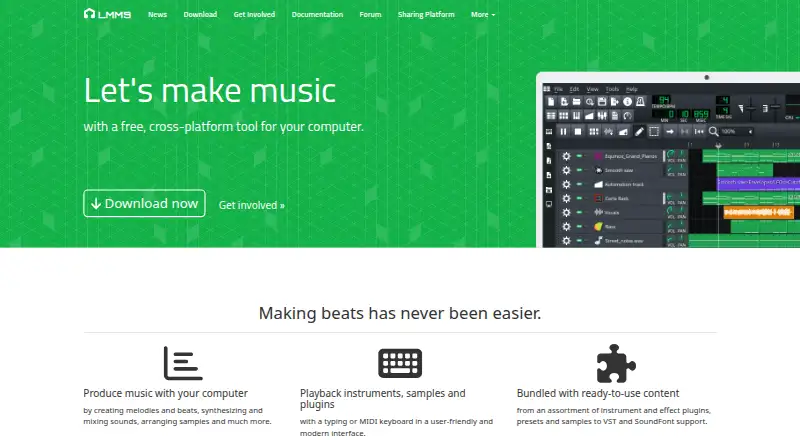
What LMMS is
LMMS is a free, open-source desktop tool for making music on Windows, macOS, and Linux. It provides a workflow for sequencing, composing, mixing, and automating songs, including creating melodies and beats, synthesizing and mixing sounds, and arranging samples. Notes can be played with a MIDI or typing keyboard, and projects can import MIDI files and Hydrogen project files. The software lists 16 built-in synthesizers, including emulations of the TB-303, Commodore 64 SID, NES, GameBoy, and Yamaha OPL2. It supports multisample instruments in SoundFont (SF2), Giga (GIG), and Gravis UltraSound (GUS) formats. Effects include LADSPA and VST plugins, along with built-in compression, limiting, delay, reverb, distortion, bass enhancement, equalizers, and a spectrum analyzer. LMMS supports 64-bit VST instruments, with a 32-bit VST bridge on 64-bit Windows, but not VST3 plugins. Its manual says backups are enabled by default and describes a backup file created when saving a project. The listed plans cost nothing.
Who it suits
LMMS suits people making and arranging music on a desktop across Linux, macOS, or Windows. It may work for users whose instrument and effect needs fit its listed formats and plugin support.
What it does well
- Available on Linux, macOS, and Windows
- Imports MIDI and Hydrogen project files
- Lists 16 built-in synthesizers
- Supports LADSPA and VST effects
- Project backups are enabled by default
What to know first
- Does not support VST3 plugins
- No free trial
Limits
LMMS is listed as free, with no free trial. It does not support VST3 plugins and has no video timeline.
Plans
| Plan | Billed and limits | Price |
|---|---|---|
| Free | Open-source software · Available for Windows, macOS, and Linux | Free |
| LMMS | 100% free · open source · community-driven project | Free |
As lmms.io lists them, read 19 Sept 2026. The maker's own page has the final word.
Getting started
- Visit the LMMS website.
- Download the build for Windows, macOS, or Linux.
- On Windows, use a Windows 10 or 11 build.
- On macOS, use macOS 10.13 or newer for x86_64, or macOS 11 or newer for arm64.
- Open LMMS and play notes with a MIDI or typing keyboard, or import a MIDI or Hydrogen project file.
LMMS is a free desktop workstation for composing, sequencing, synthesizing, mixing, and arranging music. It suits beatmakers, game-music composers, and Linux users who want a substantial instrument and effect set without a subscription or purchase. The main qualification is compatibility: projects that rely on VST3 plugins will need another application.
Overview
LMMS combines song sequencing, composition, mixing, and automation in one desktop workflow. You can play and enter notes from a MIDI keyboard or an ordinary typing keyboard, which makes it workable with dedicated hardware or a laptop alone. MIDI and Hydrogen project imports also provide a way to continue compatible arrangements instead of rebuilding them manually.
The free software is open source and community driven, hosted on GitHub. A backup feature is enabled by default and creates a backup file when saving a project, a useful safeguard for longer compositions. LMMS is therefore a practical starting point for independent musicians who value control over software cost, provided its plugin-format boundary fits their setup.
Key features
- Unified song workflow: Sequencing, composing, mixing, and automation share one interface, so a track can move from an initial pattern to an arranged song without changing programs.
- Flexible note entry: MIDI-keyboard input suits hardware players, while typing-keyboard playback lets users sketch ideas without buying a controller.
- Project compatibility: MIDI and Hydrogen project imports help users reuse material from those ecosystems; they do not replace broad interchange support for every DAW format.
- Built-in synthesis: Sixteen synthesizers include emulations of the TB-303, Commodore 64 SID, NES, GameBoy, and Yamaha OPL2. That range is particularly useful for electronic, retro, and game-oriented sounds without assembling a third-party collection.
- Sample formats: Native multisample support covers SoundFont (SF2), Giga (GIG), and Gravis UltraSound (GUS), giving composers access to established sound libraries.
- Effects and analysis: LADSPA and VST effects are supported alongside built-in compression, limiting, delay, reverb, distortion, bass enhancement, equalization, and spectrum analysis. The set covers core mixing and sound-shaping tasks inside the application.
- VST instruments: LMMS supports 64-bit VST instruments and provides a 32-bit bridge on 64-bit Windows, which helps users with older instrument plugins on that platform.
- Important format gap: VST3 plugins are not supported. Anyone whose essential instruments or effects are distributed only as VST3 should not make LMMS the center of their workflow.
Pricing
| Plan | Price | Includes |
|---|---|---|
| Free | free | Open-source software; available for Windows, macOS, and Linux |
| LMMS | free | 100% free, open source, community-driven project |
There is no paid tier and no trial period to manage. Every user receives the same free software, making LMMS a straightforward choice for learners, hobbyists, and creators who want to avoid licensing costs. The tradeoff is that the decision is about workflow and compatibility rather than upgrading for additional capabilities; VST3 support is not available at any price.
Platforms
LMMS runs on Linux, Windows, and macOS. Downloads include Windows 10 and 11 builds. Intel-based Macs require macOS 10.13 or newer, while Apple-silicon arm64 builds require macOS 11 or newer. The release also includes ARM64 builds, eight new native plugins, and broader fixes and performance improvements.
Who it's for
Choose LMMS if you compose beats or melodies, work with retro-style synthesis, or need a cross-platform desktop tool with instruments and effects included. It is especially attractive when Linux support, open-source licensing, and zero software cost matter as much as production breadth.
Look elsewhere if your projects depend on VST3 instruments or effects, or if your preferred workflow requires plugin compatibility beyond the formats LMMS supports. Its built-in toolkit is broad, but a format mismatch can outweigh that advantage.
Pros and cons
Pros
- Genuinely free and open source: There is no purchase or subscription barrier, and the same software is available across three desktop operating systems.
- Strong included sound palette: Sixteen synthesizers, multisample formats, and a useful collection of mixing effects reduce the need for immediate add-ons.
- Good for keyboard-free sketching: Typing-keyboard note playback makes basic composition possible without MIDI hardware.
- Project safety: Default backups add protection when saving work.
Cons
- No VST3: Modern plugin collections that require VST3 cannot be used in LMMS.
- Older-plugin caveat: The 32-bit VST bridge is specifically provided on 64-bit Windows, so that compatibility path does not extend equally to every platform.
Alternatives
SunVox is worth choosing when a freemium modular synthesizer and tracker is more important than LMMS's conventional desktop workflow; its Desktop plan is free on most platforms and it supports MIDI import/export.
DefleMask fits users seeking a dedicated tracker for console-style music who are willing to pay 14.99 USD once for the current plan; its free legacy edition is a 32-bit unsupported demo.
Pro Tools is the better route for creators who want a mainstream DAW with a free Intro offering capped at eight audio, instrument, and MIDI tracks.
Furnace is a free open-source chiptune tracker for users focused specifically on chip-music production.
GarageBand suits Apple users who prefer a free Mac and iOS music tool, with up to 255 Mac tracks and 32 tracks on iPhone and iPad.
LSDJ is a free option for personal or educational use when a focused tracker workflow is the priority; commercial users should seek permission.
MilkyTracker is another free choice for users who want a tracker on Linux, macOS, or Windows.
OpenMPT is a free alternative for Windows or compatible Wine setups that meet its stated system requirements.
For broader category browsing, see Game Music Software, Digital Audio Workstations, and Audio Editing Software.
Verdict
LMMS is a strong recommendation for cost-conscious composers and beatmakers who want built-in synthesis, effects, MIDI-oriented input, and Linux support in one open-source package. Choose it for the breadth of its included tools and zero price; choose another DAW when VST3 compatibility is essential to your sound library.
Verdict
LMMS offers a free desktop music workflow with built-in instruments, effects, and MIDI-related features. Users who need VST3 plugins should note that this format is not supported.
Questions
How much does LMMS cost?
The listed Free and LMMS plans each cost nothing.
Which operating systems can run LMMS?
LMMS is available for Linux, macOS, and Windows. The download page lists Windows 10 or 11 builds, macOS 10.13 or newer for x86_64, and macOS 11 or newer for arm64.
Is LMMS open source?
Yes. LMMS is described as a free, open-source, community-driven project hosted on GitHub.
Can LMMS use VST plugins?
It supports VST effects and 64-bit VST instruments, with a 32-bit VST bridge on 64-bit Windows. It does not support VST3 plugins.
Can LMMS import projects?
It can import MIDI files and Hydrogen project files.
Does LMMS include built-in instruments and effects?
Yes. It lists 16 built-in synthesizers and built-in effects including compression, limiting, delay, reverb, distortion, bass enhancement, equalizers, and a spectrum analyzer.
Facts from LMMS's own pages
- Built-in instruments
- The site lists 16 built-in synthesizers, including emulations of the TB-303, Commodore 64 SID, NES, GameBoy, and Yamaha OPL2. · lmms.io, 5 Oct 2026
- Desktop platforms
- The home page describes LMMS as a tool for Linux, Windows, and macOS. · lmms.io, 5 Oct 2026
- Download requirements
- The download page lists Windows 10 or 11 builds and macOS 10.13 or newer for x86_64, or macOS 11 or newer for arm64. · lmms.io, 5 Oct 2026
- Effects and plugins
- The site lists LADSPA and VST effect plugin support, plus built-in compressor, limiter, delay, reverb, distortion, bass enhancer, equalizers, and a spectrum analyzer. · lmms.io, 5 Oct 2026
- Free plan
- Yes · docs.lmms.io, 19 Sept 2026
- Import
- LMMS can import MIDI files and Hydrogen project files. · lmms.io, 5 Oct 2026
- Input
- LMMS supports note playback using a MIDI or typing keyboard. · lmms.io, 5 Oct 2026
- Instrument formats
- LMMS lists native multisample support for SoundFont (SF2), Giga (GIG), and Gravis UltraSound (GUS) formats. · lmms.io, 5 Oct 2026
- Project model
- The home page describes LMMS as a 100% free, open-source, community-driven project hosted on GitHub. · lmms.io, 5 Oct 2026
- Release notes
- The download page says the release includes 8 new native plugins, ARM64 builds, and many features, fixes, and performance improvements. · lmms.io, 5 Oct 2026
- Security and backups
- The user manual says the backup feature is on by default and describes a backup file created when saving a project. · docs.lmms.io, 5 Oct 2026
- VST3 limitation
- The user manual states that LMMS does not yet support VST3 plugins. · docs.lmms.io, 5 Oct 2026
- VST instruments
- The site lists built-in 64-bit VST instrument support with a 32-bit VST bridge on 64-bit Windows. · lmms.io, 5 Oct 2026
- What it does
- LMMS is a cross-platform tool for making music on a computer, including creating melodies and beats, synthesizing and mixing sounds, and arranging samples. · lmms.io, 5 Oct 2026
- Workflow
- It provides an interface to sequence, compose, mix, and automate songs. · lmms.io, 5 Oct 2026
Where LMMS stands on Freedom251
- Digital Audio Workstations#3 of 39
- Audio Editing Software#21 of 131
- Game Music Software#5 of 27