Freedom251 › Game Music Software
LSDJ
What LSDJ is
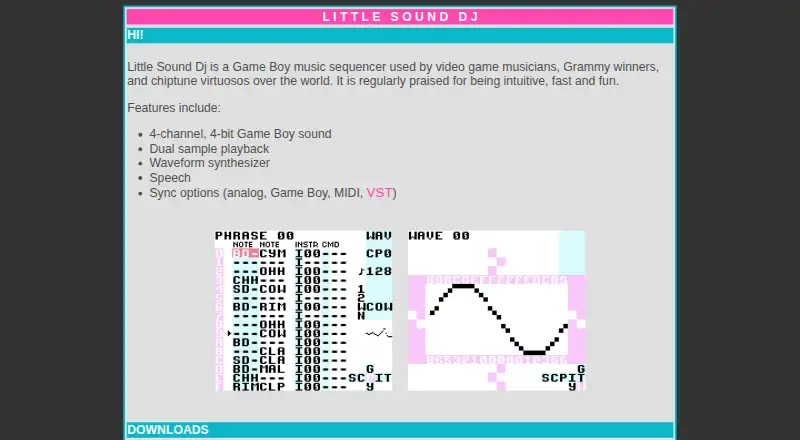
Little Sound Dj, also called LSDJ, is a Game Boy music sequencer for making music with the console's sound engine. It provides four channels of 4-bit Game Boy sound, with dual sample playback, a waveform synthesizer, and speech among its listed features. Sync options include analog, Game Boy, MIDI, and VST. The site offers a ROM image and manual, plus a save-file manager, a sample patcher for adding user samples, and player versions. For computer use, the maker recommends BGB, which runs on Windows and is described as working on Mac and Linux with Wine; SameBoy is also listed as an emulator option. The ROM can run on an original Game Boy using a reprogrammable flash cartridge, and RG300, BittBoy, and Odroid-GO are named as hardware emulator examples. LSDJ is free for personal and educational use; commercial users should seek permission from the copyright holder. Its license restricts copying, publishing, distributing, sublicensing, or selling copies, and provides the software as-is without warranty. The maker invites bug reports by email and says reported bugs will be fixed.
Who it suits
LSDJ suits video game musicians and chiptune musicians who want to make music with Game Boy sound, as well as personal or educational users.
What it does well
- Provides four channels of 4-bit Game Boy sound
- Includes dual sample playback and waveform synthesis
- Offers analog, Game Boy, MIDI, and VST sync
- Free for personal and educational use
What to know first
- Commercial use requires permission
- The license prohibits distributing copies
- Software is provided without warranty
Limits
The listed free plan covers personal or educational use; commercial users should seek permission from the copyright holder. The license also prohibits copying, publishing, distributing, sublicensing, or selling copies.
Plans
| Plan | Billed and limits | Price |
|---|---|---|
| Personal and educational use | personal or educational use · commercial users should seek permission | Free |
As littlesounddj.com lists them, read 7 Oct 2026. The maker's own page has the final word.
Getting started
- Visit the LSDJ website and download the ROM image and manual.
- For computer use, choose BGB or SameBoy; the maker recommends BGB.
- Use BGB on Windows, or with Wine on macOS or Linux as described by the maker.
- Alternatively, use the ROM on an original Game Boy with a reprogrammable flash cartridge.
- Consider the listed save-file manager, sample patcher, and player versions in the download area.
LSDJ is a Game Boy music sequencer for chiptune artists and video-game composers who want the handheld’s tightly defined sonic character. It is best for creators willing to work through an emulator or flash cartridge rather than a conventional DAW. Its dedicated four-channel engine and unusually broad sync support are compelling; the restrictive software license and specialized setup are the main reasons to choose something else.
Overview
Little Sound Dj builds music with four channels of 4-bit Game Boy audio. That narrow design is an advantage when authenticity and deliberate limitations matter, giving arrangements a coherent handheld palette instead of a general-purpose workstation’s open-ended production environment. It is a poor fit for users who need unrestricted tracks, modern studio routing or a broad plug-in ecosystem.
The package is delivered as a ROM image with a manual. Downloads also include a save-file manager, a sample patcher for adding your own samples and player versions. Bug reports are invited by email, with the maker stating that reported bugs will be fixed. Donations help fund development, hosting and related operating costs.
Key features
Game Boy sound engine
Dual sample playback, a waveform synthesizer and speech add variety without abandoning the four-channel, 4-bit character. The result suits chiptune and game-music arrangements built around recognizable Game Boy timbres. Those same constraints make LSDJ unsuitable as a replacement for a full multitrack production suite.
Synchronization and plug-in support
LSDJ supports analog, Game Boy, MIDI and VST synchronization. That range lets a hardware setup, another Game Boy, MIDI equipment or a VST-based workflow provide timing, so it can serve as one instrument in a larger performance rig rather than an isolated sequencer. The available choices are valuable to technically minded musicians, though they also imply more setup than a self-contained desktop music application.
Emulator and hardware routes
For computer use, the maker recommends BGB, which runs on Windows and is described as working on macOS and Linux through Wine; SameBoy is also listed as an emulator option. The ROM can run on an original Game Boy with a reprogrammable flash cartridge. RG300, BittBoy and Odroid-GO are named as hardware-emulator examples, giving portable players a path beyond a desktop screen.
Pricing
| Plan | Price | Terms |
|---|---|---|
| Personal and educational use | 0.00 USD | Free for personal or educational use; commercial users should seek permission |
There is no trial because the personal and educational plan is free. It is the right choice for hobbyists, students and teachers who can stay within those terms. Commercial creators must obtain permission before use, and the license prohibits copying, publishing, distributing, sublicensing or selling copies of the software. The software is supplied as-is without express or implied warranty, and the license disclaims liability for damages arising from use. Those conditions matter if you plan to ship a commercial soundtrack, bundle the ROM or redistribute it to collaborators.
Platforms
LSDJ is offered for Windows, macOS and Linux workflows through emulation. BGB is the recommended emulator for Windows and is described as usable on macOS and Linux with Wine; SameBoy is another option. Hardware use covers an original Game Boy with a reprogrammable flash cartridge, plus listed hardware-emulator devices including RG300, BittBoy and Odroid-GO. VST synchronization is supported for desktop setups.
Who it's for
LSDJ is aimed at chiptune musicians, video-game composers and performers who specifically want Game Boy sound, whether on original hardware, a portable emulator or a computer. It also fits educators and learners who can use the free plan within its license. Look elsewhere if you need a conventional DAW, unrestricted multitrack production or straightforward commercial redistribution without contacting a rights holder.
Pros and cons
Pros
- Authentic focus: Four channels of 4-bit Game Boy audio keep chiptune arrangements consistent and distinctive.
- Useful sound variety: Dual sample playback, waveform synthesis and speech expand the palette within the hardware-inspired limits.
- Broad sync choices: Analog, Game Boy, MIDI and VST options support hardware, emulator and studio integrations.
- Flexible deployment: A ROM, emulators and flash-cartridge hardware cover desktop and portable use.
- No personal cost: Personal and educational use costs 0.00 USD.
Cons
- Severe channel limits: Four 4-bit channels cannot substitute for an unrestricted modern workstation.
- Setup overhead: Computer users need an emulator, while original-hardware use requires a reprogrammable flash cartridge.
- Commercial restrictions: Commercial users need permission, and redistribution, sublicensing and selling copies are prohibited.
- Warranty exclusion: The software is provided as-is with liability disclaimed for damages.
Alternatives
SunVox is the better choice when you want a freemium modular synthesizer and tracker across Android, iOS, Linux, macOS, web and Windows, with MIDI import/export noted for its Android plan.
DefleMask suits users seeking a freemium tracker with a 0.00 USD legacy demo or a 14.99 USD one-time DefleMask purchase, across Android, iOS, Linux, macOS and Windows.
Pro Tools is preferable for a conventional desktop studio on macOS or Windows, with a free Intro offering up to eight audio, instrument and MIDI tracks.
Furnace is a free, open-source chiptune tracker for Linux, macOS and Windows.
GarageBand is the straightforward free alternative for Mac, iPhone and iPad users who want up to 255 tracks on Mac or 32 on iPhone and iPad.
LMMS is free, open-source and community-driven on Windows, macOS and Linux.
MilkyTracker is a free tracker for Linux, macOS and Windows, with optional donations.
OpenMPT is free software for Windows or compatible Wine setups, requiring Windows 7 SP1 or newer (or Wine 1.8+) and an SSE2-capable CPU or ARM/ARM64 system.
Browse more options in Game Music Software.
Verdict
Choose LSDJ if your priority is authentic Game Boy composition with analog, MIDI, Game Boy and VST synchronization, and you accept an emulator or hardware workflow. Its focused engine is the reason to use it. Choose another tool if you need broad multitrack production, a simpler desktop setup or permission-free commercial distribution.
Verdict
LSDJ offers a Game Boy-focused music sequencer with multiple sync options and emulator or hardware use. It is free for personal and educational purposes, but commercial users need permission and redistribution is restricted.
Questions
How much does LSDJ cost?
The listed personal and educational plan is free. The ROM is free for personal and educational use.
Can I use LSDJ commercially?
Commercial users should seek permission from the copyright holder first.
What platforms can run LSDJ?
The listed desktop platforms are Windows, macOS, and Linux via emulator. The maker recommends BGB and also lists SameBoy.
Can LSDJ run on a Game Boy?
Yes. The ROM can be used on an original Game Boy with a reprogrammable flash cartridge.
What does the license allow?
The ROM is free for personal and educational use. The license prohibits copying, publishing, distributing, sublicensing, or selling copies.
Facts from LSDJ's own pages
- Additional utilities
- The download area lists a save-file manager, a sample patcher for adding users’ samples, and player versions. · littlesounddj.com, 7 Oct 2026
- Computer use
- The maker recommends BGB, which runs on Windows and is described as working on Mac and Linux with Wine; it also lists SameBoy as an emulator option. · littlesounddj.com, 7 Oct 2026
- Distribution limit
- The license prohibits copying, publishing, distributing, sublicensing, or selling copies of the software. · littlesounddj.com, 7 Oct 2026
- Donations
- The maker says donations support ongoing development, web hosting, and other costs. · littlesounddj.com, 7 Oct 2026
- Hardware use
- The ROM can be used on an original Game Boy with a reprogrammable flash cartridge, and the site names RG300, BittBoy, and Odroid-GO as hardware emulator examples. · littlesounddj.com, 7 Oct 2026
- Headquarters
- Stockholm, Sweden · littlesounddj.com, 28 Sept 2026
- License
- The ROM is free for personal and educational use; commercial users should seek the copyright holder’s permission first. · littlesounddj.com, 7 Oct 2026
- Purpose
- Little Sound Dj is a Game Boy music sequencer used by video game musicians, Grammy winners, and chiptune musicians. · littlesounddj.com, 7 Oct 2026
- ROM and manual
- The site offers a ROM image and manual for download. · littlesounddj.com, 7 Oct 2026
- Sampling
- Its listed features include dual sample playback. · littlesounddj.com, 7 Oct 2026
- Sound engine
- It provides 4-channel, 4-bit Game Boy sound. · littlesounddj.com, 7 Oct 2026
- Support
- The maker invites bug reports by email and says reported bugs will be fixed. · littlesounddj.com, 7 Oct 2026
- Sync
- The site lists analog, Game Boy, MIDI, and VST sync options. · littlesounddj.com, 7 Oct 2026
- Synthesis
- Its listed features include a waveform synthesizer and speech. · littlesounddj.com, 7 Oct 2026
- Warranty
- The license provides the software as-is without express or implied warranty and disclaims liability for damages arising from its use. · littlesounddj.com, 7 Oct 2026
Where LSDJ stands on Freedom251
- Game Music Software#6 of 27