Freedom251 › Yoga Studio Software

zenyogi
What zenyogi is
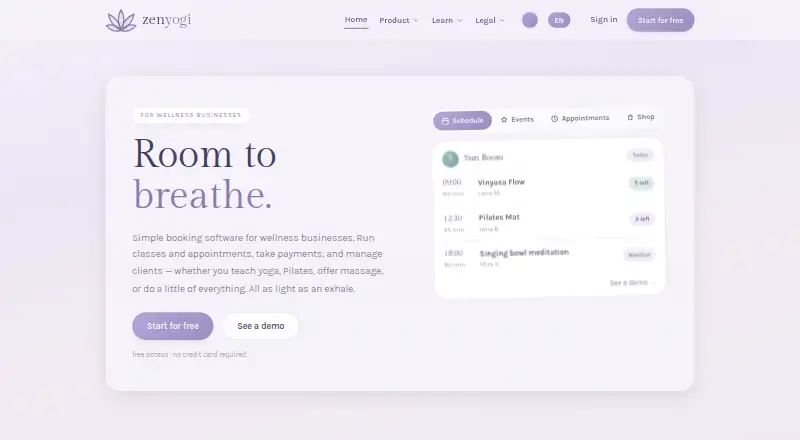
zenyogi provides yoga studios with hosted websites, scheduling, bookings, payments, and member administration. Studios can manage in-person and online classes on one calendar, with bookings through the hosted site or an embedded schedule. The mobile-friendly site lets visitors book classes, view passes, and receive email reminders. Studios can charge for drop-ins, class cards, and memberships through SEPA, card, or Apple Pay; payment flows can also connect to Stripe, PayPal, or SumUp. When a class is full, a waitlist can automatically fill open seats. Online classes can include emailed meeting links for live sessions or recorded follow-ups, and the video library can offer on-demand classes for free or members-only access. The Free plan costs nothing, includes up to two published offerings, and has an 8% platform fee. Studio costs $49 a month and has a 0% platform fee; Plus costs $99 a month. The service is web-based and does not provide a native app, SMS, or Urban Sports Club integration.
Who it suits
zenyogi may suit yoga studios that need a hosted site, class bookings, payment processing, and member administration. Its online class and video options may also suit studios offering live or on-demand sessions.
What it does well
- Studio and online classes share one calendar.
- Waitlists can automatically fill open class seats.
- Supports SEPA, card, and Apple Pay billing.
- Offers on-demand classes with free or members-only access.
- Free plan costs nothing.
What to know first
- Free plan allows up to two published offerings.
- Free plan has an 8% platform fee.
- No native app or SMS is provided.
- Urban Sports Club integration is not included.
Limits
The Free plan allows up to two published offerings and charges an 8% platform fee. Studio costs $49 a month and has a 0% platform fee; Plus costs $99 a month.
Plans
| Plan | Billed and limits | Price |
|---|---|---|
| Free | $0/ month · Unlimited classes & basic events · Hosted studio site & schedule embed · Up to 2 published offerings · Stripe or PayPal payments · 8% platform fee | Free |
| Studio | $49/ month · Unlimited one-time offerings · 0% platform fee · Waitlists & booking windows · Custom domain & page builder · Shop, gift cards & invoices | $49 a month |
| Plus | $99/ month · Everything in Studio · Recurring memberships & promo codes · Email campaigns · Challenge Orb · Co-owner accounts & white-label site | $99 a month |
As zenyogi.io lists them, read 30 Sept 2026. The maker's own page has the final word.
Getting started
- Visit https://www.zenyogi.io/en.
- Use zenyogi on the web.
- Start on the Free plan at no cost, or choose Studio at $49 a month or Plus at $99 a month.
- Set up a hosted studio site or embed the schedule for bookings.
- Connect Stripe, PayPal, or SumUp for payment flows, if desired.
zenyogi is a web service for yoga studios that combines a hosted site, scheduling, bookings, payments, and member administration. It suits owners running both in-person and online classes who want one calendar and one booking path. The main trade-off is the Free tier’s two-offering ceiling and 8% platform fee, while paid tiers remove that fee and add operational tools.
Overview
A studio can use zenyogi’s hosted website or embed its schedule into an existing site. One calendar handles studio and online classes, and customers can book from a mobile-friendly page, view their passes, and receive email reminders. This keeps the customer journey web-based, but there is no native mobile app or SMS messaging.
Payments cover drop-ins, class cards, and memberships through SEPA, cards, or Apple Pay. Connecting Stripe, PayPal, or SumUp gives studios a choice of payment processor. Member records can be exported or deleted through account features. Studios remain controllers of member data, while zenyogi processes it under its GDPR Article 28 DPA; the security provisions include TLS in transit, authenticated access, role controls, separation between businesses, offered encryption at rest, backups, and logging.
Key features
Scheduling and booking
Automatic waitlists fill seats when cancellations occur, reducing manual follow-up for popular sessions. That feature, together with booking windows, starts in Studio rather than Free. Free still allows unlimited classes and basic events, but only two offerings can be published, so it works for a very small or experimental schedule rather than a broad timetable.
Online and on-demand teaching
Live bookings can trigger emailed meeting links, and studios can send recorded follow-ups. A video library supports free or members-only on-demand classes, making zenyogi suitable for a hybrid studio that wants to extend access beyond scheduled visits. Online enrollment and payments are supported within the same system.
Site and commerce tools
Studio adds a custom domain, page builder, shop, gift cards, invoices, unlimited one-time offerings, and zero platform fee. Plus adds recurring memberships, promo codes, email campaigns, Challenge Orb, co-owner accounts, and a white-label site. Those additions matter when a studio is building repeat revenue or sharing administration; they are unnecessary overhead for a solo teacher with occasional classes.
Pricing
| Plan | Price | What it means |
|---|---|---|
| Free | free | Unlimited classes and basic events, hosted site and schedule embed, up to two published offerings, Stripe or PayPal payments, and an 8% platform fee. |
| Studio | $49 a month | Unlimited one-time offerings, 0% platform fee, waitlists, booking windows, custom domain, page builder, shop, gift cards, and invoices. |
| Plus | $99 a month | Everything in Studio plus recurring memberships, promo codes, email campaigns, Challenge Orb, co-owner accounts, and a white-label site. |
Free is a sensible way to launch with two published offerings, but the 8% fee can outweigh its zero subscription as sales grow. Studio is the practical level for a fuller schedule or a business that wants fee-free platform billing and stronger site controls. Plus is aimed at studios running memberships, marketing campaigns, and multi-person administration; it offers little reason to upgrade if one-time classes are all you sell.
Platforms
zenyogi runs on the web. Its responsive hosted site supports mobile booking, pass viewing, and reminders, but customers do not get a native app.
Who it's for
Choose zenyogi if you operate a yoga studio that needs a branded web presence, class reservations, online or on-demand instruction, and payment handling in one place. Free suits a pilot or very small timetable. Studio fits a growing schedule with one-time sales, while Plus suits membership-led studios with co-owners and active email promotion. Look elsewhere if native apps, SMS communication, or Urban Sports Club integration are essential.
Pros and cons
- Pro: One calendar covers in-person and online classes, reducing split scheduling.
- Pro: Waitlists and emailed live-session links support fuller, hybrid programs.
- Pro: SEPA, card, and Apple Pay billing plus Stripe, PayPal, or SumUp connections provide payment flexibility.
- Con: Free permits only two published offerings and charges an 8% platform fee.
- Con: No native app, SMS, or Urban Sports Club connection limits customer-channel options.
Alternatives
TeamUp is a better fit when Android, iOS, API, and web access or a free setup with five sub-calendars and five users matters more than zenyogi’s hosted yoga-site focus. WellnessLiving suits businesses seeking a broader paid platform with staff and client apps; its Starter plan is $62 a month billed annually. Zenamu is worth considering for a free tier capped at 30 orders per month and one teacher account, or a higher-volume paid tier. ClassWolf fits course-based operations, with its free Cub plan capped at three courses, three disciplines, three teachers, and 30 students and no payment collection. Newvia offers a free plan with unlimited bookings for one location and up to two staff, making it an option for small multi-staff businesses. Flyby Global is a paid alternative on Android, iOS, and web. Momence is preferable when tailored pricing and mobile apps are priorities. StudioFlow suits organizations wanting a quoted setup for locations, membership models, integrations, and migration support.
Verdict
zenyogi is a strong choice for yoga studios that want a hosted website, unified in-person and online scheduling, and integrated payments without assembling separate tools. Start with Free only for a tiny offering set; most growing studios should choose Studio to remove the 8% fee and unlock waitlists and site controls. Choose another platform if native apps, SMS, or broader integrations are central to your operation.
Verdict
zenyogi combines studio websites, class management, and payments, with online and on-demand class options. Compare the Free plan’s offering limit and fee with the paid plans’ listed features.
Questions
Does zenyogi have a free plan?
Yes. Free costs nothing and includes unlimited classes and basic events, a hosted studio site and schedule embed, up to two published offerings, Stripe or PayPal payments, and an 8% platform fee.
What are the paid plan prices?
Studio costs $49 a month. Plus costs $99 a month.
Which platforms does it support?
zenyogi is web-based. Its hosted studio site is mobile-friendly, but the service does not provide a native app.
What payment methods can studios use?
Drop-ins, class cards, and memberships can be billed via SEPA, card, or Apple Pay. Payment flows can also use Stripe, PayPal, or SumUp when the studio connects those providers.
Can studios sell memberships and online classes?
Membership sales and online enrollment are supported. Studios can email meeting links for live online sessions or recorded follow-ups, and offer on-demand videos for free or to members.
Who is responsible for member data?
Studios are independent controllers of member data, while zenyogi acts as the GDPR processor under its Article 28 DPA. Studios can export and request deletion of member profiles through account features.
Facts from zenyogi's own pages
- Data rights
- Studios can export and request deletion of member profiles through account features. · zenyogi.io, 30 Sept 2026
- Headquarters
- McFarland, Wisconsin, United States · zenyogi.io, 28 Sept 2026
- Integrations
- Payment flows can use Stripe, PayPal, or SumUp when the studio connects those providers. · zenyogi.io, 30 Sept 2026
- Mobile access
- The hosted studio site is mobile-friendly and lets users book classes, view passes, and receive email reminders. · zenyogi.io, 30 Sept 2026
- Not included
- The service does not provide a native app, SMS, or Urban Sports Club integration. · zenyogi.io, 30 Sept 2026
- Online classes
- Online classes can include meeting links emailed to booked yogis for live sessions or recorded follow-ups. · zenyogi.io, 30 Sept 2026
- Payments
- Drop-ins, class cards, and memberships can be billed via SEPA, card, or Apple Pay. · zenyogi.io, 30 Sept 2026
- Privacy
- Studios are independent controllers for member data, while zenyogi acts as the GDPR processor under its Article 28 DPA. · zenyogi.io, 30 Sept 2026
- Purpose
- zenyogi provides hosted studio websites, scheduling, booking, payments, and member administration for yoga studios. · zenyogi.io, 30 Sept 2026
- Scheduling
- The service provides one calendar for studio and online classes, with bookings through a hosted site or schedule embed. · zenyogi.io, 30 Sept 2026
- Security
- The DPA lists HTTPS/TLS in transit, authenticated account access, role controls, business-level data separation, encryption at rest where offered, backups, and security logging. · zenyogi.io, 30 Sept 2026
- Video library
- Studios can offer on-demand classes for free or members-only access. · zenyogi.io, 30 Sept 2026
- Waitlists
- When a class is full, the waitlist automatically fills seats. · zenyogi.io, 30 Sept 2026
Where zenyogi stands on Freedom251
- Yoga Studio Software#7 of 25
- Fitness Website Builders#23 of 39
- Gym Website Builder Software#15 of 25