Freedom251 › AI Photo Enhancer Software

YouCam Enhance
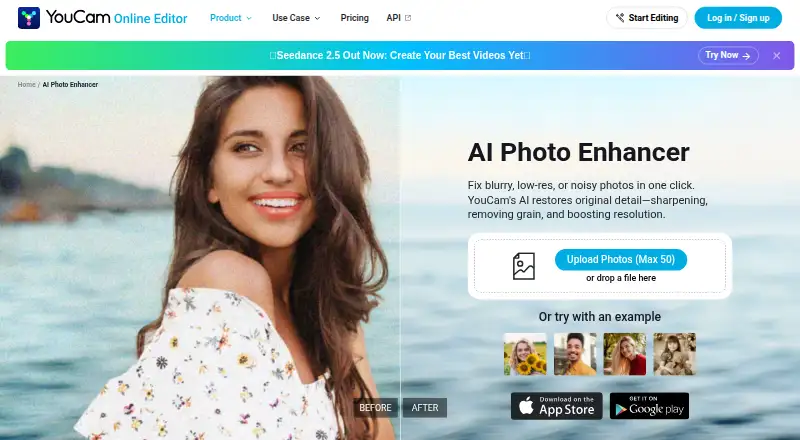
What YouCam Enhance is
YouCam Enhance is Perfect Corp.’s photo and video enhancement app for Android, iOS, and the web. Its photo tools sharpen blurred images, reduce noise, adjust lighting, and upscale images by up to 4x or near 4K quality. AI Photo Repair can address scratches, faded colors, noise, and lighting issues in old or damaged photos. Video tools include enhancement, repair, lighting correction, denoising, and upscaling to 4K. The app also offers AI image generation, image-to-video and text-to-video generation, and a chat-based editing assistant. In the browser, the photo enhancer accepts JPG, PNG, and WEBP files, with batch uploads of up to 50 photos. The service has a free plan and trial; it is free to download, while Premium pricing varies by region and promotional period. Some advanced AI generation features use credits and may need an additional purchase even on paid plans. iPhone requires iOS 16.0 or later, and iPad is not currently supported.
Who it suits
It may suit photographers, online sellers, creators, and social media users who need image or video enhancement, restoration, or generation tools. Its web photo enhancer also supports batch uploads for e-commerce product photography and print materials.
What it does well
- Photo tools sharpen, reduce noise, adjust lighting, and upscale images.
- AI Photo Repair addresses damage in old photos.
- Video tools include repair, denoising, and upscaling to 4K.
- Web batch uploads support up to 50 photos.
- Free plan and trial are available.
What to know first
- Some advanced AI generation features may require extra credits.
- iPhone requires iOS 16.0 or later.
- iPad is not currently supported.
- Premium pricing varies by region and promotional period.
Limits
The free download does not include Premium’s unlimited AI features, batch processing, and higher-quality output. Some advanced AI generation features may require additional credits even on paid plans.
Plans
| Plan | Billed and limits | Price |
|---|---|---|
| Free download | Free to download; Premium subscription unlocks unlimited AI features, batch processing, and higher-quality output; some advanced AI generation features may require additional credits | Free |
| Premium subscription | Pricing varies by region and promotional period; check the App Store or Google Play · Unlimited basic enhancement features on paid plans; some advanced AI generation features may require additional credits | On request |
As yce.perfectcorp.com lists them, read 4 Oct 2026. The maker's own page has the final word.
Getting started
- Visit https://yce.perfectcorp.com/photo-enhance.
- Choose the web enhancer or use the app on Android or iPhone.
- On iPhone, use a device with iOS 16.0 or later.
- Start with the free download, free plan, or free trial.
- Choose Premium if you want unlimited AI features, batch processing, and higher-quality output.
YouCam Enhance is an AI editor for repairing and improving photos and video, with generative tools layered on top. It suits photographers, sellers, creators and social-media users who want restoration and clip cleanup in the same app. Its broad enhancement set is compelling, but iPhone requirements and credit-based generation deserve attention before committing.
Overview
Photo work covers sharpening and deblurring, noise reduction, lighting correction and enlargement up to 4x or near 4K quality. AI Photo Repair targets older or damaged pictures by addressing scratches, faded color, noise and poor lighting. Video tools add repair, lighting correction, denoising and upscaling to 4K, making this a more versatile choice than a photo-only utility. The stated maximum output is 16.777216 MP, so very large print projects may encounter a practical ceiling.
Alongside correction, YouCam Enhance includes AI image generation, image-to-video and text-to-video creation, plus a chat-based editing assistant. Those creative features broaden its appeal, but some advanced generation—including video generation and image-to-video—uses credits and can require an extra purchase even with a subscription.
Key features
Restoration and enhancement
Face enhancement and an all-in-one mode complement the core controls. AI Photo Repair is particularly relevant for family archives and scanned photographs, while sharpening, denoising and lighting adjustments address everyday images. The combination is useful when a single project mixes damaged originals with routine edits.
Video and batch workflows
Video repair and enhancement handle cleanup tasks without moving to a separate product, and 4K upscaling supports higher-resolution clips. Premium adds batch processing; the service also describes batch support for photo enhancement and lighting. In the browser, JPG, PNG and WEBP uploads are accepted, with batches of up to 50 photos. That limit is practical for product catalogs or social queues, though larger archives will need multiple runs.
Privacy and support
Store privacy disclosures say data is encrypted in transit and not shared with third parties. Device identifiers and usage data are collected for analytics and app functionality and are not linked to personal identity. In-app support is reached through Settings → Send Feedback.
Pricing
Free download — free
The free download provides a way to start without payment. Premium unlocks unlimited AI features, batch processing and higher-quality output, while some advanced generation can still require additional credits. This tier is best for occasional enhancement or for evaluating the workflow before paying; it is less suitable for sustained batch or high-output work.
Premium subscription — custom pricing
Pricing varies by region and promotional period and is billed through the App Store or Google Play. Paid plans include unlimited basic enhancement features, but they do not guarantee that every generative operation is covered: advanced AI generation may consume separately purchased credits. Premium makes sense for regular repair, enhancement and batch users who can accept variable generation costs. Readers who mainly need occasional edits may find the free download sufficient.
Platforms
YouCam Enhance runs on Android, iOS and the web. On iPhone it requires iOS 16.0 or later and supports Apple Vision; iPad is not currently supported. The browser workflow is strongest for supported JPG, PNG and WEBP photo batches, while mobile access suits users working directly from a phone.
Who it's for
Photographers can combine restoration, face enhancement and enlargement; online sellers and e-commerce teams can process product photos in batches; creators and social-media publishers get both image and video cleanup plus generative formats; and people digitizing old family photos have a dedicated repair mode. It is a weaker fit for iPad owners, users who need a fixed all-inclusive generation price, or projects demanding output beyond the stated 16.777216 MP ceiling.
Pros and cons
Pros
- Photo and video in one app: Repair, lighting, denoising and upscaling cover mixed media projects.
- Strong restoration focus: AI Photo Repair specifically addresses scratches, faded colors, noise and lighting in old images.
- Useful browser batches: JPG, PNG and WEBP support with up to 50 photos per upload suits catalog and content queues.
- Broad creative toolkit: Image generation, text-to-video, image-to-video and chat-based editing extend beyond routine correction.
- Clear mobile privacy posture: Encryption in transit and no third-party sharing are stated, with analytics data not linked to identity.
Cons
- Generation costs can continue after subscription: Video and image-to-video features may require additional credits.
- Premium price is variable: Region and promotional billing make the ongoing subscription cost less predictable.
- iPad exclusion: iPhone support does not extend to iPad, and iOS requires version 16.0 or later.
- Defined output ceiling: The maximum stated resolution is 16.777216 MP, which may constrain very large prints.
Alternatives
Choose AI Photo Enhancer Software when you want to compare a broader directory of enhancement products.
PhotoBoost is a better fit if you need Linux, macOS or Windows support alongside mobile and web access, and its free plan starts with two introductory credits and 3 MP cloud output.
ImageColorizer suits users who prefer a defined credit allowance, offering 50 credits per month on its free plan and a 6.90 USD monthly Starter tier.
PicWish Photo Enhancer is worth choosing for free previews and five standard enhancements per day, with access across desktop, mobile, web and API.
Aragon Magic Eraser is a mobile and web option built around free daily credits and higher-resolution paid outputs.
HeyStar AI Image Enhancer is a simpler choice for free core enhancement and upscaling, with advanced or high-volume use handled through plan options.
Hotpot AI Photo Restorer fits web, API or self-hosted workflows, with two free images daily and paid unlimited, commercial and private-image features.
HueFold is a lightweight Android and web alternative that lets users start free and upgrade when needed.
Verdict
Choose YouCam Enhance if you need photo restoration, everyday enhancement and video cleanup together, especially with batch work or mobile-first editing. Its main advantage is breadth: one service spans damaged-photo repair, 4K video upscaling and generative formats. Look elsewhere if you use an iPad, need a predictable price for generation, or require output beyond its stated resolution limit.
Verdict
YouCam Enhance combines photo and video enhancement with restoration and AI generation features across web and mobile platforms. Check the iOS requirement and credit limits if you plan to use advanced generation tools.
Questions
Is YouCam Enhance free?
It has a free plan and is free to download, and a free trial is available. Premium is a subscription whose price varies by region and promotional period; check the App Store or Google Play.
Which platforms does YouCam Enhance support?
It is available on Android, iOS, and the web. iPhone requires iOS 16.0 or later, and iPad is not currently supported.
What does Premium include?
Premium includes batch processing and unlocks unlimited AI features and higher-quality output. Some advanced AI generation features may still require additional credits.
What file types does the browser photo enhancer accept?
It supports JPG, PNG, and WEBP, and allows batch uploads of up to 50 photos.
Who developed YouCam Enhance?
Perfect Corp developed the app. The maker was founded in 2015.
Does YouCam Enhance collect or share data?
The app page says its store privacy disclosures indicate data is encrypted in transit and no data is shared with third parties. Device identifiers and usage data are collected for analytics and app functionality, and are not linked to personal identity.
Facts from YouCam Enhance's own pages
- AI generation and editing
- The app also supports AI image generation, image-to-video and text-to-video generation, plus a chat-based AI editing assistant. · perfectcorp.com, 4 Oct 2026
- Batch processing
- Premium includes batch processing, and the app page says photo enhancement and lighting tools support batch work. · perfectcorp.com, 4 Oct 2026
- Credit limits
- Some advanced AI generation features, including video generation and image-to-video, use credits and may require an additional purchase even on paid plans. · perfectcorp.com, 4 Oct 2026
- Founded
- 2015 · yce.perfectcorp.com, 23 Sept 2026
- Free trial
- A free trial is offered on yearly plans, with duration and availability varying by region and promotion. · perfectcorp.com, 4 Oct 2026
- Intended users
- The maker describes use cases including photographers, online sellers, creators, social media posts, e-commerce product photography, and print materials. · yce.perfectcorp.com, 4 Oct 2026
- Photo enhancement
- Its photo tools unblur and sharpen images, reduce noise, improve lighting, and upscale images by up to 4x or near 4K quality. · perfectcorp.com, 4 Oct 2026
- Photo restoration
- AI Photo Repair can detect and fix scratches, noise, faded colors, and lighting in old or damaged photos. · perfectcorp.com, 4 Oct 2026
- Platforms and device limits
- The app is available for iPhone and Android; iPhone requires iOS 16.0 or later, supports Apple Vision, and iPad is not currently supported. · perfectcorp.com, 4 Oct 2026
- Purpose
- YouCam Enhance is an AI-powered photo and video enhancement app developed by Perfect Corp. · perfectcorp.com, 4 Oct 2026
- Security
- The app page says store privacy disclosures indicate data is encrypted in transit and no data is shared with third parties; device identifiers and usage data are collected for analytics and app functionality and are not linked to personal identity. · perfectcorp.com, 4 Oct 2026
- Support
- Users can contact support through Settings → Send Feedback inside the app. · perfectcorp.com, 4 Oct 2026
- Video tools
- The app offers video enhancement, repair, lighting correction, and denoising, with video upscaling up to 4K. · perfectcorp.com, 4 Oct 2026
- Web formats and batch limit
- The browser photo enhancer supports JPG, PNG, and WEBP and allows batch uploads of up to 50 photos. · yce.perfectcorp.com, 4 Oct 2026
Where YouCam Enhance stands on Freedom251
- AI Photo Enhancer Software#17 of 26