Freedom251 › AI Photo Enhancer Software
HeyStar AI Image Enhancer
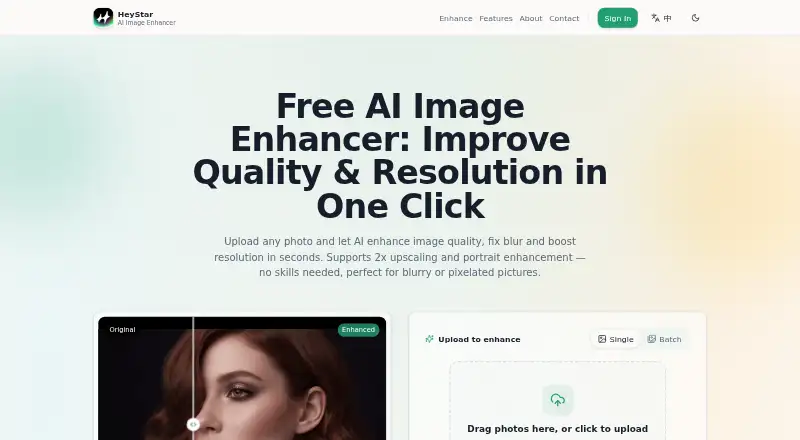
What HeyStar AI Image Enhancer is
HeyStar AI Image Enhancer is a browser-based photo tool for sharpening, deblurring, denoising, and enlarging images. Its online enhancer supports 2× upscaling, doubling an image's width and height while reconstructing detail. Restoration tools are described as reducing scratches, fading, and yellowing in old photos; a portrait tool refines facial detail, eyes, and skin texture. Users can queue dozens of photos for background processing. The homepage lists JPG, PNG, JPEG, BMP, and WEBP uploads up to 10 MB each, and says the service runs in a browser without installation. A free plan covers core enhancement and upscaling, while advanced or high-volume use may have plan options. The service agreement says some templates may not be free, subscriptions are weekly or annual, and in-app access or results for AI generation, video, and enhancement require coins. Its agreement also allows submitted content to be used to operate and improve the service, including training AI models; users may email to refuse or revoke that authorization. HeyStar's iPhone app listing describes enhancement, deblurring, restoration, erasing, and video effects.
Who it suits
It suits people who want browser-based photo enhancement, upscaling, or old-photo restoration without installing software. It may also suit iPhone users seeking the listed image and video effects, provided they review the usage and content terms.
What it does well
- Free plan includes core enhancement and upscaling.
- Supports 2× image upscaling.
- Queues dozens of photos for background processing.
- Browser use does not require installation.
- Lists five upload formats, up to 10 MB each.
What to know first
- Some templates may not be free.
- In-app AI, video, and enhancement access or results require coins.
- Subscriptions are weekly or annual.
- Submitted content may be used for AI model training.
Limits
The free plan covers core image enhancement and upscaling; advanced or high-volume usage may have plan options. Some templates may not be free, and in-app AI generation, video, and enhancement access or results require coins.
Plans
| Plan | Billed and limits | Price |
|---|---|---|
| Free | Core image enhancement and upscaling available free; advanced or high-volume usage may have plan options | Free |
As heystarai.com lists them, read 3 Oct 2026. The maker's own page has the final word.
Getting started
- Visit heystarai.com in a browser; installation is not required.
- Upload a JPG, PNG, JPEG, BMP, or WEBP image up to 10 MB.
- Use the free plan for core image enhancement or upscaling.
- For mobile access, use the HeyStar iPhone app.
- Use the homepage contact form or email [email protected] for support.
Overview
HeyStar AI Image Enhancer is a browser and mobile photo service covering general cleanup, portrait work, restoration, and upscaling. It suits people who want several routine corrections in one place, particularly anyone processing a queue of older or damaged pictures. The free core tool is useful, but coin-based mobile use and the service agreement’s broad rights over uploads make it a choice for users comfortable with those trade-offs.
Key features
Its all-in-one mode combines sharpening, deblurring, denoising, and enlargement in one pass. The online enhancer supports 2x upscaling, doubling both width and height while reconstructing detail. That is sensible for modest enlargements for sharing or ordinary prints, but it is not a stated solution for very large output requirements.
The portrait tool targets facial detail, eyes, and skin texture, with the maker describing the intended result as natural-looking. Restoration addresses scratches, fading, and yellowing in old photographs, giving the service a practical role in family-archive repair as well as everyday image cleanup.
Batch processing can queue dozens of photos for background enhancement. This should save time on a backlog, although the amount you can complete may depend on coin requirements or paid access in the app. Uploads accept JPG, PNG, JPEG, BMP, and WEBP files up to 10 MB each.
HeyStar runs in a browser without installation. Its homepage describes isolated processing records and personal data and secure image hosting. However, the service agreement grants the operator a worldwide license to use submitted content to provide, operate, and improve the service, including training AI models. You can email to refuse or revoke that authorization, but privacy-sensitive users should decide whether that process is acceptable before uploading.
Pricing
The Free plan costs nothing and includes core image enhancement and upscaling. Advanced or high-volume use may have additional plan options, so the free tier is best viewed as an entry point rather than an unlimited production allowance.
In the app, AI generation, video, and enhancement access or results require coins, and some templates are not free. Subscriptions are offered weekly or annually. Those conditions make HeyStar less predictable for frequent mobile work than a plan with a clearly stated monthly quota; check the coin balance and renewal terms before committing.
Platforms
HeyStar is offered on web, Android, and iOS. The browser version needs no installation, while the iPhone listing includes AI enhance, deblur, restore, erase, and video effects. There is no desktop application, so computer users work through the browser.
Who it's for
Choose HeyStar if you need one service for routine sharpening, a 2x enlargement, portrait refinement, and old-photo repair, or if queuing dozens of images is valuable. It is also a reasonable starting point when free core enhancement matters. Look elsewhere if you need a published high-volume allowance, larger stated upscale factors, or do not want submitted images covered by a model-training license.
Pros and cons
Pros
- Broad correction set: sharpening, deblurring, denoising, 2x upscaling, portrait refinement, and old-photo restoration cover more jobs than a single-purpose sharpener.
- Batch queue: dozens of uploads can run in the background, useful for a sizeable backlog.
- Flexible access: browser, Android, and iOS availability avoids a required desktop installation.
- Free entry: core enhancement and upscaling are included at no charge.
Cons
- Limited stated enlargement: online upscaling is specified only at 2x.
- Usage uncertainty: advanced or high-volume work may require another plan, while app features and results can consume coins.
- Content license: submitted material may be used to improve the service and train AI models unless you email to refuse or revoke authorization.
- File ceiling: each upload is limited to 10 MB.
Alternatives
AI Photo Enhancer Software is the broader directory choice when you want to compare this category before selecting a tool.
Pick PhotoBoost instead if you want Android, iOS, Linux, macOS, web, and Windows coverage, a free trial, and two introductory credits with outputs up to 3 MP.
ImageColorizer suits users who prefer 50 free credits per month, single processing, all AI features, and ads, with a published paid starter tier.
Choose PicWish Photo Enhancer for free previews, free tools, limited non-HD downloads, and five standard enhancements per day.
PhotoApp is another freemium option with a free trial and a lifetime subscription option.
Aragon Magic Eraser offers free daily credits and paid higher-resolution outputs, with an account required.
YouCam Enhance is worth considering when unlimited AI features, batch processing, and higher-quality output are priorities under Premium.
Choose Hotpot AI Photo Restorer for a web or API workflow with two free images daily and a premium option for unlimited and commercial use.
HueFold is an alternative freemium Android and web service with a free starting tier.
Verdict
HeyStar is a good fit for people who want free, multi-purpose photo correction across browser and mobile, especially portrait touchups, old-photo repair, and queued batches. Its main reason to choose it is the breadth of everyday tools in one workflow. Look elsewhere when predictable quotas, larger enlargements, or tighter control over how uploaded images may be used matter more than that convenience.
Verdict
HeyStar combines image enhancement, restoration, portrait refinement, and batch queuing in browser access, with an iPhone app also listed. Before uploading, consider its content-use terms and the coin requirements and paid options for some use.
Questions
Is HeyStar AI Image Enhancer free?
It has a free plan at no cost for core image enhancement and upscaling. Advanced or high-volume usage may have plan options.
What platforms does HeyStar support?
The listed platforms are Android, iOS, and web. The App Store listing describes an iPhone app.
What image formats and sizes can I upload?
The homepage lists JPG, PNG, JPEG, BMP, and WEBP files up to 10 MB each.
Does HeyStar require installation?
The browser version runs without installation.
Can HeyStar use uploaded images to train AI models?
Its service agreement allows submitted content to be used to provide, operate, and improve the service, including training AI models. Users may email to refuse or revoke that authorization.
Who operates HeyStar?
The service agreement names Chongqing Cuyi Technology Co., Ltd. as the operator.
Facts from HeyStar AI Image Enhancer's own pages
- Accepted formats and size
- The homepage lists JPG, PNG, JPEG, BMP, and WEBP uploads up to 10 MB each. · heystarai.com, 3 Oct 2026
- Batch processing
- The homepage says users can upload dozens of photos for queued background enhancement. · heystarai.com, 3 Oct 2026
- Browser access
- The FAQ says HeyStar runs in a browser and does not require installation. · heystarai.com, 3 Oct 2026
- Headquarters
- Chongqing, China · heystarai.com, 28 Sept 2026
- Image enhancement
- HeyStar says its AI enhancer sharpens, deblurs, denoises, and upscales photos in one pass. · heystarai.com, 3 Oct 2026
- Image use and AI training
- The service agreement grants HeyStar a worldwide license to use submitted content to provide, operate, and improve the service, including training AI models; users may email to refuse or revoke that authorization. · heystarai.com, 3 Oct 2026
- Maker and location
- The service agreement names Chongqing Cuyi Technology Co., Ltd. as the operator, and the homepage lists an address in Wulong District, Chongqing. · heystarai.com, 3 Oct 2026
- Mobile app
- HeyStar’s App Store listing describes an iPhone app with AI enhance, deblur, restore, erase, and video effects. · apps.apple.com, 3 Oct 2026
- Paid access and usage
- The service agreement says some templates may not be free, subscriptions are weekly or annual, and AI generation, video, and enhancement access or results require coins in the app. · heystarai.com, 3 Oct 2026
- Photo restoration
- HeyStar says its restoration can reduce scratches, fading, and yellowing in old photos. · heystarai.com, 3 Oct 2026
- Portrait enhancement
- The maker says its portrait tool refines facial detail, eyes, and skin texture for natural-looking results. · heystarai.com, 3 Oct 2026
- Privacy information
- The homepage says processing records and personal data are isolated and describes image hosting as secure. · heystarai.com, 3 Oct 2026
- Support contact
- The homepage provides a contact form and lists [email protected] for email contact. · heystarai.com, 3 Oct 2026
- Upscaling
- The online enhancer supports 2x upscaling, doubling an image’s width and height while reconstructing detail. · heystarai.com, 3 Oct 2026
Where HeyStar AI Image Enhancer stands on Freedom251
- AI Photo Enhancer Software#6 of 26