
Face26
by Face26
What Face26 is
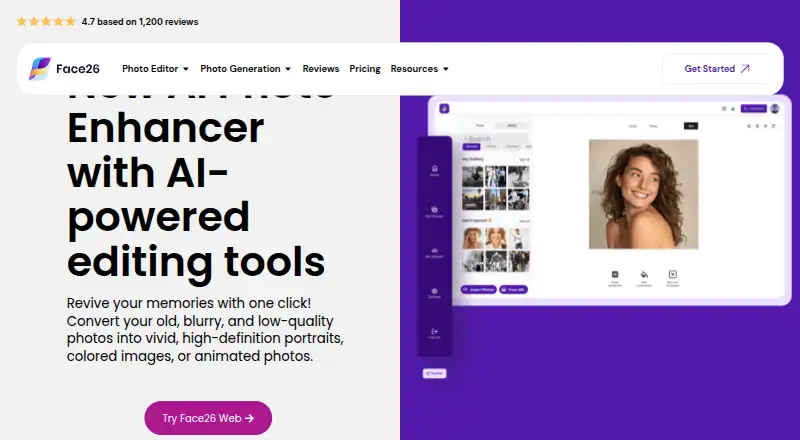
Face26 is an image enhancement service from Face26, a company identified on its site as TechArt 26 LLC. It uses AI to improve image quality with tools for unblurring, denoising, face retouching, colorizing black-and-white photos, and restoring old photos. Its product page says small, low-definition pictures can be enlarged by 2× or 4× to HD. In the browser app, users upload a photo, enhance it with one click, and download the result to a desktop or smartphone. Face26 is available on the web, Android, and iOS, and lists API access for developers. Those APIs cover background and object removal, photo enhancement, background generation, image compression, colorization, ID photos, and cropping. The service has a free plan, along with weekly, monthly, yearly, image-purchase, and lifetime access plans. Its support FAQ says uploads are kept only as long as needed to provide app functionality unless the user agrees to AI improvement use; consented files are held for a limited time before deletion. The privacy policy says images are transferred with SSL/TLS encryption and processed for the requested purpose. Users can manage personal information through account settings, subject to possible deletion delays and legal retention.
Who it suits
Face26 suits people who want to improve, enlarge, colorize, or restore photos through a browser or mobile app. Developers can also consider it for image tasks covered by its listed APIs, such as background removal, cropping, or compression.
What it does well
- One-click browser workflow for enhancing and downloading photos
- Upscaling option for small pictures by 2× or 4× to HD
- Tools include face retouching, denoising, colorization, and restoration
- Available on web, Android, iOS, and through APIs
- Free plan available
What to know first
- Subscriptions automatically renew unless canceled
- Deletion may be delayed, and some information may be retained for legal reasons
Plans
| Plan | Billed and limits | Price |
|---|---|---|
| Weekly | Unlimited access to app features | On request |
| Monthly | Unlimited access to app features | On request |
| Yearly | Unlimited access to app features | On request |
| Purchase 5 Images | 5 images | On request |
| Purchase 10 Images | 10 images | On request |
| Purchase 30 Images | 30 images | On request |
| Purchase 70 Images | 70 images | On request |
| Purchase 75 Images | 75 images | On request |
The first 8 of 10 plans, as face26.com lists them, read 22 Sept 2026. The maker's own page has the final word. Every plan
Getting started
- Open the Face26 photo enhancer website or use the Android or iOS app
- Upload a photo in the browser app
- Choose an enhancement and run it with one click
- Download the enhanced image to a desktop or smartphone
- For ongoing access, choose a listed subscription or image-purchase plan
Verdict
Choose Face26 if you want a photo enhancement service with restoration, colorization, face retouching, and upscaling tools across web and mobile. Developers may also find its listed image APIs useful. Consider the subscription renewal terms and the stated limits on deletion when deciding whether to use an account or consent to AI improvement use.
Questions
Does Face26 have a free plan?
Yes. Face26 lists a free plan.
Which platforms does Face26 support?
Face26 lists web, Android, iOS, and API access.
What image enhancement tools does Face26 offer?
Listed tools include unblurring, colorizing black-and-white photos, restoring old photos, upscaling, face retouching, and denoising.
Can Face26 enlarge low-definition pictures?
Its product page says it can upscale small, low-definition pictures by 2× or 4× to HD.
What happens to uploaded photos?
The support FAQ says uploads are kept only as long as needed for app functionality unless the user consents to AI improvement use. Consented files are kept for a limited period before deletion.
Does Face26 offer developer APIs?
Yes. Listed API tools include background removal, object removal, enhancement, background generation, compression, colorization, ID photos, and cropping.
Facts from Face26's own pages
- Company
- The site identifies the service provider as TechArt 26 LLC and says Face26 was founded in 2021. · face26.com, 7 Oct 2026
- Data control
- The privacy policy says users can access, amend, download, and delete personal information through account settings, subject to possible deletion latency and legal retention. · face26.com, 7 Oct 2026
- Developer APIs
- The tools page lists developer APIs for background removal, object removal, photo enhancement, background generation, image compression, photo colorization, ID photos, and photo cropping. · face26.com, 7 Oct 2026
- Enhancement tools
- Its listed tools include unblurring, colorizing black-and-white photos, restoring old photos, upscaling, face retouching, and denoising. · face26.com, 7 Oct 2026
- Founded
- 2021 · face26.com, 28 Sept 2026
- Free plan
- Yes · face26.com, 22 Sept 2026
- Headquarters
- Cheyenne, Wyoming, United States · face26.com, 28 Sept 2026
- Platforms
- Face26 describes web, iOS, and Android apps; its support page also refers to a browser desktop app. · face26.com, 7 Oct 2026
- Privacy
- The support FAQ says uploads are not stored on its servers beyond the time needed to provide app functionality unless the user explicitly consents to AI improvement use; consented files are kept for a limited period before deletion. · face26.com, 7 Oct 2026
- Purpose
- Face26 uses AI to improve, enhance, and fix image quality. · face26.com, 7 Oct 2026
- Security
- The privacy policy says uploaded images are transferred with SSL/TLS encryption and used only for requested image processing. · face26.com, 7 Oct 2026
- Support
- Face26 directs users to FAQs and guides and lists [email protected] for assistance. · face26.com, 7 Oct 2026
- Third-party services
- Its terms say Face26 integrates with Stripe, PayPal, and Google, among other third-party applications and services. · face26.com, 7 Oct 2026
- Trial and subscriptions
- The app terms say Face26 may offer free trials at its discretion and that subscriptions automatically renew for periods of the same duration unless canceled. · face26.com, 7 Oct 2026
- Upscaling
- The product page says it can upscale small, low-definition pictures by 2× or 4× to HD. · face26.com, 7 Oct 2026
- Web workflow
- Users can upload a photo, enhance it with one click, and download the result to a desktop or smartphone through the browser app. · face26.com, 7 Oct 2026
Where Face26 stands on Freedom251
- AI Photo Editors#8 of 96
- AI Photo Enhancer Software#3 of 26
- Photo editors#32 of 96