Freedom251 › Fitness Class Scheduling Software
YogaCRM
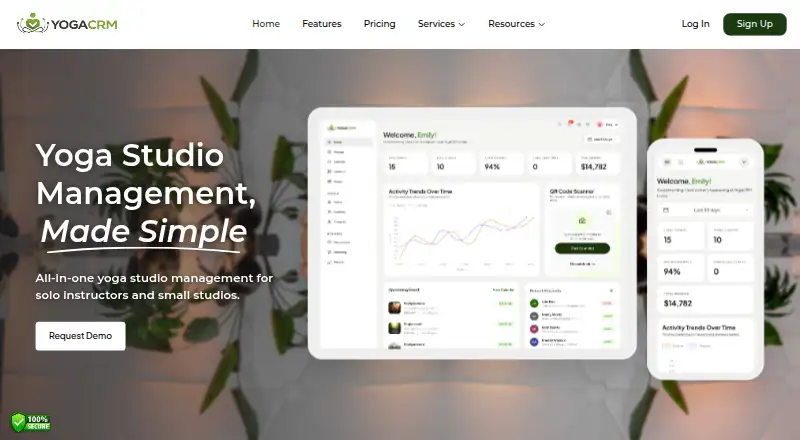
What YogaCRM is
YogaCRM is a management platform for solo instructors and small yoga studios, covering schedules, bookings, check-in, payments, and student communications. Schedules can include recurring classes, workshops, retreats, private sessions, instructor assignments, and rosters, with automatic waitlist promotion. Students can see real-time availability and book drop-ins, courses, and trials from any device. Check-in supports QR codes or taps, guest and waiver capture, capacity tracking, and no-show follow-ups. Payment options include Stripe, pay-at-venue, memberships, passes, packages, and invoices; instructor payout reports are also available. Listed integrations include iCal and Google Calendar synchronization, Stripe and PayPal payments, and Zoom. Student notices can be sent by WhatsApp, SMS, or email, alongside class and event updates and announcement templates. The mobile app lets owners and team members manage sessions, students, bookings, schedules, check-ins, notifications, and account details. YogaCRM lists a free plan and 30-day trial, with paid plans from $29/mo. It says there are no contracts and that departing customers can receive a full data export.
Who it suits
It is aimed at solo yoga instructors and small studios that need to coordinate classes, bookings, payments, and student updates. Its mobile app also supports owners and team members managing studio activity.
What it does well
- Supports recurring classes and automatic waitlist promotion.
- Students can book from any device.
- Includes QR-code or tap check-in.
- Offers a full customer-data export if a customer leaves.
What to know first
- The Solo Teacher plan allows up to one team member.
- The Business Plan allows up to six team members.
- Pay As You Go charges 2.9% per successful transaction.
Limits
The listed facts do not describe what the free plan includes or where its limits are. A 30-day trial is available; paid plans start at $29/mo.
Plans
YogaCRM's published prices are being re-checked against the maker's own page.
| Plan | Billed and limits | Price |
|---|---|---|
| Solo Teacher | Monthly; $10 saved · Up to 1 team member · Unlimited bookings · 0% platform fee on online bookings | Price being re-checked |
| Business Plan | Monthly; $10 saved · Up to 6 team members · Unlimited bookings · 0% platform fee on online bookings | Price being re-checked |
| Pay As You Go | 2.9% per successful transaction · Unlimited team members · Unlimited event listings · Online payments · QR code check-in · Reports and analytics | Price being re-checked |
As yogacrm.com lists them, read 1 Oct 2026. The maker's own page has the final word.
Getting started
- Visit https://yogacrm.com/.
- Choose the free plan or start the 30-day trial.
- Use the web platform or access the mobile app on Android or iOS.
- Import existing members, receipts, payment transactions, or calendar appointments from .xls, .xlsx, or .csv files.
YogaCRM is built for solo yoga teachers and small studios that need scheduling, enrollment, attendance, payments, and messaging in one system. It suits operators running a mixture of classes, workshops, retreats, and private sessions. The free entry point and mobile coverage are appealing, while team caps and transaction costs make plan selection important.
Overview
YogaCRM covers the operating cycle from publishing a class to following up after a missed visit. Students can see live availability and book drop-ins, courses, or trial sessions on a phone or computer. Owners and staff can work from Android, iOS, or the web, and the mobile app includes classes, events, private sessions, student records, bookings, schedules, check-ins, notifications, and account settings.
Its focus is deliberately narrow: solo instructors and small yoga studios rather than broad enterprise operations. There are no contracts, and YogaCRM says departing customers receive a complete customer-data export, which reduces the risk of being locked into the service.
Key features
Scheduling and booking
Recurring classes sit alongside one-off workshops, retreats, private sessions, and instructor assignments. Rosters, capacity controls, and automatic promotion from a waitlist are practical for studios with limited mats and frequent cancellations. Students can book from web or mobile, including drop-ins, courses, and trials, so staff do not have to mediate every reservation.
Check-in and attendance
QR-code or tap check-in connects reservations with arrivals. Guest and waiver capture keeps first visits in the same workflow, while real-time capacity helps prevent overbooking. No-show follow-ups provide a way to re-engage absent students, a useful addition for studios where attendance is as important as taking payment.
Payments and reporting
Stripe and pay-at-venue support cover online and in-person collection. Memberships, passes, packages, and invoices accommodate different ways of selling access, and instructor payout reports help studios reconcile teaching income. The Pay As You Go option charges per successful transaction, which can suit variable volume but becomes less predictable as online sales grow.
Communications, integrations, and migration
WhatsApp, SMS, and email reminders can be used for class and event updates, with announcement templates for repeat messages. iCal and Google Calendar synchronization, Stripe and PayPal payments, and Zoom integration connect the core booking workflow to common calendars, payment services, and online sessions. Existing members, receipts, payment transactions, and calendar appointments can be imported from XLS, XLSX, or CSV files.
YogaCRM says it uses encryption and access controls as part of industry-standard security measures. Its U.S.-based support team operates every day of the year and typically replies within six minutes or less, a strong fit for small operators without dedicated technical staff.
Pricing
YogaCRM has a free plan, a free trial lasting 30 days, and paid pricing stated from $29/mo. The published plan figures are:
| Plan | Price and terms | Included limits and features |
|---|---|---|
| Solo Teacher | $2,919 a month, billed monthly; $10 saved | Up to 1 team member, unlimited bookings, 0% platform fee on online bookings |
| Business Plan | $3,929 a month, billed monthly; $10 saved | Up to 6 team members, unlimited bookings, 0% platform fee on online bookings |
| Pay As You Go | Custom pricing; 2.9% per successful transaction | Unlimited team members, unlimited event listings, online payments, QR-code check-in, reports and analytics |
Solo Teacher is the natural fit for an independent instructor, provided one staff account is enough. Business Plan raises the allowance to six people without a platform fee on online bookings, making it more suitable for a small staffed studio. Pay As You Go removes the team ceiling and keeps event listings unlimited, but its percentage charge ties cost directly to payment volume. Because the two monthly figures are unusually high relative to the stated $29/mo starting price, confirm the current quote and billing terms before committing. The free plan is useful for evaluating the workflow, but its specific caps are not published.
Platforms
YogaCRM runs on the web and offers Android and iOS apps. That combination supports students booking from any device and staff handling schedules, check-ins, and communications away from a desk.
Who it's for
Choose YogaCRM if you are a solo teacher or small yoga studio managing recurring classes plus appointments or events, and you want booking, attendance, payments, and messaging together. It is particularly relevant when waitlists, waivers, memberships, packages, or instructor payouts are part of daily administration. A simple calendar-only operation may find this broader feature set unnecessary, while a larger organization should examine the six-person Business Plan ceiling.
Pros and cons
Pros
- One workflow spans recurring classes, retreats, private sessions, bookings, check-in, payments, and follow-up.
- Automatic waitlist promotion and live capacity information address common small-studio attendance problems.
- QR or tap check-in, waiver capture, and no-show follow-ups connect front-desk work with student records.
- Android, iOS, and web access lets owners, staff, and students use the service across devices.
- Data import, full customer-data export, no contracts, and year-round responsive support reduce migration and support friction.
Cons
- Solo Teacher allows only one team member, and Business Plan allows six, which may constrain growing studios.
- Pay As You Go takes 2.9% of each successful transaction, potentially costing more at high online volume.
- The supplied monthly prices for the two fixed plans conflict with the stated $29/mo starting point and should be verified.
- The free plan's usage limits are not defined, making it difficult to forecast when an upgrade will be needed.
Alternatives
For a broader shortlist, see Fitness Class Scheduling Software.
Waine Appointments is worth considering when a free plan with unlimited appointments or a $19 CAD monthly Starter plan for five staff accounts is the priority; it supports Android, iOS, and web.
ClassWolf fits a small course provider that can work within a free web plan capped at three courses, three disciplines, three teachers, and 30 students, without fee collection or online payments.
Resovu is a lower-cost web option when three services, 45 bookings per month, and one team member are enough on its free plan, with card fees of 2.9% plus €0.15.
YogisApp suits studios wanting unlimited students and Stripe connections for free but willing to forgo student online bookings on that tier.
Momence is a paid, custom-priced alternative with Android, iOS, and web apps and a free trial.
MotionHub offers Android, iOS, and web access with a free plan and free trial, while its studio subscription price is not published.
PM Course Booking is a web-only, custom-deployment option priced on request.
StudioFlow provides web software on a custom quote after a demo, with options for single or multiple locations.
Verdict
YogaCRM is a strong choice for an independent instructor or small yoga studio that wants class scheduling, student self-booking, operational check-in, flexible payments, and communications in one place. Its broad yoga-specific workflow and cross-device access are the main reasons to choose it. Look elsewhere if your team exceeds six people, transaction percentages are unacceptable, or the unresolved gap between the $29/mo starting claim and the published monthly plan figures makes budgeting too uncertain.
Verdict
YogaCRM combines studio scheduling, student booking, payment options, and communications in one management platform. Its stated team limits and transaction-based option are worth considering when selecting a plan.
Questions
Is YogaCRM free?
Yes. YogaCRM lists a free plan and a 30-day trial.
How much do paid plans cost?
Paid plans are listed as starting at $29/mo.
Which platforms does YogaCRM support?
YogaCRM is available on Android, iOS, and the web.
What payment options and integrations are listed?
Payment options include Stripe and pay-at-venue, plus memberships, passes, packages, and invoices. Integrations listed include iCal, Google Calendar, Stripe, PayPal, and Zoom.
Can existing studio data be imported?
Yes. Members, receipts, payment transactions, and calendar appointments can be imported from .xls, .xlsx, or .csv files.
Does YogaCRM require a contract?
YogaCRM says it has no contracts and will provide a full customer-data export if a customer leaves.
Facts from YogaCRM's own pages
- Booking
- Students can view real-time availability and book drop-ins, courses, and trials from any device. · yogacrm.com, 1 Oct 2026
- Check-in
- The system supports QR-code or tap check-in, guest and waiver capture, real-time capacity, and no-show follow-ups. · yogacrm.com, 1 Oct 2026
- Contract and export
- YogaCRM says it has no contracts and will provide a full export of customer data if a customer leaves. · yogacrm.com, 1 Oct 2026
- Data import
- Existing members, receipts, payment transactions, and calendar appointments can be imported through .xls, .xlsx, or .csv files. · yogacrm.com, 1 Oct 2026
- Headquarters
- 15333 N Pima Rd, Ste 305, Scottsdale, AZ 85260, USA · yogacrm.com, 28 Sept 2026
- Integrations
- The product lists iCal and Google Calendar synchronization, Stripe and PayPal payments, and a Zoom integration. · yogacrm.com, 1 Oct 2026
- Mobile app
- The YogaCRM mobile app lets studio owners and team members manage classes, events, private sessions, students, bookings, schedules, check-ins, notifications, and account details. · play.google.com, 1 Oct 2026
- Notifications
- Student notifications can use WhatsApp, SMS, and email reminders, plus class and event updates and announcement templates. · admin.yogacrm.com, 1 Oct 2026
- Payments
- YogaCRM supports Stripe payments, pay-at-venue payments, memberships, passes, packages, invoices, and instructor payout reports. · yogacrm.com, 1 Oct 2026
- Product focus
- YogaCRM is an all-in-one management platform for solo instructors and small yoga studios. · yogacrm.com, 1 Oct 2026
- Scheduling
- It supports recurring classes, one-off workshops, retreats, private sessions, instructor assignments, rosters, and automatic waitlist promotion. · yogacrm.com, 1 Oct 2026
- Security
- YogaCRM states that it uses industry-standard security measures including encryption and access controls. · admin.yogacrm.com, 1 Oct 2026
- Support
- YogaCRM says its U.S.-based support team is available seven days a week, 365 days a year, typically responding within six minutes or less. · yogacrm.com, 1 Oct 2026