Freedom251 › HR Knowledge Base Software

XWiki
What XWiki is
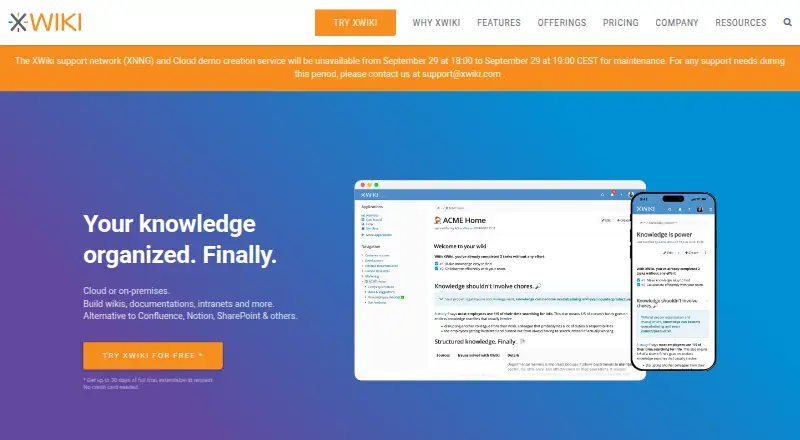
XWiki is a wiki-based collaboration platform for organizing knowledge and creating shared resources. Its WYSIWYG editor supports in-place changes, attachments with previews, comments, annotations, notifications, and a full change history. For information that needs a defined structure, teams can use AppWithinMinutes to build pages and forms, then explore entries in filterable livetables. XWiki offers more than 700 ready-to-use extensions and hundreds of APIs in its scripting language.
Organizations can connect XWiki with Active Directory and LDAP, use single sign-on, import or preview office documents, view and export PDFs, and bring in data. XWiki Pro adds connectors for Google Apps, Office 365, and OnlyOffice, as well as Active Directory and Azure Active Directory SSO apps. XWiki Standard is open source and free, with cloud and on-premises deployment options. XWiki Cloud handles setup, hosting, upgrades, maintenance, backups, security updates, and 24/7 monitoring. The cloud service runs in France on OVHcloud infrastructure, whose hosting certifications include ISO 27001, SOC 1, and SOC 2. Organizations can also host XWiki themselves to control hosting, access, integrations, and data residency. A free plan is available, paid pricing starts at €1/user/mo, and a trial runs for up to 30 days without a credit card.
Who it suits
XWiki suits teams that need a shared knowledge base with structured pages, forms, and filterable livetables. It can also suit organizations that need to choose between managed cloud hosting and deployment on their own infrastructure.
What it does well
- WYSIWYG and in-place editing, comments, annotations, and change history
- Build structured pages and forms with AppWithinMinutes
- More than 700 ready-to-use extensions
- Open-source XWiki Standard is available free
- Cloud or on-premises deployment options
- Trial available for up to 30 days without a credit card
What to know first
- The free Community plan is on-premises and has community support with no guarantees
- Starter is limited to 25 users and one sub-wiki
- Paid plans are billed yearly or for three years
Limits
Community is free on-premises and includes community support with no guarantees. Starter supports up to 25 users and one sub-wiki; Basic supports up to 1,000 users and 25 sub-wikis; Business supports up to 10,000 users and 50 sub-wikis; Enterprise has unlimited users and 100 sub-wikis.
Plans
| Plan | Billed and limits | Price |
|---|---|---|
| Community | Free · on-premises · community support with no guarantees | Free |
| Starter | Yearly or 3 years (save 20%) · Up to 25 users · XWiki Cloud only · 1 sub-wiki | On request |
| Basic | Yearly or 3 years (save 20%) · Up to 1,000 users · cloud or on-premises · 25 sub-wikis | On request |
| Enterprise | Yearly or 3 years (save 20%) · Unlimited users · cloud or on-premises · 100 sub-wikis | On request |
| Business | Yearly or 3 years (save 20%) · Up to 10,000 users · cloud or on-premises · 50 sub-wikis | On request |
As xwiki.com lists them, read 5 Oct 2026. The maker's own page has the final word.
Getting started
- Visit the XWiki website
- Choose XWiki Standard for a free on-premises deployment or review the cloud and on-premises plans
- For XWiki Cloud, use the setup and hosting service
- Start the trial for up to 30 days without a credit card
XWiki is a collaboration platform for building a shared knowledge base, from editable wiki pages to structured records and forms. It is best suited to organizations that want to shape how knowledge is organized and choose where it is hosted. Teams looking for a straightforward, low-maintenance wiki may find its flexibility comes with more choices than they need.
Overview
Founded in 2004 and headquartered in Paris, XWiki brings collaborative editing together with tools for organizing structured information. Its open-source XWiki Standard is free for on-premises use, while XWiki also offers cloud and on-premises options for organizations seeking managed hosting or professional support.
The deployment choice matters. XWiki Cloud includes setup, hosting, upgrades, maintenance, backups, security updates, and 24/7 monitoring. It runs in France on OVHcloud infrastructure, whose hosting infrastructure XWiki says has ISO 27001, SOC 1, and SOC 2 certifications. Organizations deploying on their own infrastructure retain control over hosting, access management, integrations, and data residency, but take on the operational responsibility themselves.
Key features
Editing combines a WYSIWYG editor with in-place changes, attachments and previews, comments, annotations, notifications, and full change history. That makes XWiki a fit for teams that need to revise and discuss knowledge in place, not simply publish finished pages. Version history provides a record of changes, while comments and annotations support review.
AppWithinMinutes helps users create structured pages and forms; filterable livetables make the resulting data easier to browse. This is a meaningful advantage for organizations managing repeatable information, such as records or internal processes, rather than a collection of free-form articles alone.
XWiki says it offers more than 700 ready-to-use extensions and hundreds of APIs in its scripting language. That breadth gives teams room to adapt the platform, but also makes it a better match for organizations prepared to select and manage the extensions they need than for those seeking a narrowly defined, ready-made tool.
Enterprise integration features include Active Directory and LDAP connections, single sign-on, office-document import and preview, PDF viewing and export, and data imports. XWiki Pro lists Google Apps, Office 365, and OnlyOffice connectors, along with Active Directory and Azure Active Directory SSO apps. AI search or answers and Slack integration are also available; semantic search is not.
Pricing
XWiki uses a freemium model, with a free plan and paid plans whose prices are custom pricing. A 30-day trial is offered, extendable on request, with no credit card required. The homepage describes it as up to 30 days of full trial.
| Plan | Price | Limits and deployment |
|---|---|---|
| Community | free | On-premises; community support with no guarantees. |
| Starter | Custom pricing | Up to 25 users; XWiki Cloud only; 1 sub-wiki. |
| Basic | Custom pricing | Up to 1,000 users; cloud or on-premises; 25 sub-wikis. |
| Business | Custom pricing | Up to 10,000 users; cloud or on-premises; 50 sub-wikis. |
| Enterprise | Custom pricing | Unlimited users; cloud or on-premises; 100 sub-wikis. |
Paid plans are billed yearly or for three years, with a 20% saving on the three-year term. Starter suits smaller teams willing to use cloud hosting, but its 25-user cap and single sub-wiki leave little room for a growing or multi-wiki setup. Basic raises the cap and allows on-premises deployment; Business and Enterprise extend the user and sub-wiki limits for larger organizations. Community avoids a subscription price, but is on-premises only and has no guaranteed community support. Organizations that need support experts can consider XWiki Pro, which offers different support levels with coverage, response times, and channels varying by plan.
Platforms
XWiki supports web, Linux, Windows, API, and self-hosted environments. This range accommodates both browser-based use and organizations that want to run the software on their own infrastructure.
Who it's for
XWiki is a strong candidate for organizations that need structured knowledge, extensibility, and a choice between managed cloud hosting and self-hosting. It is particularly well suited to teams with repeatable information to manage, or with requirements around data residency and access control. A small team that wants a simple hosted wiki without deployment decisions or custom configuration should look elsewhere.
Pros and cons
- Pro: Structured pages, forms, and filterable livetables let teams organize information beyond conventional wiki articles.
- Pro: Cloud and on-premises deployment serve different priorities, from managed operations to control over hosting and data residency.
- Pro: A large extension and API ecosystem creates room to tailor the platform to organizational needs.
- Con: The free Community plan is on-premises only and provides no guaranteed support.
- Con: Paid plans have user and sub-wiki caps, and their prices are custom pricing, making plan fit and cost harder to judge before a quote.
- Con: Starter is cloud-only, so teams that need self-hosting must consider a higher plan.
Alternatives
For a fully free, self-hosted wiki, Wiki.js is an alternative with an AGPL-licensed free-forever plan. BookStack is another free, MIT-licensed self-hosted option for readers who want software they can download and install themselves.
CompassDocs may suit teams prioritizing unlimited users and documents on its free self-hosted Community plan; its Cloud plan is listed at 8.00 US. KBPublisher is worth considering when an on-premises free edition with unlimited staff users, end users, articles, and files is the priority.
Happy HR is a freemium alternative focused on recruitment software. Jostle is a paid alternative with a free plan and plans that include news, an activity feed, employee recognition, discussions, email digest, and mobile apps.
HRDocket Employee Self-Service may fit a reader seeking employee self-service, with a free tier limited to one employee profile and one company. Vivantio is a paid alternative for readers considering ITSM software; its published range is $49–$99 per agent per month, billed annually, and end users are free.
Readers comparing categories can also browse HR Knowledge Base Software and Internal Knowledge Base Software.
Verdict
Choose XWiki if your organization needs a knowledge platform that can handle structured content, extensive customization, and either cloud or on-premises deployment. Its strongest reason to choose it is the combination of structured pages and deployment control; its main drawback is the planning required around plan caps, custom pricing, and support. If you want a small, simple wiki with a clear low-cost hosted plan, a more focused alternative is likely a better fit.
Verdict
Choose XWiki if you need a wiki that can handle structured content and offers cloud or on-premises deployment. Its free Community plan is on-premises, while the paid plan details include user and sub-wiki caps; organizations evaluating support should review XWiki Pro support levels.
Questions
Is XWiki free?
XWiki Standard is open source and available free. The Community plan is on-premises and includes community support with no guarantees.
How much do paid plans cost?
The pricing note says paid plans start at €1/user/mo. Starter, Basic, Business, and Enterprise plan prices are not provided here.
Is there a free trial?
Yes. XWiki offers a trial of up to 30 days, extendable on request, with no credit card required.
Where can XWiki be deployed?
XWiki offers cloud and on-premises options. XWiki Cloud includes setup, hosting, upgrades, maintenance, backups, security updates, and 24/7 monitoring.
Is XWiki open source?
XWiki Standard is open source and available for free.
What integrations does XWiki offer?
Enterprise integration features include Active Directory and LDAP connections, single sign-on, office document import or preview, PDF viewing and export, and data imports. XWiki Pro lists connectors for Google Apps, Office 365, and OnlyOffice.
Facts from XWiki's own pages
- Cloud hosting
- XWiki Cloud includes setup, hosting, upgrades, maintenance, backups, regular security updates, and 24/7 monitoring. · xwiki.com, 5 Oct 2026
- Cloud security
- XWiki Cloud is hosted in France on OVHcloud infrastructure; the maker states that its hosting infrastructure has ISO 27001, SOC 1, and SOC 2 certifications. · xwiki.com, 5 Oct 2026
- Data control
- The maker says organizations can deploy XWiki on their own infrastructure to control hosting, access management, integrations, and data residency. · xwiki.com, 5 Oct 2026
- Deployment
- XWiki Standard is open source and available for free, with cloud and on-premises options described by the maker. · xwiki.com, 5 Oct 2026
- Editing
- It offers a WYSIWYG editor, in-place editing, attachments and previews, comments, annotations, notifications, and full change history. · xwiki.com, 5 Oct 2026
- Extensions
- XWiki says it has over 700 ready-to-use extensions and hundreds of APIs in its scripting language. · xwiki.com, 5 Oct 2026
- Founded
- 2004 · xwiki.com, 28 Sept 2026
- Headquarters
- Paris, France · xwiki.com, 28 Sept 2026
- Integrations
- Enterprise integration features include Active Directory and LDAP connections, single sign-on, office document import or preview, PDF viewing and export, and data imports. · xwiki.com, 5 Oct 2026
- Plan limits
- The pricing page lists user caps of 25 for Starter, 1,000 for Basic, 10,000 for Business, and unlimited for Enterprise. · xwiki.com, 5 Oct 2026
- Pro connectors
- XWiki Pro lists connectors for Google Apps, Office 365, and OnlyOffice, plus Active Directory and Azure Active Directory SSO apps. · xwiki.com, 5 Oct 2026
- Purpose
- XWiki is a wiki-based collaboration platform for organizing knowledge and building collaboration culture. · xwiki.com, 5 Oct 2026
- Structured content
- Users can create structured pages and forms with AppWithinMinutes and browse structured data in filterable livetables. · xwiki.com, 5 Oct 2026
- Support
- XWiki Pro includes access to support experts and different support levels, and its pricing page lists support coverage, response times, and channels by plan. · xwiki.com, 5 Oct 2026
- Trial
- The homepage offers up to 30 days of full trial, extendable on request, with no credit card required. · xwiki.com, 5 Oct 2026
Where XWiki stands on Freedom251
- HR Knowledge Base Software#8 of 50
- Internal Knowledge Base Software#11 of 25