Freedom251 › Marketing Project Management Software
WorkTogethr
What WorkTogethr is
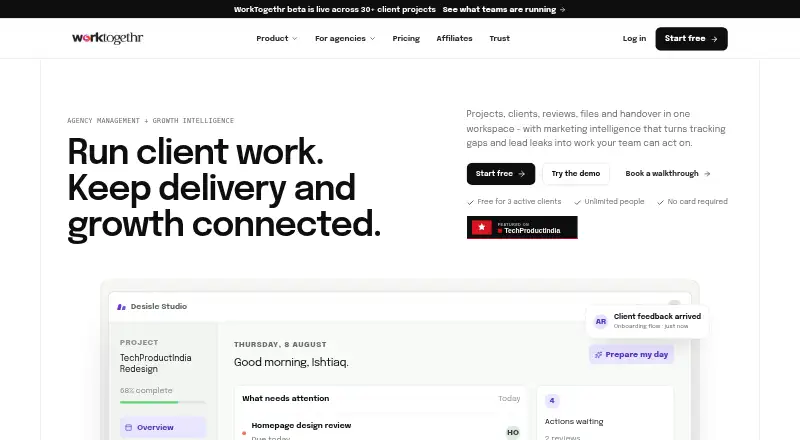
WorkTogethr is web-based project-management software for agencies and their clients, bringing project delivery, collaboration and handover into one workspace. Delivery tools include projects, tasks, calendars, time tracking, comments, checklists, activity, files and chat. Its client portal supports reviews, voting, comments, approvals, shared files, conversations and requested actions. AI features can prepare daily briefings, turn notes into tasks, summarize feedback, draft client updates and proposals, and respond through Ask WorkTogethr. Agency operations include CRM, proposals, e-signed contracts, invoices on record, people and HR tools, hiring, testimonials and portfolio features. The product is described as built for marketing agencies, design agencies, development agencies and product studios. The Free plan costs nothing and includes 3 active clients, 15 active projects, 2 GB storage and 50 AI actions per month. Monthly paid options are Studio at 29.00 USD, Agency at 79.00 USD and Scaled at 199.00 USD. When an allowance is reached, existing records remain accessible but new countable actions pause until reset or a plan change.
Who it suits
It suits agencies and product studios coordinating projects with clients, particularly those wanting client reviews, approvals and shared files in the same workspace. The free plan may suit teams whose client, project, storage and AI-action needs fit its allowances.
What it does well
- Project delivery includes time tracking and chat
- Client portal supports reviews, approvals and voting
- AI can draft updates and summarize feedback
- Includes CRM, proposals and e-signed contracts
- Unlimited people across listed plans
What to know first
- Free plan limits active clients and projects
- Free plan includes 2 GB storage
- New countable actions pause when allowances are reached
- No free trial
Limits
The Free plan allows 3 active clients, 15 active projects, 2 GB of storage, and 50 AI actions per month. When an allowance is reached, existing records remain accessible, but new countable actions pause until the allowance resets or the plan changes.
Plans
| Plan | Billed and limits | Price |
|---|---|---|
| Free | Free forever · 3 active clients · 15 active projects · 2 GB storage · 50 AI actions / month · unlimited people | Free |
| Scaled | Billed monthly · Unlimited active clients · unlimited active projects · 500 GB storage · 5,000 AI actions / month · unlimited people | $199 a month |
| Studio | Billed monthly · 25 active clients · 100 active projects · 10 GB storage · 300 AI actions / month · unlimited people | $29 a month |
| Agency | Billed monthly · 100 active clients · 500 active projects · 100 GB storage · 1,500 AI actions / month · unlimited people | $79 a month |
As worktogethr.com lists them, read 3 Oct 2026. The maker's own page has the final word.
Getting started
- Open the WorkTogethr website in a web browser.
- Choose the Free plan or a paid plan: Studio, Agency, or Scaled.
- Set up a workspace for your agency or studio.
- Use the web workspace, or install it through the one-tap option in a supported browser.
WorkTogethr brings agency delivery, client participation, and internal operations into one web workspace. It suits marketing, design, and development agencies and product studios managing recurring client work. The main buying decision is capacity: client, project, storage, and AI-action ceilings determine when each plan stops accepting new countable activity.
Overview
The workspace follows work from planning to handover. Delivery tools cover projects, tasks, calendars, time tracking, comments, checklists, activity, files, and chat, while the client portal puts reviews, voting, approvals, shared files, conversations, and requested actions in the same environment. Agencies that currently split these steps across several products may value the joined-up workflow; a team wanting only a lightweight task list may be paying for a wider operating system.
Campaign planning, content calendars, approval workflows, and creative proofing make the product particularly relevant to marketing and design engagements. Unlimited guest access is useful when a project has many client reviewers rather than a small fixed group.
Key features
Delivery and client collaboration
Tasks and checklists support execution, calendars and time tracking support planning and accountability, and activity, comments, files, and chat keep project context together. The portal’s voting and approval functions give clients a defined place to respond instead of relying solely on informal messages. Requested actions also make it possible to turn client participation into explicit follow-up work.
AI assistance
Daily briefings, note-to-task conversion, feedback summaries, client-update drafts, proposal drafts, and Ask WorkTogethr target the repetitive writing and synthesis around agency work. These tools can save time for teams with frequent status communication and feedback cycles, but every plan meters AI actions, so heavy use needs a higher allowance.
Operations, security, and privacy
CRM, proposals, e-signed contracts, invoice records, people and HR tools, hiring, testimonials, and portfolio features extend the workspace beyond project delivery. Growth Intelligence is positioned for connections to Google Analytics, Search Console, Tag Manager, Meta, and Google Ads. Access boundaries at workspace, client, project, and role levels govern records, files, and AI context, and stored secrets are encrypted. Workspace content is not used to train AI models, and personal data is not sold.
Pricing
WorkTogethr has a permanent free tier and monthly paid plans. When a plan allowance is reached, existing records remain accessible, but new countable actions pause until the allowance resets or the plan changes. That behavior makes quota monitoring important for active agencies.
| Plan | Price | Included capacity |
|---|---|---|
| Free | free, Free forever | 3 active clients, 15 active projects, 2 GB storage, 50 AI actions/month, unlimited people |
| Studio | $29 a month, billed monthly | 25 active clients, 100 active projects, 10 GB storage, 300 AI actions/month, unlimited people |
| Agency | $79 a month, billed monthly | 100 active clients, 500 active projects, 100 GB storage, 1,500 AI actions/month, unlimited people |
| Scaled | $199 a month, billed monthly | Unlimited active clients and projects, 500 GB storage, 5,000 AI actions/month, unlimited people |
Free is suitable for a small agency validating the workflow, but three clients, 15 projects, 2 GB, and 50 monthly AI actions leave little room for a busy pipeline. Studio is the sensible starting point for a growing shop that needs 25 clients and 100 projects. Agency adds substantially more headroom for established teams. Scaled is aimed at portfolios without client or project-count ceilings, although its 5,000 AI actions and 500 GB storage still define practical limits. There is no free trial, so the free-forever plan is the route to evaluation.
Platforms
WorkTogethr runs on the web. Supported browsers can offer a one-tap install that opens the workspace in its own window with an app icon, but it remains a browser-based product rather than a separately listed native desktop or mobile application.
Who it's for
Marketing agencies can combine campaign plans, content calendars, approvals, client feedback, and advertising-account connections. Design agencies benefit from proofing and review workflows, while development agencies and product studios gain structured delivery, time tracking, handover context, and operational records. Unlimited people and guests help when many staff and client participants need access. Organizations that do not need client portals, agency operations, or AI drafting may prefer a narrower project-management tool.
Pros and cons
Pros
- One agency workspace: delivery, client approvals, proposals, contracts, invoices, and people operations can share context.
- Client-ready collaboration: reviews, voting, approvals, shared files, conversations, and unlimited guests support multi-reviewer engagements.
- Broad AI toolkit: briefings, summaries, task creation, and draft generation address common agency admin work.
- Clear access and privacy posture: role and project boundaries protect context, with encrypted secrets and no model-training use of workspace content.
Cons
- Capacity pauses are consequential: reaching any allowance stops new countable actions, even though existing records remain visible.
- Free capacity is narrow: three clients, 15 projects, 2 GB, and 50 AI actions suit pilots more than a busy agency.
- No trial period: teams must assess the product through the free tier rather than a time-limited paid trial.
- Scope may be excessive: teams seeking only task management may not need the operational and client-management layers.
Alternatives
For a broader list, see Marketing Project Management Software.
- CoSchedule is a better fit when social publishing is central and you want Android, iOS, extension, and web access, plus a free trial.
- Planable suits teams focused on collaborative content planning, with web, iOS, and Android apps and a free tier capped at 50 total posts.
- Atheer is worth considering for a 30-day free period, client review links, content plans, and a brand hub.
- FlowQi is an alternative for teams wanting API access and generous contact, project, and task allowances on its free tier.
- QuickProof is a focused option for temporary image reviews through public shared links.
- Wonderful targets teams wanting unlimited workspaces and teams with per-team storage and feed limits.
- Orangescrum offers a free forever plan for one user and one project, making it more suitable for a very small setup.
- Varum is an alternative with a free core plan and a separate AI-oriented team plan.
Verdict
Choose WorkTogethr if you run a client-service agency or studio and want delivery, approvals, AI-assisted communication, and agency administration connected in one web workspace. Its strongest reason to buy is the combination of client-facing workflow and operational breadth, with unlimited people and guests supporting collaborative accounts. Look elsewhere if you need a native mobile product, a trial before committing, or quotas that do not pause new work when a client, project, storage, or AI allowance is exhausted.
Verdict
WorkTogethr combines agency project work with client collaboration and operational tools. Review each plan’s client, project, storage and AI-action allowances, since reaching a limit pauses new countable actions.
Questions
Is there a free plan?
Yes. The Free plan costs nothing and is billed Free forever.
What do the plans cost?
Studio costs $29 a month, Agency costs $79 a month, and Scaled costs $199 a month. Each is billed monthly.
What are the Free plan limits?
It includes 3 active clients, 15 active projects, 2 GB of storage, 50 AI actions per month, and unlimited people.
What platforms does WorkTogethr support?
The listed platform is web. A one-tap install option is available in supported browsers, opening the workspace in its own window with an icon.
Does WorkTogethr offer a free trial?
No, a free trial is not offered.
What does WorkTogethr say about AI privacy?
Its privacy policy says workspace content is not used to train AI models. It also says personal data is not sold.
Facts from WorkTogethr's own pages
- Agency operations
- Agency operations include CRM, proposals, e-signed contracts, invoices on record, people and HR tools, hiring, testimonials, and portfolio features. · worktogethr.com, 3 Oct 2026
- AI
- AI features include daily briefings, turning notes into tasks, feedback summaries, client update drafts, proposal drafts, and Ask WorkTogethr. · worktogethr.com, 3 Oct 2026
- Audience
- The product is described as built for marketing agencies, design agencies, development agencies, and product studios. · worktogethr.com, 3 Oct 2026
- Client collaboration
- The client portal supports reviews, voting, comments, approvals, shared files, client conversations, and requested actions. · worktogethr.com, 3 Oct 2026
- Delivery features
- Project delivery includes projects, tasks, calendar, time tracking, comments, checklists, activity, files, and chat. · worktogethr.com, 3 Oct 2026
- Installable app
- A one-tap option to install WorkTogethr as an app is available in supported browsers, giving the workspace its own window and icon. · worktogethr.com, 3 Oct 2026
- Integrations
- The maker lists Google Analytics, Search Console, Tag Manager, Meta, and Google Ads account connections as next steps for Growth Intelligence. · worktogethr.com, 3 Oct 2026
- Limits
- When a plan allowance is reached, existing records remain accessible and new countable actions pause until the allowance resets or the plan changes. · worktogethr.com, 3 Oct 2026
- Privacy
- The privacy policy says workspace content is not used to train AI models and personal data is not sold. · worktogethr.com, 3 Oct 2026
- Product
- WorkTogethr is project-management software for agencies and their clients that connects project work, client collaboration, context, and handover. · worktogethr.com, 3 Oct 2026
- Product stage
- The homepage says the beta is live across more than 30 active client projects. · worktogethr.com, 3 Oct 2026
- Security
- The Trust Centre says workspace, client, project, and role boundaries govern access to records, files, and AI context, and that stored secrets are encrypted. · worktogethr.com, 3 Oct 2026
- Support
- WorkTogethr lists [email protected] for support and says replies usually arrive within two working days. · worktogethr.com, 3 Oct 2026