Freedom251 › Accounting Practice Management Software
Task Session
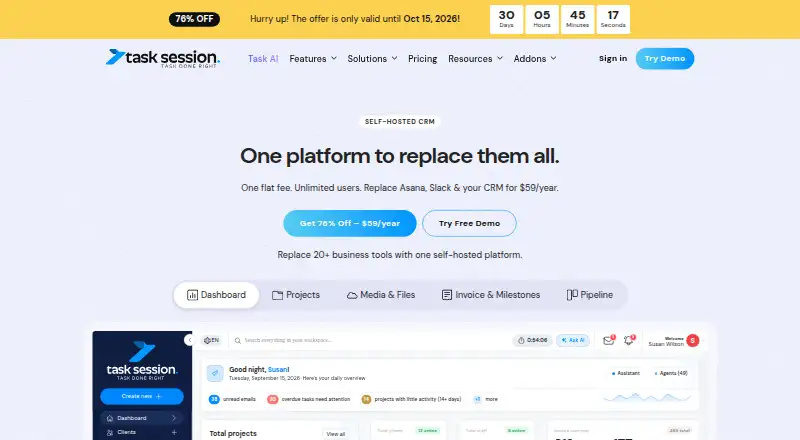
What Task Session is
Task Session is a self-hosted CRM and work management platform for organizing projects, tasks, clients, and business operations. Work tools include Kanban boards, time tracking, reporting, and deadline tracking; CRM functions cover lead pipelines and client management. It also brings together a client portal, invoicing, attendance management, email and file management, and team chat. Workflow automation is available, and the plan comparison lists REST API access and webhook automation. Listed integrations include Google Calendar, Google Drive, Stripe, PayPal, 2Checkout, Gmail, and Outlook. Task Session runs on customers' own servers, and the company says its free, open-source edition supports unlimited users at no cost. Customers need a server, which may be shared hosting, a VPS, or a dedicated server. Paid plans include support and updates. Starter costs $59 a year, billed at $59 yearly and renewing at $99/year; it includes one domain license, one year of support and updates, and unlimited projects and tasks. The Founder Plan costs $249, paid once, and Enterprise pricing is custom. The company describes the software as encrypted and says self-hosting gives customers control over their data.
Who it suits
Task Session is described for freelancers, agencies, and teams of all sizes. It may suit customers who want CRM and work management on a server they control.
What it does well
- Free, open-source edition supports unlimited users.
- Includes CRM, project management, and invoicing.
- Lists integrations with Google, payment services, Gmail, and Outlook.
- Self-hosting gives customers control over their data.
What to know first
- Customers need to provide a server.
- Starter renews at $99/year after the first year.
- Enterprise pricing is custom.
Limits
The free edition is described as supporting unlimited users at no cost, but it requires a server. Starter is limited to one domain license and includes one year of support and updates; it renews at $99/year after the initial $59 yearly billing.
Plans
| Plan | Billed and limits | Price |
|---|---|---|
| Free | Forever · Unlimited users · task management and Kanban boards · time tracking · projects and dashboard · white-label · no support | Free |
| Founder Plan | One-time payment; 5 years updates · Unlimited users · 1 domain · priority support · managed setup and deployment · full CRM · projects and tasks · email sync · calendar sync · web forms · roles and permissions · white-label client portal | $249, paid once |
| Task Session AI addon | Per installation; also $9/month or $99 every two years · Unlimited users · requires an active Task Session licence · bring-your-own provider API key | $49 |
| Starter | Renews at $99/year · Unlimited users · 1 domain · 1 year support and updates · full CRM · projects and tasks · email sync · calendar sync · web forms · roles and permissions · white-label client portal | $59 a year |
| Enterprise | Custom Pricing · Custom licenses · custom deployment options · priority support | On request |
As tasksession.com lists them, read 21 Oct 2026. The maker's own page has the final word.
Getting started
- Choose a server: shared hosting, a VPS, or a dedicated server.
- Run Task Session on your own server.
- Use the web platform to access CRM and work management features.
- Choose the free edition or a paid plan based on your needs.
Task Session is a self-hosted workspace that unifies customer records, sales leads, project delivery, and routine business administration. It suits freelancers, agencies, and growing teams that can provide hosting and want one web-based system instead of several specialist tools. The free edition is unusually generous on users, while paid tiers add licensing, updates, and support for organizations that need a supported deployment.
Overview
Task Session covers the full path from prospect to completed client work. CRM and lead-pipeline functions sit beside projects, tasks, Kanban boards, deadlines, time logs, and reports. Invoicing, attendance, email, files, and team chat extend it into general operations, with a client portal and workflow automation for external collaboration and repeatable processes. This wide remit is valuable for a small firm seeking a central system; a buyer wanting only project tracking or only CRM may be taking on more software than necessary.
Deployment is the defining trade-off. The web application runs on a server chosen by the customer: shared hosting, a VPS, or a dedicated machine are all supported. Self-hosting keeps data under the customer's control, and the company describes the product as encrypted, but the customer remains responsible for arranging and maintaining that hosting. It is therefore a better fit for technically capable owners or organizations with an administrator than for anyone expecting a vendor-managed SaaS service.
Key features
Client delivery and sales
CRM, client records, and lead pipelines connect sales activity with project execution. Project and task management, Kanban views, deadline tracking, and time tracking give teams several ways to organize work and monitor effort. Reporting turns those activity records into management oversight, which is useful when agencies need to review delivery or billable time across clients.
Business administration
Billing and invoicing, attendance management, email management, file management, and team chat address everyday operations around client work. A client portal provides an outward-facing place for collaboration, while document management and workflow automation support structured handoffs. These functions can reduce the number of separate systems a small business must coordinate, although they do not make the hosting obligation disappear.
Connections and extensibility
Listed integrations include Google Calendar, Google Drive, Stripe, PayPal, 2Checkout, Gmail, and Outlook. REST API access and webhook automation are included in the plan comparison, giving teams a route to connect Task Session with other services or trigger processes when events occur.
Pricing
The free, open-source edition costs nothing and supports unlimited users. It is the clearest starting point for freelancers or teams able to manage their own server and willing to operate without the paid plans' stated support and update terms. There is no free trial, so prospective buyers cannot use a time-limited hosted evaluation period.
| Plan | Price and terms | What it includes |
|---|---|---|
| Starter | $59 a year, billed $59 / Yearly; renews at $99/year | 1 domain license; 1 year of support and updates; unlimited projects and tasks |
| Founder Plan | 249.00 USD once, billed $249 / One-Time | 1 domain license; 5 years of updates; unlimited projects and tasks |
| Enterprise | Custom pricing | Custom licenses, custom deployment options, and priority support |
Starter has the lowest entry price but its renewal rises to $99 annually, and its support and updates last one year. Founder costs more upfront yet avoids recurring license payments and provides five years of updates, making it more suitable for an owner committed to a single-domain installation. Enterprise is aimed at organizations needing tailored licensing, deployment, or priority assistance rather than a standard package. Paid plans include a 7-day money-back guarantee.
Platforms
Task Session is self-hosted and web-based. Customers may use shared hosting, a VPS, or a dedicated server, so platform choice comes with direct responsibility for server provision and upkeep.
Who it's for
Freelancers and agencies can use the combined CRM, client portal, projects, time tracking, and invoicing to keep sales and delivery together. Teams of different sizes may benefit from unlimited users in the free edition and unlimited projects and tasks in the paid plans. It is less appropriate for buyers who want a fully managed service, a mobile-native experience, or a product that requires no server administration.
Pros and cons
Pros
- Unlimited users in the free edition: removes per-seat expansion pressure for self-hosting teams.
- Broad operational coverage: CRM, delivery, billing, documents, communication, and attendance share one system.
- Self-hosted control: organizations choose their server environment and retain control of data location.
- Flexible automation: REST API, webhooks, and named integrations support connected workflows.
- Longer update option: Founder provides five years of updates after a one-time payment.
Cons
- Server required: customers must supply and maintain shared hosting, a VPS, or a dedicated server.
- No free trial: evaluation must use the free edition or another route rather than a time-limited trial.
- Starter renewal increase: the $59 first year renews at $99 per year.
- Web-only access: the published platform is web and self-hosted, not a native mobile offering.
Alternatives
For accounting-firm workflows, browse Accounting Practice Management Software or Marketing Project Management Software for category-focused options.
- Xero Practice Manager is a web-based freemium choice, with a free partner-level plan and a 65.00 NZD monthly one-user plan, for practices already aligned with that model.
- Canopy offers freemium access across Android, iOS, and web, with client portals, secure messaging, eSign, recurring workflows, and invoicing in its Standard plan.
- CCH Axcess Practice is a paid Android, iOS, and web product sold by quote.
- IRIS Practice Engine is a paid web and API option.
- Practice CS is a paid web and Windows system with configurable implementation and sales-led pricing.
- TaxDome is a paid multi-platform product without a free plan; its Essentials tier starts at $800 a year per seat with commitment-based rates.
- FYI is a paid product for iOS, macOS, web, and Windows, with a free trial and an Intermediate plan at A$30 per user per month, minimum five users.
- Nomi is a paid Android, iOS, and web option with a free trial and specialist practice-workflow plans.
Verdict
Choose Task Session if you want CRM, project control, time, billing, and business administration in one self-hosted web system, especially when unlimited users and data-location control matter. Look elsewhere if supplying and maintaining a server is unacceptable, or if you need a managed service or native mobile platforms. The free edition makes experimentation accessible, while Founder is the strongest fit for a long-lived single-domain installation that values five years of updates.
Verdict
Task Session combines client, project, time, and business-operation tools, with a free edition and paid plans. Its self-hosted setup requires a server, so buyers should weigh that requirement against the control it offers.
Questions
Is Task Session free?
Yes. The company says its free, open-source edition supports unlimited users at no cost.
What does Task Session cost?
Starter is $59 a year, billed at $59 yearly and renewing at $99/year. Founder Plan is $249, paid once; Enterprise uses custom pricing.
Where can I use Task Session?
Task Session is available on the web and is self-hosted on a customer’s server.
What server do I need?
The company says customers need a server and can use shared hosting, a VPS, or a dedicated server.
Is Task Session open source?
The company describes its free edition as open source.
What integrations does Task Session list?
Listed integrations include Google Calendar, Google Drive, Stripe, PayPal, 2Checkout, Gmail, and Outlook.
Facts from Task Session's own pages
- AI extensibility
- The optional AI module supports provider keys for OpenAI, Claude, Gemini and other providers, plus assistants, scheduled agents and file analysis. · tasksession.com, 21 Oct 2026
- API
- The plan comparison lists REST API access and webhook automation. · tasksession.com, 8 Oct 2026
- API and webhooks
- The changelog documents JSON APIs, REST bearer tokens for workspace tools and webhook integration for external automation. · tasksession.com, 21 Oct 2026
- Audience
- The company says Task Session is built for freelancers, agencies, and teams of all sizes. · tasksession.com, 8 Oct 2026
- Business tools
- Listed tools include invoicing, attendance management, email management, file management, and team chat. · tasksession.com, 8 Oct 2026
- Calendar
- The product includes calendar views, events and Google Calendar synchronization with two-way sync options. · tasksession.com, 21 Oct 2026
- Client portal
- A white-label portal lets clients view shared projects, tasks, files, invoices, payments and communications. · tasksession.com, 21 Oct 2026
- Collaboration
- The platform offers project, task, group and one-to-one chat, mentions, replies, voice notes and searchable message history. · tasksession.com, 21 Oct 2026
- Company and headquarters
- SaaSHub identifies Task Session as a Houston, United States startup founded by Alex Miller. · saashub.com, 21 Oct 2026
- Company founding
- Task Session says it was founded in 2024. · tasksession.com, 21 Oct 2026
- Company history
- The company says Task Session was founded in 2024. · tasksession.com, 8 Oct 2026
- Company size
- SaaSHub lists the company at 10–19 employees. · saashub.com, 21 Oct 2026
- CRM and pipeline
- Task Session provides contacts, leads, visual deal pipelines, custom stages, lead assignment, tagging and lead status tracking. · tasksession.com, 21 Oct 2026
- CRM and sales
- The product includes CRM, lead pipeline management, and client management features. · tasksession.com, 8 Oct 2026
- Email management supports Gmail, Outlook and custom SMTP, with tracking, signatures, shared threads and lead-linked email. · tasksession.com, 21 Oct 2026
- Files and media
- Media Vault provides folders, table or grid views, public share links, bulk downloads, Google Drive synchronization and permission controls. · tasksession.com, 21 Oct 2026
- Free edition
- The company says its free, open-source edition supports unlimited users at no cost. · tasksession.com, 8 Oct 2026
- Free-edition claim
- The about page calls its free edition open-source, while the licence page retains all intellectual-property ownership and prohibits redistribution. · tasksession.com, 21 Oct 2026
- Independent directory description
- Capterra describes Task Session as self-hosted software combining project management, CRM, invoicing, Kanban, time tracking, chat, email and client portals. · capterra.com, 21 Oct 2026
- Independent security measurement
- Legit.Show measured HTTPS and several security headers but reported no HSTS, no Content-Security-Policy and a 55/100 privacy score. · legit.show, 21 Oct 2026
- Independent support listing
- Capterra lists live online sessions, documentation, videos, email/help desk, knowledge base, chat and phone support options. · capterra.com, 21 Oct 2026
- Integrations
- The pricing comparison lists Google Calendar, Google Drive, Stripe, PayPal and 2Checkout integrations. · tasksession.com, 21 Oct 2026
- Invoicing
- Users can create recurring or one-time invoices, payment links, reminders, online payments and payment-status tracking. · tasksession.com, 21 Oct 2026
- Licence
- The licence is proprietary, non-transferable and non-sublicensable; redistribution is prohibited and regular licences cover one domain or server. · tasksession.com, 21 Oct 2026