
WeMod
What WeMod is
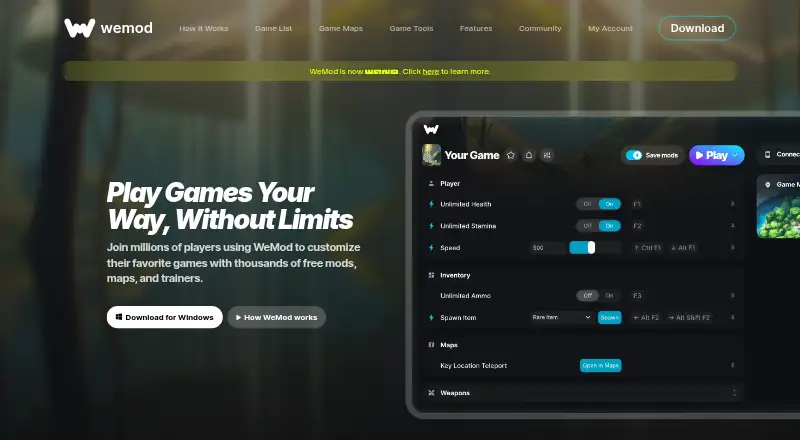
WeMod is a Windows application for customizing single-player PC games with mods, maps, and trainers. Its homepage lists support for more than 3,000 games and thousands of free tools. Players can adjust resources, skills, speed, and difficulty, use training mode, and save mod selections for later. The app detects installed games and pairs them with available mods; changes are temporary and can be toggled. An in-game overlay lets players alter settings without leaving a game. Interactive maps provide fast travel, detailed mapping, and player-created markers for more than 60 games. WeMod lists launcher support for Steam, Xbox, Ubisoft, Origin, GOG, Epic Games, and Rockstar Games. The free plan costs nothing and includes keyboard hotkeys; newly created accounts have two hours of mod use per day. Pro adds interactive controls and remote-app access for $7.99 a month or $59.99 a year. The Pro phone app can apply mods without hotkeys. WeMod says its mods are malware-free and community-tested, and links to a VirusTotal scan.
Who it suits
WeMod suits Windows players who want to modify single-player PC games, adjust difficulty, or use interactive game maps. Its phone companion is for Pro users who want to apply mods without hotkeys.
What it does well
- Supports more than 3,000 single-player PC games.
- The overlay changes settings while playing.
- Free plan includes keyboard hotkeys.
- Maps cover more than 60 games.
- Pro offers remote-app access.
What to know first
- The desktop app is Windows-only.
- New free accounts have two hours of daily mod use.
- The privacy policy says gameplay activity is collected.
- Information may be used for targeted advertising.
Limits
The Free plan provides keyboard hotkeys and, for newly created accounts, two hours of mod use per day. Interactive controls and remote-app access are included with Pro, which costs $7.99 a month or $59.99 a year.
Plans
| Plan | Billed and limits | Price |
|---|---|---|
| Free | keyboard hotkeys · 2 hours of mod usage per day for newly created accounts | Free |
| Pro Yearly | yearly · interactive controls · remote app | $59.99 a year |
| Pro Monthly | monthly · interactive controls · remote app | $7.99 a month |
As wemod.com lists them, read 30 Sept 2026. The maker's own page has the final word.
Getting started
- Visit wemod.com and download the Windows app.
- Open the app so it can scan for installed games.
- Choose a detected game and select available mods or trainers.
- Adjust settings with the available controls and use the in-game overlay while playing.
- Choose a Pro plan if you want interactive controls and remote-app access.
WeMod is aimed at Windows players who want to alter supported single-player games without assembling separate trainers, map tools, and launchers. It suits broad PC libraries and players who value changing settings during play, while its free usage ceiling, Windows desktop requirement, and data practices make the paid and privacy trade-offs important.
Overview
WeMod combines trainers, mods, and maps in one application. It scans a computer for installed games, matches them with compatible options, and applies changes that can be switched on or off temporarily. The service describes coverage ranging from more than 2,000 to more than 3,000 single-player PC games, with new titles added weekly; that scale is its strongest reason to choose it over a narrowly focused utility.
Available adjustments include resources, skills, game speed, difficulty, and a training mode. This makes it useful both for experimenting with game systems and for making a difficult section more manageable. It is designed for single-player use rather than competitive multiplayer.
Key features
In-game controls
An overlay puts supported options on screen while a game is running, so changing a setting does not require repeatedly leaving the game. Sliders, buttons, and drop-downs provide more control than a hotkey-only setup, and saved selections can be reused. Automatic detection handles the initial pairing of installed games with available mods, while automatic updates reduce manual maintenance.
Maps and remote control
Interactive maps cover more than 60 games and include detailed mapping, fast travel, player-created markers, and more than 150 maps in total. They are most valuable for exploration-heavy games where navigation is a separate chore. WeMod also describes a Pro phone app that applies mods without hotkeys, allowing remote adjustment while playing.
Compatibility and safety
Launcher integrations include Steam, Xbox, Ubisoft, Origin, GOG, Epic Games, and Rockstar Games. WeMod says its mods are malware-free, community-tested, and scanned through VirusTotal, a useful assurance for software that changes game processes, though that remains the company's safety claim. Its services also include game-session capture, AI assistance, and integrations with Google, OpenAI, or Anthropic language-model services.
Pricing
| Plan | Price | Includes |
|---|---|---|
| Free | free | Keyboard hotkeys; 2 hours of mod usage per day for newly created accounts |
| Pro Monthly | $7.99 a month, billed monthly | Interactive controls; remote app |
| Pro Yearly | $59.99 a year, billed yearly | Interactive controls; remote app |
The free plan is a sensible way to check game coverage and accept hotkey control, but the two-hour daily limit for newly created accounts makes it a poor fit for long sessions. Pro is the route for interactive controls and phone-based operation. Monthly billing costs more over a year but avoids an annual commitment; yearly billing lowers the equivalent monthly cost for someone who expects regular use. A free trial is offered, and the stated refund window is 0 days, so cancellation timing matters.
Platforms
The desktop app is Windows-only, despite the service's platform listing also mentioning Android. Android is relevant to the Pro remote app rather than a replacement desktop environment. Players on macOS or Linux should not choose WeMod expecting a native desktop client.
Who it's for
Choose WeMod if you play many supported single-player PC games and want one overlay for trainers, adjustable difficulty, speed controls, and maps. It is particularly suitable for players who prefer temporary changes, need accessibility-oriented control over difficulty, or want to operate mods from a phone. It is less suitable for multiplayer-focused players, non-Windows desktop users, or anyone unwilling to trade usage data—including games played, mods used, and gameplay activity—that may be used for targeted advertising.
Pros and cons
Pros
- Very broad single-player coverage gives owners of varied libraries one catalog to check.
- Automatic detection and an in-game overlay cut down setup and context switching.
- Interactive maps, markers, and fast travel add value beyond conventional trainers.
- Temporary, toggleable changes and adjustable difficulty support experimentation and accessibility.
- Encryption in transit and restricted access to sensitive data are stated security measures.
Cons
- The Windows-only desktop app excludes macOS and Linux players.
- New free accounts are limited to two hours of mod use per day.
- Pro is required for interactive controls and the remote phone app.
- Usage and gameplay data collection, including possible targeted advertising, may concern privacy-conscious users.
- A 0-day refund window leaves little room to reverse an annual purchase.
Alternatives
Browse Game Trainers when you want a wider category comparison, or Game Overlay Software when the overlay itself is the deciding feature.
Cheat Happens is worth considering for broader operating-system support and a free pass with profile and message-board access, while paid access is tied to game availability. AurorAI suits users seeking unlimited free AI usage without membership. ChooChoo Loader is a free option spanning Linux, macOS, web, and Windows.
PLITCH offers free access to 28,298 mods and 712 trainers, with paid annual access for additional features. Rival Gaming is a free macOS, web, and Windows choice with three daily sessions on its free tier and an earned Pro tier. ArtMoney fits Windows users who prefer freeware or a one-time Pro purchase. CheatDeck is a free Linux or self-hosted alternative. CoSMOS is free on Linux and Windows with no registration and no locked features.
Verdict
WeMod is a strong pick for Windows single-player gamers who want extensive game coverage, real-time overlay controls, and integrated maps in one place. Choose Pro if the free plan's daily cap or hotkey-only controls interrupt your sessions. Look elsewhere if you need a macOS or Linux desktop app, multiplayer tooling, a longer refund window, or less extensive gameplay-data collection.
Verdict
WeMod combines game mods, trainers, and interactive maps with an in-game overlay and automatic game detection. The free plan has a daily usage limit for new accounts, and the desktop app is Windows-only.
Questions
Is WeMod free?
Yes. The Free plan costs nothing and includes keyboard hotkeys. For newly created accounts, it allows two hours of mod use per day.
How much does Pro cost?
Pro Monthly costs $7.99 a month, billed monthly. Pro Yearly costs $59.99 a year, billed yearly.
Which platforms does the app support?
The desktop app is Windows-only. Android is also listed as a platform, and the Pro phone app can apply mods without hotkeys.
What games and launchers does WeMod support?
WeMod says it supports more than 3,000 single-player PC games. Listed launcher support includes Steam, Xbox, Ubisoft, Origin, GOG, Epic Games, and Rockstar Games.
What does Pro add?
Pro includes interactive controls and remote-app access through the phone app.
What does WeMod say about privacy and mod safety?
WeMod says its mods are malware-free, community-tested, and scanned with VirusTotal. Its privacy policy describes encryption in transit and restricted access to sensitive data, as well as collection of gameplay activity and possible use of information for targeted advertising.
Facts from WeMod's own pages
- Accessibility
- WeMod provides flexible difficulty settings and gameplay speed adjustment. · wemod.com, 30 Sept 2026
- Automatic detection
- WeMod scans the computer for installed games and pairs them with available mods. · wemod.com, 30 Sept 2026
- Automatic setup
- The app says it detects installed games automatically and applies changes that are temporary and toggleable. · wemod.com, 30 Sept 2026
- Company
- The privacy policy identifies the provider as WeMod LLC and gives its principal place of business as Miami, Florida. · wemod.com, 30 Sept 2026
- Core purpose
- WeMod is an application for modding thousands of single-player PC games. · community.wemod.com, 30 Sept 2026
- Customization
- Users can control mods with sliders, buttons, and drop-downs and save mod selections for later. · wemod.com, 30 Sept 2026
- Data and AI integrations
- WeMod says its services include game-session capture, interactive maps, AI-powered assistance, and integrations with Google, OpenAI, or Anthropic language-model services. · wemod.com, 30 Sept 2026
- Desktop platform
- The download page identifies the WeMod app as Windows only. · wemod.com, 30 Sept 2026
- Free content
- The homepage says players can use thousands of free mods, maps, and trainers. · wemod.com, 30 Sept 2026
- Game coverage
- WeMod supports over 2,000 single-player PC games, with new titles coming every week. · wemod.com, 30 Sept 2026
- Game customization
- Listed options include adjusting game resources, skills, speed, and difficulty, plus a training mode. · wemod.com, 30 Sept 2026
- Game library
- The homepage says WeMod supports more than 3,000 single-player PC games. · wemod.com, 30 Sept 2026
- Headquarters
- Miami, Florida, United States · wemod.com, 28 Sept 2026
- In-game controls
- The app includes an overlay for changing settings in real time while playing. · wemod.com, 30 Sept 2026
- Interactive maps
- WeMod says its interactive maps offer fast travel and detailed mapping for 60+ games, with player-created markers. · wemod.com, 30 Sept 2026
- Launcher integrations
- WeMod lists support for Steam, Xbox, Ubisoft, Origin, GOG, Epic Games, and Rockstar Games. · wemod.com, 30 Sept 2026
- Maps
- WeMod offers interactive maps with fast travel and detailed mapping for more than 60 games, plus more than 150 maps. · wemod.com, 30 Sept 2026
- Mobile companion
- The features page describes a WeMod Pro phone app that can apply mods without hotkeys. · wemod.com, 30 Sept 2026
- Mod safety claim
- WeMod says its mods are malware-free and community-tested, and links to a VirusTotal scan. · wemod.com, 30 Sept 2026
- Overlay
- The app provides an in-game overlay for customizing games without leaving the game. · wemod.com, 30 Sept 2026
- Phone app
- The WeMod Pro app lets users adjust and apply mods from a phone without hotkeys. · wemod.com, 30 Sept 2026
- Platform limit
- The WeMod app is Windows only. · wemod.com, 30 Sept 2026
- Privacy and security
- The privacy policy says WeMod uses encryption for data in transit and access restrictions for sensitive data such as passwords. · wemod.com, 30 Sept 2026
- Privacy limitation
- The privacy policy says WeMod collects usage information including games played, mods used, and gameplay activity, and may use information for targeted advertising. · wemod.com, 30 Sept 2026
Where WeMod stands on Freedom251
- Game Trainers#20 of 30
- Game Overlay Software#18 of 25