
DeckCheatz
What DeckCheatz is
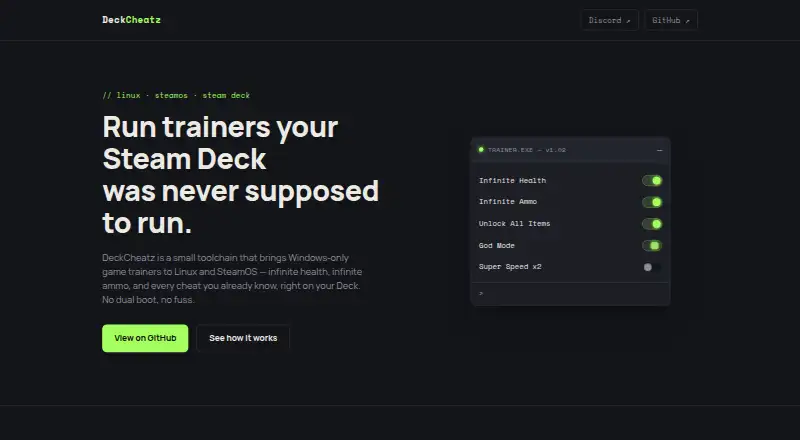
DeckCheatz is a free, open-source Linux tool for running Windows game trainers on SteamOS and other supported Linux systems. It registers as a Steam Play compatibility tool, allowing Steam to launch it alongside an assigned game. The app matches configured trainers to that game's Proton prefix and starts the selected trainer in the background. The maker targets SteamOS on Steam Deck and also names Bazzite, CachyOS, and NixOS. Example cheats listed include infinite health, infinite ammo, unlocking all items, God Mode, and Super Speed x2. The project describes the app as portable and Flatpak-ready. DeckCheatz is independent of trainer developers and companies, and trainer compatibility is being worked out without official integrations. It is intended for single-player use and solo modding, and the maker asks users to keep it offline. The current app has no in-game overlay. A Decky Loader plugin for selecting and toggling trainers from the Quick Access Menu is planned, as are overlay controls for changing cheats during gameplay. The earlier script-based approach ran Wand inside a game's Steam Play prefix and is being rewritten.
Who it suits
DeckCheatz suits Linux and SteamOS users interested in running trainers for single-player games and solo modding. Its maker asks users to keep it offline.
What it does well
- Free and open source
- Matches trainers to a game's Proton prefix
- Targets SteamOS, Bazzite, CachyOS, and NixOS
- Portable and Flatpak-ready
What to know first
- No in-game overlay currently
- Trainer compatibility is being worked out without official integrations
- Planned Quick Access Menu plugin is not yet available
Limits
The current release has no in-game overlay, and trainer compatibility is being developed without official integrations. Planned Decky Loader and overlay controls are not yet integrated.
Getting started
- Open the DeckCheatz website or repository
- Install the portable or Flatpak-ready Linux application
- Register DeckCheatz as a Steam Play compatibility tool
- Assign it to a Steam game
- Configure a trainer for the game’s Proton prefix
- Launch the game through Steam and run the selected trainer
Verdict
DeckCheatz provides a native route for launching configured Windows game trainers alongside Steam games on supported Linux systems. It is an independent project, and its planned overlay controls are not part of the current app.
Questions
How much does DeckCheatz cost?
DeckCheatz is free and open source.
Which systems does it support?
It targets SteamOS on Steam Deck and also supports Bazzite, CachyOS, and NixOS. The project is for Linux systems.
How does DeckCheatz launch trainers?
It registers as a Steam Play compatibility tool, matches configured trainers to a game’s Proton prefix, and launches the selected trainer in the background.
Does it include an in-game overlay?
The current app does not have an in-game overlay. Overlay toggling and a Decky Loader Quick Access plugin are planned.
Who makes or supports DeckCheatz?
DeckCheatz is an independent project and is not affiliated with, endorsed by, or supported by trainer developers or companies. Its site links to a Discord server.
Facts from DeckCheatz's own pages
- Affiliation
- The project says it is independent and is not affiliated with, endorsed by, or supported by trainer developers or companies. · deckcheatz.app, 9 Oct 2026
- Caution
- The maker says DeckCheatz is not affiliated with, endorsed by, or supported by trainer developers or companies. · deckcheatz.app, 4 Oct 2026
- Core app
- The native app registers as a Steam Play compatibility tool, so Steam launches it alongside an assigned game. · deckcheatz.app, 9 Oct 2026
- Distribution format
- The GitHub repository describes the app as portable and Flatpak-ready for Steam Deck and other Linux systems. · github.com, 4 Oct 2026
- Earlier approach
- The earlier wand-launcher script started Wand inside the running game's Steam Play prefix and is being rewritten. · deckcheatz.app, 4 Oct 2026
- Example cheats
- The site lists infinite health, infinite ammo, unlocking all items, God Mode, and Super Speed x2 as example cheats. · deckcheatz.app, 9 Oct 2026
- Experimental project
- OMMXP is an in-progress memory-modification protocol that is not yet integrated into DeckCheatz or its trainers. · deckcheatz.app, 9 Oct 2026
- How it launches
- It registers as a Steam Play compatibility tool so Steam can launch it alongside an assigned game. · deckcheatz.app, 4 Oct 2026
- Intended use
- DeckCheatz is built for single-player solo modding, and its site asks users to keep it offline. · deckcheatz.app, 9 Oct 2026
- Legacy approach
- The earlier wand-launcher script ran Wand inside the game's Steam Play prefix and is currently being rewritten. · deckcheatz.app, 9 Oct 2026
- Planned controls
- The maker says tighter integration with the overlay is planned for toggling cheats with a button press during gameplay. · deckcheatz.app, 4 Oct 2026
- Planned integration
- A Decky Loader plugin and Quick Access Menu cheat controls are described as planned features. · deckcheatz.app, 9 Oct 2026
- Purpose
- DeckCheatz brings Windows-only game trainers to Linux and SteamOS, including Steam Deck. · deckcheatz.app, 9 Oct 2026
- Security and compliance
- The opened maker pages do not state security certifications or compliance claims. · deckcheatz.app, 4 Oct 2026
- Support channel
- The maker's site links to a DeckCheatz Discord server. · deckcheatz.app, 4 Oct 2026
- Supported systems
- The project says it supports SteamOS, Bazzite, CachyOS, and NixOS. · deckcheatz.app, 9 Oct 2026
- Trainer compatibility
- The maker says the project is independent and is figuring out trainer compatibility without official integrations. · deckcheatz.app, 4 Oct 2026
- Trainer selection
- It matches configured trainers to a game's Proton prefix and launches the selected trainer in the background with the game. · deckcheatz.app, 9 Oct 2026
- What it does
- DeckCheatz is a native tool for running Windows game trainers on SteamOS and Linux. · deckcheatz.app, 4 Oct 2026
Where DeckCheatz stands on Freedom251
- Game Trainers#16 of 30