Game Trainer Manager
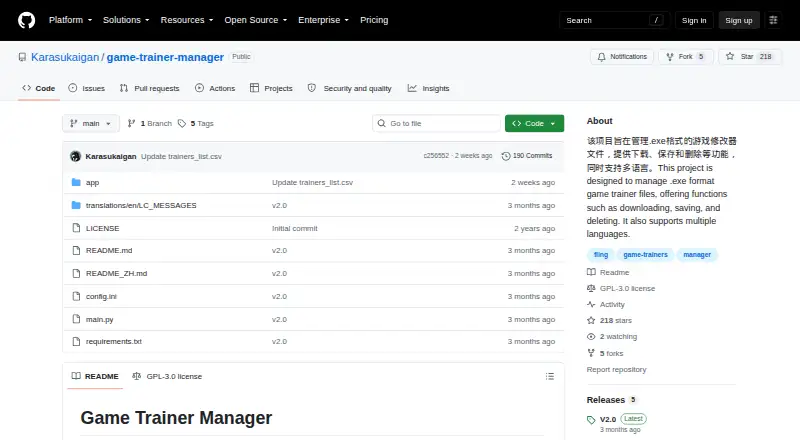
What Game Trainer Manager is
Game Trainer Manager is a free Windows desktop app for keeping game trainer files organized and easy to open. It imports individual .exe files and .zip or .rar packages, then lets users search, pin, delete, or launch trainers with one click. A selected download directory can be monitored so matching files are imported automatically. For finding trainers, the app offers local fuzzy search and online fuzzy search using FLiNG Trainer catalog data. The search can handle abbreviations and Chinese-to-English lookup, while download links open in the default browser.
The interface supports Simplified Chinese and English. Other tools include batch filename translation, one-click Steam launch, light and dark themes, and a debug log panel. Trainer catalog and game-name data refresh at startup when more than two days have passed, or users can update them manually. Configurable GitHub mirror URLs are supported for data downloads. The project provides a Windows setup installer through Releases and instructions for running the Python source. It is open source under GPL-3.0, and the project says it is not for commercial use. It also advises users to consider risks from third-party trainers and follow game terms.
Who it suits
Game Trainer Manager suits Windows users who want to collect, search, and launch trainer files from one desktop app. It may also suit users who want FLiNG catalog search, automatic imports from a chosen folder, or a Simplified Chinese interface.
What it does well
- Imports .exe files and .zip or .rar packages.
- Monitors a chosen folder for automatic imports.
- Searches local trainers and the FLiNG catalog.
- Fuzzy search includes abbreviations and Chinese-to-English lookup.
- Offers English and Simplified Chinese interfaces.
- Open source under GPL-3.0.
What to know first
- Windows is the only listed platform.
- The project says not to use it commercially.
- Trainer download links open in the default browser.
Limits
The free plan is completely free, but the project says the software should not be used commercially.
Plans
| Plan | Billed and limits | Price |
|---|---|---|
| Free | Completely free · not for commercial use | Free |
As github.com lists them, read 3 Oct 2026. The maker's own page has the final word.
Getting started
- Download the Windows setup installer from Releases, or follow the instructions to run the Python source.
- Import .exe files or .zip and .rar packages, or choose a download directory for automatic imports.
- Search local trainers or the FLiNG Trainer catalog.
- Open a trainer with one click; catalog download links open in the default browser.
Verdict
Choose Game Trainer Manager if you want a free Windows app to organize trainer files, search the FLiNG catalog, and open trainers or Steam from one place. Look elsewhere if you need a commercial-use license or a platform other than Windows.
Questions
How much does Game Trainer Manager cost?
The listed Free plan costs 0.00 USD and is described as completely free.
Which platforms does it support?
The listed platform is Windows.
Is Game Trainer Manager open source?
Yes. The project includes a GPL-3.0 license.
Can it find and download trainers?
It searches local trainers and the FLiNG Trainer catalog, including fuzzy search for abbreviations and Chinese-to-English lookup. Download links open in the default browser.
Can I use it commercially?
The project says it should not be used commercially.
How can I get started?
The project offers a Windows setup installer through Releases or instructions for running the Python source.
Facts from Game Trainer Manager's own pages
- Automatic import
- The app can monitor a chosen download directory and automatically import matching .exe, .zip, and .rar files. · github.com, 3 Oct 2026
- Data updates
- Trainer catalog and game-name data update on startup when more than two days have passed, and can also be updated manually. · github.com, 3 Oct 2026
- Distribution
- The README offers a Windows setup installer from Releases or instructions to run the Python source. · github.com, 3 Oct 2026
- Downloads
- It lists downloadable trainers from the FLiNG Trainer catalog and opens download links in the default browser. · github.com, 3 Oct 2026
- Integrations
- The app uses FLiNG Trainer catalog data, can launch Steam, and supports configurable GitHub mirror URLs for data downloads. · github.com, 3 Oct 2026
- Language
- The interface supports Simplified Chinese and English. · github.com, 3 Oct 2026
- License
- The repository includes a GPL-3.0 license. · github.com, 3 Oct 2026
- Other features
- It includes pinning trainers, batch filename translation, one-click Steam launch, dark and light themes, and a debug log panel. · github.com, 3 Oct 2026
- Privacy and security
- The README says the official version removed its built-in crawler, opens trainer downloads in the browser, and searches rely on local CSV data; it does not describe security certifications or compliance. · github.com, 3 Oct 2026
- Purpose
- Game Trainer Manager is a lightweight desktop app for managing .exe game trainer files. · github.com, 3 Oct 2026
- Search
- It supports local fuzzy search and online fuzzy search of the FLiNG Trainer catalog, including abbreviations and Chinese-to-English lookup. · github.com, 3 Oct 2026
- Support
- The repository page lists GitHub Issues as its issue tracker and shows zero open issues. · github.com, 3 Oct 2026
- Trainer management
- It can import .exe files and .zip or .rar packages, organize and search trainers, delete them, and open them with one click. · github.com, 3 Oct 2026
- Use limitation
- The project says it is free and open source but should not be used commercially, and warns users to consider risks from third-party trainers and follow game terms. · github.com, 3 Oct 2026
Where Game Trainer Manager stands on Freedom251
- Game Trainers#13 of 30