Freedom251 › Text Expansion Software
Web Text Expander
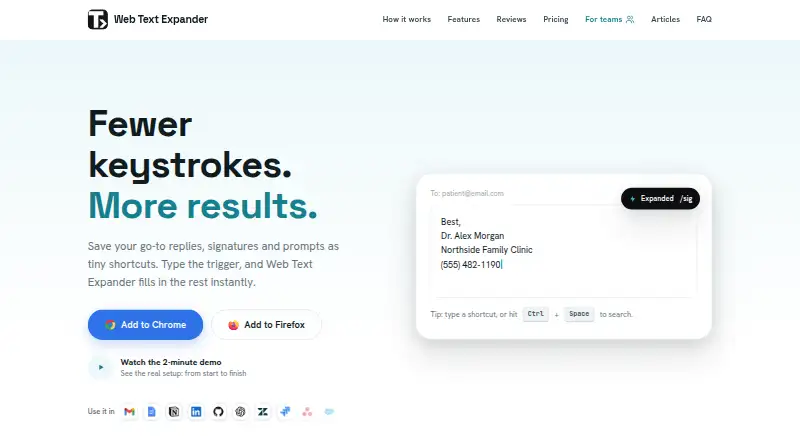
What Web Text Expander is
Web Text Expander is a desktop browser extension that turns typed shortcuts into saved replies, signatures, prompts, and templates. It supports Chrome and Firefox, plus Chromium-based browsers such as Edge, Brave, and Opera through the Chrome extension. It works on Windows, macOS, Linux, and ChromeOS wherever those browsers run, but is unavailable on iOS and Android. Shortcuts can use rich formatting, fillable placeholders, categories, caret control, clipboard insertion, and automatic dates; quick search and quick add are also included. The free plan offers unlimited shortcuts and import and export, with use on two devices per email. Plus costs €1.99 a month, billed 23.88 EUR yearly, and adds the extended shortcut features. Team costs €4.99 a month, billed monthly, with a two-seat minimum and shared libraries, a dashboard, usage insights, and centralized billing. Snippets are stored locally in the browser. The maker says expansion happens on-device without reading, collecting, or transmitting typed text. It works on almost all websites, though custom editors may behave differently.
Who it suits
It suits people who frequently reuse text, including customer support workers, healthcare professionals, sales teams, virtual assistants, recruiters, and freelancers. Teams can use shared libraries and administration features on the Team plan.
What it does well
- Free plan includes unlimited shortcuts
- Supports Chrome, Firefox, and Chromium-based browsers
- Snippets are stored locally in the browser
- Team plan includes shared shortcut libraries
What to know first
- Unavailable on iOS and Android
- Free plan is limited to two devices per email
- Team plan requires at least two seats
Limits
The free plan supports two devices per email. Team requires a minimum of two seats; Plus is billed €23.88 yearly, and Team is billed monthly.
Plans
| Plan | Billed and limits | Price |
|---|---|---|
| Free | Forever · Unlimited shortcuts · Import & export · 2 devices per email · Email support | Free |
| Plus | Billed €23.88 yearly. Save 20%. · Unlimited shortcut length · Rich text formatting · Fillable placeholders · Categories · Caret position control · Clipboard insertion · Date placeholders · Quick search · Quick add | €1.99 a month |
| Team | Monthly only; minimum 2 seats · Full Plus features · Shared shortcut libraries · Team dashboard · Usage insights · Centralized billing | €4.99 a month |
As webtextexpander.com lists them, read 8 Oct 2026. The maker's own page has the final word.
Getting started
- Visit https://webtextexpander.com/.
- Use Chrome, Firefox, or a supported Chromium-based browser on Windows, macOS, Linux, or ChromeOS.
- Choose the Free, Plus, or Team plan.
- For Team, select at least two seats.
- Create shortcuts for saved replies, signatures, prompts, or templates.
Web Text Expander is a desktop browser extension that turns short triggers into saved replies, signatures, prompts, and templates. It is best for individuals and browser-based teams that repeat substantial amounts of text, especially where local storage and an unlimited free shortcut count matter. Its desktop-only scope and paid team minimum make it less suitable for mobile workers or very small groups seeking shared libraries.
Overview
The extension expands shortcuts on almost all websites and supports Chrome, Firefox, and most Chromium browsers, including Edge, Brave, and Opera through the Chrome extension. Custom editors can behave differently, so workflows built around specialized web applications may not be equally predictable everywhere. Snippets remain stored locally in the browser, and the maker says expansion occurs on-device without reading, collecting, or transmitting typed text. That is a strong privacy position for customer replies, healthcare text, recruiting material, or sales prompts.
The Free plan is unusually substantial for solo use: it permits unlimited shortcuts and includes import and export. Use is capped at two devices per email, however, so people moving among more machines may need Plus or a separate account arrangement. Paid tiers add editing controls and collaboration rather than merely increasing the shortcut allowance.
Key features
Plus supplies rich formatting, fillable placeholders, categories, caret-position control, clipboard insertion, automatic date placeholders, quick search, and quick add. These features turn a shortcut into a reusable template: placeholders accommodate changing names or details, dates keep time-sensitive replies current, and categories and search make a large library practical. Caret control and clipboard insertion are useful when expanded text still needs finishing in a particular location.
Team adds automatic synchronization of shared shortcut libraries and lets administrators decide which categories each team receives. Admins can invite or remove members, manage seats, and see each member's shortcut and expanded-character counts. Teams may also use the collaboration features while keeping snippets local and exchanging them through import and export, a worthwhile option for organizations that do not want centrally stored text.
Pricing
Free
Free costs nothing, billed Forever. It includes unlimited shortcuts, import and export, use on two devices per email, and email support. Choose it when a single desktop user needs a large personal library and does not require Plus editing tools or synchronized team libraries.
Plus
Plus costs €1.99 a month, billed €23.88 yearly, with a 20% saving. It includes every listed formatting, placeholder, organization, search, date, caret, clipboard, and quick-add feature. It is the sensible individual upgrade for structured templates and faster retrieval; it does not add Team's shared libraries, dashboard, or usage administration.
Team
Team costs €4.99 a month, billed monthly only, with a minimum of two seats. It includes full Plus features, shared shortcut libraries, a team dashboard, usage insights, and centralized billing. The seat minimum means it is aimed at an actual group rather than a solo buyer, but the administrative controls are useful for support, recruiting, sales, and virtual-assistant operations that need consistent responses.
Platforms
Web Text Expander runs on Windows, macOS, Linux, and ChromeOS wherever Chrome or Firefox run. It is delivered as a browser extension and has no iOS or Android version. Desktop browser users are the target; anyone needing phone-based expansion should look elsewhere. Email is the primary support channel, with replies normally provided within two business days.
Who it's for
Customer-support agents can standardize recurring answers, while healthcare professionals can keep frequently used wording close at hand without sending snippets to a server. Sales outreach and recruiting teams benefit from adaptable prompts and shared categories, and freelancers or virtual assistants can start with the generous free tier. It is a poor fit for mobile-first work, users dependent on unusual web editors, or teams that need fewer than two paid seats for centralized sharing.
Pros and cons
Pros
- Unlimited free shortcuts: a personal library can grow without a shortcut-count ceiling.
- Local, on-device expansion: the maker says typed text is not read, collected, or transmitted.
- Strong template tooling: placeholders, dates, formatting, caret control, and clipboard insertion support complex replies.
- Practical team controls: shared libraries, category assignment, seat management, and usage counts support governed deployment.
Cons
- Desktop only: no iOS or Android support excludes mobile workflows.
- Free device cap: the free tier works on two devices per email.
- Team entry cost: Team requires at least two seats and monthly billing.
- Editor variability: custom website editors may not behave like ordinary text fields.
Alternatives
Sniips is worth choosing if Android or iOS access matters, or if a free trial and a 25-snippet, two-device Basic tier suit a smaller starting library.
InsertKit fits buyers wanting Android support and a free plan capped at 10 snippets with clipboard history and no team access.
TextExpander is an alternative for users who need iOS alongside desktop and web platforms.
Briskine suits people seeking Android and iOS availability with a free 30-template, one-person plan.
PhraseExpress is another desktop-oriented option with lifetime-license plans and a free trial.
typedesk is appropriate when a personal free tier limited to 50 uses per week is acceptable.
Ant Text is a macOS, Windows, and web alternative with free snippet tiers and a free trial.
Espanso is the straightforward choice for users who specifically want free, open-source software under GPL-3.
See the broader Text Expansion Software list for more options.
Verdict
Choose Web Text Expander if you work primarily in desktop browsers and want unlimited personal shortcuts, privacy-conscious local storage, and a low-cost path to rich templates. Look elsewhere if mobile support is essential, your sites rely heavily on custom editors, or you need team sharing without committing to Team's two-seat minimum.
Verdict
Web Text Expander covers reusable text across supported desktop browsers, with a free option and paid individual and team plans. Check browser compatibility and the device limit if considering the free plan.
Questions
Is Web Text Expander free?
Yes. The Free plan costs nothing and includes unlimited shortcuts, import and export, and use on two devices per email.
What do the paid plans cost?
Plus costs €1.99 a month, billed €23.88 yearly. Team costs €4.99 a month, billed monthly, with a minimum of two seats.
Which browsers and systems does it support?
It supports Chrome and Firefox, plus most Chromium-based browsers including Edge, Brave, and Opera. It runs on Windows, macOS, Linux, and ChromeOS wherever Chrome or Firefox run.
Can I use it on a phone or tablet?
No. It is a desktop browser extension and is unavailable on iOS and Android.
Does it support team sharing?
Yes. Team can sync shared shortcut libraries automatically and lets administrators control which categories members receive.
Where are snippets stored?
Snippets are stored locally in the browser. The maker says expansion happens on-device without reading, collecting, or transmitting typed text.
Facts from Web Text Expander's own pages
- Browser support
- It supports Chrome and Firefox, plus most Chromium based browsers including Edge, Brave, and Opera through the Chrome extension. · webtextexpander.com, 8 Oct 2026
- Core features
- Features include rich formatting, fillable placeholders, category organization, caret control, clipboard insertion, automatic dates, quick search, and quick add. · webtextexpander.com, 8 Oct 2026
- Free limits
- The free plan allows unlimited shortcuts and includes import and export, with use on two devices per email. · webtextexpander.com, 8 Oct 2026
- Intended users
- The maker lists customer support, healthcare professionals, sales outreach, virtual assistants, recruiting teams, and freelancers among its intended users. · webtextexpander.com, 8 Oct 2026
- Mobile limit
- The product is a desktop browser extension and is not available on iOS or Android. · webtextexpander.com, 8 Oct 2026
- Purpose
- The browser extension expands typed shortcuts into saved replies, signatures, prompts, and templates. · webtextexpander.com, 8 Oct 2026
- Storage and privacy
- Snippets are stored locally in the browser, and the maker says expansion happens on-device without reading, collecting, or transmitting typed text. · webtextexpander.com, 8 Oct 2026
- Support
- The legal notice lists email as the primary support channel and says the provider normally replies within two business days. · webtextexpander.com, 8 Oct 2026
- Supported systems
- It works on Windows, macOS, Linux, and ChromeOS wherever Chrome or Firefox run. · webtextexpander.com, 8 Oct 2026
- Team administration
- Team administrators can invite and remove members, manage seats, and view counts of shortcuts and characters expanded by each member. · webtextexpander.com, 8 Oct 2026
- Team sharing
- The Team plan can sync shared shortcut libraries automatically to members and lets admins control which categories each team receives. · webtextexpander.com, 8 Oct 2026
- Team storage choice
- The maker says teams can use the other Team plan features while keeping snippets local and sharing them through import and export. · webtextexpander.com, 8 Oct 2026
- Website compatibility
- It works on almost all websites, though some sites with custom editors may behave differently. · webtextexpander.com, 8 Oct 2026
Where Web Text Expander stands on Freedom251
- Text Expansion Software#20 of 31