Freedom251 › Text Expansion Software

Sniips
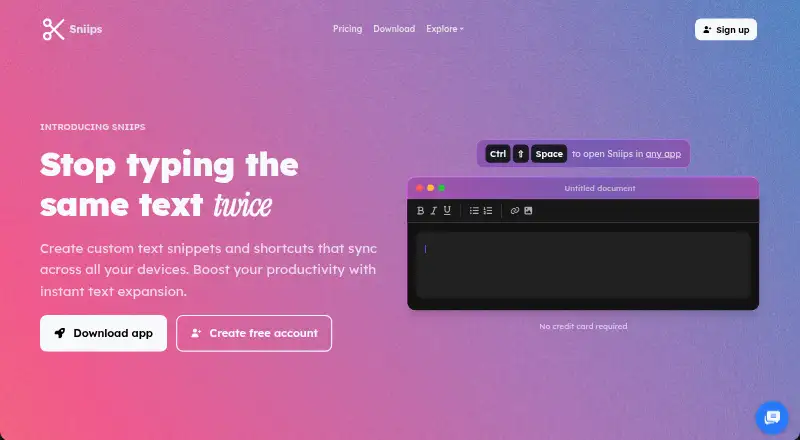
What Sniips is
Sniips creates reusable text snippets and shortcuts that expand in applications such as browsers, email, code editors, and chat apps, then syncs them across devices. Snippets can include rich text, placeholders, and date or time stamps; smart variables can insert dates, clipboard contents, cursor positions, or custom fill-in fields. Folders, tags, search, favorites, import and export, and backup options help manage a collection. Sniips says it can import from TextExpander, aText, and other tools, and its browser extension works independently of its desktop app. Team features include shared folders, permission controls, and updates that sync to everyone immediately. An MCP integration provides setup guidance for AI assistant clients, and a private API key authenticates API requests. The maker says it uses end-to-end encryption and does not sell user data. The free Basic plan allows 25 snippets on two devices. Paid plans are listed at $4 a year for Plus, $8 a year for Pro, and $16 a year for Max, each billed annually at $48, $96, and $192 respectively.
Who it suits
Sniips suits individuals, developers, and teams who reuse text or code and want shortcuts across devices. Its team features, API, and AI-assistant integration may also suit shared workflows.
What it does well
- Free Basic plan includes 25 snippets on two devices.
- Smart variables can insert clipboard contents and custom fields.
- Team plans include shared folders and permission controls.
- Browser extension works independently of the desktop app.
- Imports from TextExpander, aText, and other tools.
What to know first
- No mobile support.
- Free plan is limited to 25 snippets and two devices.
- Downgrading over the free-plan limit prevents creating snippets.
- Paid plans are billed annually.
Limits
Basic allows 25 snippets across two devices. After downgrading beyond the free plan's limits, users can access and edit existing snippets but cannot create new ones until they are under the limit or upgrade.
Plans
| Plan | Billed and limits | Price |
|---|---|---|
| Basic | 25 snippets · 2 devices | Free |
| Max | Billed $192 annually · Unlimited snippets · unlimited device sync · team sharing · custom branding | $16 a month |
| Plus | Billed $48 annually · 200 snippets · unlimited device sync · smart variables | $4 a month |
| Pro | Billed $96 annually · 1,000 snippets · unlimited device sync · priority support | $8 a month |
| Enterprise | Custom solutions · advanced security · flexible pricing | On request |
As sniips.com lists them, read 15 Oct 2026. The maker's own page has the final word.
Getting started
- Visit the Sniips website.
- Choose the free Basic plan or a paid plan.
- Install Sniips on Windows, macOS, or Linux, or use the web app or browser extension.
- Create snippets and organize them with folders or tags.
- Import snippets from TextExpander, aText, or another tool if needed.
- For AI assistant connections, follow the MCP setup guidance for a supported client.
Sniips is a text-expansion app for people who reuse text or code across applications and devices. It suits individuals who need more than a small snippet list, as well as teams that want shared folders and permissions. Its strongest case is the combination of flexible variables and collaboration; mobile support is a notable gap.
Overview
Sniips turns shortcuts into text in browsers, email, code editors, and chat apps. Rich text and organization tools help keep a larger collection manageable, while variables let you tailor an expansion instead of pasting the same fixed wording each time. Team sharing extends that utility beyond one person, but the free tier's 25-snippet and two-device limits can force an upgrade as usage grows.
The browser extension works independently of the desktop app, useful for browser-based workflows. Sniips also offers an MCP integration for connecting AI assistants and a private API key for authenticated requests. It says it uses end-to-end encryption and does not sell user data.
Key features
Snippets and smart variables
Folders, tags, search, and favorites provide several ways to find saved text; import, export, and backup options support maintaining a reusable library. Smart variables can insert dates, clipboard contents, cursor positions, and custom fill-in fields. That makes the app a better fit for messages or code that need recurring edits than a basic collection of fixed shortcuts.
Team and developer workflows
Shared folders, permission controls, and updates that sync immediately to teammates make Sniips suitable for groups maintaining common text. The MCP setup guidance covers Claude, Cursor, VS Code, Codex, and Gemini CLI. These connections may appeal to developers and AI-assisted workflows, though the API uses a private key rather than being described as a shared team interface.
Pricing
Sniips has a free plan and a 14-day trial. Basic costs nothing and allows 25 snippets on two devices. That is a reasonable starting point for a small personal library, but the device cap and snippet ceiling make it less suitable for heavier use. After downgrading below a plan's limits, users can still access and edit existing snippets but cannot create new ones until they are under the limit or upgrade.
- Plus: $4 a year, billed $48 annually. It includes 200 snippets, unlimited device sync, and smart variables. It suits individuals who outgrow Basic and need adaptable snippets across devices.
- Pro: $8 a year, billed $96 annually. It raises the cap to 1,000 snippets and adds priority support, while retaining unlimited device sync. The larger library and quicker support response make it a better fit for frequent users.
- Max: $16 a year, billed $192 annually. It provides unlimited snippets, unlimited device sync, team sharing, and custom branding. This is the relevant tier for teams that need shared content; individuals who do not need sharing may not need its additional scope.
- Enterprise: custom pricing for custom solutions for large organizations.
Support typically responds within 24 hours on business days; Pro and Max users usually receive responses within four hours. The paid plans' annual billing is a meaningful commitment compared with a monthly option.
Platforms
Sniips supports Windows, macOS, Linux, and web, along with a browser extension. It has no mobile support, despite being usable across desktop and web environments. That makes it a poor choice if phone-based expansion is essential. The broader platform list also includes Android, iOS, and API, but the supported-platform details specify desktop, web, and extension use.
Who it's for
Sniips is best for people who repeatedly enter the same messages or code and want organization, reusable variables, or synchronized access across devices. Teams can benefit from shared folders and permission controls, while developers may value the API and MCP setup. It is less compelling for occasional users who can stay within a small free library, or anyone who needs mobile support.
Pros and cons
- Pros: Smart variables cover dates, clipboard contents, cursor positions, and fill-in fields, making snippets adaptable.
- Pros: Shared folders and permissions support coordinated team libraries, with updates syncing immediately.
- Pros: Importing from TextExpander, aText, and other tools can ease a switch to Sniips.
- Cons: The free plan stops at 25 snippets and two devices, which limits growth without upgrading.
- Cons: No mobile support rules it out for workflows centered on phones or tablets.
- Cons: Paid plans are billed annually, so the stated monthly-equivalent prices are not monthly payment terms.
Alternatives
Text Expansion Software is a useful starting point for comparing the category. Consider InsertKit if its free tier's 10 snippets and 30-item clipboard history better match a smaller collection, or if its listed mobile app matters. TextExpander is another freemium option with a free plan and support for iOS, unlike Sniips. Choose Briskine if a web-focused tool with Android and iOS support is a closer fit; its free plan covers 30 templates for one person.
PhraseExpress is worth considering for users who want a lifetime-license option or professional-use features. typedesk may suit personal use that can stay within 50 uses per week and one user on its free plan. Web Text Expander offers a free plan with unlimited shortcuts and a two-device limit, and supports EUR pricing. Ant Text is another option with free snippet tiers and a free trial. Choose Espanso if open-source software under the GPL-3 license is the priority.
Verdict
Choose Sniips if you need organized text expansion with smart variables and, at the Max tier, team sharing across supported desktop and web platforms. Its upgrade path supports growing personal libraries and shared team use, but the free caps and annual billing deserve attention. Look elsewhere if mobile expansion is essential or a small, free collection is all you need.
Verdict
Sniips offers text expansion with organization tools, variables, and team sharing across supported platforms. Check the free-plan limits and annual billing details against your needs.
Questions
Is Sniips free?
Yes. Basic is free and includes 25 snippets on two devices.
What do the paid plans cost?
Plus is listed at $4.00 per year, billed $48 annually; Pro is $8.00 per year, billed $96 annually; Max is $16.00 per year, billed $192 annually. A 14-day trial is also listed.
Which platforms does Sniips support?
The listed platforms include Windows, macOS, Linux, web, and browser extension. Mobile support is not offered.
Does Sniips support team sharing?
Yes. Team features include shared folders, permission controls, and updates that sync to everyone immediately.
Can Sniips connect to AI assistants?
Yes. Its account page describes an MCP integration and setup guidance for clients including Claude, Cursor, VS Code, Codex, and Gemini CLI.
Can I import existing snippets?
Yes. Sniips says it can import from TextExpander, aText, and other tools.
Facts from Sniips's own pages
- API
- The account page provides a private API key for authenticating API requests. · sniips.com, 9 Oct 2026
- API and SDKs
- The official pages reviewed describe application features but do not provide a public API reference or SDK documentation. · sniips.com, 15 Oct 2026
- Automatic updates
- The terms say the installed application may automatically install updated or revised files. · sniips.com, 15 Oct 2026
- Browser extension
- The browser extension can operate independently without the desktop application. · sniips.com, 15 Oct 2026
- Code snippets
- Developer features include function and class templates, React scaffolds, API patterns, documentation blocks and debugging snippets. · sniips.com, 15 Oct 2026
- Company activities
- LinkedIn says ITW Creative Works develops apps and provides marketing, SEO, software development and music-production services. · linkedin.com, 15 Oct 2026
- Company founding
- LinkedIn lists ITW Creative Works as founded in 2018. · linkedin.com, 15 Oct 2026
- Company headquarters
- LinkedIn lists ITW Creative Works headquarters in Redondo Beach, California. · linkedin.com, 15 Oct 2026
- Company ownership
- Sniips identifies itself as a brand within parent company ITW Creative Works. · sniips.com, 15 Oct 2026
- Company size
- LinkedIn lists ITW Creative Works as having 2–10 employees. · linkedin.com, 15 Oct 2026
- Cross-device sync
- Sniips synchronizes snippet libraries across Mac, Windows and browser extensions. · sniips.com, 15 Oct 2026
- Data rights
- The terms say Sniips collects only data it considers necessary and provide a right to request deletion under GDPR language. · sniips.com, 15 Oct 2026
- Downgrade limit
- After downgrading beyond the free plan's limits, users can access and edit existing snippets but cannot create new ones until under the limit or upgraded. · sniips.com, 9 Oct 2026
- Editor support
- The developer page says Sniips works in VS Code, IntelliJ, Sublime and Vim, regardless of language. · sniips.com, 15 Oct 2026
- Email templates
- Reusable templates work in Gmail, Outlook, Apple Mail and other email clients, with recipient and date placeholders. · sniips.com, 15 Oct 2026
- Expansion
- Snippets can expand in applications including browsers, email, code editors, and chat apps. · sniips.com, 9 Oct 2026
- Features
- The site lists rich text, variable placeholders, date and time stamps, folders, tags, search, favorites, import and export, and backup options. · sniips.com, 9 Oct 2026
- Founded
- 2019 · sniips.com, 28 Sept 2026
- Importing
- Sniips says it can import snippets from TextExpander, aText, and other tools. · sniips.com, 9 Oct 2026
- Import support
- Sniips says it can import snippets from TextExpander, aText, PhraseExpress and most other text expanders. · sniips.com, 15 Oct 2026
- Independent mention
- Anthill’s 2018 SMART100 article lists Sniips among its honorable mentions. · anthillonline.com, 15 Oct 2026
- Integrations
- The official solutions pages name Gmail, Outlook, Apple Mail, Slack, Word, browsers and code editors as places where expansion works. · sniips.com, 15 Oct 2026
- Intended users
- The site presents Sniips for individuals, developers, and teams that want to reduce repetitive typing and reuse text or code. · sniips.com, 9 Oct 2026
- Liability limit
- The terms limit claims against Sniips to the amount the user paid and disclaim liability for downtime, data loss and service changes. · sniips.com, 15 Oct 2026
Where Sniips stands on Freedom251
- Text Expansion Software#12 of 31