Freedom251 › Dictation software
VoiceInk
What VoiceInk is
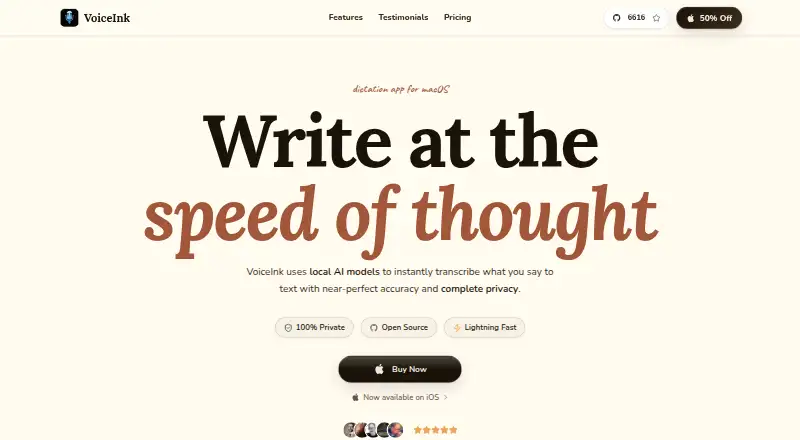
VoiceInk is a dictation and writing app for macOS and iOS that turns speech into text across Mac apps. It can remove filler words, structure longer notes, draft emails, and rewrite selected text. Custom vocabulary and Smart Replace help retain specific terms or expand and replace phrases, while voice commands provide another way to control dictation. Local AI models process transcription on the device by default, and the maker says transcription data is not transmitted in that mode. Users may connect cloud transcription or enhancement services with their own API keys; cloud transcription sends audio, while enhancement sends text. VoiceInk describes itself as open source. Its iOS companion supports dictation across iPhone and iPad apps and is free during beta. Mac use requires an Apple Silicon Mac with macOS 14.4 or later. The listed Mac plans are one-time purchases with lifetime access, although prices use monthly terms: $25.00, $39.00, and $49 a month.
Who it suits
VoiceInk suits Mac users who want dictation, writing cleanup, custom vocabulary, and voice commands. It also fits people who prefer local transcription or need an iOS companion for dictation.
What it does well
- Offline dictation and local transcription
- Custom vocabulary and Smart Replace
- Voice commands supported
- Writing tools rewrite and structure text
- Open-source project
What to know first
- Requires Apple Silicon Mac
- Requires macOS 14.4 or later
- No free plan
- Cloud options send audio or text
Limits
The Solo plan covers one macOS device, Personal covers up to two, and Extended covers up to three. The iOS companion is free during beta, with a one-time purchase planned afterward.
Plans
| Plan | Billed and limits | Price |
|---|---|---|
| Solo | One-time purchase · 1 macOS device · lifetime access and updates · 14-day money-back guarantee | $25, paid once |
| Personal | One-time purchase · Up to 2 macOS devices · lifetime access and updates · 14-day money-back guarantee | $39, paid once |
| Extended | One-time purchase · Up to 3 macOS devices · lifetime access and updates · 14-day money-back guarantee | $49, paid once |
As tryvoiceink.com lists them, read 8 Oct 2026. The maker's own page has the final word.
Getting started
- Open the VoiceInk website
- Choose the Mac plan that matches your macOS device count
- Install it on an Apple Silicon Mac running macOS 14.4 or later
- Start the free trial
- Configure custom words, Smart Replace, or voice commands
- Optionally connect a third-party provider with your own API key
- Use the iOS companion for dictation in iPhone and iPad apps
Verdict
VoiceInk offers broad dictation and editing tools with local processing by default. Check the Mac hardware requirement and the unusual one-time-purchase pricing presentation before buying.
Questions
Does VoiceInk have a free plan?
There is no free Mac plan, but a free trial is available. The iOS companion is free during beta.
How much do the Mac plans cost?
Solo is $25 a month, Personal is $39 a month, and Extended is $49 a month. Each is described as a one-time purchase with lifetime access.
Which devices and operating systems are supported?
VoiceInk supports macOS and iOS. Mac use requires an Apple Silicon Mac with macOS 14.4 or later.
Can transcription run offline?
Yes. Offline dictation is supported, and local AI models process transcription on the device by default.
Is VoiceInk open source?
VoiceInk describes itself as open source and links to its source code on GitHub.
Facts from VoiceInk's own pages
- Custom vocabulary
- Yes · tryvoiceink.com, 20 Sept 2026
- Dictation
- VoiceInk turns speech into text for use across apps on Mac. · tryvoiceink.com, 8 Oct 2026
- Free plan
- No · tryvoiceink.com, 20 Sept 2026
- Free trial
- The Mac download page advertises a free seven-day trial. · tryvoiceink.com, 8 Oct 2026
- iOS companion
- The iOS companion app offers dictation across iPhone and iPad apps and is free during beta, with a one-time purchase planned afterward. · tryvoiceink.com, 8 Oct 2026
- Local processing
- Local AI models process transcription on the device by default, and the maker says transcription data is not transmitted when local processing is used. · tryvoiceink.com, 8 Oct 2026
- Mac requirements
- The pricing page says VoiceInk works only on Apple Silicon Macs and requires macOS 14.4 or later. · tryvoiceink.com, 8 Oct 2026
- Offline dictation
- Yes · tryvoiceink.com, 20 Sept 2026
- Open source
- VoiceInk describes itself as open source and links to its source code on GitHub. · tryvoiceink.com, 8 Oct 2026
- Optional cloud services
- Users can connect third-party transcription and enhancement providers with their own API keys; cloud transcription sends audio, while enhancement sends text. · tryvoiceink.com, 8 Oct 2026
- Privacy model
- hybrid · tryvoiceink.com, 20 Sept 2026
- Providers
- The privacy policy lists providers including Groq, OpenAI, Anthropic, Gemini, Mistral, Deepgram, ElevenLabs, Speechmatics, Soniox, OpenRouter, and Ollama. · tryvoiceink.com, 8 Oct 2026
- Security
- The maker says API keys are stored in the device Keychain and local transcription data is held in a SwiftData database protected by system-level encryption. · tryvoiceink.com, 8 Oct 2026
- Support
- The solo developer, Pax, provides support by email and says replies usually arrive within 24–48 hours. · tryvoiceink.com, 8 Oct 2026
- Supported platforms
- macOS,iOS · tryvoiceink.com, 20 Sept 2026
- Vocabulary
- Custom words and Smart Replace let users preserve specific terms and expand or replace phrases. · tryvoiceink.com, 8 Oct 2026
- Voice commands
- Yes · tryvoiceink.com, 20 Sept 2026
- Writing features
- It can remove filler words, structure longer notes, draft emails, and rewrite selected text. · tryvoiceink.com, 8 Oct 2026
Where VoiceInk stands on Freedom251
- Dictation software#24 of 27
- Ai Dictation Apps#22 of 23