Freedom251 › Dictation software
Voice In
What Voice In is
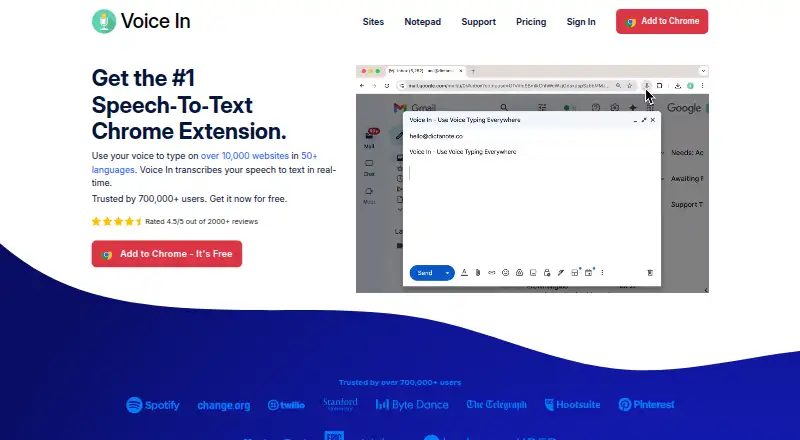
Voice In is a browser extension that turns speech into text in web text fields, placing recognized words at the cursor as you speak. It is available for Chrome and Edge on Windows, macOS, Linux, and Chromebooks, and supports more than 50 languages and 100 dialects. The maker says it supports dictation on more than 10,000 websites and lists 268 tested apps, including Gmail, ChatGPT, Google Docs, WhatsApp, Slack, Notion, Salesforce, and Teladoc. Some listed apps require Plus Advanced Mode. Built-in voice commands can add punctuation and paragraphs or correct common dictation errors. The free plan includes 60 minutes of dictation per day. Voice In Plus adds unlimited dictation, Advanced Mode, custom commands, language switching, a Dictation Box, and other premium features. Its AI Transforms can polish selected text or apply a style you customize; only the selected text is sent to an AI model, and Voice In says it is not stored by the service. Dictation uses Chrome or Edge speech-to-text, and the privacy policy says audio and transcript text are not sent to Voice In servers. The extension requires an internet connection and works only in a browser.
Who it suits
Voice In suits people who want to dictate into web text fields across supported Chrome or Edge browsers, with voice commands and broad language support. Its free plan fits users who can work within 60 minutes of dictation per day; Plus is for those who need unlimited dictation and premium features.
What it does well
- Dictates into web text fields at the cursor in real time.
- Supports more than 50 languages and 100 dialects.
- Built-in commands add punctuation, paragraphs, and corrections.
- Free plan includes 60 minutes of daily dictation.
- Audio and transcript text are not sent to Voice In servers.
What to know first
- Requires an active internet connection and cannot dictate offline.
- Works only within a browser.
- Free plan limits dictation to 60 minutes per day.
- Some listed apps require Plus Advanced Mode.
Limits
The free plan allows 60 minutes of dictation per day. Voice In requires an internet connection and does not work offline; some listed apps require Plus Advanced Mode.
Plans
| Plan | Billed and limits | Price |
|---|---|---|
| Free plan | Dictation in 50+ languages · popular sites · built-in punctuation commands · 60 minutes of dictation per day | Free |
| Voice In Plus Monthly | Billed monthly · cancel anytime · Unlimited dictation · Advanced Mode on every site · AI Transforms · custom voice commands · all premium features | $9.99 a month |
| Voice In Plus Yearly | $59.99 / year; page also shows ~~$119.88~~ and “Save 50% Just $5 / month” · Unlimited dictation · Advanced Mode on every site · AI Transforms · custom voice commands · all premium features | $59.99 a year |
| Voice In Plus Lifetime | One payment, no subscription · All premium features for life · all future plan updates · offer stated available until October 05th | $149.99, paid once |
As dictanote.co lists them, read 5 Oct 2026. The maker's own page has the final word.
Getting started
- Visit the Voice In website.
- Use Chrome or Edge on Windows, macOS, Linux, or a Chromebook.
- Choose the free plan or a Voice In Plus plan.
- Use the browser extension to dictate into a web text field.
Voice In is a Chrome and Edge extension that turns speech into text wherever a web text field accepts typing. It suits people who spend their day in browser-based documents, messaging, support and productivity apps. The trade-off is a strict browser-and-internet boundary, while the free tier limits dictation to 60 minutes a day.
Overview
Voice In inserts recognized speech at the cursor in real time, avoiding the need to dictate into a separate app and paste the result into a website. The maker says it works on more than 10,000 websites and identifies 268 tested apps, including Gmail, Google Docs, ChatGPT, WhatsApp, Slack, Notion, Salesforce and Teladoc. A lock marks some tested apps that require Plus Advanced Mode, so the headline site count does not mean every integration is available on Free.
It recognizes more than 50 languages and 100 dialects. Built-in commands can add punctuation, create paragraphs and fix common dictation errors, giving basic users some control over structure rather than a raw stream of words. Voice In is still a browser utility: it does not provide system-wide dictation, requires an active internet connection and cannot work offline.
Key features
Voice In Plus expands the extension with Advanced Mode, custom voice commands, dictation across multiple tabs, a Dictation Box, language switching, case changes and premium support. Advanced Mode is particularly important for sites marked as requiring it; multiple-tab support and a Dictation Box are more relevant to users moving between several browser workflows than to occasional dictation.
AI Transforms can polish selected text or apply a style you define. Only the selected passage is sent to an AI model, and Voice In says it does not store that text. This is useful for revising a dictated draft, but it is an optional Plus workflow rather than part of the free speech-to-text core.
Processing uses the Chrome or Edge speech-to-text service. Dictated audio and transcript text are not sent to or stored on Voice In servers. The service does collect domains used and whether dictation worked, and logged-in accounts store settings and voice commands. The maker says it complies with GDPR and supports requests to access, correct or remove personal data. It does not offer a HIPAA business associate agreement because it does not control the browser speech-to-text function.
Pricing
| Plan | Price | What you get |
|---|---|---|
| Free plan | free | Dictation in 50+ languages, popular sites, built-in punctuation commands and 60 minutes of dictation per day. |
| Voice In Plus Monthly | $9.99 a month | Unlimited dictation, Advanced Mode on every site, AI Transforms, custom voice commands and all premium features; billed monthly and cancel anytime. |
| Voice In Plus Yearly | $59.99 a year | The same Plus feature set, shown as $5 per month with a crossed-out $119.88 and “Save 50%”; billed annually. |
| Voice In Plus Lifetime | Custom pricing | All premium features for life and all future plan updates. |
Free is a credible fit for browser writers whose daily dictation stays below an hour. Monthly Plus removes the quota and suits variable or heavy use without a long commitment. Yearly costs less than twelve monthly payments at the stated prices, but requires annual billing. Lifetime pricing is not published, so its value depends on the quoted amount.
Platforms
Voice In is offered as an extension for Windows, macOS, Linux and Chromebooks, through Chrome and Edge. It works inside the browser rather than as a native desktop dictation layer. The active internet requirement rules it out for offline work or environments where browser speech services cannot be used.
Who it's for
Choose it for browser-first work: email, web documents, chat, CRM forms and other online fields where speaking directly into the cursor saves switching and pasting. Multilingual users also benefit from the language and dialect coverage. Plus is aimed at people who need unlimited minutes, Advanced Mode on restricted sites, custom commands or cross-tab workflows.
Look elsewhere if you need dictation in desktop applications, offline operation or a HIPAA business associate agreement. The 60-minute daily ceiling also makes Free unsuitable for sustained all-day dictation.
Pros and cons
Pros
- Works directly in a very large range of web fields, including major mail, document, chat and business apps.
- More than 50 languages and 100 dialects broaden its usefulness for multilingual teams.
- Built-in punctuation and correction commands make dictated drafts easier to shape.
- On-device browser processing keeps dictated audio and transcripts off Voice In servers.
- Plus adds unlimited use, Advanced Mode, custom commands, AI Transforms and multi-tab dictation.
Cons
- Browser-only operation excludes native desktop software and offline scenarios.
- Free dictation stops at 60 minutes per day.
- Some tested websites require Plus Advanced Mode.
- Voice In collects domain-use and success data, and logged-in users' settings and commands are stored.
- No HIPAA business associate agreement is offered.
Alternatives
Wispr Flow is a better fit when you want Android or iOS coverage as well as desktop apps, though its free plan limits desktop use to 2,000 words per week and mobile use to 1,000.
Superwhisper suits users seeking voice-to-text in any app, meeting recording and transcription, 100+ languages and a free trial.
Dictanote is preferable if you want a notes-focused service across web and mobile platforms, with 50 notes in one notebook and 60 minutes of daily dictation on Free.
WakaScribe offers a free local plan with unlimited words and no time limit.
Lispr is a macOS and Windows alternative with 60 free dictation minutes per week.
Vito is a free, open-source option for local use on Linux, macOS and Windows.
Serenade is another free, open-source desktop choice for Linux, macOS and Windows.
Aqua Voice offers mobile and desktop apps with a 1,000-word Starter allowance and a paid unlimited tier.
Browse more options in Dictation software, Speech-to-Text Software and Speech Recognition Software.
Verdict
Voice In is a strong choice for people who dictate mainly into Chrome or Edge and want commands, broad website coverage and multilingual support without installing a desktop recorder. Its main reason to choose Plus is unlimited dictation with Advanced Mode and customization; its main reason to look elsewhere is the unavoidable browser-only, online requirement and the Free plan's daily cap.
Verdict
Choose Voice In if you want speech-to-text across web fields in Chrome or Edge, with built-in voice commands and a daily free allowance. Look elsewhere if you need offline dictation or dictation outside a browser. Plus may suit users who need unlimited dictation and features such as Advanced Mode or AI Transforms.
Questions
Is Voice In free?
Yes. The free plan costs nothing and allows 60 minutes of dictation per day.
How much does Voice In Plus cost?
The monthly plan costs $9.99 a month. The yearly plan costs $59.99 a year.
Which browsers and platforms does it support?
Voice In is offered for Chrome and Edge on Windows, macOS, Linux, and Chromebooks.
Can Voice In work offline?
No. It requires an active internet connection and does not work offline.
What does Plus add?
Plus includes unlimited dictation, Advanced Mode, custom voice commands, a Dictation Box, language switching, case changes, AI Transforms, and premium support.
How does Voice In handle dictated audio and text?
Its privacy policy says Chrome or Edge speech-to-text processes dictated audio and transcript text, which are not sent to or stored on Voice In servers.
Facts from Voice In's own pages
- AI Transforms
- AI Transforms can polish selected text or apply a user-customized style, and the maker says only the selected text is sent to an AI model and is not stored by Voice In. · dictanote.co, 5 Oct 2026
- Browser availability
- The maker offers Voice In for Chrome and Edge. · dictanote.co, 5 Oct 2026
- Built-in commands
- Built-in voice commands can insert punctuation, add paragraphs, and correct common dictation errors. · dictanote.co, 5 Oct 2026
- Data collected
- The privacy policy says Voice In collects domains used and whether dictation worked, and stores account settings and voice commands for logged-in users. · dictanote.co, 5 Oct 2026
- Free plan
- Yes · dictanote.co, 20 Sept 2026
- GDPR
- The maker's support page states that Voice In complies with GDPR and that users can request access, correction, or removal of personal data. · dictanote.co, 5 Oct 2026
- HIPAA
- The maker says it has not offered a HIPAA business associates agreement because it does not control the browser-provided speech-to-text function. · help.dictanote.co, 5 Oct 2026
- Integrations
- The tested app list includes Gmail, ChatGPT, Google Docs, WhatsApp, Slack, Notion, Salesforce, Teladoc, and many other web apps; a lock marks apps requiring Plus Advanced Mode. · dictanote.co, 5 Oct 2026
- Languages
- The product supports dictation in more than 50 languages and 100 dialects. · dictanote.co, 5 Oct 2026
- Limitations
- Voice In works only within the browser, requires an active internet connection, and does not work offline. · dictanote.co, 5 Oct 2026
- Offline dictation
- No · dictanote.co, 20 Sept 2026
- Plus features
- Voice In Plus includes Advanced Mode, custom voice commands, dictation across multiple tabs, a Dictation Box, language switching, case changes, and premium support. · dictanote.co, 5 Oct 2026
- Privacy
- The privacy policy says dictated audio and transcript text are processed using Chrome or Edge speech-to-text and are not transmitted to or stored on Voice In servers. · dictanote.co, 5 Oct 2026
- Privacy model
- on-device · dictanote.co, 20 Sept 2026
- Product
- Voice In is a browser extension for speech-to-text dictation in web text fields, typing recognized speech at the cursor in real time. · dictanote.co, 5 Oct 2026
- Support
- Users can contact support by email or use the Help Center and community forum; the support page says replies are usually immediate or within 24 hours. · dictanote.co, 5 Oct 2026
- Supported platforms
- Windows,macOS,Linux,Chromebooks; Chrome and Edge browsers · dictanote.co, 20 Sept 2026
- Voice commands
- Yes · dictanote.co, 20 Sept 2026
- Website coverage
- The maker says Voice In supports dictation on more than 10,000 websites, and lists 268 tested apps. · dictanote.co, 5 Oct 2026
Where Voice In stands on Freedom251
- Dictation software#3 of 27
- Ai Dictation Apps#10 of 23
- Speech-to-Text Software#18 of 35
- Speech Recognition Software#19 of 32