Freedom251 › Dictation software

Serenade
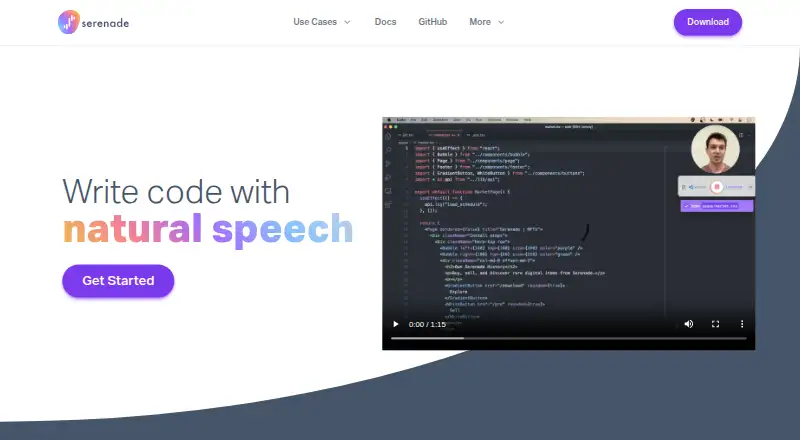
What Serenade is
Serenade is a free, open-source voice assistant for developers who want to write and edit code using natural speech. It runs on macOS, Windows and Linux, and also supports Chrome. Voice commands can add, insert, change or delete code, as well as navigate, copy and paste. Users can set custom vocabulary and create commands or plugins through an open protocol that connects the desktop app and plugins using JSON over WebSockets. Listed integrations and supported tools include VS Code, Chrome, Hyper, Slack, IntelliJ, Jupyter and GitHub.
Speech recognition can run in the cloud or locally on the device. With cloud processing, audio and the file being edited are sent to Serenade’s servers; the maker says they are not stored unless sharing is enabled. Local processing keeps audio and code on the device unless the user opts in to sharing. That preference can be changed in the app. On Windows, local processing requires WSL with Ubuntu. The maker says the software is licensed under Apache 2.0.
Who it suits
Serenade suits developers who want to write or edit code by voice, including people with an injury or those seeking to avoid typing. It may also suit users who want custom commands or local speech processing.
What it does well
- Free plan is available.
- Voice commands support code editing and navigation.
- Offers cloud and on-device speech processing.
- Supports custom vocabulary and commands.
- Listed integrations include VS Code and IntelliJ.
What to know first
- Windows local processing requires WSL with Ubuntu.
- Cloud processing sends audio and the edited file to Serenade servers.
Plans
| Plan | Billed and limits | Price |
|---|---|---|
| Serenade | Download for free · macOS, Windows, Linux | Free |
As serenade.ai lists them, read 4 Oct 2026. The maker's own page has the final word.
Getting started
- Open the Serenade website.
- Download the free app for macOS, Windows, or Linux.
- Choose cloud speech recognition or local processing.
- On Windows, set up WSL with Ubuntu for the local server.
- Set custom vocabulary or commands if needed, and connect supported tools such as VS Code.
Verdict
Serenade combines spoken code editing with customizable commands and cloud or local speech processing. Windows users who want local processing need WSL with Ubuntu.
Questions
Is Serenade free?
Yes. The Serenade plan is free.
What platforms does it support?
It runs on macOS, Windows, and Linux, and Chrome is also listed as supported.
Is Serenade open source?
Yes. The maker says it is fully open source and licensed under Apache 2.0.
Can speech be processed locally?
Yes. With local processing, audio and code stay on the device unless the user opts in to sharing data.
What happens to data in cloud mode?
Audio and the file being edited are sent to Serenade servers. The maker says they are not stored unless the user opts in to sharing.
What tools does it integrate with?
Listed integrations and supported tools include VS Code, Chrome, Hyper, Slack, IntelliJ, Jupyter, and GitHub.
Facts from Serenade's own pages
- Accessibility
- The maker says Serenade can help people with an injury or anyone looking to prevent one work without typing. · serenade.ai, 4 Oct 2026
- Cloud data handling
- With a cloud endpoint, audio and the file being edited are sent to Serenade servers; the maker says they are not stored unless the user opts in to sharing. · serenade.ai, 4 Oct 2026
- Custom commands
- Users can create custom voice commands and plugins using Serenade's open protocol. · serenade.ai, 4 Oct 2026
- Custom vocabulary
- Yes · serenade.ai, 20 Sept 2026
- Editing commands
- Voice commands can add, insert, change, delete, navigate, copy, and paste code. · serenade.ai, 4 Oct 2026
- Free plan
- Yes · serenade.ai, 20 Sept 2026
- Integrations
- The maker lists integrations and supported tools including VS Code, Chrome, Hyper, Slack, IntelliJ, Jupyter, and GitHub. · serenade.ai, 4 Oct 2026
- Local data handling
- With local processing, audio and code stay on the device unless the user opts in to sharing data. · serenade.ai, 4 Oct 2026
- Local-mode requirement
- On Windows, the local server requires WSL with Ubuntu. · serenade.ai, 4 Oct 2026
- Offline dictation
- Yes · serenade.ai, 20 Sept 2026
- Open source
- The maker says Serenade is fully open source and licensed under Apache 2.0. · serenade.ai, 4 Oct 2026
- Privacy controls
- Users can opt in to share audio and code data, and can change that setting in the Serenade application. · serenade.ai, 4 Oct 2026
- Privacy model
- hybrid · serenade.ai, 20 Sept 2026
- Protocol
- The Serenade Protocol uses JSON over WebSockets for communication between the desktop app and plugins. · serenade.ai, 4 Oct 2026
- Purpose
- Serenade is an open-source voice assistant that lets developers write code using natural speech. · serenade.ai, 4 Oct 2026
- Speech modes
- Serenade can use cloud speech recognition or process speech locally on the device. · serenade.ai, 4 Oct 2026
- Support
- The site provides a community link and lists [email protected] for contact. · serenade.ai, 4 Oct 2026
- Supported platforms
- macOS,Windows,Linux,Chrome · serenade.ai, 20 Sept 2026
- Voice commands
- Yes · serenade.ai, 20 Sept 2026
Where Serenade stands on Freedom251
- Dictation software#11 of 27