Freedom251 › Dictation software

Vito
What Vito is
Vito is a free voice dictation app for Linux, macOS, and Windows. It supports offline dictation, so voice input can be used locally without usage fees. Vito also offers custom vocabulary and voice commands, giving users ways to tailor dictation and control it by voice. The software is open source and requires no account. Its free plan costs nothing, and it has no subscription. Vito's privacy model is hybrid, and local use has no usage fees. The listed platforms make it an option for people who want voice dictation across desktop operating systems, with offline capability and no account requirement. Its feature set centers on spoken input, vocabulary customization, and voice commands rather than a paid subscription model.
Who it suits
Vito suits people who want voice dictation on Linux, macOS, or Windows, especially those who need offline use, custom vocabulary, or voice commands.
What it does well
- Offline dictation is supported.
- Custom vocabulary is available.
- Voice commands are included.
- Open source and no account required.
- Local use has no usage fees.
What to know first
- Privacy model is hybrid.
- No subscription plan is offered.
Limits
The free plan has no subscription and local use has no usage fees. Cloud provider usage is billed directly by the provider, and the maker says local processing places more load on the computer. History keeps 5,000 dictations and at least the last three months, according to the October 2026 release notes.
Plans
| Plan | Billed and limits | Price |
|---|---|---|
| Free | No subscription; local use has no usage fees. Cloud provider usage is billed directly by the provider. · Local Parakeet transcription and local OpenAI-compatible cleanup have no usage fees · Cloud provider costs vary | Free |
As vito.talk lists them, read 8 Oct 2026. The maker's own page has the final word.
Getting started
- Visit the Vito website.
- Choose the download for Windows, macOS or Linux; Linux downloads include AppImage and Flatpak options.
- Install Vito and use a hotkey to dictate into the app where you are working.
- Choose a cleanup style or write a custom prompt.
- For local transcription, install and manage Parakeet in Vito; for remote services, configure a supported provider endpoint.
Vito is a desktop dictation utility for people who want speech turned into cleaned-up text inside the app they already use. It is best suited to users who value broad desktop coverage, configurable cleanup and the option to keep processing local, while accepting that the product is still young and cloud use can add provider charges.
Overview
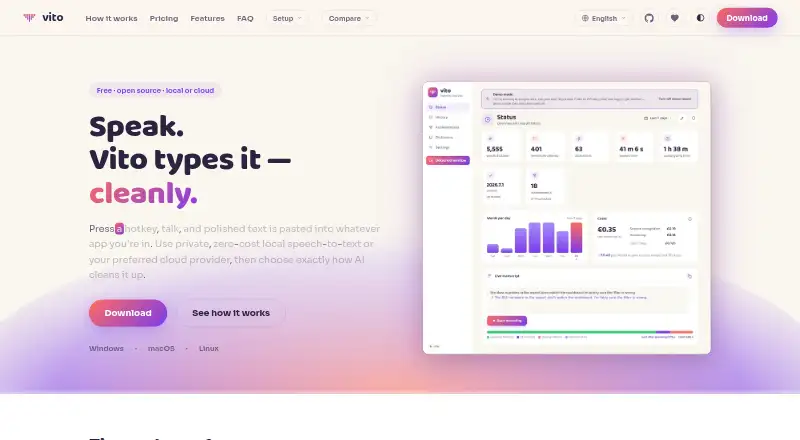
A hotkey starts dictation and pastes the resulting text into the active application. That makes Vito practical for drafting, messaging and note-taking without switching to a separate editor. Vito Assist also handles spoken requests for translations, answers, calculations and word definitions, returning the result as text.
Cleanup is adaptable: choose one of five styles or write a custom prompt. An existing recording can be uploaded for transcription into clean text. Support for dictation and the interface spans 60 languages. A personal dictionary and custom vocabulary are useful for names, specialist terminology and repeated phrasing.
Searchable history, an always-on-top mini overlay, dashboards and achievements round out the utility. History retains 5,000 dictations and at least the most recent three months, according to the October 2026 release notes.
Key features
Local and remote processing
Vito can install and manage Parakeet for on-device transcription in 25 languages. Local processing has no usage fee, but it uses more of your computer's resources. Remote speech-to-text can use Soniox or AssemblyAI; cleanup can use Groq, Anthropic or OpenAI-compatible endpoints. This gives technically minded users provider choice, but cloud costs are paid directly to the selected provider and vary by provider.
Privacy and control
Vito operates without an account, analytics or telemetry, and stores history and settings locally. Audio is sent only to a configured remote endpoint when you choose one. The maker publishes the code on GitHub and describes Vito as open source, which will appeal to users who want to inspect or manage their setup. Those who require an entirely local workflow should choose local transcription and local OpenAI-compatible cleanup rather than a remote endpoint.
Pricing
Free: €0.00 per user, no subscription. Local Parakeet transcription and local OpenAI-compatible cleanup have no usage fees. Cloud provider usage is billed directly by the provider, so the software itself is free but remote processing is not necessarily cost-free. There is no free trial because the product is already offered as a free plan.
This single plan suits individuals who want unrestricted local use and are comfortable configuring their own providers. It is less suitable for anyone seeking one bundled cloud allowance or a vendor-managed account and billing relationship.
Platforms
Vito supports Windows, macOS and Linux. Downloads include a Windows installer, macOS disk image, Linux AppImage and a Linux Flatpak, giving Linux users more than one packaging route.
Who it's for
Choose Vito if you dictate across desktop applications, need custom vocabulary or voice commands, and want local processing without a subscription. Its 60-language coverage and recording upload also fit multilingual writers and people converting existing audio into text.
Look elsewhere if you need a mature support operation: the maker directs bug reports to GitHub and cautions that occasional bugs are to be expected from this young product. Users who prefer a fully managed cloud service may also find configuring endpoints and paying providers separately inconvenient.
Pros and cons
- Pro: Free desktop use on Windows, macOS and Linux, including Linux AppImage and Flatpak options.
- Pro: Local Parakeet transcription avoids usage fees and keeps processing on the device.
- Pro: Five cleanup styles, custom prompts, custom vocabulary and voice commands let users shape output for different workflows.
- Pro: No account, analytics or telemetry, with local history and settings.
- Con: Cloud transcription and cleanup can create separate provider bills, with costs that vary by provider.
- Con: Local processing increases computer load and Parakeet covers 25 languages rather than the full 60-language interface and dictation claim.
- Con: The young product may have occasional bugs, with support centered on GitHub reports.
Alternatives
Pick Wispr Flow instead if you want Android and iOS coverage alongside desktop apps and a free tier capped at 2,000 desktop words and 1,000 mobile words per week.
Superwhisper is the better fit for users seeking meeting recording, transcription, 100-plus languages and unlimited Whisper models, with a free trial.
Choose Dictanote for a broader platform list including web and a free plan with 60 minutes of dictation per day and up to 50 notes in one notebook.
Voice In suits browser-focused users who want dictation on popular sites, punctuation commands and a 60-minute daily free allowance.
WakaScribe offers a free local plan with unlimited words and no time limit.
Lispr is an option for macOS and Windows users who prefer a free 60-minute weekly allowance or a paid annual plan.
Choose Serenade if fully open-source software under Apache 2.0 is the priority.
Aqua Voice is an alternative with a 1,000-word free Starter tier and a paid Pro plan.
Verdict
Vito is a strong choice for desktop users who want free dictation, configurable cleanup and a genuinely local route across Windows, macOS and Linux. Its main reason to choose it is the combination of no account, open-source code and flexible provider or on-device processing. Look elsewhere if you need polished maturity, mobile apps, or cloud costs bundled into a predictable subscription.
Verdict
Vito offers free dictation across three desktop platforms, with offline use, custom vocabulary, and voice commands. Its hybrid privacy model is worth considering if privacy approach is a deciding factor.
Questions
How much does Vito cost?
The Free plan costs nothing with no subscription. Local use has no usage fees; cloud provider costs vary and are billed directly by the provider.
Which platforms does Vito support?
Vito supports Windows, macOS and Linux. Downloads include a Windows installer, a macOS disk image, a Linux AppImage and a Linux Flatpak.
Can Vito dictate offline?
Yes. Vito can install and manage Parakeet for on-device transcription in 25 languages. The maker says local processing has no usage fees but puts more load on the computer.
Is Vito open source?
Yes. The maker says Vito is open source and its code is public on GitHub.
Does Vito require an account?
The maker says Vito has no account, analytics or telemetry. History and settings stay local, and audio is sent only to a configured remote endpoint when one is used.
Which speech and cleanup integrations are named?
The site names Soniox and AssemblyAI for speech-to-text, Groq and Anthropic for cleanup, and OpenAI-compatible endpoints for transcription or cleanup.
Facts from Vito's own pages
- Audio files
- Users can upload an existing recording for transcription into clean text. · vito.talk, 8 Oct 2026
- Cleanup
- Users can choose from five cleanup styles or write a custom prompt. · vito.talk, 8 Oct 2026
- Custom vocabulary
- Yes · vito.talk, 20 Sept 2026
- Download formats
- The download information lists a Windows installer, macOS disk image and Linux AppImage, and also mentions a Linux Flatpak. · vito.talk, 8 Oct 2026
- Free plan
- Yes · vito.talk, 20 Sept 2026
- History limit
- The October 2026 release notes say history keeps 5,000 dictations and at least the last three months. · vito.talk, 8 Oct 2026
- Integrations
- The site names Soniox and AssemblyAI for speech-to-text, Groq and Anthropic for cleanup, and OpenAI-compatible endpoints for transcription or cleanup. · vito.talk, 8 Oct 2026
- Languages
- Vito says it supports dictation and an interface in 60 languages. · vito.talk, 8 Oct 2026
- Local processing
- Vito can install and manage Parakeet for on-device transcription in 25 languages; the site says local processing has no usage fees but puts more load on the computer. · vito.talk, 8 Oct 2026
- Offline dictation
- Yes · vito.talk, 20 Sept 2026
- Open source
- The maker says Vito is open source and its code is public on GitHub. · vito.talk, 8 Oct 2026
- Other features
- Vito includes searchable history, a personal dictionary, an always-on-top mini overlay, dashboards and achievements. · vito.talk, 8 Oct 2026
- Privacy
- The site says Vito has no account, analytics or telemetry, keeps history and settings local, and sends audio only to a configured remote endpoint when one is used. · vito.talk, 8 Oct 2026
- Privacy model
- hybrid · vito.talk, 20 Sept 2026
- Support
- The maker directs users to report bugs on GitHub and says users should expect the occasional bug because Vito is young. · vito.talk, 8 Oct 2026
- Supported platforms
- Windows,macOS,Linux · vito.talk, 20 Sept 2026
- Voice assistant
- Vito Assist can handle spoken requests such as translations, answers, calculations and word definitions, returning text. · vito.talk, 8 Oct 2026
- Voice commands
- Yes · vito.talk, 20 Sept 2026
- What it does
- Vito uses a hotkey to turn speech into polished text pasted into the app where the user is working. · vito.talk, 8 Oct 2026
Where Vito stands on Freedom251
- Dictation software#7 of 27