Freedom251 › AI Voice Dictation Software
SpeechTexter
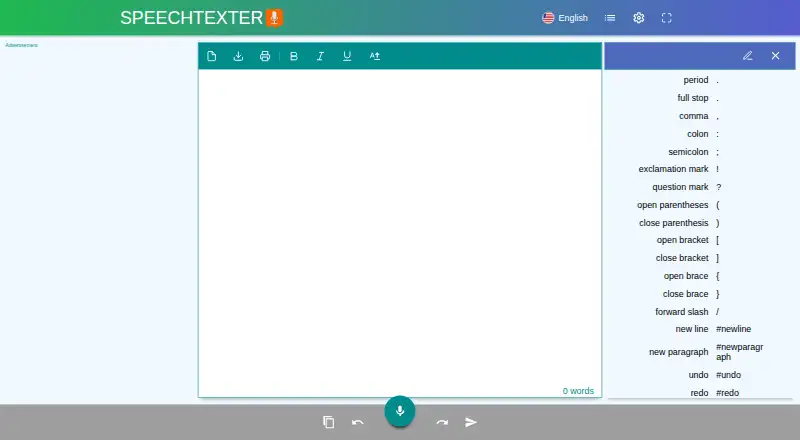
What SpeechTexter is
SpeechTexter is a free multilingual speech-to-text app for dictating notes, documents, books, reports, and blog posts. It converts speech in real time using Google Speech recognition, with support for more than 70 languages. Custom vocabulary and voice commands are available, and the site says accuracy above 90% should be expected, with results varying by language and speaker.
The web app runs without a download, installation, or registration. Desktop use requires the latest Google Chrome browser; the site documents web use on Windows, Mac, and Linux, and mobile web use on Android. iPhones and iPads are not supported, and the Android app is no longer supported or updated. Audio files cannot be uploaded for transcription; the suggested alternative is to play audio and capture it with a microphone.
Dictated speech is processed on Google servers, while SpeechTexter says it does not store dictated text. Autosaved text and custom voice commands are kept in local browser cache or app storage. The site identifies students, teachers, writers, bloggers, and people who face difficulties with conventional input as potential users.
Who it suits
SpeechTexter suits students, teachers, writers, and bloggers who want to dictate text in a supported language. It may also help people with hand-use difficulties, dyslexia, or disabilities that affect conventional input.
What it does well
- Free multilingual speech-to-text app.
- Supports more than 70 languages.
- Offers custom vocabulary and voice commands.
- Web app requires no installation or registration.
- Works on desktop web and Android mobile web.
What to know first
- Requires the latest Google Chrome for desktop use.
- iPhones and iPads are not supported.
- Android app is no longer supported or updated.
- Audio-file uploads for transcription are unavailable.
Limits
The Free plan costs nothing. The service is subject to a fair use policy, and users who abuse it may be permanently blocked.
Plans
| Plan | Billed and limits | Price |
|---|---|---|
| Free | Free multilingual speech-to-text application | Free |
As speechtexter.com lists them, read 5 Oct 2026. The maker's own page has the final word.
Getting started
- Open https://www.speechtexter.com/ to use the web app.
- On desktop, use the latest Google Chrome browser.
- Use the web app without downloading, installing, or registering.
- On Android, use the mobile web version; the Android app is no longer supported or updated.
Verdict
Choose SpeechTexter for free browser-based dictation, custom vocabulary, and voice commands across its documented platforms. Look elsewhere if you need iPhone or iPad support, an updated Android app, or direct audio-file transcription.
Questions
Is SpeechTexter free?
Yes. Its Free plan is listed as free, and the pricing model is free.
Which languages does SpeechTexter support?
The site lists support for more than 70 languages.
Which platforms can I use?
The site documents desktop web use on Windows, Mac, and Linux, plus mobile web use on Android. It says iPhones and iPads are not supported.
Do I need to register or install anything?
The web app requires no download, installation, or registration. Desktop use requires the latest Google Chrome browser.
Does SpeechTexter upload audio files for transcription?
No. Audio-file upload is unavailable; the site suggests playing the audio and capturing it through a microphone.
How does SpeechTexter handle dictated text?
Dictated speech is processed on Google servers, and SpeechTexter says it does not store dictated text. Autosaved text and custom voice commands are kept in local browser cache or app storage.
Facts from SpeechTexter's own pages
- Accuracy
- The site says accuracy levels higher than 90% should be expected, varying by language and speaker. · speechtexter.com, 5 Oct 2026
- Android app
- The site says its Android app is no longer supported or updated. · speechtexter.com, 5 Oct 2026
- Audience
- The site names students, teachers, writers, and bloggers as users, and describes accessibility uses for people with hand-use difficulties, dyslexia, or disabilities affecting conventional input. · speechtexter.com, 5 Oct 2026
- Audio upload limit
- Uploading an audio file for transcription is not available; the site suggests playing audio and capturing it through the microphone instead. · speechtexter.com, 5 Oct 2026
- Custom vocabulary
- Yes · speechtexter.com, 20 Sept 2026
- Data handling
- The privacy policy says dictated speech is processed on Google servers and SpeechTexter does not store dictated text; autosaved text and custom voice commands are stored locally in browser cache or app storage. · speechtexter.com, 5 Oct 2026
- Fair use
- The terms say the service is provided under a fair use policy and users who abuse it may be permanently blocked. · speechtexter.com, 5 Oct 2026
- Free plan
- Yes · speechtexter.com, 20 Sept 2026
- Languages
- The site lists support for more than 70 languages. · speechtexter.com, 5 Oct 2026
- Platform support
- The site documents desktop web use on Windows, Mac, and Linux and mobile web use on Android; it says iPhones and iPads are not supported. · speechtexter.com, 5 Oct 2026
- Privacy model
- cloud · speechtexter.com, 20 Sept 2026
- Purpose
- SpeechTexter is a multilingual speech-to-text app for dictating notes, documents, books, reports, and blog posts. · speechtexter.com, 5 Oct 2026
- Recognition
- It uses Google Speech recognition for real-time speech-to-text transcription. · speechtexter.com, 5 Oct 2026
- Security statement
- The privacy policy says it adopts data collection, storage, processing practices, and security measures to protect personal information and data stored on its site. · speechtexter.com, 5 Oct 2026
- Setup
- The web app requires no download, installation, or registration, and desktop use requires the latest Google Chrome browser. · speechtexter.com, 5 Oct 2026
- Support
- The site directs users to submit voice-command corrections or suggestions by email using the address at the bottom of the page. · speechtexter.com, 5 Oct 2026
- Supported platforms
- web,Windows,macOS,Linux,Android · speechtexter.com, 20 Sept 2026
- Voice commands
- Custom voice commands can insert punctuation and phrases or run actions such as undo, redo, and starting a new paragraph. · speechtexter.com, 5 Oct 2026
Where SpeechTexter stands on Freedom251
- AI Voice Dictation Software#7 of 22
- Dictation software#13 of 27