Freedom251 › Wi-Fi Analyzer Software
Vistumbler
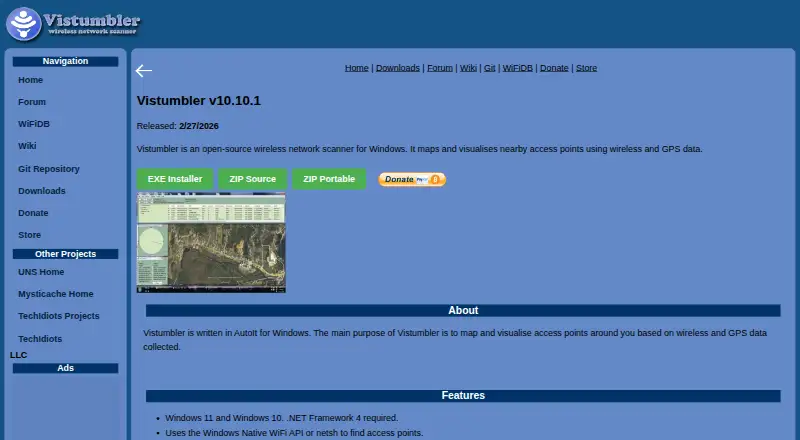
What Vistumbler is
Vistumbler is free, open-source software for Windows that scans for nearby wireless access points and maps them using wireless and GPS data. It can find access points through the Windows Native WiFi API or netsh, and supports COM/NMEA GPS receivers. Users can import and export access point data, export KML and GPX files, track scans live in Google Earth, and use audio alerts. The stable release supports Windows 10 and 11 and requires .NET Framework 4. Official downloads include an installer, source code, and a portable ZIP; the maker says these releases do not bundle third-party installers or adware. The project recommends checking provided checksums and following standard anti-malware practices. Vistumbler can collect GPS and WiFi location data while it runs. WiFiDB accepts scan uploads from Vistumbler and other scanners to create statistics and maps. The software is intended for legitimate network analysis and WiFi mapping; its terms prohibit unauthorized access and monitoring without consent. An experimental MAUI preview is available for Windows and Android, but the maker says it remains in development and may have missing features or bugs.
Who it suits
Vistumbler suits people mapping nearby access points on Windows for legitimate network analysis. Android users can consider the separate MAUI preview, but it is still in development.
What it does well
- Free and open-source under GPLv2.
- Exports scan data in KML and GPX.
- Supports live Google Earth tracking and audio alerts.
- Official downloads include a portable ZIP.
- MAUI preview includes Android background scanning.
What to know first
- Stable release requires Windows 10 or 11 and .NET Framework 4.
- Software can collect GPS and WiFi location data.
- MAUI preview may have missing features and bugs.
- Project advises disconnecting from access points for best scanning.
Limits
The stable release requires Windows 10 or 11 and .NET Framework 4. The Android-capable MAUI preview is still in development and may have missing features, bugs, or changes between versions.
Plans
| Plan | Billed and limits | Price |
|---|---|---|
| Vistumbler | Free and open-source software · GPLv2 | Free |
As vistumbler.net lists them, read 8 Oct 2026. The maker's own page has the final word.
Getting started
- Visit the Vistumbler website and choose an official installer, source, or portable ZIP download.
- Check any provided checksum and follow standard anti-malware practices when installing.
- On Windows, use the stable release with Windows 10 or 11 and .NET Framework 4.
- For the experimental Android preview, use Android 8.0 or later.
- Select the correct network adapter if no access points appear.
Overview
Vistumbler is an open-source wireless scanner for locating nearby access points and associating them with GPS positions. It is a strong fit for Windows users documenting local Wi-Fi coverage, collecting field data, or exporting maps without a subscription. The stable Windows edition is the dependable option, while the Android-capable MAUI build is better treated as a work in progress.
Key features
Scanning uses the Windows Native WiFi API or netsh, giving Windows operators two discovery paths for local access-point surveys. COM/NMEA GPS receiver support lets each observation carry location context, which is more useful for coverage mapping than a simple list of network names. The project advises disconnecting from access points during scans for best results; if nothing appears, selecting the correct adapter is an important troubleshooting step.
Vistumbler can import and export access-point data and write KML and GPX files for mapping tools. Live Google Earth tracking and audio alerts suit users who need to follow a survey as it happens, although the product remains focused on nearby wireless discovery rather than continuous enterprise monitoring. Asset inventory is included, but topology mapping is not, so it will not replace a platform that models relationships across a larger network.
WiFiDB accepts uploads from Vistumbler and other scanners, then builds statistics and maps from those scans. The MAUI preview adds a live access-point list, GPS map, WiFiDB history layers, a channel graph, scan import and export, Android background scanning, and account registration through a QR code or link. Those additions make the preview more versatile, but development status means missing features, bugs, and behavior changes between versions are possible.
Pricing
Vistumbler costs free on its sole “Vistumbler” plan. It is free and open-source software under GPLv2, with no paid tier, trial period, seat charge, quota, or renewal term stated. That makes it suitable for personal, educational, and professional analysis where a no-cost tool is preferred, while users needing vendor warranty or commercial support should account for the software being supplied as is without warranty.
Platforms
The stable release supports Windows 10 and Windows 11 and requires .NET Framework 4. Official downloads include an installer, source code, and a portable ZIP; the project says these releases do not bundle third-party installers or adware. Vistumbler MAUI is an experimental preview for Windows and Android, with Android 8.0 or later required. Check provided checksums and follow standard anti-malware practice when installing.
Who it's for
Choose Vistumbler for authorized local Wi-Fi analysis, wardriving-style mapping, GPS-tagged surveys, and workflows that need KML or GPX output. It is particularly appropriate for Windows operators who value source availability, portable distribution, and Google Earth tracking. It is a poor match for topology-aware network management, broad asset relationships, or users who require a polished, supported Android release. Its terms prohibit unauthorized network access and nonconsensual monitoring, and scans can contain GPS and Wi-Fi location data; upload to WiFiDB only when that sharing is intended.
Pros and cons
- Pros: Free GPLv2 software with installer, source, and portable downloads; GPS receiver support; KML and GPX export; live Google Earth tracking and audio alerts; WiFiDB statistics and map integration.
- Cons: Stable requirements center on Windows and .NET Framework 4; no topology mapping; best scanning may require disconnecting from access points; the Android-capable MAUI version is explicitly experimental; collected location data requires careful handling.
Alternatives
For a broad comparison, see Wi-Fi Analyzer Software and Network Discovery Software.
- NetSpot is the better choice when you want Android, iOS, macOS, and Windows coverage, a free edition, and a trial-supported freemium model.
- WiFiman suits users wanting a free, ad-free app across mobile, desktop, and Linux, though desktop features are limited to UniFi Device Discovery and Teleport VPN.
- inSSIDer is worth considering for macOS or Windows Wi-Fi visualization, with a free download and an optional MetaGeek Plus subscription at $200 a year.
- Kismet is an alternative free, open-source option spanning Linux, macOS, Windows, APIs, and self-hosting.
- Parkdale is a free download for Android, macOS, and Windows.
- DTNT fits Windows users seeking Wi-Fi survey, live channel views, IP scanning, speed tests, and saved history, with a 59.00 USD one-time Pro plan.
- Wi-Fi Scanner offers a free personal-use Windows license and a 99.95 USD one-time business license.
- iwScanner is a free Linux wireless scanner with source included.
Verdict
Vistumbler is a sensible recommendation for Windows users who need free, GPS-aware local Wi-Fi scanning with practical export and Google Earth tracking. Its GPLv2 licensing and field-mapping tools are the main reasons to choose it. Look elsewhere if you need topology mapping, a stable Android experience, or formal warranty and support.
Verdict
Vistumbler offers scanning, mapping, and export tools at no cost, with a stable Windows release and a separate experimental Android-capable preview. Review its location-data behavior and use it only for authorized analysis.
Questions
Is Vistumbler free?
Yes. It is free and open-source software under GPLv2 unless an individual release specifies otherwise.
Which platforms does it support?
The stable release supports Windows 10 and 11. The experimental MAUI preview supports Windows and Android; Android 8.0 or later is required.
What can it export?
Vistumbler supports access point import and export, plus KML and GPX export.
Does it work with GPS?
It supports COM/NMEA GPS receivers and can use wireless and GPS data to map access points.
Does it integrate with WiFiDB?
WiFiDB accepts scan uploads gathered by Vistumbler or other scanners. The MAUI preview also supports WiFiDB accounts and history layers.
Who operates Vistumbler?
The site identifies TechIdiots LLC, located in Rutland, Massachusetts, as the operator.
Facts from Vistumbler's own pages
- Downloads
- Official releases include installer, source, and portable ZIP downloads; the downloads page says official releases do not bundle third-party installers or adware. · vistumbler.net, 8 Oct 2026
- Experimental Android version
- Vistumbler MAUI is an experimental preview for Windows and Android, with Android 8.0 or later required. · vistumbler.net, 8 Oct 2026
- Experimental status
- The maker says the MAUI preview is still in development and may have missing features, bugs, and changes between versions. · vistumbler.net, 8 Oct 2026
- Exports
- It supports access point import and export, plus KML and GPX export. · vistumbler.net, 8 Oct 2026
- Google Earth
- The stable release supports live Google Earth tracking and audio alerts. · vistumbler.net, 8 Oct 2026
- GPS
- It supports COM/NMEA GPS receivers. · vistumbler.net, 8 Oct 2026
- Integrations
- WiFiDB accepts wireless scan uploads, including scans gathered by Vistumbler or other scanners, and creates statistics and maps from them. · wifidb.net, 8 Oct 2026
- Intended use
- The terms describe the software as intended for legitimate network analysis and WiFi mapping, and prohibit unauthorized network access and nonconsensual monitoring. · vistumbler.net, 8 Oct 2026
- License
- Vistumbler is free and open-source software licensed under GPLv2 unless an individual release specifies otherwise. · vistumbler.net, 8 Oct 2026
- License and warranty
- Vistumbler is described as GPLv2 free and open-source software provided as is without warranty. · vistumbler.net, 8 Oct 2026
- Limitations
- The project advises disconnecting from access points while scanning for best results and checking that the correct network adapter is selected if no access points appear. · vistumbler.net, 8 Oct 2026
- Live tracking
- It offers live Google Earth tracking and audio alerts. · vistumbler.net, 8 Oct 2026
- Maker
- The site identifies TechIdiots LLC as the operator and lists its location as Rutland, Massachusetts. · techidiots.net, 8 Oct 2026
- MAUI features
- The MAUI preview includes a live access point list, GPS map, WiFiDB history layers, channel graph, scan import and export, and Android background scanning. · vistumbler.net, 8 Oct 2026
- Privacy
- The software can collect GPS and WiFi location data when run, while the website says it does not collect device location unless it is explicitly submitted, such as through WiFiDB. · vistumbler.net, 8 Oct 2026
- Purpose
- Vistumbler is an open-source wireless network scanner for Windows that maps and visualises nearby access points using wireless and GPS data. · vistumbler.net, 8 Oct 2026
- Requirements
- The stable release lists Windows 10 and 11 support and requires .NET Framework 4. · vistumbler.net, 8 Oct 2026
- Scanning
- It finds access points through the Windows Native WiFi API or netsh. · vistumbler.net, 8 Oct 2026
- Security
- The project recommends verifying provided checksums and using standard anti-malware practices when installing. · vistumbler.net, 8 Oct 2026
- Security and downloads
- The maker says official releases do not bundle third-party installers or adware and recommends verifying checksums where provided. · vistumbler.net, 8 Oct 2026
- Stable platform requirements
- The stable release supports Windows 10 and 11 and requires .NET Framework 4. · vistumbler.net, 8 Oct 2026
- Support
- The project directs questions about its terms or licensing to its forum or GitLab repository. · vistumbler.net, 8 Oct 2026
- WiFiDB integration
- The MAUI preview supports WiFiDB accounts, including registration by QR code or link. · vistumbler.net, 8 Oct 2026
Where Vistumbler stands on Freedom251
- Wi-Fi Analyzer Software#8 of 29
- Network Discovery Software#15 of 35