Freedom251 › Wi-Fi Analyzer Software
DTNT
What DTNT is
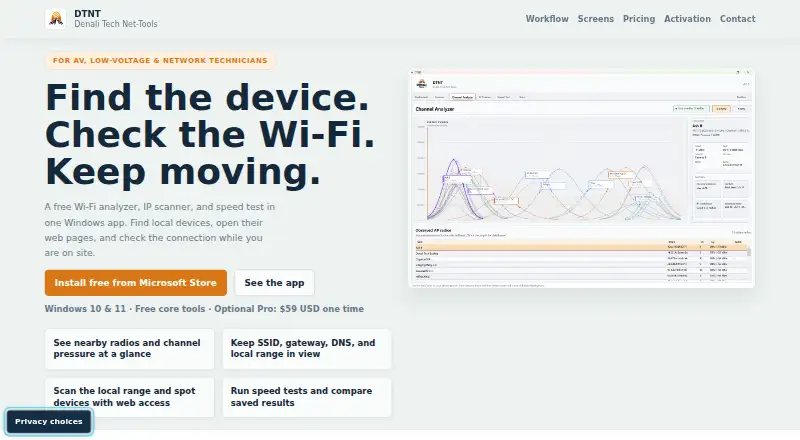
DTNT is a Windows desktop app combining Wi-Fi visibility, IP discovery, speed tests, saved profile review, and network diagnostics. It is presented for AV, low-voltage, and network technicians. The free plan includes a survey showing nearby radios and current SSID, band, channel, security, and live channel context. Its IP Scanner can scan the active range, remember and label hosts, filter results, and copy IP addresses. Free also includes speed tests with saved history, profile review, and a one-time ping. Pro adds best-channel guidance and richer lane-pressure detail, selected-host follow-up and TCP checks, JSON or CSV exports for speed history and profile or network evidence, saved-key reveal, continuous ping, and trace route. Pro is listed at $59, paid once as a one-time purchase. It covers one purchaser or internal technician seat and can be activated on up to three Windows devices under that purchaser’s control. Network inventories, saved Wi-Fi keys, device passwords, exports, and diagnostic logs are not automatically uploaded. Pro activation and validation send purchase and device identifiers to Denali Tech’s service; startup update checks request release metadata from the DTNT website.
Who it suits
DTNT may suit AV, low-voltage, and network technicians who need Windows tools for Wi-Fi surveys, host discovery, speed tests, and diagnostics. Pro is for users who need its additional checks, guidance, or exports.
What it does well
- Free plan includes Wi-Fi survey and IP Scanner.
- Speed tests can save history.
- Pro supports JSON and CSV exports.
- Saved device-login passwords are protected locally.
- Pro can activate on up to three Windows devices.
What to know first
- Windows only.
- Pro costs $59, paid once.
- Pro activation and validation send identifiers online.
- Offline revalidation grace period is up to fourteen days.
Limits
The free plan does not include Pro features such as best-channel guidance, selected-host follow-up and TCP checks, JSON or CSV exports, saved-key reveal, continuous ping, or trace route. Pro covers one purchaser or internal technician seat and up to three Windows devices; online validation is required, with up to fourteen days allowed after a successful check if the service cannot be reached.
Plans
| Plan | Billed and limits | Price |
|---|---|---|
| Free | Main app workflows · Wi-Fi survey and live channel view · IP Scanner · Speed tests and saved history · Profile review · Ping once | Free |
| Pro | One-time purchase; $59 current launch price, planned regular price $99 after launch window · Best-channel guidance · Selected-host follow-up and TCP checks · JSON/CSV exports · Saved-key reveal · Continuous ping and trace route | $59, paid once |
As dt-nt.com lists them, read 7 Oct 2026. The maker's own page has the final word.
Getting started
- Visit the DTNT website.
- Install DTNT through the Microsoft Store, the maker’s recommended route.
- Start with the Free plan or purchase Pro for $59, paid once.
- For Pro, activate online; validation can continue offline for up to fourteen days after the last successful check.
DTNT is a Windows desktop toolkit for inspecting wireless conditions, discovering local devices, measuring speed and checking saved network profiles. It suits AV, low-voltage and network technicians who need several field diagnostics in one application. The free edition is useful for routine checks, while the paid tier targets technicians who need deeper tests and portable evidence.
Overview
DTNT’s appeal is consolidation. One Windows app combines a nearby-radio survey, active-range IP scanning, speed tests, profile review and network diagnostics. That makes sense for technicians moving between installations who would otherwise switch among separate utilities.
The free tier covers the principal inspection workflows, but the decisions and documentation that matter in more demanding jobs are concentrated in Pro. A purchase is for one purchaser or internal technician seat and can be activated on up to three Windows devices controlled by that purchaser. Teams needing several independent users should account for that restriction.
Key features
Wireless survey
The free app surveys nearby radios and reports SSID, band, channel and security with live channel context. It is a practical snapshot for identifying what surrounds an installation. Pro adds best-channel guidance and richer lane-pressure detail, turning observation into a more direct basis for channel selection.
Discovery and diagnostics
IP Scanner scans the active range, remembers and labels hosts, filters results and copies addresses. Those functions suit inventory and initial fault isolation. Pro adds selected-host follow-up and TCP checks, plus continuous ping and trace route; the free plan provides only a one-time ping. Choose Pro when troubleshooting requires repeated reachability checks or service-level probing rather than a quick list of devices.
Speed, profiles and evidence
Free includes speed tests with saved history and profile review. Pro can reveal saved Wi-Fi keys and export speed history plus profile or network evidence in JSON or CSV. Exportable records are useful when a technician must hand findings to a client or retain a job trail; key revealing should be limited to authorized work.
Data handling and validation
Network inventories, saved Wi-Fi keys, device passwords, exports and diagnostic logs are not automatically uploaded to Denali Tech. Saved device-login passwords are protected locally with Windows data protection for the current Windows account, although other settings, logs, inventories and exports are not all encrypted by DTNT.
Online Pro activation and validation send purchase and device identifiers to Denali Tech’s fulfillment service. Startup update checks request release metadata from the DTNT website. After activation, the app can continue for up to fourteen days following the last successful validation if the licensing service cannot be reached, so fully disconnected operation is not a Pro strength.
Pricing
Free
The Free plan costs nothing. It includes the main app workflows, Wi-Fi survey and live channel view, IP Scanner, speed tests with saved history, profile review and one ping. It is the sensible starting point for occasional checks and basic inventories, but it omits channel recommendations, advanced host checks, continuous diagnostics, key reveal and exports.
Pro
Pro costs $59, paid once as a one-time purchase at the current launch price; the planned regular price is $99 after the launch window. It adds best-channel guidance, selected-host follow-up, TCP checks, JSON/CSV exports, saved-key reveal, continuous ping and trace route. There is no recurring renewal, but the license is limited to one purchaser or internal technician seat and three controlled Windows devices. Support is offered at [email protected] on a commercially reasonable basis, without a guaranteed response time or uptime commitment.
Platforms
DTNT supports Windows desktop only. The maker recommends installing through Microsoft Store and describes Stripe as the checkout provider. Technicians working across macOS, Linux, Android or iOS will need a different primary tool or a separate companion utility.
Who it's for
DTNT is a good fit for independent AV, low-voltage and network technicians who want wireless survey, host discovery and basic diagnostics together, especially when a Windows laptop is already standard equipment. Pro is aimed at recurring service work where channel advice, targeted TCP checks and JSON or CSV evidence justify the purchase.
It is less suitable for multi-technician deployments because one purchase covers one seat, for users requiring broad operating-system coverage, or for environments that cannot permit periodic online validation. Organizations with strict encryption requirements should also review what remains stored locally without DTNT-wide encryption.
Pros and cons
- Pros: Combines Wi-Fi visibility, IP discovery, speed history, profile review and diagnostics in one Windows app.
- Pros: Free tier includes meaningful survey, scanning and history workflows rather than a time-limited trial.
- Pros: Pro exports JSON or CSV evidence and adds targeted TCP, continuous ping and trace-route checks.
- Pros: Inventories, keys, passwords, exports and logs are not automatically uploaded.
- Cons: Pro requires startup revalidation and permits only fourteen days offline after the last successful check.
- Cons: The license covers one technician seat, despite activation on up to three devices.
- Cons: Local protection is uneven: Windows data protection covers saved device passwords, but not all other local data is encrypted by DTNT.
- Cons: Windows-only support rules out technicians needing a cross-platform toolkit.
Alternatives
For a broader survey of wireless tools, see Wi-Fi Analyzer Software.
- NetSpot is the better choice when macOS, Android or iOS support and a free trial matter alongside Windows; its free edition is for personal and evaluation use.
- WiFiman suits readers wanting a free, ad-free mobile app across several platforms, though its desktop scope is limited to UniFi Device Discovery and Teleport VPN.
- inSSIDer is an option for macOS and Windows Wi-Fi visualization, with a free download requiring an Oscium account and a $200-per-year MetaGeek Plus plan.
- Kismet fits readers seeking free, open-source software across Linux, macOS, Windows, API and self-hosted environments.
- Parkdale is a free alternative for straightforward speed checking on Android, macOS and Windows.
- Vistumbler is free and open source for readers who want a simpler option on Android or Windows.
- Wi-Fi Scanner offers Windows scanning with a free personal, non-commercial license and a $99.95 one-time business license per machine.
- iwScanner is a free Linux wireless scanner with source included in the download.
Verdict
Choose DTNT if you are a Windows-based field technician who values one place for wireless surveys, local discovery and escalating diagnostics, with Pro evidence exports available for a one-time $59 launch price. Look elsewhere if you need multiple licensed technicians, cross-platform coverage, fully encrypted local storage or dependable operation without online validation.
Verdict
DTNT combines several network inspection tasks in a Windows app, with a free plan and a one-time Pro option. Review its online validation requirements and local data protections before choosing Pro.
Questions
Is DTNT free?
Yes. The Free plan is listed as free and includes the main app workflows, Wi-Fi survey and live channel view, IP Scanner, speed tests with saved history, profile review, and one ping.
How much does Pro cost?
Pro is listed at $59, paid once as a one-time purchase. The listed current launch price is $59, with a planned regular price of $99 after the launch window.
Which platforms does DTNT support?
DTNT supports Windows. The maker recommends the Microsoft Store as the installation route.
What does Pro add?
Pro adds best-channel guidance, richer lane-pressure detail, selected-host follow-up and TCP checks, JSON or CSV exports, saved-key reveal, continuous ping, and trace route.
How many devices does a Pro purchase cover?
It covers one purchaser or internal technician seat and can be activated on up to three Windows devices under that purchaser’s control.
Does DTNT integrate with other products?
The maker does not list product integrations. It describes Microsoft Store as the recommended install path and Stripe as a checkout provider.
Facts from DTNT's own pages
- Activation limit
- A Pro purchase covers one purchaser or internal technician seat and may be activated on up to three Windows devices under that purchaser’s control. · dt-nt.com, 7 Oct 2026
- Audience
- The product is presented for AV, low-voltage, and network technicians. · dt-nt.com, 7 Oct 2026
- Company
- The legal page identifies Denali Tech Inc as DTNT’s publisher. · dt-nt.com, 7 Oct 2026
- Device discovery
- IP Scanner can scan the active range, remember and label hosts, filter results, and copy IP addresses; Pro adds selected-host follow-up and TCP checks. · dt-nt.com, 7 Oct 2026
- Exports
- Pro can export speed history and profile or network evidence in JSON or CSV. · dt-nt.com, 7 Oct 2026
- Integrations
- The maker describes Microsoft Store as the recommended install path and Stripe as a checkout provider; it does not list product integrations on the opened pages. · dt-nt.com, 7 Oct 2026
- Local data
- The privacy notice says network inventories, saved Wi-Fi keys, device passwords, exports, and diagnostic logs are not automatically uploaded to Denali Tech. · dt-nt.com, 7 Oct 2026
- Offline limit
- Online Pro activation revalidates at app startup and allows up to fourteen days after the last successful validation if the licensing service is unreachable. · dt-nt.com, 7 Oct 2026
- Online requests
- Online Pro activation and validation send purchase and device identifiers to Denali Tech’s fulfillment service, and startup update checks request release metadata from the DTNT website. · dt-nt.com, 7 Oct 2026
- Product
- DTNT combines Wi-Fi visibility, IP discovery, speed testing, saved profile review, and network diagnostics in a Windows desktop app. · dt-nt.com, 7 Oct 2026
- Security detail
- Saved device-login passwords are protected locally using Windows data protection for the current Windows account, while some other local settings, logs, inventories, and exports are not all encrypted by DTNT. · dt-nt.com, 7 Oct 2026
- Support
- Support is available at [email protected] on a commercially reasonable basis, without a guaranteed response time or uptime commitment. · dt-nt.com, 7 Oct 2026
- Wi-Fi
- The free app surveys nearby radios and shows current SSID, band, channel, security, and live channel context; Pro adds best-channel guidance and richer lane-pressure detail. · dt-nt.com, 7 Oct 2026
Where DTNT stands on Freedom251
- Wi-Fi Analyzer Software#5 of 29