Freedom251 › Wi-Fi Analyzer Software

NetSpot
What NetSpot is
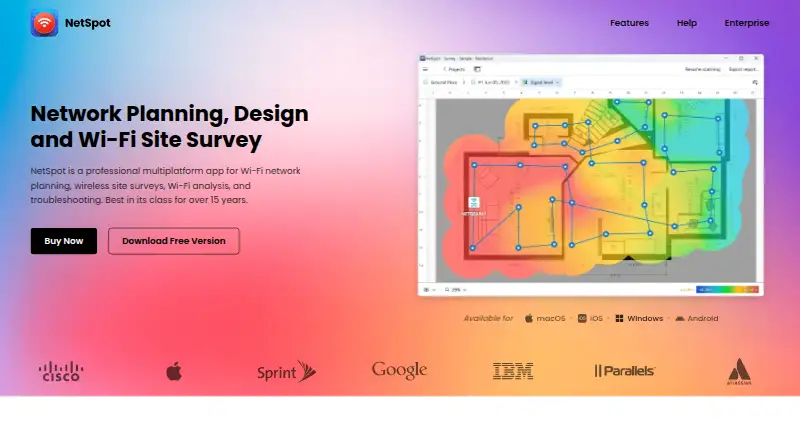
NetSpot is a Wi-Fi app for planning networks, surveying wireless coverage, analysing nearby networks, and troubleshooting. Inspector mode displays nearby networks with details such as channels, vendors, security type, bands, signal, and noise. Survey mode turns measurements into interactive, colour-coded heatmaps, with more than 20 visualizations and customizable reports. Planning mode supports predictive surveys and network design, including multi-floor layouts. Survey data can be exported as PDF or CSV, and heatmaps saved as PNG. Active survey throughput testing can use Iperf 3 or custom speed-test servers. NetSpot says survey, scan, heatmap, network, and location data are processed locally and not automatically sent to Etwok. Desktop editions support offline activation and can run fully offline afterward. Optional anonymized, aggregated usage statistics can be disabled in Preferences. The free edition is for personal and evaluation use on macOS and Windows. The full-featured PRO trial lasts seven days and requires a valid corporate email and an explanation for the request.
Who it suits
It suits individuals and solopreneurs planning or surveying Wi-Fi networks, as well as teams and organizations considering Enterprise. Desktop users can work offline after activation.
What it does well
- More than 20 heatmap visualizations.
- Supports predictive and multi-floor network planning.
- Exports survey data as PDF or CSV.
- Desktop editions can run offline after activation.
- Survey and location data are processed locally, according to NetSpot.
What to know first
- Free edition is for macOS and Windows only.
- PRO trial requires a corporate email and explanation.
- PRO limits projects to 50 zones and 50 snapshots per zone.
- Optional usage statistics may be sent unless disabled.
Limits
The free NetSpot edition is described for personal and evaluation use and is available for macOS and Windows. PRO is limited to 50 zones per project, 50 snapshots per zone, and 500 data points per snapshot; Enterprise allows unlimited amounts of each. The PRO trial lasts seven days and requires a valid corporate email and an explanation for the request.
Plans
| Plan | Billed and limits | Price |
|---|---|---|
| NetSpot Pro | Lifetime license; perpetual one-time purchase · 1 user · 1 technician · 50 zones per project · 50 snapshots per zone · 500 data points per snapshot | $199, paid once |
| NetSpot Pro | 1 user · 1 technician · 50 zones per project · 50 snapshots per zone · 500 data points per snapshot | On request |
| NetSpot Enterprise | 10 users · 10 technicians · Unlimited zones · Unlimited snapshots · Unlimited data points | On request |
| NetSpot Free | Personal and evaluation use · Free edition for macOS and Windows | Free |
| NetSpot PRO Annual Subscription | Annual subscription; renews automatically every 12 months unless canceled · 1 user + 1 technician · 50 zones per project · 50 snapshots per zone · 500 data points per snapshot | On request |
| NetSpot Enterprise Annual Subscription | Annual subscription; renews automatically every 12 months unless canceled · 10 users + 10 technicians · Unlimited zones, snapshots, and data points | On request |
| NetSpot PRO Lifetime License | Pay once; all updates included · 1 user + 1 technician · 50 zones per project · 50 snapshots per zone · 500 data points per snapshot | On request |
| NetSpot Enterprise Lifetime License | Pay once; all updates included · 10 users + 10 technicians · Unlimited zones, snapshots, and data points | On request |
As netspotapp.com lists them, read 20 Sept 2026. The maker's own page has the final word.
Getting started
- Visit the NetSpot website.
- Choose the free edition for personal or evaluation use on macOS or Windows.
- Use the seven-day PRO trial request route with a valid corporate email and an explanation.
- Select a PRO or Enterprise annual subscription or lifetime license if a paid plan suits your needs.
- For the desktop editions, activate online or use offline activation, then run the app offline if needed.
Overview
NetSpot brings Wi-Fi inspection, site surveys, heatmaps, and predictive network planning together for people diagnosing wireless issues or designing coverage.
Founded in 2010 and headquartered in New Castle, Delaware, NetSpot is available on desktop and mobile, though its free edition is limited to macOS and Windows.
Key features
Inspect and troubleshoot
Inspector mode shows nearby networks with channel, vendor, security, band, signal, and noise details. Spectrum analysis, channel recommendations, and historical analysis add useful context for investigating interference or changes over time. This makes NetSpot more than a basic network list, although the value of these tools depends on needing a broader view of the wireless environment.
Survey coverage and export reports
Survey mode turns measurements into interactive, color-coded heatmaps, with more than 20 visualizations and customizable reports. PDF and CSV exports make survey data easier to share or work with elsewhere, while PNG heatmaps provide a straightforward visual record. Iperf 3 or custom speed-test servers can be used for throughput testing during active surveys.
PRO allows up to 50 zones per project, 50 snapshots per zone, and 500 data points per snapshot. Those ceilings give individuals room for substantial survey work, but may constrain larger projects or repeated measurements; Enterprise removes those caps.
Plan and work offline
Planning mode supports predictive surveys and network design, including multi-floor projects. Desktop editions can run entirely offline after activation, a practical advantage for work in restricted environments. NetSpot says survey, scan, heatmap, network, and location data are processed locally and are not automatically sent to Etwok. Optional anonymized, aggregated usage statistics can be disabled in Preferences; Etwok says access controls and encryption in transit protect the limited personal data it holds.
Pricing
NetSpot is freemium, with a listed starting price of $199, but the named paid-plan prices are custom pricing. The free edition costs nothing and is for personal and evaluation use on macOS and Windows. Its platform and use restrictions make it a sensible way to assess the desktop app, not a substitute for a paid team deployment.
The 7-day full-featured PRO trial requires a valid corporate email and an explanation for the request. That application requirement makes it less immediate than an open signup trial.
PRO Annual Subscription is for one user and one technician, with 50 zones per project, 50 snapshots per zone, and 500 data points per snapshot. It renews automatically every 12 months unless canceled. PRO Lifetime License has the same seats and limits, is paid once, and includes all updates. These are the individual and solopreneur options; choose annual billing for a subscription or lifetime for a one-time purchase.
Enterprise Annual Subscription covers 10 users and 10 technicians with unlimited zones, snapshots, and data points, renewing every 12 months unless canceled. Enterprise Lifetime License offers the same seats and unlimited project capacity, with a one-time payment and all updates included. Enterprise is aimed at teams and organizations that need more seats or cannot work within PRO’s survey caps.
Platforms
NetSpot supports Windows, macOS, iOS, and Android. The free edition is specifically for macOS and Windows, while desktop editions support offline use after activation.
Who it's for
NetSpot suits individuals, solopreneurs, and organizations that need to inspect nearby networks, map signal coverage, or plan multi-floor Wi-Fi. PRO’s defined survey limits make it appropriate for bounded individual projects; teams needing more seats and unlimited survey capacity have a clearer fit in Enterprise. It is less suitable for someone who needs an unrestricted free edition across mobile platforms or wants a trial without an application step.
Pros and cons
- Pros: Inspection, survey, and predictive planning tools share one app, so users can move from diagnosing nearby networks to mapping or designing coverage.
- Pros: More than 20 heatmap visualizations, customizable reports, and PDF, CSV, and PNG exports support both analysis and communication.
- Pros: Desktop offline operation after activation and local processing of survey-related data suit users with privacy or connectivity constraints.
- Cons: The free edition is confined to macOS and Windows and to personal and evaluation use.
- Cons: PRO caps zones, snapshots, and data points, while exact paid-plan prices are custom pricing.
- Cons: The seven-day PRO trial requires a corporate email and an explanation, adding friction before evaluation.
Alternatives
For broader browsing, compare Wi-Fi Analyzer Software and Network Diagnostic Software lists.
- WiFiman is the better fit for a free, ad-free mobile app; its desktop version is limited to UniFi Device Discovery and Teleport VPN.
- Hamina Planner is another freemium planning option, with a listed Planner starting price of price on request.
- inSSIDer suits users who want free Wi-Fi scanning and visualization on macOS or Windows; its free download requires a free Oscium account.
- Kismet is a free, open-source option for users looking for software with no paid plan or usage limit stated.
- Parkdale is a free alternative available for Android, macOS, and Windows.
- DTNT is a freemium option for Windows users.
- iwScanner is a free alternative for Linux.
- Wi-Fi Designer is a free web-based alternative.
Verdict
Choose NetSpot if you need one toolkit for nearby-network inspection, heatmap surveys, and predictive Wi-Fi planning, especially when offline desktop use or visual exports matter. Its combination of survey and planning capabilities is the central reason to choose it. Look elsewhere if you need a fully open free edition, a trial without approval requirements, or published prices for comparing paid tiers.
Verdict
NetSpot covers nearby-network inspection, wireless surveys, heatmaps, and predictive planning, with desktop offline use after activation. Its free edition is limited to macOS and Windows, and the seven-day PRO trial has an application requirement.
Questions
Is NetSpot free?
Yes. NetSpot Free costs nothing and is described for personal and evaluation use on macOS and Windows.
How much do paid NetSpot plans cost?
The pricing note says paid plans start from $199. The listed PRO and Enterprise subscription and lifetime plan entries do not show specific prices.
Which platforms does NetSpot support?
The supported platform list includes Windows, macOS, iOS, and Android. The free edition is listed for macOS and Windows.
Does NetSpot offer a free trial?
Yes. The full-featured PRO trial lasts seven days and requires a valid corporate email and an explanation for the request.
Can NetSpot work offline?
The desktop editions support offline activation and can run entirely offline after activation.
What are the PRO and Enterprise limits?
PRO includes one user and one technician, up to 50 zones per project, 50 snapshots per zone, and 500 data points per snapshot. Enterprise includes 10 users and 10 technicians, with unlimited zones, snapshots, and data points.
Facts from NetSpot's own pages
- Enterprise audience
- NetSpot describes Enterprise as intended for teams and organizations, while PRO is for individuals and solopreneurs. · netspotapp.com, 29 Sept 2026
- Exports
- Survey data can be exported as PDF or CSV, and heatmaps can be saved as PNG. · netspotapp.com, 29 Sept 2026
- Founded
- 2010 · netspotapp.com, 23 Sept 2026
- Headquarters
- New Castle, Delaware, USA · netspotapp.com, 23 Sept 2026
- Inspector mode
- Inspector mode displays nearby Wi-Fi networks and details such as channels, vendors, security type, bands, signal, and noise. · netspotapp.com, 29 Sept 2026
- Integrations
- The features page describes Iperf 3 or custom speed-test servers for active survey throughput testing. · netspotapp.com, 29 Sept 2026
- Offline use
- The desktop editions support offline activation, and NetSpot says the app can run entirely offline after activation. · netspotapp.com, 29 Sept 2026
- Optional analytics
- The app may send anonymized, aggregated usage statistics, which users can disable in NetSpot Preferences. · netspotapp.com, 29 Sept 2026
- Planning
- Planning mode supports predictive Wi-Fi surveys and network design, including multi-floor planning. · netspotapp.com, 29 Sept 2026
- Privacy
- NetSpot says survey, scan, heatmap, network, and location data are processed locally and are not automatically sent to Etwok. · netspotapp.com, 29 Sept 2026
- PRO limits
- The PRO plan allows up to 50 zones per survey, 50 snapshots per zone, and 500 data points per snapshot. · netspotapp.com, 29 Sept 2026
- Purpose
- NetSpot is a Wi-Fi app for network planning, wireless site surveys, analysis, and troubleshooting. · netspotapp.com, 29 Sept 2026
- Security
- Etwok says it uses access controls and encryption in transit to protect the limited personal data it holds. · netspotapp.com, 29 Sept 2026
- Support
- NetSpot provides email support at [email protected]. · netspotapp.com, 29 Sept 2026
- Surveys and heatmaps
- Survey mode creates interactive, color-coded Wi-Fi heatmaps, with more than 20 visualizations and customizable reports. · netspotapp.com, 29 Sept 2026
- Trial conditions
- The 7-day full-featured PRO trial requires a valid corporate email and an explanation for the request. · netspotapp.com, 29 Sept 2026
Where NetSpot stands on Freedom251
- Wi-Fi Analyzer Software#4 of 29
- Network Diagnostic Software#10 of 37