Freedom251 › Wi-Fi Analyzer Software

WiFiman
What WiFiman is
WiFiman is a network utility for discovering UniFi devices, checking wireless performance and accessing a UniFi network remotely through Teleport VPN. The mobile app tests upload and download speeds over Wi-Fi or cellular networks. With a UniFi Gateway, it can also monitor signal strength, throughput, latency and roaming between access points. On LiDAR-equipped mobile devices, Floorplan Mapper records signal strength across locations to visualize coverage and roaming. The Discovery tab shows IP addresses and other identifying details for devices connected to the Wi-Fi network. Teleport is a zero-configuration VPN that requires a compatible UniFi gateway and uses WireGuard encryption; Ubiquiti says it does not store user data. Invitations expire after 24 hours and can be used by one device at a time. WiFiman is free on Android, iOS, Windows, macOS and Linux, but desktop editions support only UniFi Device Discovery and Teleport VPN. Other listed functions are mobile-only.
Who it suits
WiFiman suits UniFi users who want device discovery or remote network access, and mobile users who need wireless speed and signal tools. The desktop edition is limited to device discovery and Teleport VPN.
What it does well
- Free and available on mobile and desktop
- Mobile speed tests cover Wi-Fi and cellular
- Gateway users can monitor roaming and latency
- Teleport uses WireGuard encryption
What to know first
- Teleport requires a compatible UniFi gateway
- Desktop supports only discovery and Teleport VPN
- Invitations expire after 24 hours
- Each invitation is limited to one device at a time
Limits
The free desktop version supports UniFi Device Discovery and Teleport VPN; other listed features are mobile-only. Teleport requires a compatible UniFi gateway, and invitations expire after 24 hours and allow one device at a time.
Plans
| Plan | Billed and limits | Price |
|---|---|---|
| Free | Wi-Fi network detection · Speed testing · Network discovery · Teleport VPN | Free |
| WiFiman | free-to-use · ad-free · mobile and desktop apps | Free |
As ui.com lists them, read 20 Sept 2026. The maker's own page has the final word.
Getting started
- Visit https://www.ui.com/download/app/wifiman-desktop.
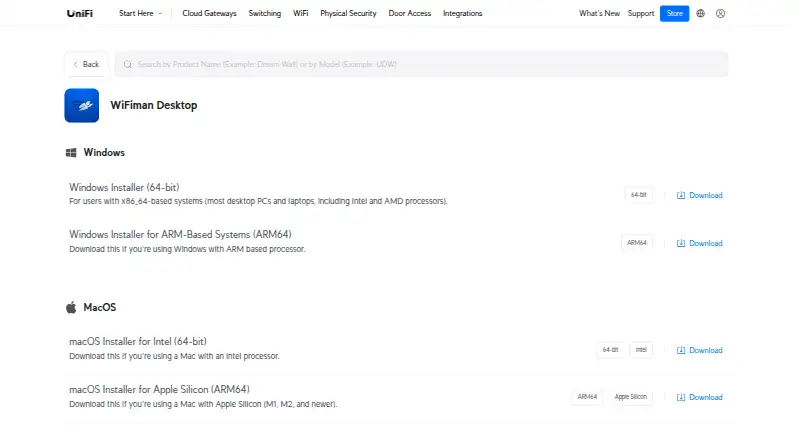
- Download WiFiman for Android or iOS, or choose a desktop installer for Windows, macOS or Linux.
- Open Discovery to view identifying information for devices connected to Wi-Fi.
- Use a compatible UniFi gateway to set up Teleport remote access.
- For Teleport access, use an invitation within 24 hours and on one device at a time.
WiFiman is Ubiquiti’s free network utility for finding devices, checking wireless performance and connecting remotely to a UniFi network. It is best for people who want those checks on a phone, especially those with UniFi equipment. Its mobile toolkit is broad for a free app, but desktop support is narrower and some measurements require UniFi hardware.
Overview
WiFiman brings device discovery and network checks together with Teleport, a remote-access VPN for a UniFi network. The balance differs sharply by platform: mobile includes speed tests and wireless tools, while desktop is limited to UniFi Device Discovery and Teleport. It is therefore a better fit as a mobile companion than as a full desktop Wi-Fi analysis suite.
Key features
- Speed and wireless metrics: The mobile app measures upload and download speeds on connected Wi-Fi or cellular. With a UniFi Gateway, it can also monitor signal strength, throughput, latency and roaming between access points. The speed check is useful without that gateway, but the richer network view is most relevant to UniFi users.
- Coverage mapping: Floorplan Mapper uses LiDAR-equipped mobile devices to record signal strength around an area and visualize coverage and device roaming. This can help compatible-device owners understand variation across a space; it is not a reason to choose WiFiman if their phone lacks LiDAR.
- Device discovery: The Discovery tab displays IP addresses and other identifying information for devices connected to the Wi-Fi network. That makes it useful for a quick view of connected devices, rather than a general-purpose desktop analysis workflow.
- Teleport VPN: Teleport provides remote access to a UniFi network without manual configuration and requires a compatible UniFi gateway. It uses WireGuard encryption, and Ubiquiti says it does not store user data. An invitation expires after 24 hours and works with one device at a time, a practical constraint when arranging access across several devices.
- Site survey tools: WiFiman includes site survey tools, channel recommendations and historical analysis. These capabilities add value for assessing wireless networks, though the desktop edition still supports only device discovery and Teleport.
Pricing
WiFiman — free (billed Free). The mobile app is free and ad-free, so it suits people who want basic wireless checks without a subscription. There is no free trial because the product is free. The trade-off is not a paid tier but platform and hardware limits: desktop provides only discovery and Teleport, gateway-dependent metrics need a UniFi Gateway, and Floorplan Mapper needs a LiDAR-equipped mobile device.
Platforms
WiFiman supports Android, iOS, Linux, macOS and Windows. Ubiquiti offers desktop installers for Windows x86-64 and ARM64, macOS Intel and Apple Silicon, and Linux AMD64. The wider platform list does not mean feature parity: speed testing, wireless metrics and coverage mapping are mobile-only, while desktop covers UniFi Device Discovery and Teleport VPN.
For privacy-conscious users, Google Play says the app may share location and personal information, and may collect personal information, app activity and app performance data; it also says data is encrypted in transit. The store provides the support email [email protected].
Who it's for
WiFiman is a sensible choice for UniFi users who want to identify devices, check wireless performance on a phone and reach their network remotely. It also suits mobile users who need speed checks over Wi-Fi or cellular without paying. It is less suitable for people who need a consistent desktop survey workflow, or who want the gateway-dependent metrics and Teleport without a compatible UniFi Gateway.
Pros and cons
- Pro: The mobile app is free and ad-free, with speed checks on both Wi-Fi and cellular.
- Pro: UniFi Gateway owners can see signal strength, throughput, latency and roaming, rather than just a speed result.
- Pro: Teleport combines remote UniFi access with WireGuard encryption and a zero-configuration setup.
- Con: Desktop omits the mobile app’s other listed tools, limiting its appeal as a desktop analyzer.
- Con: Teleport needs a compatible UniFi Gateway, and each invitation expires after 24 hours and can serve one device at a time.
- Con: Coverage mapping depends on a LiDAR-equipped mobile device.
Alternatives
For a broader comparison of tools in this category, browse Wi-Fi Analyzer Software.
- NetSpot is a freemium alternative with a free edition for personal and evaluation use on macOS and Windows, plus a free trial; consider it when a desktop-oriented option is a better fit.
- inSSIDer offers a free download for Wi-Fi scanning and visualization, requiring a free Oscium account, as well as a free trial; its listed platforms are macOS and Windows.
- Kismet is free and open source across Linux, macOS, Windows, API and self-hosted platforms, making it an alternative for readers seeking an open-source option.
- Parkdale is free to download and use on Android, macOS and Windows.
- Hamina Planner is a freemium option for Linux, macOS, Windows and web, with its Planner plan starting from $590.
- AirMagnet Survey PRO is a freemium alternative for macOS and Windows.
- DTNT is a freemium alternative for Windows.
- Wi-Fi Designer is a free web-based alternative.
Verdict
Choose WiFiman if you want a free mobile toolkit for device discovery and wireless checks, particularly on a UniFi network. Its combination of mobile measurements and Teleport is compelling for that audience. Look elsewhere if you need the same analysis tools on desktop, or if your priority is gateway-independent access to the full set of wireless metrics.
Verdict
WiFiman combines UniFi device discovery and remote access with additional wireless tools on mobile. Check the platform limits and gateway requirement if you need the mobile-only measurements or Teleport VPN.
Questions
How much does WiFiman cost?
The WiFiman plan is free. The mobile app is free and ad-free.
Which platforms support WiFiman?
WiFiman is available for Android, iOS, Windows, macOS and Linux. Desktop installers include Windows x86-64 and ARM64, macOS Intel and Apple Silicon, and Linux AMD64.
What can WiFiman Desktop do?
Desktop supports UniFi Device Discovery and Teleport VPN. The other listed features are mobile-only.
Does WiFiman include remote access?
Teleport provides remote access to a UniFi network and requires a compatible UniFi gateway. It uses WireGuard encryption, and Ubiquiti says it does not store user data.
How long does a Teleport invitation last?
An invitation expires after 24 hours and can be used by one device at a time.
What information may the app collect or share?
Google Play says WiFiman may share location and personal information, and may collect personal information, app activity and app performance data. It says data is encrypted in transit.
Facts from WiFiman's own pages
- Company founder and date
- Ubiquiti's investor-relations page says Robert Pera founded the company in October 2003 and that current operations began in 2005. · ir.ui.com, 15 Oct 2026
- Company headquarters
- Ubiquiti lists its executive office at 685 Third Avenue, New York, New York 10017. · sec.gov, 15 Oct 2026
- Company workforce
- Ubiquiti reported 1,818 full-time-equivalent employees as of June 30, 2026, including 1,321 in research and development. · sec.gov, 15 Oct 2026
- Coverage mapping
- Floorplan Mapper on LiDAR-equipped mobile devices records signal strength in different areas to visualize Wi-Fi coverage and device roaming. · help.ui.com, 30 Sept 2026
- Data practices
- Google Play says the app may share location and personal information, may collect personal information, app activity, and app performance data, and encrypts data in transit. · play.google.com, 30 Sept 2026
- Desktop downloads
- Ubiquiti provides Windows x86-64 and ARM64 installers, macOS Intel and Apple Silicon installers, and a Linux AMD64 installer. · ui.com, 15 Oct 2026
- Desktop scope
- The desktop application supports UniFi device discovery and Teleport VPN, while the other documented tools are mobile-only. · help.ui.com, 15 Oct 2026
- Device discovery
- The Discovery view shows IP addresses and identifying information for devices on the local Wi-Fi network. · help.ui.com, 15 Oct 2026
- Floorplan Mapper
- LiDAR-equipped mobile devices can record signal strength by location to visualize coverage and roaming behavior. · help.ui.com, 15 Oct 2026
- Founded
- 2005 · ui.com, 28 Sept 2026
- Headquarters
- New York, New York, USA · ui.com, 28 Sept 2026
- Limit: company support sentiment
- Trustpilot reviews for UI commonly mention hardware failures, unstable connections, poor technical support and promised features not arriving; these reviews concern Ubiquiti overall rather than WiFiman specifically. · trustpilot.com, 15 Oct 2026
- Limit: floorplan export
- A Google Play reviewer said created signal-strength floorplans cannot be exported directly and must be shared individually or captured as screenshots. · play.google.com, 15 Oct 2026
- Limit: missing Apple TV app
- An Apple reviewer requested an Apple TV version to measure that device's wireless performance. · apps.apple.com, 15 Oct 2026
- Limit: scan navigation bug
- A Google Play reviewer described Android scan screens becoming stuck and requiring a force close, while noting the problem later appeared fixed. · play.google.com, 15 Oct 2026
- Limit: speed-test accuracy
- An Apple reviewer reported that WiFiman speed-test results are sometimes not very accurate. · apps.apple.com, 15 Oct 2026
- Limit: throughput confidence
- A Reddit user reported that WiFiman seemed accurate for signal strength but weaker for real throughput than a local OpenSpeedTest deployment. · reddit.com, 15 Oct 2026
- Network information
- The app displays IP address, netmask, gateway, DNS server, SSID, BSSID, signal strength, channel, ping latency and packet loss. · play.google.com, 15 Oct 2026
- Network scanning
- The Android listing says WiFiman can detect Wi-Fi and Bluetooth LE networks, scan subnets, and inspect Bonjour, SNMP, NetBIOS and Ubiquiti discovery information. · play.google.com, 15 Oct 2026
- Port scanner
- The Android listing includes a network analyzer with Wi-Fi 6 support, a signal meter, cellular information, device discovery and a port scanner. · play.google.com, 15 Oct 2026
- Praise: optimization data
- An Apple reviewer praised the channel and band information, optimization suggestions and intuitive interface for improving Wi-Fi. · apps.apple.com, 15 Oct 2026
- Praise: usability
- An Apple reviewer said the small feature set works well, the interface is fine and the app being free leaves little to complain about. · apps.apple.com, 15 Oct 2026
- Purpose
- WiFiman provides tools for UniFi device discovery, wireless speed and latency testing, and instant remote access VPN. · help.ui.com, 30 Sept 2026
- Rating on Apple App Store
- 4.8 out of 5 from 40K reviews · apps.apple.com, 15 Oct 2026
Where WiFiman stands on Freedom251
- Wi-Fi Analyzer Software#6 of 29