Freedom251 › Wi-Fi Analyzer Software
Wi-Fi Scanner
What Wi-Fi Scanner is
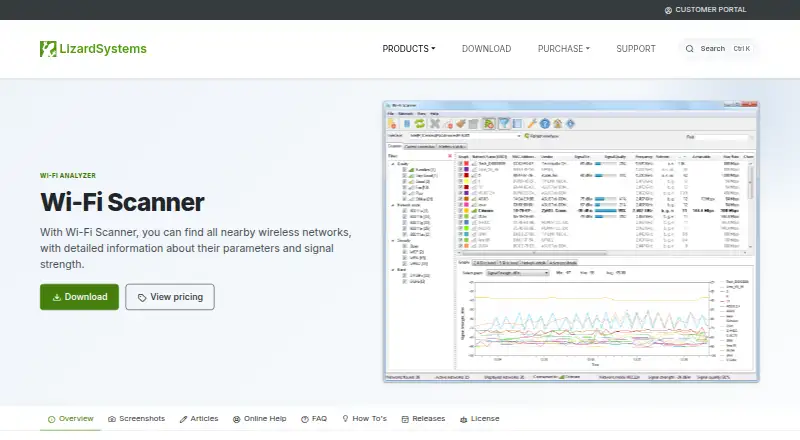
Wi-Fi Scanner is a Windows program for finding nearby wireless networks and inspecting their signal and connection details. It displays network identifiers, signal quality, channel, data rates, security, channel utilization, and clients. It supports 802.11a/b/g/n/ac/ax across 2.4 and 5 GHz bands, with channel widths from 20 to 160 MHz, including 80+80 MHz. Users can graph signal level over time, view signal spectrum masks, and filter networks by quality, mode, security, and other parameters. The software can connect to detected networks, manage wireless profiles, and connect or disconnect wireless adapters. It detects WEP, WPA, and WPA2 security standards and supports WPS 1.0 and 2.0. The maker describes it for home users checking signal distribution or access-point placement and corporate administrators planning or monitoring wireless security. The listed version 25.05 was released May 16, 2025, with initial Wi-Fi 7 support. A Wi-Fi adapter, administrator privileges, and internet access for registration and updates are listed minimum requirements. The personal license is free for non-commercial use; paid licenses start at $99.95.
Who it suits
Wi-Fi Scanner suits home users assessing signal distribution or access-point placement, and corporate administrators configuring, planning, or monitoring wireless security. It is for Windows systems with a Wi-Fi adapter.
What it does well
- Displays signal, channel, security, and client details.
- Graphs signal level over time.
- Supports 2.4 and 5 GHz bands.
- Personal license is free for non-commercial use.
- Business license includes one year of free updates.
What to know first
- Personal license is non-commercial only.
- Requires administrator privileges and a Wi-Fi adapter.
- Registration and updates require internet access.
- Evaluation displays nag screens and is limited to one computer in the network.
Limits
The free personal license is limited to non-commercial use. The unregistered evaluation has no functional limitations, but it may be used on only one computer in the network and displays nag screens.
Plans
| Plan | Billed and limits | Price |
|---|---|---|
| Personal License | Free for personal use · non-commercial use only · perpetual license | Free |
| Corporate License | Whole organization · unlimited installations · unlimited technicians · across departments and sites · one year of free updates · email and ticket support · priority support | $1,999.95, paid once |
| Business License | Commercial, per machine · perpetual license · one year of free updates · email and ticket support | $99.95, paid once |
As lizardsystems.com lists them, read 9 Oct 2026. The maker's own page has the final word.
Getting started
- Visit the Wi-Fi Scanner product website.
- Use a Windows computer with a Wi-Fi adapter and administrator privileges.
- Choose the free personal license for non-commercial use, or select a paid business or corporate license.
- Have internet access available for registration and product updates.
- During evaluation, use the program on one computer in the network and expect nag screens.
Verdict
Wi-Fi Scanner combines network inspection, signal analysis, and connection management for Windows. Check the license terms and system requirements, especially if use is commercial or spans multiple computers.
Questions
Is Wi-Fi Scanner free?
A personal license is free for non-commercial use and is perpetual. The business license costs $99.95, paid once, and the corporate license costs $1,999.95, paid once.
Is there a free trial?
Yes. The pricing note lists a 10-day trial. The unregistered evaluation has no functional limitations, but it is limited to one computer in the network and displays nag screens.
Which operating systems does it support?
Wi-Fi Scanner is listed for Windows. Supported platforms include Windows 8, 8.1, Windows 10, and Server 2012, Server 2012 R2, Server 2016, and Server 2019.
What does the business license include?
It costs $99.95, paid once and covers commercial use per machine. It includes one year of free updates and email and ticket support.
What does the corporate license include?
It costs $1,999.95, paid once and covers an organization with unlimited installations and technicians across departments and sites. It includes one year of free updates, email and ticket support, and priority support.
What equipment and access does it require?
The minimum requirements include a Wi-Fi adapter, administrator privileges, and internet access for registration and product updates.
Facts from Wi-Fi Scanner's own pages
- Analysis features
- It can graph signal level over time, show signal spectrum masks, and filter detected networks by parameters such as quality, mode, and security. · lizardsystems.com, 9 Oct 2026
- Connection management
- The software can connect to detected networks, manage wireless profiles, and disconnect or connect wireless adapters. · lizardsystems.com, 9 Oct 2026
- Evaluation limits
- The unregistered evaluation has no functional limitations but may be used on only one computer in the network and displays nag screens. · lizardsystems.com, 9 Oct 2026
- Intended users
- The maker describes it for home users checking signal distribution or access-point placement and corporate administrators configuring, planning, and monitoring wireless network security. · lizardsystems.com, 9 Oct 2026
- Latest listed release
- The product page lists version 25.05, released May 16, 2025, with initial Wi-Fi 7 support. · lizardsystems.com, 9 Oct 2026
- Network details
- It displays SSID, RSSI, BSSID, signal quality, channel, data rates, security, channel utilization, and clients. · lizardsystems.com, 9 Oct 2026
- Purpose
- Wi-Fi Scanner finds nearby wireless networks and displays their parameters and signal strength. · lizardsystems.com, 9 Oct 2026
- Security and privacy
- The maker's privacy policy says it uses reasonable, commercially acceptable security procedures for personal information and does not guarantee absolute security. · lizardsystems.com, 9 Oct 2026
- Security features
- It detects WEP, WPA, and WPA2 security standards and supports WPS 1.0 and WPS 2.0. · lizardsystems.com, 9 Oct 2026
- Standards and bands
- It supports 802.11a/b/g/n/ac/ax, 2.4 and 5 GHz bands, and channel widths from 20 to 160 MHz, including 80+80 MHz. · lizardsystems.com, 9 Oct 2026
- Support
- Paid business and corporate licenses include email and ticket support, with priority support listed for the corporate license. · lizardsystems.com, 9 Oct 2026
- System requirements
- The listed minimum requirements include a Wi-Fi adapter, administrator privileges, and internet access for registration and product updates. · lizardsystems.com, 9 Oct 2026
Where Wi-Fi Scanner stands on Freedom251
- Wi-Fi Analyzer Software#10 of 29