Freedom251 › Image Annotation Software
Vailabel Studio
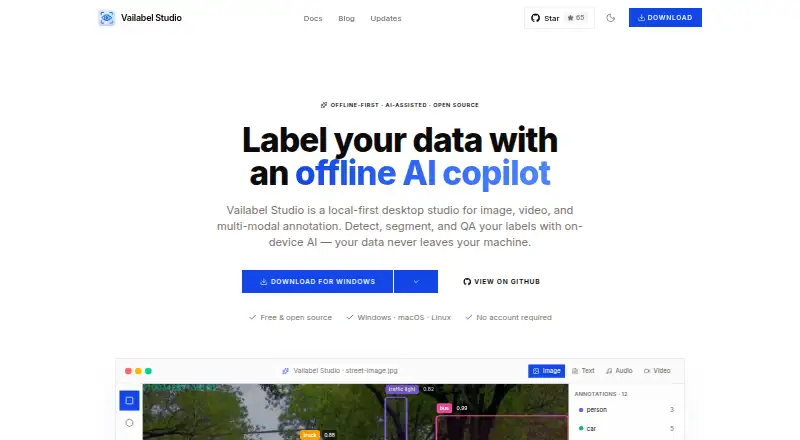
What Vailabel Studio is
Vailabel Studio is a free, open-source desktop app for annotating image, video, and multimodal data on Linux, macOS, and Windows. Its annotation tools include bounding boxes, polygons, points, lines, circles, free-draw, and SAM smart segmentation. An on-device copilot using local models can detect objects, segment masks, suggest labels, and check annotation quality. Video labeling is done frame by frame and includes object tracking. Projects are stored in a local SQLite database; the site says nothing is uploaded unless users connect cloud storage. Optional storage connections include Amazon S3, Azure Blob, and Google Cloud Storage, with credentials kept in the operating system keychain. Project types include object detection, semantic segmentation, image classification, keypoints, and mixed shapes. Export formats include LabelMe JSON, COCO, YOLO, YOLO-Seg, and Pascal VOC. The copilot works with LM Studio, Ollama, and Jan, using ONNX Runtime with optional CUDA. The software uses the Apache-2.0 license. Team collaboration is listed as planned rather than available.
Who it suits
It suits individual dataset annotators who want local-first image or video labeling and exports in the listed formats. It is not suited to workflows that require current in-app team collaboration.
What it does well
- Free and open source under Apache-2.0
- Local database storage with optional cloud connections
- On-device copilot supports labeling and QA tasks
- Exports to COCO, YOLO, and other listed formats
What to know first
- Team collaboration is planned, not currently listed
- Cloud storage requires users to connect an account
Plans
| Plan | Billed and limits | Price |
|---|---|---|
| Free | Free and open source · no account required | Free |
As vailabel.com lists them, read 8 Oct 2026. The maker's own page has the final word.
Getting started
- Visit the Vailabel website.
- Choose the desktop platform: Linux, macOS, or Windows.
- Create or open a project for a supported type, such as object detection or image classification.
- Use the annotation tools and, if desired, connect the copilot with LM Studio, Ollama, or Jan.
- Connect Amazon S3, Azure Blob, or Google Cloud Storage only if you want cloud storage.
- Export the annotations in a supported format.
Overview
Vailabel Studio is an open-source desktop app for annotating images, video and multimodal data. It suits people who want local projects, varied annotation tools and model assistance without a paid plan. Its strongest fit is individual work on Linux, macOS or Windows; teams needing shared workspaces should look elsewhere.
Key features
The annotation set covers bounding boxes, polygons, points, lines, circles and free-draw, alongside SAM smart segmentation. Projects can target object detection, semantic segmentation, image classification, keypoints or mixed shapes. That range makes the app useful across several common computer-vision workflows, rather than limiting it to boxes alone.
For video, labeling proceeds frame by frame and includes object tracking. The on-device copilot can detect objects, segment masks, suggest labels and check annotations using local models. It works with LM Studio, Ollama and Jan, through ONNX Runtime with optional CUDA. This is a meaningful advantage for users who want model-assisted work on their own machine, though it depends on those integrations and local model setup.
Projects reside in a local SQLite database. The site says data is not uploaded unless users choose to connect cloud storage; optional connections include Amazon S3, Azure Blob and Google Cloud Storage, with credentials kept in the operating system keychain. This local-first approach suits privacy-conscious workflows, while teams that expect shared cloud projects will not find collaboration today.
Exports include LabelMe JSON, COCO, YOLO, YOLO-Seg and Pascal VOC, giving users several established ways to move annotated data into other workflows. Team collaboration is planned, not a current feature. Florence-2, SAM 2, dataset intelligence and a conversational copilot are in progress, so they should not factor into a purchase decision now.
Pricing
Vailabel Studio costs nothing. The Free plan is open source, requires no account and includes the listed annotation types, model-assisted labeling and dataset export formats. There is no free trial because the product is free. No paid tier or usage cap is given, so the practical trade-off is not a cheaper plan with fewer tools: it is the absence of current team collaboration.
Platforms
The desktop app supports Linux, macOS and Windows. Its local-first design is suited to users who want to keep project storage on their own machine; no web or mobile platform is offered.
Who it's for
Vailabel Studio is a strong match for solo annotators, researchers and developers who want a free desktop workflow, local project storage, multiple export choices and optional model assistance. It is less suitable for teams that need shared workspaces now, or users who prefer a browser-based annotation tool.
Pros and cons
- Pros: Free and open source under Apache-2.0, with no account required.
- Pros: Broad shape tools, video tracking and multiple project types cover varied annotation work.
- Pros: Local storage and optional cloud connections give users control over where projects reside.
- Pros: On-device model assistance and five export formats support a capable individual workflow.
- Cons: Team collaboration is not available, making it a poor fit for groups that need shared workspaces.
- Cons: It is a desktop-only choice, not a browser-based option.
- Cons: Several roadmap capabilities remain in progress and cannot yet strengthen the current product.
Alternatives
For a broader set of choices, browse Image Annotation Software. Label Studio is worth considering for users who want a freemium option with a free trial and web, API or self-hosted platforms. Choose MakeSense.ai if a browser-based, free-to-use photo labeling tool better fits the workflow.
Roboflow may suit users who want a freemium service with a monthly free allocation of 10 credits, described as enough for about 30 model trainings or 80,000 inferences. VGG Image Annotator is another free option, released under a two-clause BSD license with no paid tiers or usage limits stated.
Annota AI offers a free web and self-hosted plan capped at one member, two datasets, 4 GB of storage and €4 in monthly credits. CVAT offers a limited personal-use and small-team Community plan, as well as a free online plan with one member, one project, three tasks and 1 GB of storage. Draw Attention is a web-focused alternative for interactive images, with its free edition limited to one image. Labellerr has a free Researcher plan for students and researchers, capped at 2,500 data credits, one seat, one workspace and up to 10 projects.
Verdict
Choose Vailabel Studio if you want a no-cost, open-source desktop annotator with local project storage, model assistance and a broad set of annotation and export options. Its central limitation is straightforward: collaboration is still planned, so teams that need shared workspaces should pick another tool.
Verdict
Vailabel Studio offers a broad annotation set with local project storage and model-assisted labeling. Its planned collaboration feature is not a current option for teams that need shared workspaces.
Questions
Does Vailabel Studio cost anything?
No. Its Free plan costs nothing and requires no account.
Is Vailabel Studio open source?
Yes. It is licensed under Apache-2.0.
Which operating systems does it support?
Vailabel Studio is a desktop app for Linux, macOS, and Windows.
What annotation tools and project types are supported?
Tools include bounding boxes, polygons, points, lines, circles, free-draw, and SAM smart segmentation. Project types include object detection, semantic segmentation, image classification, keypoints, and mixed shapes.
Can projects be stored in cloud services?
Yes. Optional connections include Amazon S3, Azure Blob, and Google Cloud Storage. Projects are stored locally unless users choose to connect cloud storage.
Does it support team collaboration?
Team collaboration is listed as planned. It is not included among the current features.
Facts from Vailabel Studio's own pages
- AI copilot
- The on-device copilot can detect objects, segment masks, suggest labels, and QA annotations using local models. · vailabel.com, 8 Oct 2026
- Annotation tools
- It supports bounding boxes, polygons, points, lines, circles, free-draw, and SAM smart segmentation. · vailabel.com, 8 Oct 2026
- Cloud storage
- Optional storage connections include Amazon S3, Azure Blob, and Google Cloud Storage; credentials are kept in the OS keychain. · vailabel.com, 8 Oct 2026
- Exports
- Export formats include LabelMe JSON, COCO, YOLO, YOLO-Seg, and Pascal VOC. · vailabel.com, 8 Oct 2026
- License
- The software is open source under the Apache-2.0 license. · vailabel.com, 8 Oct 2026
- Model integrations
- The site says the copilot works with LM Studio, Ollama, and Jan, and uses ONNX Runtime with optional CUDA. · vailabel.com, 8 Oct 2026
- Platforms
- The desktop app is available for Windows, macOS, and Linux, and requires no account or internet connection to start labeling. · vailabel.com, 8 Oct 2026
- Privacy
- Projects are stored in a local SQLite database, and the site says nothing is uploaded unless users choose to connect cloud storage. · vailabel.com, 8 Oct 2026
- Product
- Vailabel Studio is a local-first desktop app for image, video, and multimodal data annotation. · vailabel.com, 8 Oct 2026
- Project types
- Supported project types include object detection, semantic segmentation, image classification, keypoints, and mixed shapes. · vailabel.com, 8 Oct 2026
- Roadmap
- Team collaboration is listed as planned, while Florence-2, SAM 2, dataset intelligence, and a conversational copilot are listed as in progress. · vailabel.com, 8 Oct 2026
- Video
- Video labeling works frame by frame and includes object tracking. · vailabel.com, 8 Oct 2026
Where Vailabel Studio stands on Freedom251
- Image Annotation Software#17 of 28