Freedom251 › Image Annotation Software
PixLab Annotate
What PixLab Annotate is
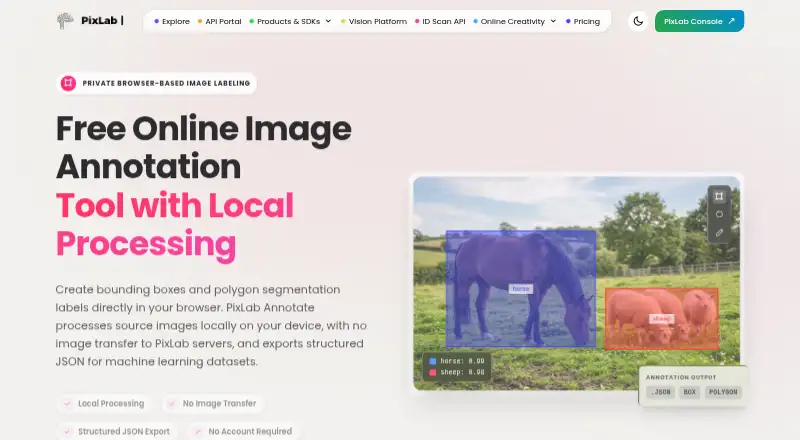
PixLab Annotate is a browser-based image labeler for creating bounding boxes and polygon segmentation labels for machine learning datasets. You can select multiple images from a device folder and move through them sequentially in the browser. Rectangle and polygon tools create annotations, while zoom, drag, full-screen display, snapshots, and an eraser support the labeling workflow. Labels can be named and assigned colors. The tool also keeps annotation history and supports undo and redo. When labeling is complete, it exports structured JSON with annotation coordinates, rectangle geometry, and label metadata for adaptation to a machine learning pipeline. PixLab says source images are processed in the browser rather than transferred to its servers. Annotation state is stored in browser storage and can be resumed in the same browser on the same device; clearing that storage removes saved work. No account is required to load images, create labels, or export annotation data. The web tool is free, with a plan listed as free. PixLab describes it as useful for developers, researchers, ML engineers, dataset preparation, small teams, QA review, and classroom training. PixLab identifies Symisc Systems, SUARL as its maker and says its SaaS business began with PixLab in 2017. Feature and support requests can be made through the PixLab GitHub repository.
Who it suits
PixLab Annotate suits developers, researchers, and ML engineers preparing datasets with bounding boxes or polygon labels. Its browser workflow and JSON export may also fit small teams, QA review, and classroom training.
What it does well
- Creates bounding box and polygon annotations.
- Can move through multiple selected images sequentially.
- Labels support names and colors, with history, undo, and redo.
- Exports structured JSON with coordinates and label metadata.
- Images are processed in the browser, according to PixLab.
- No account is required to load, label, or export images.
What to know first
- Saved annotation state is tied to the same browser and device.
- Clearing browser storage removes saved annotation state.
- The listed export is structured JSON.
Plans
| Plan | Billed and limits | Price |
|---|---|---|
| Free | Free to use · no account required · bounding boxes and polygons · structured JSON export | Free |
As pixlab.io lists them, read 9 Oct 2026. The maker's own page has the final word.
Getting started
- Open the PixLab Annotate website in a browser.
- Select images from a device folder.
- Create and name labels, then assign colors as needed.
- Annotate with rectangles or polygons and use the available review tools.
- Export the structured JSON when finished.
- Return in the same browser on the same device to resume saved annotation state.
Verdict
Choose PixLab Annotate if you need a free browser tool for bounding boxes or polygon labels and a structured JSON export. Keep the same browser storage on the same device to resume work.
Questions
How much does PixLab Annotate cost?
The Free plan is listed as free.
Do I need an account?
No account is required to load images, create labels, or export annotation data.
What annotation types are available?
PixLab Annotate supports bounding boxes and polygons.
What does the export contain?
It exports structured JSON with annotation coordinates, rectangle geometry, and label metadata.
Where are images and saved annotations handled?
PixLab says source images are processed in the browser and are not transferred to its servers. Annotation state is saved in browser storage and can be resumed in the same browser on the same device.
Who makes PixLab Annotate?
PixLab identifies Symisc Systems, SUARL as its maker.
Facts from PixLab Annotate's own pages
- Account requirement
- The tool says no account is required to load images, create labels, or export annotation data. · pixlab.io, 9 Oct 2026
- Annotation tools
- The tool provides rectangle and polygon labeling, plus zoom, drag, full-screen display, snapshots, and an eraser. · pixlab.io, 9 Oct 2026
- Batch labeling
- You can select multiple images from a device folder and move through them sequentially in the browser. · pixlab.io, 9 Oct 2026
- Export
- The tool exports structured JSON with annotation coordinates, rectangle geometry, and label metadata for adaptation to a machine learning pipeline. · pixlab.io, 9 Oct 2026
- Labels and history
- You can create and manage labels with names and colors, review annotation history, and undo or redo changes. · pixlab.io, 9 Oct 2026
- Local processing
- PixLab says source images are processed in the browser and are not transferred to PixLab servers. · pixlab.io, 9 Oct 2026
- Maker
- PixLab identifies Symisc Systems, SUARL as its maker and says its SaaS business began with PixLab in 2017. · symisc.net, 9 Oct 2026
- Purpose
- PixLab Annotate is a browser-based image labeler for creating bounding boxes and polygon segmentation labels for machine learning datasets. · pixlab.io, 9 Oct 2026
- Saved work
- Annotation state is stored in browser storage and can be resumed in the same browser on the same device; clearing that storage removes the saved state. · pixlab.io, 9 Oct 2026
- Support
- The app page says feature and support requests can be made through the PixLab GitHub repository. · annotate.pixlab.io, 9 Oct 2026
- Supported use cases
- The maker describes the tool as useful for developers, researchers, ML engineers, dataset preparation, small teams, QA review, and classroom training. · pixlab.io, 9 Oct 2026
Where PixLab Annotate stands on Freedom251
- Image Annotation Software#15 of 28