Freedom251 › AI Image Segmentation Software

CVAT
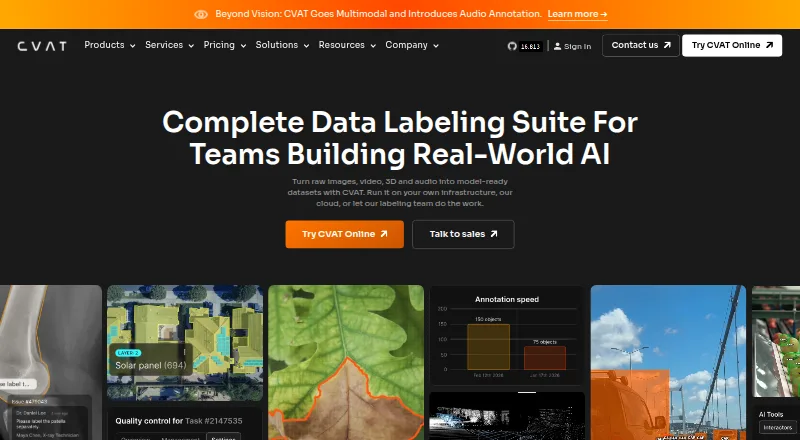
What CVAT is
CVAT helps teams turn images, video, 3D data, and audio into labeled datasets for AI workflows. Its visual tools cover boxes, pixel masks, polygons, keypoints, skeletons, and object tracks. Teams can review work through validation and acceptance stages, and assess quality with ground truth, honeypots, and consensus workflows. Storage connections include Amazon S3, Azure Blob Storage, Google Cloud Storage, S3-compatible buckets, and self-hosted storage. CVAT names SAM 2, SAM 3, Ultralytics, Hugging Face models, and custom models as ways to assist labeling. It exports to more than 20 formats, including COCO, YOLO, KITTI, Cityscapes, and Pascal VOC; automation is available through its API, SDK, and CLI. Deployment options include managed cloud and self-hosting, including on-premises and air-gapped deployments. A free plan is available, while online paid plans start at $23/user/mo billed annually. CVAT lists encryption, role-based access, SSO, logging, and audit trails among its security controls, but says it does not currently hold ISO 27001 or SOC 2 certifications.
Who it suits
CVAT suits AI teams labeling visual, 3D, or audio data, including teams that need review workflows and dataset exports. Managed cloud and self-hosted options serve different deployment needs.
What it does well
- Supports image, video, 3D, and audio labeling
- Offers validation and acceptance review stages
- Exports to more than 20 formats
- Available as managed cloud or self-hosted
What to know first
- Community lacks SSO and automated quality assurance
- Community lacks SAM and built-in AI agent integrations
- Does not currently hold ISO 27001 or SOC 2
Limits
CVAT Online Free allows one member, one project, three tasks, and 1 GB of internal storage. The Community edition lacks automated quality assurance, SSO, SAM integration, built-in AI agent integrations, and advanced reporting.
Plans
| Plan | Billed and limits | Price |
|---|---|---|
| Community | Limited plan for personal use and small teams · MIT license | Free |
| CVAT Online Free | 1 member · 1 project · 3 tasks · 1 GB internal storage | Free |
| Enterprise Basic | $12,000 per year · Single-instance deployment · essential support for critical issues | $12,000 a year |
| CVAT Online Solo Yearly | $23 / per month · Save 30% · Unlimited plan for personal workspace only | $23 |
| CVAT Online Team Yearly | $23/per user · $46 / per month for 2 seats · Save 30% · 2–50 seats | $23 |
| CVAT Online Team Monthly | $33/per user · $66 / per month for 2 seats · 2–50 seats · pay as you go | $33 a month |
| CVAT Online Solo Monthly | $33 / per month · Unlimited plan for personal workspace only | $33 a month |
| Enterprise Premium | Custom · Advanced deployment · customization · priority expert support · up to 3 instances · 100 dev hours | On request |
As cvat.ai lists them, read 29 Sept 2026. The maker's own page has the final word.
Getting started
- Visit https://www.cvat.ai/.
- Choose the managed cloud service or a self-hosted deployment.
- For the free online plan, start with its allowance of one member, one project, and three tasks.
- For a paid online workspace, choose a solo or team plan billed monthly or annually.
- Connect supported storage and use CVAT's annotation tools to prepare datasets.
CVAT is a broad dataset-labeling platform for image, video, 3D, and audio projects. It best suits teams that need many annotation types, structured review, and a choice between cloud and self-hosted deployment. Its free and low-cost options are useful for individuals and small teams, while larger organizations must budget for enterprise features and support.
Overview
CVAT converts raw media into labeled datasets for AI workflows, covering detection, segmentation, tracking, keypoints, and more. The project began as an Intel internal tool in 2017, became open source in 2018, and became an independent company in 2022. That history is reflected in the MIT-licensed Community edition and the separate managed offerings.
Deployment is unusually flexible: you can use CVAT Online, run it through an API, or deploy it yourself on premises, including in air-gapped environments. Security features include encryption in transit and at rest, role-based access controls, SSO, access logging, and audit trails. Organizations that require ISO 27001 or SOC 2 certification should choose another provider or obtain their own compliance assurance.
Key features
Annotation tools cover rectangles and bounding boxes, polygons, polylines, points, ellipses, cuboids, skeletons, tags, brush and pixel masks, keypoints, and object tracks. That breadth is valuable when one dataset combines detection, segmentation, pose, and video-tracking work. Image inputs include JPEG, PNG, BMP, GIF, PPM, and TIFF.
Review is treated as a workflow rather than an afterthought. Teams can move jobs through validation and acceptance stages and use ground truth, honeypots, and consensus workflows to measure labeling quality. Community does not include automated quality assurance, so organizations wanting more automatic checking need an Enterprise plan.
CVAT connects to Amazon S3, Azure Blob Storage, Google Cloud Storage, S3-compatible buckets, and self-hosted storage. It names SAM 2, SAM 3, Ultralytics, Hugging Face models, and custom models as ways to accelerate annotation. Community lacks SAM integration and built-in AI agent integrations, limiting the appeal of those assisted workflows on the free self-hosted edition.
Exports cover more than 20 formats, including CVAT XML, Datumaro JSON, COCO, YOLO, Pascal VOC, Cityscapes, KITTI, Open Images, and MOT. API, SDK, and CLI access make it practical to automate imports, exports, and repeatable labeling operations rather than relying solely on the web interface.
Pricing
CVAT uses a freemium model. Community costs nothing and is a limited MIT-licensed plan for personal use and small teams. CVAT Online Free also costs nothing, but is capped at 1 member, 1 project, 3 tasks, and 1 GB of internal storage. It is suitable for trying the service or handling a small personal dataset, not a growing team.
CVAT Online Solo Yearly costs $23 a year, billed at $23 per month, with a 30% saving and an unlimited personal workspace. The monthly Solo plan costs $33 a month and is also unlimited for a personal workspace. These plans remove the small free-tier quotas but are not designed for shared team work.
CVAT Online Team Yearly is $23 a year, billed at $23 per user, with $46 per month for two seats, a 30% saving, and 2–50 seats. Team Monthly costs $33 a month, billed at $33 per user, or $66 per month for two seats, for 2–50 seats on a pay-as-you-go basis. Enterprise Basic costs $12,000 a year for a single-instance deployment and essential critical-issue support, including 24-hour email support with a 24-hour response SLA and a private urgent-issue helpdesk. Enterprise Premium has custom pricing and adds advanced deployment, customization, priority expert support, up to three instances, and 100 developer hours.
Platforms
CVAT runs on the web, offers API access, and can be self-hosted. Self-hosting supports on-premises and air-gapped installations, while managed cloud plans avoid that operational burden. The trade-off is straightforward: self-hosting gives control over infrastructure and data location, whereas Online plans provide a faster route to a shared workspace.
Who it's for
Choose CVAT for mixed-media AI datasets, collaborative annotation programs, or teams that need storage integrations, quality gates, and extensive export formats. Community and Online Free fit personal work and small experiments. Solo plans suit one person with larger needs; Team plans fit 2–50 collaborators. Enterprise is the relevant tier for dedicated deployment, formal support, customization, or multiple instances.
Pros and cons
Pros
- Exceptionally broad annotation coverage, including 3D shapes, skeletons, masks, and tracks.
- Validation, acceptance, ground truth, honeypots, and consensus support measurable review workflows.
- Cloud, self-hosted, on-premises, and air-gapped deployment options accommodate different data policies.
- More than 20 export formats plus API, SDK, and CLI support integration with existing pipelines.
Cons
- Community omits automated quality assurance, SSO, SAM integration, built-in AI agent integrations, and advanced reporting.
- Online Free is restricted to one member, one project, three tasks, and 1 GB of storage.
- No ISO 27001 or SOC 2 certification is currently held.
- Enterprise Premium requires a custom quote, making its total cost harder to compare.
Alternatives
Label Studio is a freemium, cross-platform alternative with a Community Edition and free trial; choose it when you need Windows, macOS, Linux, web, and self-hosted coverage.
MakeSense.ai is a free browser-based photo-labeling tool, better for straightforward image work without a paid tier.
Roboflow offers a free tier with 10 credits per month and paid project tooling, making it an option when those defined hosted credits fit your workflow.
VGG Image Annotator is free under a two-clause BSD license with no paid tiers or stated usage limits.
Vailabel Studio is free, open source, and requires no account.
Annota AI offers a free web or self-hosted plan with 1 member, 2 datasets, 4 GB of storage, and monthly credits.
Draw Attention focuses on interactive images, with a free edition limited to one interactive image.
Labellerr has a free researcher plan with 2,500 data credits, one seat, one workspace, and up to 10 projects.
For more choices, see Image Annotation Software, AI Image Annotation Tools, AI Data Labeling Tools, Data Labeling Software, and Video Annotation Software.
Verdict
CVAT is a strong recommendation for teams building varied AI datasets that need serious annotation coverage, review controls, automation, and deployment flexibility. Its main reason to choose it is the combination of breadth and workflow control at a free or relatively low starting price. Look elsewhere if your organization requires ISO 27001 or SOC 2 certification, or if Community’s missing SSO, automated QA, and integrated AI features are essential.
Verdict
CVAT combines varied annotation tools with review workflows, storage connections, and broad export options. Its Community edition omits several listed Enterprise capabilities, and the company says it lacks ISO 27001 and SOC 2 certifications.
Questions
Is CVAT free?
Yes. The Community edition is free under the MIT license, and CVAT Online Free is also listed at 0.00 USD.
What does CVAT Online Free include?
It includes one member, one project, three tasks, and 1 GB of internal storage.
How much do paid online plans cost?
Paid online plans start at $23/user/mo billed annually. Monthly online plans are listed at $33 per user per month.
Which platforms does CVAT support?
CVAT is available through the web, API, and self-hosted deployment.
Is CVAT open source?
The Community edition is MIT licensed. CVAT was released as open source in 2018.
What storage and model integrations are named?
Storage options include Amazon S3, Azure Blob Storage, Google Cloud Storage, S3-compatible buckets, and self-hosted storage. Named labeling options include SAM 2, SAM 3, Ultralytics, Hugging Face models, and custom models.
Facts from CVAT's own pages
- AI integrations
- The platform names SAM 2, SAM 3, Ultralytics, Hugging Face models, and custom models as ways to accelerate labeling. · cvat.ai, 29 Sept 2026
- Annotation features
- Its visual annotation tools include boxes, pixel masks, polygons, keypoints, skeletons, and object tracks. · cvat.ai, 29 Sept 2026
- Certification limits
- CVAT says it does not currently hold ISO 27001 or SOC 2 certifications. · cvat.ai, 29 Sept 2026
- Community edition limits
- The Enterprise page says Community lacks automated quality assurance, SSO, SAM integration, built-in AI agent integrations, and advanced reporting. · cvat.ai, 29 Sept 2026
- Company history
- CVAT began as an internal Intel tool in 2017, was released as open source in 2018, and spun out as an independent company in 2022. · cvat.ai, 29 Sept 2026
- Deployment
- CVAT is offered as a managed cloud service or as a self-hosted deployment, including on-premises and air-gapped options. · cvat.ai, 29 Sept 2026
- Exports and automation
- CVAT exports data in more than 20 formats, including COCO, YOLO, KITTI, Cityscapes, and Pascal VOC, and supports automation through its API, SDK, and CLI. · cvat.ai, 29 Sept 2026
- Founded
- 2022 · cvat.ai, 23 Sept 2026
- Purpose
- CVAT turns raw images, video, 3D data, and audio into labeled datasets for AI workflows. · cvat.ai, 29 Sept 2026
- Quality control
- Teams can review jobs through validation and acceptance stages and assess quality with ground truth, honeypots, and consensus workflows. · cvat.ai, 29 Sept 2026
- Security controls
- CVAT lists encryption in transit and at rest, role-based access controls, SSO, access logging, and audit trails among its security features. · cvat.ai, 29 Sept 2026
- Storage integrations
- CVAT supports Amazon S3, Azure Blob Storage, Google Cloud Storage, S3-compatible buckets, and self-hosted storage. · cvat.ai, 29 Sept 2026
- Support
- Enterprise Basic includes 24-hour email support with a 24-hour response SLA and a private helpdesk channel for urgent critical issues. · cvat.ai, 29 Sept 2026
Where CVAT stands on Freedom251
- AI Image Segmentation Software#1 of 33
- Video Annotation Software#4 of 34
- Image Annotation Software#5 of 28
- AI Image Annotation Tools#6 of 24
- Data Labeling Software#8 of 24
- AI Data Labeling Tools#8 of 22