Freedom251 › Case Management Software
UiPath Maestro Case Management
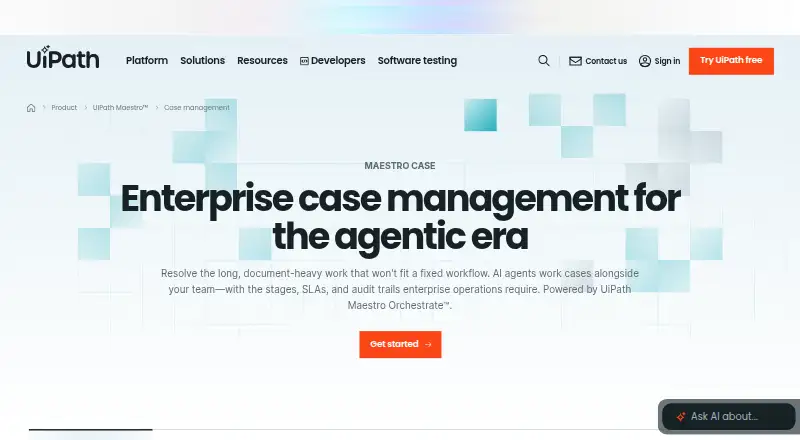
What UiPath Maestro Case Management is
UiPath Maestro Case Management is an enterprise case-management platform for document-heavy work that does not fit a fixed workflow. AI agents can read claims, contracts, applications, and notes, draft responses, update systems, and help close cases, while people remain involved when judgment is needed. Governance features include service-level agreements, escalation policies, role-based access, and immutable audit trails. Case Manager and Stage Manager Agents produce auditable plans that explain their actions. Ready connectors cover SAP, Oracle, Salesforce, ServiceNow, and Workday; API-first integrations are also available for custom systems. Case records can bring together live data through UiPath Data Fabric without copying it. Business users can configure plans, stages, SLAs, and escalation rules in Studio Web. Ready process apps provide intake forms, queues, and dashboards, and templates cover claims, loan origination, dispute resolution, onboarding, compliance, and investigations. Deployment options include Automation Cloud and self-hosting. A free trial and demo/contact path are listed, but no public prices or trial limits are printed.
Who it suits
It suits enterprises handling long, document-heavy cases across systems such as CRM, ERP, ITSM, or HR. Business users can configure case plans and controls in Studio Web.
What it does well
- AI agents can read documents and update systems.
- Includes SLAs, escalation policies, and immutable audit trails.
- Connectors include SAP, Salesforce, and ServiceNow.
- Ready process apps include intake forms, queues, and dashboards.
What to know first
- No public plan prices are printed.
- Trial limits are not printed.
- A first case type may take weeks to stand up.
Plans
| Plan | Billed and limits | Price |
|---|---|---|
| Free trial | — | On request |
| Request demo | — | On request |
As uipath.com lists them, read 27 Sept 2026. The maker's own page has the final word.
Getting started
- Visit the UiPath Maestro Case Management website.
- Start the offered free trial or request a demo.
- Choose Automation Cloud or self-hosting based on deployment needs.
- Configure case plans, stages, SLAs, and escalation rules in Studio Web.
- Use a ready process app or a template for a supported case type.
Overview
UiPath Maestro Case Management is enterprise software for complex cases that span documents, systems and changing workflows. It is best suited to organizations that need automation alongside human decisions and formal controls. Its breadth is compelling for that work, but buyers should be ready to discuss custom pricing and deployment needs.
Rather than force long-running cases into a fixed sequence, Maestro combines document processing, AI agents and configurable case plans. It can connect case work to existing enterprise systems, while keeping people involved where judgment is required.
For a broader comparison, see Case Management Software.
Key features
- Document-led automation: Native intelligent document processing reads claims, contracts, applications and notes. AI agents can draft responses, update systems and help move cases forward. This is a strong fit for document-heavy operations; it is less relevant to teams whose cases are simple and largely form-driven.
- Adaptable plans with oversight: Case Manager and Stage Manager Agents create plans and stages, with auditable explanations of their actions. Business users can configure plans, stages, SLAs and escalation rules in Studio Web without code. That flexibility helps when case paths vary, while human involvement remains available for decisions that should not be delegated to automation.
- Governance and auditability: SLAs, escalation policies, role-based access and immutable audit trails support controlled case operations. These controls matter in work that needs accountability; they may be more than a small team needs.
- Enterprise connections and live records: Ready connectors include SAP, Oracle, Salesforce, ServiceNow and Workday, with API-first integrations for custom systems. UiPath Data Fabric can aggregate live data into case records without copying it. That can reduce fragmentation across enterprise systems, though teams should assess fit with their own environment.
- Starting points for common processes: Ready process apps provide intake forms, queues and dashboards, and templates cover claims, loan origination, dispute resolution, onboarding, compliance and investigations. Most teams can stand up a first case type in weeks rather than quarters, a useful head start for organizations with a matching process.
Pricing
Maestro is presented with a freemium pricing model, but there is no free plan. A free trial is offered, and a separate demo/contact path is available; both have custom pricing, with no published trial length, quota or seat terms. The paid starting price is 25 /mo. Buyers should confirm currency, billing term, included capacity and renewal terms with UiPath before comparing that figure with a full deployment budget.
The free trial is the route to evaluate the product before purchase, while the demo path suits organizations that want to discuss requirements first. No lower-priced plan with published limits is described, so there is no basis to weigh feature trade-offs between tiers.
Platforms
Deployment options include UiPath Automation Cloud, which provides the full UiPath Platform with fast updates and scalability, and self-hosting for performance, compliance or security needs. The deployment model is hybrid, so organizations can weigh managed cloud operations against greater control over hosting. Confirm the configuration that fits your requirements during procurement.
Who it's for
Maestro is for enterprises handling long, document-heavy work that resists fixed workflows and involves multiple systems. It is particularly suited to teams that need auditable automation, configurable escalation and human judgment within one case process. Smaller teams with straightforward cases, or buyers who need a transparent standalone price before engaging a vendor, should consider simpler alternatives.
Pros and cons
Pros
- Handles varied documents: Native document processing and AI-assisted drafting support cases built around claims, contracts, applications and notes.
- Balances automation and control: Auditable agent plans, role-based access and immutable trails give teams ways to govern work while people retain judgment.
- Connects across enterprise systems: Named connectors and API integrations support cases that rely on data in several business applications.
Cons
- No free plan: A trial is offered, but teams seeking an ongoing no-cost option will need another product.
- Limited public pricing detail: The trial and demo have custom pricing, and the paid starting figure lacks a stated currency, billing term or included limits, making budget comparisons difficult.
- Enterprise scope may be unnecessary for simple cases: Teams without document-heavy, variable workflows may not benefit from its governance and integration breadth.
Alternatives
For smaller social-service programs, Socianote has a free plan for up to 3 staff, 50 people, 1 programme and 200 documents, making its published caps useful for a modest operation. CORE Search is a freemium option with a free plan for web, iOS and Android. Choose Pega Investigative Case Management or IntegrityLog when you want to compare other paid case-management options. DFIR-IRIS is a free, web-based alternative. Marble Case Manager offers a free self-hosted open-source plan with a real-time decision engine and community support, a route for teams seeking those attributes. For an HR-focused option, ServiceNow HR Service Delivery has HR plans that include knowledge search and virtual-agent conversations. Primero offers a free, annually billed DIY tier with self-managed open-source deployment and community support.
For adjacent categories, see Process Mining Software, Data Fabric Software and Task Mining Software.
Verdict
Choose UiPath Maestro Case Management if your organization needs to move document-heavy, variable cases across enterprise systems while preserving human judgment and auditable controls. Its combination of configurable workflows, document processing and integrations is the main reason to choose it. Look elsewhere if your needs are simple or you require clear pricing and limits before speaking with a vendor.
Verdict
UiPath Maestro Case Management is aimed at complex cases that need document handling, automation, and human judgment. Contact UiPath for pricing and trial details.
Questions
Is there a free plan?
No free plan is listed. A free trial is offered.
How long is the free trial?
The pricing note describes a 60-day trial.
What does UiPath Maestro Case Management cost?
Public prices are not printed for the free trial or demo/contact path.
What deployment options are available?
The product information describes Automation Cloud and self-hosting.
Which systems does it connect to?
Ready connectors include SAP, Oracle, Salesforce, ServiceNow, and Workday. API-first integrations are available for custom systems.
What kinds of cases have templates?
Templates cover claims, loan origination, dispute resolution, onboarding, compliance, and investigations.
Facts from UiPath Maestro Case Management's own pages
- Auditable plans
- Case Manager and Stage Manager Agents produce auditable plans explaining their actions. · uipath.com, 27 Sept 2026
- AI case work
- AI agents read documents, draft responses, update systems, and help close cases. · uipath.com, 27 Sept 2026
- API integrations
- API-first integrations are available for custom systems. · uipath.com, 27 Sept 2026
- Audit trail
- Every case action, decision, and escalation lands in an immutable audit trail. · uipath.com, 27 Sept 2026
- Audit trail
- Yes · uipath.com, 21 Sept 2026
- Company mark
- UiPath word mark, logos, and robots are registered trademarks owned by UiPath, Inc. and affiliates. · uipath.com, 27 Sept 2026
- No-code config
- Business users can configure case plans, stages, SLAs, and escalation rules in Studio Web. · uipath.com, 27 Sept 2026
- Custom case fields
- Yes · uipath.com, 21 Sept 2026
- Data Fabric
- The case record aggregates live data through UiPath Data Fabric without copying it. · uipath.com, 27 Sept 2026
- Deployment
- cloud · uipath.com, 21 Sept 2026
- Deployment time
- Most teams can stand up a first case type in weeks, not quarters. · uipath.com, 27 Sept 2026
- Document handling
- Native intelligent document processing reads claims, contracts, applications, and notes. · uipath.com, 27 Sept 2026
- Founded
- 2005 · uipath.com, 28 Sept 2026
- Free plan
- Yes · uipath.com, 21 Sept 2026
- Governance controls
- SLAs, escalation policies, role-based access, and immutable audit trails are included. · uipath.com, 27 Sept 2026
- Headquarters
- New York, New York, United States · uipath.com, 28 Sept 2026
- Human judgment
- People remain involved where judgment is needed. · uipath.com, 27 Sept 2026
- Intake dashboards
- Ready process apps provide intake forms, queues, and dashboards out of the box. · uipath.com, 27 Sept 2026
- Case intake forms
- Yes · uipath.com, 21 Sept 2026
- Enterprise systems
- Connects to CRM, ERP, ITSM, HR, custom systems, and apps such as SAP and Salesforce. · uipath.com, 27 Sept 2026
- Named connectors
- Ready connectors include SAP, Oracle, Salesforce, ServiceNow, and Workday. · uipath.com, 27 Sept 2026
- Enterprise cases
- Enterprise case management for agentic, document-heavy work. · uipath.com, 27 Sept 2026
- Reporting dashboards
- Yes · uipath.com, 21 Sept 2026
- SaaS option
- Automation Cloud provides the full UiPath Platform with fast updates and scalability. · uipath.com, 27 Sept 2026
Where UiPath Maestro Case Management stands on Freedom251
- Case Management Software#15 of 177