Freedom251 › 3D Texturing Software

Trumble
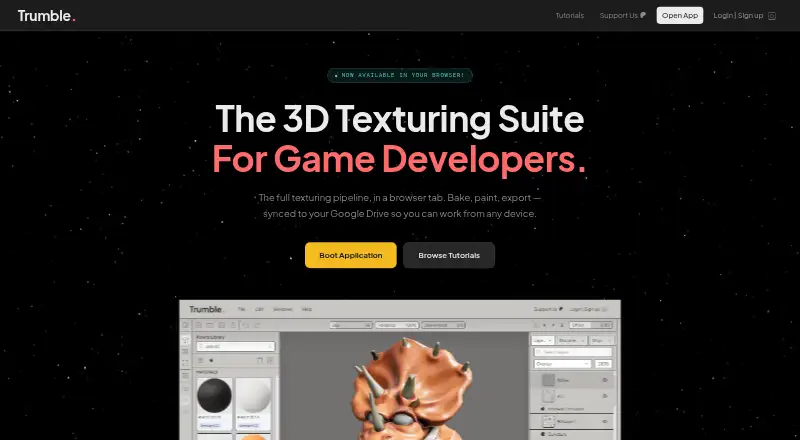
What Trumble is
Trumble is a browser-based creative suite for game developers and artists working on texturing and painting. Its Texture tool lets users paint PBR textures on 3D meshes, while Paint supports 2D work on alphas, masks, and channels. Bake generates normals, ambient occlusion, curvature, and other maps in the browser, without an offline renderer. Texture packs can be exported for Unreal, Unity, Godot, and Roblox. The tool accepts OBJ, STL, FBX, glTF, and GLB files; meshes need proper UVs to be painted. Trumble includes hundreds of materials and textures, and can save projects directly to Google Drive. It runs in modern browsers on Windows, macOS, and Linux, and no account is required to get started. The product is in early access. Its free plan includes current tools and workspace ads; paid plans begin at $5/mo. Files opened or imported are processed in the browser, and users retain rights to their content.
Who it suits
Trumble suits game developers and artists who want browser-based 2D and 3D texturing tools, including baking and engine-ready exports. It may also fit users who prefer to work without installing software or creating an account.
What it does well
- Paint PBR textures directly on meshes.
- Bake maps in-browser without an offline renderer.
- Export packs for Unreal, Unity, Godot, and Roblox.
- Includes hundreds of materials and textures.
- No account required to get started.
What to know first
- Meshes need proper UVs for painting.
- Free workspace displays ads.
- Product is in early access.
- Procedural materials are not available.
Limits
The Free plan includes all current tools and future tools, but displays workspace ads. The Low-Poly plan is $3/mo and supports ongoing development; the Pro plan is $5/mo and adds no ads and a full workspace layout.
Plans
| Plan | Billed and limits | Price |
|---|---|---|
| Free | $0 / forever · all current tools · all future tools · browser-based · workspace ads | Free |
| High-Poly | $20/mo · Free features · early access · direct developer feedback | $20 a month |
| Low-Poly | $3/mo · Free features · supports development | $3 a month |
| Pro | $5 / month · everything in Free · no ads · full workspace layout | $5 a month |
| Mid-Poly | $8/mo · Free features · roadmap voting | $8 a month |
As trumble.app lists them, read 14 Oct 2026. The maker's own page has the final word.
Getting started
- Open the Trumble website in a modern browser on Windows, macOS or Linux.
- Start using the app; no account is required.
- Open a mesh in OBJ, STL, FBX, glTF or GLB format with proper UVs for painting.
- Use Texture, Paint or Bake for the relevant workflow.
- Export a texture pack for Unreal, Unity, Godot or Roblox, or connect Google Drive for project autosaving.
Trumble is a browser-based creative suite for game artists and developers who need texturing, painting, baking, and engine exports in one workflow. It is best suited to people working with UV-ready meshes who want to avoid installing desktop software. The free tier is unusually broad, while workspace advertising and early-access status are the main compromises.
Overview
Trumble combines 3D PBR texture painting, 2D texture editing, map baking, and game-engine export in a modern browser. That makes it a practical hub for routine asset preparation rather than a single-purpose painter. The product remains in early access and receives regular improvements, so its capabilities are still developing.
It runs on Windows, macOS, and Linux through a modern browser, with no account required to begin. Files and assets opened or imported in the app are processed in the browser, and users retain rights to content they create or upload. Projects can auto-save directly to Google Drive instead of consuming Trumble account storage. Meshes must have proper UVs before the painting workflow can work, which is an important prerequisite for anyone importing models.
Key features
- 3D texturing: The Texture tool paints PBR textures directly on meshes in a browser-based 3D viewport. OBJ, STL, FBX, glTF, and GLB are accepted, giving it useful format coverage, but UV preparation remains the user’s responsibility.
- 2D painting: The Paint tool edits textures, alphas, masks, and channels. It complements mesh painting when a channel needs targeted adjustments or a texture must be edited outside the 3D view.
- Browser baking: Bake generates normals, ambient occlusion, curvature, and other maps without an offline renderer. Keeping this step in the same workspace can simplify a small asset pipeline.
- Engine export: One-click exports format texture packs for Unreal, Unity, Godot, and Roblox. That is especially useful for artists moving assets between those four ecosystems, although the product currently has no procedural-material feature.
- Material library: Hundreds of ready-to-use materials and textures span metal, wood, fabric, stone, and other categories. They provide starting content for projects rather than replacing custom authoring.
- Storage and roadmap: Google Drive integration handles project saving outside Trumble account storage. Planned work includes procedural materials, Google Drive project storage, a trim-sheet tool, more bake-map types, and additional export presets.
Pricing
Trumble uses a freemium ladder with a permanent free option and no free trial. The Free plan costs nothing, billed at $0 forever, and includes all current tools and all future tools in a browser-based workspace with ads. It is the right starting point for learners and occasional artists who can accept advertising.
Low-Poly costs $3 a month, billed $3/mo. It includes everything in Free and supports ongoing development, but the published benefits do not remove workspace ads or add a different tool allowance. Pro costs $5 a month, billed $5 / month, and adds no ads plus a full workspace layout; it is the clearest fit for regular users who want a cleaner working environment.
Mid-Poly is $8 a month, billed $8/mo, with everything above and the ability to vote on roadmap features. High-Poly is $20 a month, billed $20/mo, adding early access and direct developer feedback. Those upper tiers suit contributors who want influence or closer contact with development, not users seeking a larger published asset quota. Billing is handled by Trumble’s payment processor, which does not store card details directly.
Platforms
Trumble is available on the web, Windows, macOS, and Linux through modern browsers. Its no-install delivery is valuable on machines where desktop software deployment is inconvenient, while browser performance and the requirement for UV-ready meshes remain practical considerations.
Who it's for
Choose Trumble if you are a game artist, developer, or learner who wants one browser workspace for PBR painting, 2D channel work, baking, and exports to Unreal, Unity, Godot, or Roblox. The Free plan also makes it suitable for experimentation without a subscription. It is less suitable if you need procedural materials today, dislike ads, or routinely work with meshes that lack usable UVs.
Pros and cons
- Pros: Free access includes all current and future tools; browser operation covers Windows, macOS, and Linux; baking, painting, and engine exports share one workflow; Google Drive auto-save avoids using Trumble account storage; imported content is processed in the browser and remains owned by its creators.
- Cons: Free workspaces contain ads; mesh painting depends on proper UVs; procedural materials are not currently available; early-access changes may affect priorities; support response times may vary.
Alternatives
3D Texturing Software is a broader category starting point when you want to compare several texturing applications. Mixos Paint is a freemium, cross-platform option with Android and iOS support, but its free tier limits cloud storage, AI credits, 2D viewing resolution, and exports. Surface Labs is free during early access and supports Android, iOS, Linux, macOS, and Windows.
InstaMAT offers a free Pioneer License for qualifying projects with attribution and a paid Pro License at $36 a year. Marmoset Viewer is a free viewer included with Toolbag versions 2.07 and newer, with standalone availability. AwesomeBump is free and open source with no paid plans or usage limits stated. LigidPainter is completely free and listed as name-your-own-price.
Mari provides a free non-commercial plan with 4K and 16-bit export limits and disabled Python scripting, while Material Maker offers a name-your-own-price MIT/CC0 distribution and a 14.99 USD one-time Steam version.
Verdict
Trumble is a strong choice for artists who want a no-install, browser-based path from UV-ready mesh painting through baking and engine-formatted exports. Start with Free to access the full current toolset, or choose Pro when ads and workspace limitations interfere with regular work. Look elsewhere if procedural materials, a mature non-early-access product, or workflows that do not depend on proper UVs are essential.
Verdict
Trumble brings painting, texture editing, baking, and engine exports into a browser-based workflow. Check that your meshes have proper UVs and that the free plan's workspace ads suit you before choosing a plan.
Questions
Is Trumble free?
Yes. Its Free plan is $0 forever and includes all current and future tools, with workspace ads.
How much do paid plans cost?
Paid plans start at $5/mo. The listed tiers include Low-Poly at $3/mo, Pro at $5/mo, Mid-Poly at $8/mo and High-Poly at $20/mo.
Which platforms does Trumble support?
Trumble runs in modern browsers on Windows, macOS and Linux.
Do I need an account to use Trumble?
No account is required to get started.
Which mesh formats can I use for texturing?
The Texture tool accepts OBJ, STL, FBX, glTF and GLB files. Meshes need proper UVs to be painted.
Is Trumble open source?
The listed facts do not describe Trumble as open source.
Facts from Trumble's own pages
- 2D editor
- The Paint tool is a 2D editor for textures, alphas, masks and channel work. · trumble.app, 14 Oct 2026
- 2D painting
- The Paint tool provides 2D painting and texture editing for alphas, masks, and channels. · trumble.app, 1 Oct 2026
- 3D painting
- Its Texture tool paints PBR channels directly on meshes in a 3D viewport with real-time roughness, metallic and normal updates. · trumble.app, 14 Oct 2026
- 3D texturing
- The Texture tool lets users paint PBR textures directly on meshes in a browser-based 3D viewport. · trumble.app, 1 Oct 2026
- Advertising
- The free workspace uses Google AdSense advertising, while the Pro plan removes workspace ads. · trumble.app, 14 Oct 2026
- Asset types
- The Assets Library supports textures, alphas, materials, brushes, baked maps and imported files. · trumble.app, 14 Oct 2026
- Availability
- The product is in early access and ships improvements regularly. · trumble.app, 1 Oct 2026
- Baking
- The Bake tool generates normal, ambient-occlusion, curvature, position and thickness maps in the browser. · trumble.app, 14 Oct 2026
- Cloud storage
- Trumble connects directly to Google Drive, auto-saving projects there without using Trumble account storage. · trumble.app, 1 Oct 2026
- Data processing
- Files and assets opened or imported in the app are processed in the browser, and users retain rights to content they create or upload. · trumble.app, 1 Oct 2026
- Documentation
- The tutorials site provides six tutorial series covering Texture, Bake, Paint, Assets Library and navigation shortcuts. · trumble.app, 14 Oct 2026
- Early access
- The About page identifies Trumble as an early-access product whose features may change as development continues. · trumble.app, 14 Oct 2026
- Engine export
- Trumble exports texture packs formatted for Unreal, Unity, Godot, and Roblox with one click. · trumble.app, 1 Oct 2026
- Engine exports
- Export presets are provided for Unity, Unreal, Godot and Roblox texture workflows. · trumble.app, 14 Oct 2026
- Google Drive
- Trumble says projects auto-save to the user's Google Drive and that it does not hold the user's assets. · trumble.app, 14 Oct 2026
- Library limitation
- The documentation says Save to Library currently does nothing and is waiting for Google Drive implementation. · trumble.app, 14 Oct 2026
- Limit: asset preparation
- Zipdo says the workflow depends on correct UVs and bake-ready asset preparation. · zipdo.co, 14 Oct 2026
- Limit: baking depth
- Wifitalents characterizes Trumble's high-to-low baking coverage as narrower than dedicated baking tools. · wifitalents.com, 14 Oct 2026
- Limit: channel packing
- Wifitalents reports that advanced texture-channel packing can require extra manual steps. · wifitalents.com, 14 Oct 2026
- Limit: procedural depth
- Zipdo reports less depth than Substance 3D Painter for material-graph workflows and weaker procedural-layer coverage. · zipdo.co, 14 Oct 2026
- Limit: UDIM
- Wifitalents says Trumble's UDIM workflows are limited compared with tools built around tiled assets. · wifitalents.com, 14 Oct 2026
- Limit: UV preparation
- Wifitalents notes that complex projections require careful UV seam and scale management. · wifitalents.com, 14 Oct 2026
- Material library
- The product advertises hundreds of built-in materials and textures that can be dragged onto meshes. · trumble.app, 14 Oct 2026
- Mesh formats
- The Texture tool accepts OBJ, STL, FBX, glTF, and GLB files, and meshes need proper UVs to be painted. · trumble.app, 1 Oct 2026
Where Trumble stands on Freedom251
- 3D Texturing Software#15 of 29