Freedom251 › 3D Texturing Software
MechaPaint
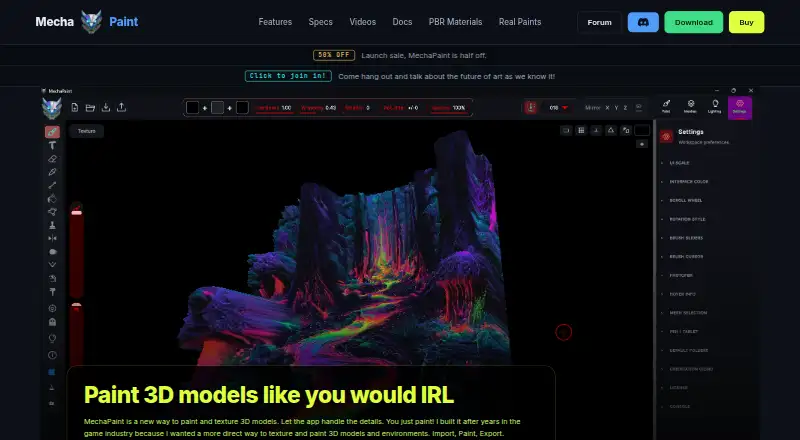
What MechaPaint is
MechaPaint is a standalone 3D art application for painting and texturing models on Windows and macOS. It lets users paint directly on model surfaces, including across seams and submesh boundaries, and organizes work in a separate layer stack for each submesh. Layers can be adjusted for opacity, merged, hidden, recolored, or used to bring in images. For animated models, users can scrub to a frame and paint in that pose. PhotoMesh turns a photo into a textured, paintable 3D model as either a relief sheet or closed solid. The app imports FBX, OBJ, LWO, USD, glTF, GLB, DAE, STL, PLY, and 3MF files; USD import is currently Windows-only, with macOS support marked as next. It exports PNG textures and FBX or OBJ geometry, with orientation presets for Roblox, Unity, Unreal, and Polytoria. Painting is layered, and source files are not modified. MechaPaint currently paints base color; roughness, metallic, and normal channels are in development. The complete app and all tools are free without a time limit, but free exports carry a watermark. The perpetual paid license is $39.50, paid once and includes one year of free upgrades.
Who it suits
MechaPaint suits 3D artists who want to paint models directly, work across seams, or paint animated models in a chosen pose. It may also fit users who want to turn photos into paintable models or export textures and geometry for supported workflows.
What it does well
- Paints across seams and submesh boundaries
- Layer controls include opacity, merge, hide, and recolor
- PhotoMesh creates paintable models from photos
- Free application has no time limit
- Perpetual license includes one year of free upgrades
What to know first
- Free exports carry a watermark
- Currently paints base color, not full PBR material sets
- USD import is currently Windows-only
- No free trial
Limits
The free download includes the complete application and every tool without a time limit, but exported textures are watermarked. The paid license includes one year of free upgrades; versions received during that year remain usable forever.
Plans
| Plan | Billed and limits | Price |
|---|---|---|
| MechaPaint | One-time payment; includes one year of free upgrades. · Full application and every tool · license covers Windows and macOS · exports are watermarked in the free download | $39.50, paid once |
As mechapaint.com lists them, read 4 Oct 2026. The maker's own page has the final word.
Getting started
- Open the MechaPaint website
- Download the application for Windows or macOS
- Import a supported model format
- Paint on model surfaces or use PhotoMesh with a photo
- Export textures or geometry
- Purchase the perpetual license to remove the free-export watermark
Verdict
MechaPaint offers a time-unlimited free version with its full toolset, while watermark-free exports require purchase. Check the current base-color focus and Windows-only USD import before relying on those capabilities.
Questions
Is MechaPaint free?
Yes. The complete application and every tool are available free without a time limit. Free exported textures carry a watermark.
How much is the paid license?
The MechaPaint plan is listed at 39.50 USD as a one-time payment and includes one year of free upgrades. The pricing note also says paid plans start from $79.
Which platforms are supported?
MechaPaint supports Windows and macOS. USD import is currently available on Windows, with macOS support marked as next.
What does it export?
It exports PNG textures and FBX or OBJ geometry, with orientation presets for Roblox, Unity, Unreal, and Polytoria.
Does it support PBR materials?
It currently paints base color. Roughness, metallic, and normal channels are in development.
Is the license perpetual?
Yes. The paid license is perpetual, and versions received during its one year of free upgrades remain usable forever.
Facts from MechaPaint's own pages
- Animated models
- Users can scrub an animation to a frame and paint directly on the model in that pose. · mechapaint.com, 4 Oct 2026
- Export
- It exports PNG textures and FBX or OBJ geometry, with engine orientation presets for Roblox, Unity, Unreal, and Polytoria. · mechapaint.com, 4 Oct 2026
- File formats
- The app imports FBX, OBJ, LWO, USD, glTF, GLB, DAE, STL, PLY, and 3MF models; USD import is currently Windows-only, with macOS support marked as next. · mechapaint.com, 4 Oct 2026
- Free download
- The complete application and every tool are available free without a time limit, but exported textures carry a watermark until purchase. · mechapaint.com, 4 Oct 2026
- Integrations
- The maker describes workflows for Blender, Unity, Unreal Engine, Godot, Roblox, Polytoria, Meshy, and Tripo. · mechapaint.com, 4 Oct 2026
- Layers
- It provides a layer stack for each submesh, with controls to adjust opacity, merge, hide, recolor, and import images into layers. · mechapaint.com, 4 Oct 2026
- License
- The paid license is perpetual and includes one year of free upgrades; versions received during that year remain usable forever. · mechapaint.com, 4 Oct 2026
- Non-destructive workflow
- The maker says painting is added on layers and imported source files are never modified. · mechapaint.com, 4 Oct 2026
- Painting
- It lets users paint directly on 3D model surfaces, including across seams and submesh boundaries. · mechapaint.com, 4 Oct 2026
- PBR support
- MechaPaint currently paints base color and does not yet author full PBR material sets; roughness, metallic, and normal channels are in development. · mechapaint.com, 4 Oct 2026
- PhotoMesh
- PhotoMesh converts a photo into a textured, paintable 3D model as a relief sheet or closed solid. · mechapaint.com, 4 Oct 2026
- Purpose
- MechaPaint is a standalone 3D art application for painting and texturing 3D models. · mechapaint.com, 4 Oct 2026
- Support and community
- The maker links to a MechaPaint Discord community from its site. · mechapaint.com, 4 Oct 2026
Where MechaPaint stands on Freedom251
- 3D Texturing Software#13 of 29