Freedom251 › Device Farm Software

TestMu AI Real Device Cloud
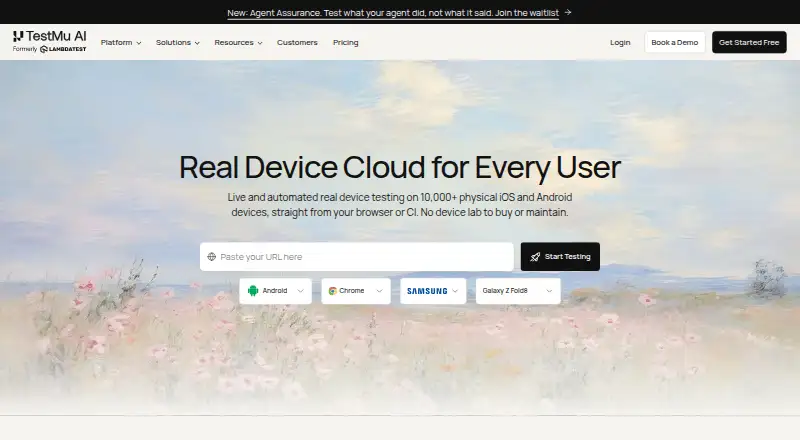
What TestMu AI Real Device Cloud is
TestMu AI Real Device Cloud provides live and automated testing on physical iOS and Android devices through a browser or CI. Teams can simulate 3G, 4G, 5G, and offline network conditions, test biometric prompts, and run video streaming tests. Accessibility checks include dynamic text sizing, high contrast, colour inversion, reduced motion, display zoom, and Assistive Touch. Appium Inspector and native DevTools help users locate elements, inspect app state, debug layouts, and verify accessibility. Location settings cover more than 150 countries. Teams can connect Appium, XCUITest, Espresso, Detox, or Maestro suites, and upload APK, AAB, or IPA files directly or by URL. Deployment options include shared public cloud, dedicated devices, and on-premise installations. The free plan allows one parallel test and five live sessions per month, each up to two minutes. Paid plans start at $39/mo (annual).
Who it suits
It suits teams testing mobile apps on real iOS and Android devices, including teams with needs for dedicated devices or on-premise deployment. The maker positions on-premise options for regulated industries with strict data-residency needs.
What it does well
- Tests on physical iOS and Android devices.
- Supports five named automation frameworks.
- Provides network, biometric, and accessibility testing options.
- Can set device locations in more than 150 countries.
- Offers shared, dedicated, and on-premise deployment choices.
What to know first
- Free plan allows one parallel test.
- Free plan includes five monthly live sessions.
- Each free live session is limited to two minutes.
- No free trial is listed.
Limits
The free plan permits one parallel test and five live sessions per month, with each session limited to two minutes. Real Device Plus Live is $49 a month per parallel test; Real Device Plus Automation Cloud is $249 a month per parallel test.
Plans
| Plan | Billed and limits | Price |
|---|---|---|
| Free | 1 parallel test · 5 live sessions per month · up to 2 minutes per session | Free |
| Real Device Plus Automation Cloud | month to month · per parallel test · Appium, Espresso, and XCUITest automation on real devices | $249 a month |
| Real Device Plus Live | month to month · per parallel test · live testing on 10,000+ real Android and iOS devices | $49 a month |
| Dedicated / Private Real Device Cloud | Dedicated devices · SLA · premium support · on-premise options | On request |
As testmuai.com lists them, read 30 Sept 2026. The maker's own page has the final word.
Getting started
- Open the Real Device Cloud website
- Choose shared public cloud, dedicated devices, or on-premise deployment
- Upload an .apk, .aab, or .ipa file, or provide its URL
- Connect a supported automation suite with one endpoint change, if needed
- Start with the free plan or select a paid plan
TestMu AI Real Device Cloud is a browser- and CI-based service for testing apps on a large pool of physical iOS and Android hardware. It is best suited to mobile teams that need realistic device, network, accessibility, and location coverage, particularly when security requirements extend beyond a shared cloud. The trade-off is a tightly capped free tier and paid capacity priced by parallel test.
Overview
The service combines live sessions with automated runs on more than 10,000 real devices. That breadth helps teams catch hardware-specific behavior that simulators may miss, while browser access supports manual investigation and CI access fits regression pipelines. Deployment can be shared public cloud, dedicated devices reserved for one team, or on-premise behind a customer's firewall, so the same product can serve a small project and a regulated organization.
Key features
Network simulation covers 3G, 4G, 5G, and offline conditions. Biometric prompt simulation and video-streaming tests add coverage for interactions that are difficult to reproduce reliably on a desktop. These controls are particularly relevant to apps whose reliability depends on connectivity, media playback, or device authentication.
Accessibility checks include dynamic text sizing, high contrast, colour inversion, reduced motion, display zoom, and Assistive Touch. Appium Inspector and native DevTools let testers find elements, inspect app state, diagnose layouts, and check accessibility during debugging. The combination is more useful than a device catalogue alone, although teams gain the most when they already have a repeatable diagnostic process.
Location can be set in more than 150 countries for regional behavior checks. APK, AAB, and IPA files can be uploaded directly or by URL, with integrations for App Store, Play Store, App Center, and TestFlight in supported scenarios. Appium, XCUITest, Espresso, Detox, and Maestro suites connect through one endpoint change, reducing the work required to move existing automation into the cloud.
Security features include isolated, wiped devices, TLS 1.2-or-higher encryption in transit, and AES-256 encryption at rest. The infrastructure is described as SOC 2, GDPR, and HIPAA compliant. Dedicated devices are offered 24/7 without queuing, with guaranteed SLAs and priority support, while private-cloud and on-premise options address isolation and data-residency needs.
Pricing
The Free plan costs nothing and permits one parallel test, five live sessions per month, and sessions of up to two minutes. It is suitable for occasional smoke checks or evaluating the workflow, not for a continuing test programme. There is no free trial, so the free allowance is the practical trial.
Real Device Plus Live costs $49 a month, billed month to month, per parallel test. It provides live testing on the 10,000-plus real Android and iOS devices and fits teams focused on interactive investigation. Real Device Plus Automation Cloud costs $249 a month, also billed month to month and per parallel test, adding Appium, Espresso, and XCUITest automation on real devices. That plan is aimed at teams running repeatable CI suites; the per-parallel-test model means increasing concurrency increases the bill.
Dedicated / Private Real Device Cloud has custom pricing. It adds dedicated devices, SLA coverage, premium support, and on-premise options, making it the relevant choice for enterprises that cannot accept shared infrastructure or queued access.
Platforms
TestMu AI Real Device Cloud supports Android, iOS, web, API, and self-hosted deployment. Its stated operating-system coverage includes iOS, Android, Windows, macOS, and ChromeOS, with both browser testing and direct device access. Mobile web testing and both direct-file and URL-based app uploads are supported.
Who it's for
Choose the public cloud for a team starting out or handling variable demand. Dedicated cloud is better for enterprises that need isolation, guaranteed service levels, and unqueued devices. On-premise deployment targets regulated industries with strict residency requirements. The free plan is only a fit for brief, infrequent checks; sustained manual work or automation requires a paid tier.
Pros and cons
Pros
- Broad physical coverage: More than 10,000 real iOS and Android devices support hardware-specific validation.
- Deep scenario testing: Network throttling, biometrics, video, accessibility modes, and 150-plus-country locations cover difficult production conditions.
- Flexible deployment: Shared, dedicated, private-cloud, and on-premise choices accommodate different isolation and residency needs.
- Automation flexibility: Five major frameworks can connect with one endpoint change.
- Enterprise controls: Isolated wiped devices, encryption, compliance claims, SLAs, and priority support strengthen the case for larger organizations.
Cons
- Minimal free allowance: One parallel test, five monthly live sessions, and two-minute sessions are insufficient for regular QA.
- Concurrency-based cost: Both principal paid plans charge per parallel test, so faster or more simultaneous pipelines raise spending.
- Automation tier is expensive: The 249.00 USD monthly entry point is difficult to justify for small teams that only need occasional automated runs.
- No free trial: Prospective buyers must judge fit through the restricted free plan before committing.
Alternatives
Browse Device Farm Software for a wider category comparison, or Mobile App Testing Software for broader testing tools.
- Maestro is the better choice when free, open-source local runs and support for Linux, macOS, Windows, web, Android, and iOS matter more than a hosted 10,000-device pool.
- SureAsset suits teams seeking free asset-lifecycle and hardware/software license management rather than device testing.
- Appetize fits users who prefer a freemium browser service with a two-active-device free cap and paid plans beginning with its 59.00 USD monthly Starter tier.
- Samsung Remote Test Lab is a free option when Samsung-focused access, limited daily credits, and variable reservation times are acceptable.
- Firebase Cloud Messaging is for teams needing no-cost push messaging, not a real-device testing cloud.
- TestingBot is worth considering for paid cross-platform testing with a free trial and a 20.00 EUR-per-year Live plan billed annually.
- BrowserStack Live is an alternative for live desktop and mobile browser testing, with a Freelancer plan at $12.50 a month when billed annually.
- DeviceFarmer is a free, self-hosted-oriented device-farm alternative.
Verdict
TestMu AI Real Device Cloud is a strong choice for teams that need extensive real-device coverage, serious debugging and accessibility checks, and a path from shared testing to dedicated or on-premise infrastructure. Choose it when realistic breadth and enterprise deployment matter more than low entry cost. Look elsewhere if you need generous free usage, predictable flat pricing for high concurrency, or only a small number of occasional device checks.
Verdict
TestMu AI Real Device Cloud offers real-device testing with live and automation workflows, debugging tools, and multiple deployment choices. The free allowance is tightly limited by parallel tests, sessions, and session duration.
Questions
Is there a free plan?
Yes. The Free plan costs nothing and includes one parallel test, five live sessions per month, and up to two minutes per session.
What does Real Device Plus Live cost?
It costs $49 a month, billed month to month per parallel test.
What does Real Device Plus Automation Cloud cost?
It costs $249 a month, billed month to month per parallel test.
Which automation frameworks can connect?
The listed frameworks are Appium, XCUITest, Espresso, Detox, and Maestro.
What deployment choices are available?
The service is offered as a shared public cloud, dedicated devices reserved for a team, or an on-premise deployment behind the customer’s firewall.
Which app stores and services are listed as integrations?
The listed integrations are App Store, Play Store, App Center, and TestFlight for app access in supported scenarios.
Facts from TestMu AI Real Device Cloud's own pages
- Accessibility
- Real-device accessibility checks include dynamic text sizing, high contrast, colour inversion, reduced motion, display zoom, and Assistive Touch. · testmuai.com, 30 Sept 2026
- App uploads
- The product accepts .apk, .aab, and .ipa files directly or by URL for testing on real iOS and Android devices. · testmuai.com, 30 Sept 2026
- Automation frameworks
- Teams can connect Appium, XCUITest, Espresso, Detox, or Maestro suites to the cloud with one endpoint change. · testmuai.com, 30 Sept 2026
- Deployment choices
- The product is offered as a shared public cloud, dedicated devices reserved for a team, or an on-premise deployment behind the customer's firewall. · testmuai.com, 30 Sept 2026
- Device debugging
- The cloud provides Appium Inspector and native DevTools to locate elements, debug layouts, inspect app state, and verify accessibility. · testmuai.com, 30 Sept 2026
- Enterprise support
- Dedicated devices are described as available 24/7 without queuing, with guaranteed SLAs and priority support. · testmuai.com, 30 Sept 2026
- Founded
- 2017 · testmuai.com, 23 Sept 2026
- Headquarters
- San Francisco, California, United States · testmuai.com, 23 Sept 2026
- Integrations
- Real Device Cloud lists integrations with App Store, Play Store, App Center, and TestFlight for app access in supported scenarios. · testmuai.com, 30 Sept 2026
- Intended users
- The page positions the public cloud for teams getting started or with variable demand, dedicated cloud for enterprises needing isolation and SLA, and on-premise cloud for regulated industries with strict data residency. · testmuai.com, 30 Sept 2026
- Location testing
- Users can set a device location in more than 150 countries to test regional app behavior. · testmuai.com, 30 Sept 2026
- Security and compliance
- The product page describes SOC 2, GDPR, and HIPAA-compliant infrastructure and offers private cloud and on-premise deployment. · testmuai.com, 30 Sept 2026
- Security details
- The FAQ states sessions use isolated, wiped devices, with traffic encrypted in transit using TLS 1.2 or higher and at rest using AES-256. · testmuai.com, 30 Sept 2026
- Testing conditions
- It supports network throttling for 3G, 4G, 5G, and offline conditions, plus biometric prompt simulation and video streaming tests. · testmuai.com, 30 Sept 2026
- What it does
- Real Device Cloud offers live and automated testing on 10,000+ physical iOS and Android devices through a browser or CI. · testmuai.com, 30 Sept 2026
Where TestMu AI Real Device Cloud stands on Freedom251
- Device Farm Software#7 of 26
- Mobile App Testing Software#11 of 32