Freedom251 › Test Analytics Software
TestBeats
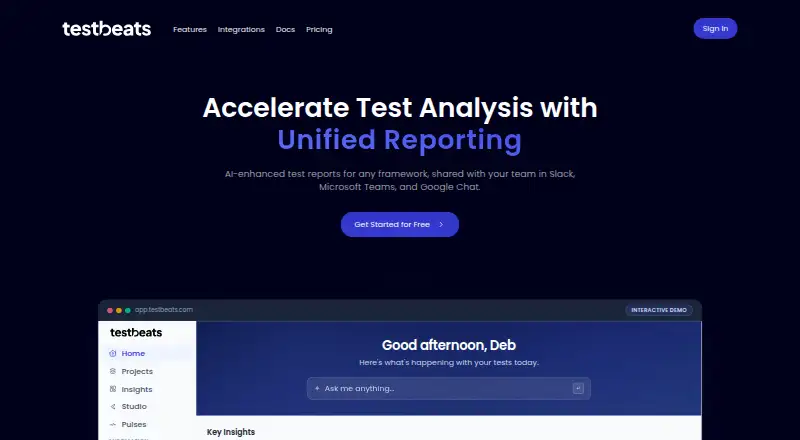
What TestBeats is
TestBeats is a test reporting and management tool for publishing results from automated testing frameworks. It provides AI failure summaries, failure analysis, failure signatures, error clusters, flaky-test detection, and execution trend reports. Teams can manage manual test cases as version-controlled Gherkin feature files in Git and sync them through CI/CD. Supported frameworks include Playwright, Cypress, Selenium, JUnit, TestNG, Cucumber, Jest, Vitest, PyTest, JMeter, Newman, Robot Framework, and others. Results can be sent to services including Slack, Microsoft Teams, Google Chat, GitHub, and InfluxDB, or to custom targets. The CLI supports npx, npm installation, downloadable executables, and programmatic JavaScript use; executables are available for Linux, macOS, and Windows. The Free plan provides 100 credits for the first 30 days, then 25 per month, with about 100 test runs monthly and 30-day result retention. Pro 200 costs $18 a month. Each run and unique test case uses credits, as does AI analysis; unused credits reset each billing cycle rather than rolling over.
Who it suits
TestBeats suits teams publishing automated test results who also want to manage manual cases in Git. Its framework integrations and result notifications support teams working with the listed testing and communication tools.
What it does well
- Supports a broad range of testing frameworks
- Manual cases use version-controlled Gherkin files
- Results can be delivered to chat and developer tools
- CLI supports npx, npm, executables, and JavaScript
What to know first
- Free plan retention is 30 days
- Unused credits do not roll over
- Self-hosted deployment is not available
Limits
The Free plan provides 100 credits for its first 30 days, then 25 credits per month, with about 100 runs per month, up to 1,000 unique test cases, 30-day result retention, and 10 attachments per run. Pro plans have 90-day retention; Enterprise lists unlimited credits, runs, and cases.
Plans
| Plan | Billed and limits | Price |
|---|---|---|
| Free | $0 /month · 100 credits first 30 days, then 25/month · up to 1,000 unique test cases · about 100 test runs/month · 30-day retention · 10 attachments/run | Free |
| Pro 2000 | $119 /month · 2,000 credits · up to 4,000 test runs · up to 40,000 test cases | $119 a month |
| Pro 200 | $18 /month · 200 credits · up to 400 test runs · up to 4,000 test cases | $18 a month |
| Pro 5000 | $249 /month · 5,000 credits · up to 10,000 test runs · up to 100,000 test cases | $249 a month |
| Pro 500 | $39 /month · 500 credits · up to 1,000 test runs · up to 10,000 test cases | $39 a month |
| Pro 1000 | $69 /month · 1,000 credits · up to 2,000 test runs · up to 20,000 test cases | $69 a month |
| Enterprise | Custom pricing · Unlimited credits · unlimited test runs · unlimited test cases · audit logs · priority support | On request |
As testbeats.com lists them, read 15 Oct 2026. The maker's own page has the final word.
Getting started
- Visit the TestBeats website and sign in with a Google or Microsoft account
- Install or invoke the CLI with npx, npm, a downloadable executable, or JavaScript
- Connect a supported testing framework and CI/CD integration
- Publish test results and configure delivery to a supported notification target
TestBeats is a test reporting and management platform for teams combining automated test results with manual cases. It is best suited to teams working across supported frameworks that want failure analysis alongside CI-connected reporting. Its broad integrations are a strength, but credit allowances and non-rolling balances make usage a central plan decision.
Overview
TestBeats brings automated result reporting and manual test-case management into one workflow. Teams can store manual cases as version-controlled Gherkin feature files in Git and sync them through CI/CD, rather than maintaining them separately from the codebase. That combination suits teams that want source-controlled cases as well as reports; teams needing only a place to publish results may not need the management layer.
Key features
Failure analysis and trends
AI failure summaries, automated analysis, failure signatures and error clusters are designed to help teams make sense of failed runs. Flaky-test detection and execution trend reports add visibility into recurring instability and changes over time. These tools are most useful when a team has enough test activity to reveal patterns, but analysis has a direct credit cost: about 0.25 credits per failed run.
Frameworks and delivery
Official integrations cover Cypress, Playwright, Selenium, WebdriverIO, JUnit, TestNG, Cucumber, Mocha, Jest, Vitest, PyTest, JMeter, Newman, Robot Framework, NUnit, xUnit and MSTest. The supported-framework list also includes PHPUnit, RSpec, Karate, Artillery and k6. Results can be delivered to Slack, Microsoft Teams, Google Chat, GitHub, InfluxDB, HTTP endpoints and custom targets. This breadth can accommodate varied test stacks and reporting destinations without narrowing the product to a single framework.
CLI and access
The CLI is available through npx, npm, downloadable executables and programmatic JavaScript use; executables are provided for Linux, macOS and Windows. The portal supports Google and Microsoft sign-in, and users with a shared work-email domain automatically gain access to their organization’s results. For credentials and integrations, the CLI documentation advises keeping webhook URLs, tokens and API keys in environment or secret variables rather than configuration files.
Pricing
TestBeats is freemium. The Free plan is billed at $0 /month and starts with 100 credits for the first 30 days, then provides 25 credits per month. It allows about 100 test runs per month, up to 1,000 unique test cases, 10 attachments per run and 30-day result retention. That is a useful way to assess a smaller workload, but the reduced monthly credit allowance and short retention limit make it a poor fit for sustained high-volume reporting.
Paid Pro plans are billed monthly and scale credits, run and case allowances together:
- Pro 200: $18 a month; 200 credits, up to 400 test runs and 4,000 test cases.
- Pro 500: $39 a month; 500 credits, up to 1,000 test runs and 10,000 test cases.
- Pro 1000: $69 a month; 1,000 credits, up to 2,000 test runs and 20,000 test cases.
- Pro 2000: $119 a month; 2,000 credits, up to 4,000 test runs and 40,000 test cases.
- Pro 5000: $249 a month; 5,000 credits, up to 10,000 test runs and 100,000 test cases.
Pro retains results for 90 days, three times the Free plan’s period. A test run costs 0.5 credits and each unique test case costs 0.05 credits, so the listed run and case ceilings are not the only consideration when estimating a workload that also uses AI analysis. Unused credits reset each billing cycle and do not roll over, making a plan sized well above regular use less appealing.
Enterprise has custom pricing and provides unlimited credits, test runs and test cases, unlimited retention, audit logs and priority support. It is the tier for organizations that need those capacity and support provisions rather than a fixed monthly credit package.
Platforms
TestBeats is available across API, Linux, macOS, web and Windows. The CLI executables cover the three desktop operating systems; the product does not offer self-hosted deployment, so organizations requiring that model should look elsewhere.
Who it's for
TestBeats is a good fit for teams that run automated tests across its supported frameworks and want reporting, failure triage and Git-managed manual cases in the same service. Smaller teams can start on Free, while teams with regular reporting volume can choose a Pro allowance suited to their runs and case counts. The credit reset means actual use should be estimated per billing cycle, including failed runs that incur AI-analysis credits. Teams requiring self-hosting, or unwilling to accept a fixed monthly allowance, are less well served.
Pros and cons
- Pro: Broad framework coverage, from mainstream browser and unit-test tools to load testing, supports mixed test stacks.
- Pro: Git-versioned Gherkin cases synced through CI/CD connect manual testing to a source-controlled workflow.
- Pro: Failure analysis, flaky-test detection and trend reports provide several ways to investigate and monitor results.
- Con: Credits are consumed by runs, unique cases and AI analysis, and unused balances expire each billing cycle, so volume needs careful sizing.
- Con: Free retention is 30 days and the plan drops to 25 credits per month after the first 30 days, limiting its usefulness for larger or longer-running histories.
- Con: Self-hosted deployment is not offered, which rules it out for teams that require that deployment option.
Alternatives
For a broader category comparison, browse Test Analytics Software.
- ReportPortal is worth considering when self-hosted deployment matters: its free community edition is open source and supports Docker, Kubernetes or Google Cloud Marketplace.
- Allure Report is a fit for readers seeking a free, open-source test reporting tool under the Apache License 2.0.
- Buildkite may suit teams prioritizing CI capacity and user allowances, with a free plan covering up to 5 users, 10 concurrent jobs and 2,000 Linux vCPU minutes per month.
- Qualflare is an alternative for a small project: its free Starter plan permits one project, one active user, 200 test cases and 100 test reports.
- Testspace is another freemium option for teams comparing project and session allowances; its Basic plan is $32 a month for four users, two private projects, unlimited public projects and 200 sessions.
- Argos is an option to consider for teams interested in an open-source, MIT-licensed platform and SDKs.
- BrowserStack Test Reporting & Analytics may appeal to teams weighing test-history and log-retention allowances; its free plan keeps test-run history and assertion-failure logs for up to 60 days, video logs for 30 days and debug logs for 60 days.
- Flakiness.io is another alternative to compare for test-flakiness needs.
Verdict
Choose TestBeats if your team wants automated test reporting, failure analysis and Git-managed manual cases in one CI-connected product, and can match a monthly credit allowance to its test volume. Its framework and notification coverage are substantial, but the resetting credits, limited Free retention and lack of self-hosting are clear reasons to look elsewhere if predictable high-volume use or deployment control matters more.
Verdict
TestBeats combines test reporting with manual case management and failure analysis. Check the credit allowances and retention period against your expected testing volume before choosing a plan.
Questions
Is there a free plan?
Yes. Free provides 100 credits for the first 30 days, then 25 credits per month.
How much do the Pro plans cost?
Pro 200 is $18 a month; Pro 500 is $39 a month; Pro 1000 is $69 a month; Pro 2000 is $119 a month; and Pro 5000 is $249 a month.
Which platforms can run the CLI?
Downloadable executables are provided for Linux, macOS, and Windows. The CLI also supports npx, npm installation, and programmatic JavaScript use.
Which testing frameworks does it integrate with?
Listed frameworks include Playwright, Cypress, Selenium, WebdriverIO, JUnit, TestNG, Cucumber, Mocha, Jest, Vitest, PyTest, JMeter, Newman, Robot Framework, NUnit, xUnit, and MSTest.
How does the Free plan differ in retention?
Free retains test results for 30 days. Pro provides 90-day retention, and Enterprise offers unlimited retention.
Can TestBeats be self-hosted?
No. Self-hosted deployment is listed as unavailable.
Facts from TestBeats's own pages
- AI failure summaries
- The platform generates AI summaries for failed test runs. · docs.testbeats.com, 15 Oct 2026
- AI reporting
- The platform provides AI failure summaries, automated failure analysis, smart analysis, failure signatures, and error clusters. · testbeats.com, 30 Sept 2026
- AI Studio
- AI Studio can answer natural-language questions by generating charts that can be saved as dashboard widgets. · testbeats.com, 15 Oct 2026
- API authentication
- Publishing to the portal uses a TestBeats API key, including the TEST_BEATS_API_KEY environment variable. · docs.testbeats.com, 15 Oct 2026
- Authentication
- The portal supports Google and Microsoft account sign-in, and users sharing a work-email domain automatically gain access to their organization’s results. · docs.testbeats.com, 30 Sept 2026
- CI/CD integrations
- The site documents GitHub Actions, Azure DevOps, Jenkins, GitLab, and CircleCI workflows. · testbeats.com, 15 Oct 2026
- CLI
- The TestBeats CLI supports npx, downloadable executables, npm installation, and programmatic JavaScript usage. · docs.testbeats.com, 30 Sept 2026
- CLI commands
- The CLI provides publish, init, and manual sync commands. · docs.testbeats.com, 15 Oct 2026
- Community limitation
- A GitHub discussion records a user reporting difficulty passing a dynamic CircleCI build value into config.json for a Teams notification. · github.com, 15 Oct 2026
- Credit costs
- A test run costs 0.5 credits, a unique test case costs 0.05 credits, and AI analysis costs about 0.25 credits per failed run. · docs.testbeats.com, 15 Oct 2026
- Credit limit
- Credits reset each billing period and unused credits do not roll over. · docs.testbeats.com, 15 Oct 2026
- Credit rollover
- Unused credits reset each billing cycle and do not roll over to the next month. · testbeats.com, 30 Sept 2026
- Credit usage
- A test run costs 0.5 credits, a unique test case costs 0.05 credits, and AI analysis costs about 0.25 credits per failed run. · testbeats.com, 30 Sept 2026
- Documentation depth
- Reference documentation includes CLI commands, configuration schemas, targets, extensions, parameter types, examples, return values, and error codes. · docs.testbeats.com, 15 Oct 2026
- Error clusters
- Error-cluster processing groups recurring error messages within runs. · testbeats.com, 15 Oct 2026
- Failure signatures
- Failure signatures group semantically similar failures across test runs. · testbeats.com, 15 Oct 2026
- Framework coverage
- Documented integrations cover Playwright, Cypress, Selenium, WebdriverIO, JUnit, TestNG, Cucumber, Mocha, Jest, Vitest, PyTest, JMeter, Newman, Robot Framework, NUnit, xUnit, MSTest, PHPUnit, RSpec, Karate, Artillery, and k6. · testbeats.com, 15 Oct 2026
- Frameworks
- Official integrations include Playwright, Cypress, Selenium, WebdriverIO, JUnit, TestNG, Cucumber, Mocha, Jest or Vitest, PyTest, JMeter, Newman, Robot Framework, and NUnit or xUnit or MSTest. · testbeats.com, 30 Sept 2026
- Independent description
- Exbridge describes TestBeats as free open-source software that automatically sends test results to major chat tools and can be self-hosted from source. · exbridge.jp, 15 Oct 2026
- Independent example
- The public Playwright example repository installs dependencies, runs Playwright tests, and publishes results with npx testbeats publish. · github.com, 15 Oct 2026
- Independent licence evidence
- Exbridge reports the project uses the MIT licence, is primarily JavaScript, and was publicly released on GitHub in August 2021. · exbridge.jp, 15 Oct 2026
- Independent praise: collaboration
- A LinkedIn post by Abhilash Giridharan praises Slack, Microsoft Teams, and Google Chat integrations for keeping teams informed and collaborative. · linkedin.com, 15 Oct 2026
- Installation
- Users can run TestBeats with npx, install it globally from npm, download executables, or use the JavaScript package. · docs.testbeats.com, 15 Oct 2026
- Licence
- The documentation and public repository identify the software as MIT licensed. · github.com, 15 Oct 2026
Where TestBeats stands on Freedom251
- Test Analytics Software#3 of 30