Freedom251 › CI Failure Analysis And Flaky Test Tools

Argos
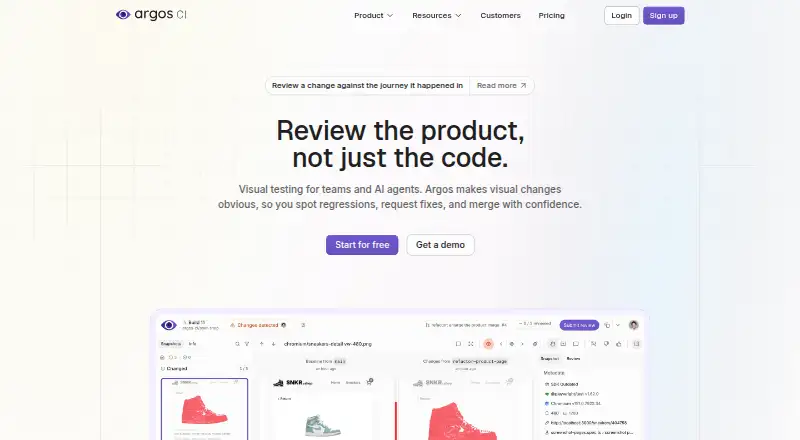
What Argos is
Argos is a visual testing platform that stores uploaded screenshots, compares them across builds, and helps teams review visual changes. A customer's own test suite captures and uploads screenshots; Argos does not connect to applications to capture them. It detects screenshot changes and can also compare Markdown, JSON, HTML, CSS, JavaScript, XML, YAML, and plain text. It works with Playwright, Cypress, Storybook, WebdriverIO, its CLI, or other frameworks. Integrations include GitHub Actions and deployment providers such as Vercel, Netlify, and Cloudflare, alongside GitHub, GitLab, Slack, Discord, and Microsoft Teams. For AI agents, Argos offers a remote MCP server, CLI workflows, and a REST API to inspect diffs, review builds, collaborate, and deploy previews. Its free Hobby plan includes up to 5,000 screenshots and public links with 30-day retention. Pro costs $100 a month, billed monthly based on usage, and includes 35,000 screenshots and one-year retention. Argos says its SDKs and platform are open source and MIT-licensed, and that it is SOC 2 Type II and GDPR compliant.
Who it suits
Argos suits teams that want to compare screenshots and other file changes between builds using their existing test framework. It may also suit teams connecting visual review to Git or collaboration tools.
What it does well
- Works with Playwright, Cypress, Storybook, and WebdriverIO
- Can diff screenshots and several text-based file types
- Free Hobby plan includes up to 5,000 screenshots
- SDKs and platform are open source and MIT-licensed
What to know first
- The customer's test suite must capture screenshots
- Hobby public links have 30-day retention
- Pro is $100 a month, billed monthly based on usage
Limits
The free Hobby plan allows up to 5,000 screenshots and public links with 30-day retention. Pro includes 35,000 screenshots; additional screenshots cost $0.004 each, and Storybook screenshots cost $0.0015 each.
Plans
| Plan | Billed and limits | Price |
|---|---|---|
| Hobby Plan | forever · Up to 5,000 screenshots · visual & snapshot testing · public links with 30-day retention · GitHub & GitLab integration · community support | Free |
| Pro Plan | Billed monthly based on usage · Includes 35,000 screenshots · extra screenshots $0.004 · Storybook screenshots $0.0015 · team collaboration · 1-year retention · Slack & Microsoft Teams notifications · Pro support | $100 a month |
| Enterprise | Custom screenshot number · SAML SSO included · fine-grained access control · dedicated support · 99.99% uptime SLA | On request |
As argos-ci.com lists them, read 1 Oct 2026. The maker's own page has the final word.
Getting started
- Visit https://argos-ci.com/ to access Argos on the web.
- Choose the free Hobby plan or the Pro plan at $100 a month billed based on usage.
- Capture screenshots through your test suite using Playwright, Cypress, Storybook, WebdriverIO, the CLI, or another framework.
- Upload screenshots to Argos for comparison and review.
- Connect GitHub Actions, a deployment provider, or collaboration tools as needed.
Verdict
Argos provides screenshot comparison plus support for text-based diffs and common testing integrations. Teams should account for screenshot capture being their responsibility and review the plan limits that apply to retention and volume.
Questions
Is Argos free?
Yes. The free Hobby plan is billed forever and allows up to 5,000 screenshots.
How much does Pro cost?
Pro costs $100 a month, billed monthly based on usage. It includes 35,000 screenshots.
Which testing tools work with Argos?
It supports Playwright, Cypress, Storybook, WebdriverIO, its CLI, or any framework.
Does Argos capture screenshots from my application?
No. The customer's test suite captures and uploads screenshots; Argos does not connect to applications to produce them.
Is Argos open source?
Argos says its SDKs and platform are open source and MIT-licensed.
What platforms can I use?
Argos lists web and API.
Facts from Argos's own pages
- AI agent access
- Argos provides a remote MCP server, CLI workflows, and a REST API for agents to inspect diffs, review builds, collaborate, and deploy previews. · argos-ci.com, 1 Oct 2026
- Capture responsibility
- Argos says the customer's test suite captures screenshots; Argos does not connect to applications to produce them. · argos-ci.com, 1 Oct 2026
- CI and deployment
- Argos integrates with GitHub Actions and deployment providers including Vercel, Netlify, and Cloudflare. · argos-ci.com, 1 Oct 2026
- Collaboration integrations
- Connected integrations include GitHub, GitLab, Slack, Discord, and Microsoft Teams. · argos-ci.com, 1 Oct 2026
- Data protection
- GitHub and GitLab access tokens are encrypted at rest, and Argos says it never needs source-code access. · argos-ci.com, 1 Oct 2026
- Data storage
- Screenshots are stored on AWS S3 in the United States and replicated to the European Union, encrypted at rest and in transit. · argos-ci.com, 1 Oct 2026
- File coverage
- Argos detects changes in screenshots and can diff Markdown, JSON, HTML, CSS, JavaScript, XML, YAML, and plain text. · argos-ci.com, 1 Oct 2026
- Headquarters
- Paris, France · argos-ci.com, 28 Sept 2026
- Open source
- Argos says its SDKs and platform are open source and MIT-licensed. · argos-ci.com, 1 Oct 2026
- Product purpose
- Argos is a visual testing platform that stores uploaded screenshots, compares them across builds, and lets teams review visual changes. · argos-ci.com, 1 Oct 2026
- Security certification
- Argos states that it is SOC 2 Type II compliant and GDPR compliant. · argos-ci.com, 1 Oct 2026
- Support
- Argos offers sales and product support by email and provides a Discord community for user help. · argos-ci.com, 1 Oct 2026
- Testing integrations
- Argos plugs into Playwright, Cypress, Storybook, WebdriverIO, its CLI, or any framework. · argos-ci.com, 1 Oct 2026
Where Argos stands on Freedom251
- CI Failure Analysis And Flaky Test Tools#3 of 21
- Visual Regression Testing Software#4 of 26
- Browser Testing Software#7 of 34
- Test Analytics Software#7 of 30
- Visual Testing#4 of 17