Freedom251 › ML Experiment Tracking Software
TensorBoard
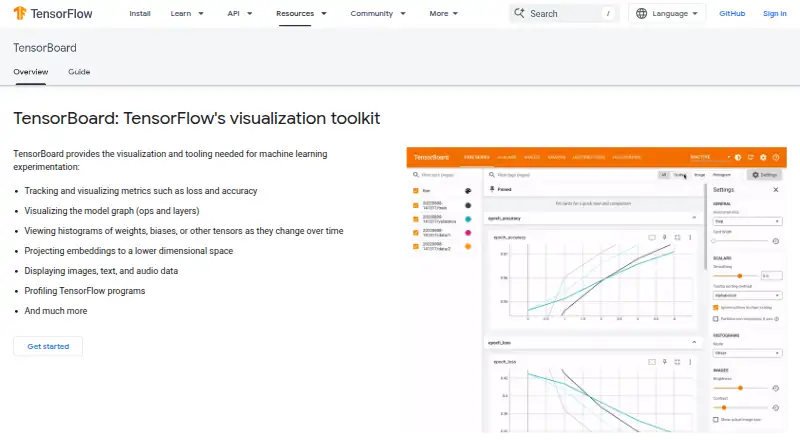
What TensorBoard is
TensorBoard is a free suite of visualization tools for examining, debugging, and optimizing TensorFlow programs during machine learning experiments. It tracks metrics such as loss and accuracy, and its Graph Explorer helps inspect TensorFlow model graphs. Dashboards display changes in tensor distributions over time, including histograms and percentile summaries. TensorBoard can also show logged images, audio, and text, project high-dimensional embeddings, and profile TensorFlow programs. For Keras workflows, a TensorFlow callback can record metrics, training graph visualizations, weight histograms, and sampled profiling data. You can launch it from the command line or in a notebook with the `%tensorboard` line magic. The project is designed to run offline, including locally, behind a corporate firewall, or in a datacenter. TensorBoard 2.0 and later uses `--host localhost` by default; `--bind_all` exposes it on public IPv4 and IPv6 networks. The README identifies Chrome and Firefox as supported browsers and notes that other browsers may have bugs or performance issues. It is licensed under Apache-2.0.
Who it suits
TensorBoard suits people working with TensorFlow who need to inspect training metrics, model graphs, distributions, or profiling data. It can also suit teams who need to run visualization locally or in a datacenter.
What it does well
- Tracks metrics such as loss and accuracy.
- Graph Explorer displays TensorFlow model graphs.
- Shows histograms and percentile summaries over time.
- Supports logged images, audio, text, and embeddings.
- Designed to run offline.
What to know first
- Without TensorFlow installed, it does not support log directories on Google Cloud Storage.
- Other browsers may have bugs or performance issues.
- `--bind_all` serves on the public network.
Plans
| Plan | Billed and limits | Price |
|---|---|---|
| TensorBoard | No price or usage limits stated on the opened pages | Free |
As tensorflow.org lists them, read 30 Sept 2026. The maker's own page has the final word.
Getting started
- Open the TensorBoard website.
- Use the command line or launch it in a notebook with `%tensorboard`.
- Use the TensorFlow Keras callback to record training data if your workflow uses Keras.
- Use `--bind_all` only if you need TensorBoard to serve on the public network.
TensorBoard is a free, TensorFlow-focused suite for examining what happens during machine-learning experiments. It best serves developers and researchers who want detailed run diagnostics in a local or self-hosted workflow. Its visualization and profiling coverage is broad, but it is not a complete experiment-management platform.
Overview
TensorBoard turns TensorFlow logs into interactive views for understanding, debugging, and improving training. You can run it through an API, on Linux, macOS, Windows, or the web, including a self-hosted installation. That deployment range suits teams that keep experiments on their own machines, inside a corporate firewall, or in a datacenter rather than sending runs to a hosted service.
The offline orientation is a practical advantage for sensitive projects and for work without dependable external connectivity. TensorBoard’s center of gravity remains TensorFlow experimentation, so teams seeking broad lifecycle management should treat it as a diagnostic companion rather than their sole machine-learning system.
Key features
Scalar dashboards chart measures such as loss and accuracy, making training progress and divergence easier to spot. Graph Explorer renders TensorFlow model graphs so you can inspect structure instead of inferring it from code alone. Histogram and percentile views show how tensor distributions move over time, which can reveal changing weights or activations that a single score would hide.
Runs can include logged images, audio, and text, and TensorBoard can project high-dimensional embeddings. Those views are valuable when an experiment produces qualitative examples or representation data alongside numerical metrics. The profiler adds tools for investigating TensorFlow program performance, extending the product from result reporting into performance diagnosis.
The TensorFlow Keras callback records metrics, training-graph visualizations, weight histograms, and sampled profiling data during fitting. Notebook users can launch the interface with the %tensorboard line magic, while command-line startup suits scripts and repeatable local workflows.
There are operational caveats. TensorBoard supports Google Chrome and Firefox; other browsers can have bugs or performance problems. When TensorBoard runs without a TensorFlow installation, its README says log directories on Google Cloud Storage are unsupported. The default host setting in version 2.0 and later is localhost, which is the safer starting point; using --bind_all serves the interface on the public IPv4 and IPv6 network and therefore requires deliberate network protection.
Pricing
TensorBoard has one free plan, named TensorBoard, priced at $0. There is no free trial because the product is already free, and no published seat, usage, or quota limits apply to this plan. That makes it a straightforward choice for individual TensorFlow work and self-hosted teams that can operate their own environment. The trade-off is that the plan does not add hosted lifecycle features, and TensorBoard does not provide artifact tracking, dataset versioning, or a model registry.
Platforms
Supported platforms are API, Linux, macOS, self-hosted, web, and Windows. This combination favors local and infrastructure-controlled deployments, with notebook and command-line entry points for interactive or automated workflows.
Who it's for
Choose TensorBoard when your primary need is to inspect TensorFlow training behavior: compare metric curves, examine model graphs, study distributions, review rich logged outputs, or profile execution. It is especially suitable for Keras users who want callback-generated diagnostics and for organizations that need offline operation.
Look elsewhere if your team needs a central system for artifacts, datasets, model promotion, or broader experiment governance. TensorBoard can visualize evidence from runs, but it does not supply those cataloging and lifecycle functions.
Pros and cons
Pros
- Wide diagnostic coverage: metrics, graphs, distributions, multimedia logs, embeddings, and profiling address different stages of debugging.
- Strong TensorFlow and Keras fit: the callback captures several useful training views with little extra workflow design.
- Flexible deployment: API, notebook, command-line, offline, and self-hosted operation suit controlled environments.
- No software charge: the sole plan costs 0.00 USD and has no stated usage caps.
Cons
- Limited lifecycle scope: there is no artifact tracking, dataset versioning, or model registry.
- Browser constraints: Chrome and Firefox are the supported choices; other browsers may misbehave or perform poorly.
- Storage and exposure caveats: Google Cloud Storage logs require TensorFlow in the stated scenario, and --bind_all exposes the service publicly.
Alternatives
For a wider selection of experiment-tracking products, see ML Experiment Tracking Software.
- Comet is a freemium option with a free open-source plan and AI observability and agent-testing features.
- Weights & Biases suits teams wanting a free hosted tier with five model seats, 5 GB per month of storage, and 1 GB per month of Weave ingestion.
- ClearML is worth considering when an open-source self-hosted experiment platform and team-oriented community plan are priorities.
- MLRun offers an open-source plan with community support, plus a separately managed enterprise option.
- Trackio is a free choice centered on its library and Hugging Face hosting.
- ZenML fits users seeking unlimited executions, projects, and self-hosting in its open-source plan, with a paid Scale tier.
- GitLab Package Registry is a better fit when package storage and GitLab-based collaboration matter, with its free tier’s user, compute-minute, and storage allowances.
- Hopsworks AI Lakehouse suits teams wanting a free project with Feature Store and Model Registry capabilities.
Verdict
TensorBoard is the right pick for TensorFlow and Keras practitioners who want rich, no-cost visibility into training runs and performance while keeping deployment local or self-hosted. Choose it for diagnosis and visualization; look to a broader tracking platform when your priority is governed artifacts, datasets, model registries, or centralized team management.
Verdict
TensorBoard offers a range of visualizations and profiling tools for TensorFlow experimentation at no cost. Consider its browser and storage limitations, and note that `--bind_all` exposes the service on the public network.
Questions
How much does TensorBoard cost?
TensorBoard is free. Its listed plan is free.
Does TensorBoard have a free plan or trial?
It has a free plan. There is no free trial.
Which platforms does TensorBoard support?
The listed platforms are API, Linux, macOS, self-hosted, web, and Windows.
Is TensorBoard open source?
The TensorBoard GitHub repository identifies its license as Apache-2.0.
How can I launch TensorBoard?
You can launch it from the command line or in a notebook using `%tensorboard`.
Which browsers does TensorBoard support?
The README says TensorBoard can be used in Google Chrome or Firefox. It says other browsers may have bugs or performance issues.
Facts from TensorBoard's own pages
- Browser support
- The README says TensorBoard can be used in Google Chrome or Firefox and that other browsers may have bugs or performance issues. · github.com, 30 Sept 2026
- Histograms and distributions
- Dashboards show how tensor distributions change over time, including histograms and percentile summaries. · github.com, 30 Sept 2026
- Keras integration
- The TensorFlow Keras callback records metrics, training graph visualizations, weight histograms, and sampled profiling data. · tensorflow.org, 30 Sept 2026
- License
- The TensorBoard GitHub repository identifies its license as Apache-2.0. · github.com, 30 Sept 2026
- Metrics
- It tracks and visualizes metrics such as loss and accuracy. · tensorflow.org, 30 Sept 2026
- Model graphs
- Its Graph Explorer visualizes TensorBoard graphs to inspect TensorFlow models. · github.com, 30 Sept 2026
- Notebook integration
- TensorBoard can be launched in notebooks using the `%tensorboard` line magic or from the command line. · tensorflow.org, 30 Sept 2026
- Offline and hosting
- The project README says TensorBoard is designed to run offline and can be used locally, behind a corporate firewall, or in a datacenter. · github.com, 30 Sept 2026
- Other data
- TensorBoard can display logged images, audio, and text, and project high-dimensional embeddings. · tensorflow.org, 30 Sept 2026
- Profiling
- TensorBoard includes tools for profiling TensorFlow programs. · tensorflow.org, 30 Sept 2026
- Purpose
- TensorBoard is a suite of visualization tools for understanding, debugging, and optimizing TensorFlow programs during machine learning experimentation. · tensorflow.org, 30 Sept 2026
- Security setting
- TensorBoard 2.0 and later defaults to `--host localhost`; `--bind_all` makes it serve on the public network over IPv4 and IPv6. · github.com, 30 Sept 2026
- Storage limit
- The README says TensorBoard does not support log directories on Google Cloud Storage when run without a TensorFlow installation. · github.com, 30 Sept 2026
- Support
- The TensorBoard README directs general usage questions to Stack Overflow and bug reports to GitHub Issues. · github.com, 30 Sept 2026
Where TensorBoard stands on Freedom251
- ML Experiment Tracking Software#14 of 39
- Experiment Tracking#8 of 22