Freedom251 › Application Lifecycle Management Software

GitLab Package Registry
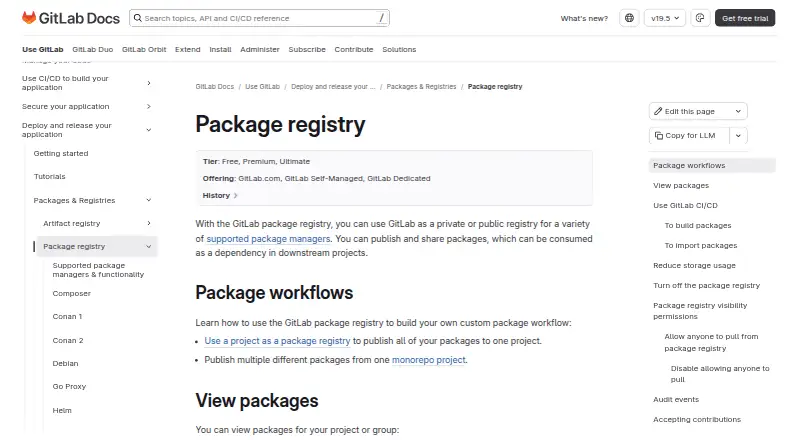
What GitLab Package Registry is
GitLab Package Registry gives projects a place to publish and share packages for other projects to use as dependencies. It can be configured as a private or public registry for supported package managers and is available through GitLab.com, GitLab Self-Managed, and GitLab Dedicated. Projects may host more than one package type, including packages built from a monorepo. Generally available formats include Generic packages, Helm, Maven, npm, NuGet, and PyPI; Composer and Conan are beta, while Debian, Go, and Ruby gems are experimental. GitLab CI/CD can build or import packages, and jobs can authenticate using CI_JOB_TOKEN. The registry also supports API administration and automation. Project roles control package access, and package protection rules can limit who pushes or deletes matching packages for supported formats. GitLab includes a Free plan; Premium is listed at $29 a year, billed annually per user per month, and a 30-day trial is offered. Conda, CRAN, RPM, and Swift are not supported.
Who it suits
It suits teams that need to publish packages for downstream projects, including projects using multiple package types or monorepos. Teams should check that their package format is supported and whether required controls are available on their plan.
What it does well
- Available on GitLab.com and self-managed deployments.
- CI/CD jobs can authenticate with CI_JOB_TOKEN.
- Projects can host multiple package types.
- API supports registry administration and automation.
What to know first
- Conda, CRAN, RPM, and Swift are unsupported.
- Some formats remain beta or experimental.
- Audit events require Premium or Ultimate.
- Dependency proxy is beta and Premium/Ultimate only.
Limits
The Free plan includes 5 users per top-level group, 400 compute minutes per month, and 10 GiB adjustable storage. Audit events and the beta dependency proxy are limited to Premium and Ultimate; Premium includes 10,000 compute minutes per month and 500 GiB storage.
Plans
| Plan | Billed and limits | Price |
|---|---|---|
| Free | per user/month · 5 users per top-level group · 400 compute minutes/month · 10 GiB adjustable storage | Free |
| Premium | per user/month, billed annually · 10,000 compute minutes/month · 500 GiB storage | $29 |
| Ultimate | Custom pricing · 50,000 compute minutes/month · 500 GiB storage | On request |
As docs.gitlab.com lists them, read 29 Sept 2026. The maker's own page has the final word.
Getting started
- Open the GitLab Package Registry documentation.
- Choose GitLab.com, GitLab Self-Managed, or GitLab Dedicated.
- Use a Free, Premium, or Ultimate plan.
- Publish packages for a supported package manager from a project.
- Configure GitLab CI/CD jobs to build or import packages and authenticate with CI_JOB_TOKEN.
Overview
GitLab Package Registry is a package-hosting service for projects that publish software for downstream projects to consume. It is best suited to teams already using GitLab for source and CI/CD workflows. Its main advantage is that packages, project permissions and automation sit together; teams should check format maturity and plan limits before making it their publishing backbone.
Key features
Formats and project workflows
The registry supports Generic packages, Helm, Maven, npm, NuGet and PyPI as generally available formats. Composer and Conan are beta, while Debian, Go and Ruby gems are experimental; Conda, CRAN, RPM and Swift are unsupported. That covers several widely used ecosystems, but a team relying on beta or experimental formats takes on more uncertainty than one using a generally available format.
A project can host multiple package types, including packages built from a monorepo. The API supports registry administration, and Generic packages can use API access for automation. GitLab CI/CD can build or import packages, with jobs authenticating through CI_JOB_TOKEN. For teams already building in GitLab, that makes package publishing part of the existing pipeline rather than a separate destination to administer.
Access, protection and auditing
Project roles govern package access. In private projects, Reporters can view and pull packages, while Developers can publish them. Protection rules can restrict who may push or delete matching packages for npm, PyPI, Maven and Conan. These controls help teams align package permissions with project roles, although protection coverage does not extend to every supported format.
Publication and deletion can generate audit events when the namespace setting is enabled, but audit events require Premium or Ultimate. The dependency proxy caches upstream packages to reduce external downloads and speed builds, but it is beta and also limited to Premium and Ultimate. Those paid-tier features may matter to teams with governance or caching needs; Free users should not assume they are included.
npm audit privacy
For npm audits, GitLab forwards requests to npmjs.com by default to retrieve vulnerability information. GitLab warns that audit request bodies can include private package information, so teams should consider that data flow before relying on npm audit.
Pricing
GitLab Package Registry is included in Free, Premium and Ultimate, and is offered on GitLab.com, GitLab Self-Managed and GitLab Dedicated. The pricing model is freemium, with a 30-day trial and paid plans starting at $29/user/mo (annual).
| Plan | Price and terms | Limits and inclusions |
|---|---|---|
| Free | free, billed per user/month | 5 users per top-level group, 400 compute minutes/month and 10 GiB adjustable storage |
| Premium | $29 a year, billed per user/month and annually | 10,000 compute minutes/month, 500 GiB storage and Priority Support |
| Ultimate | Custom pricing | 50,000 compute minutes/month and 500 GiB storage |
Free is a practical starting point for small groups, but its five-user group cap and 400 monthly compute minutes can constrain growing teams; storage is adjustable, not presented as unlimited. Premium raises compute capacity to 10,000 minutes and storage to 500 GiB, and adds Priority Support. Paid-plan support is 24/7 for Emergency severity and 24/5 for other impact levels. Ultimate offers 50,000 compute minutes with the same 500 GiB storage figure shown for Premium, but its custom pricing makes it a quote-based choice. The registry itself is included across all three plans, while audit events and the beta dependency proxy require a paid Premium or Ultimate tier.
Platforms
The registry is available through the web and API, and can be used on Linux or in self-hosted deployments. GitLab also offers it on GitLab.com and GitLab Dedicated, giving teams hosted and managed deployment choices alongside self-management.
Who it's for
GitLab Package Registry is a strong fit for teams that already use GitLab projects and CI/CD and want package publishing, project-based permissions and pipeline authentication in one environment. It also suits teams publishing several package types from a project or monorepo. It is a weaker fit when a required format is unsupported, when beta or experimental coverage is too risky for a critical release path, or when a small group will quickly outgrow Free's user and compute caps.
Pros and cons
- Pros: CI/CD jobs can publish or import packages and authenticate with CI_JOB_TOKEN, tying distribution to GitLab pipelines.
- Pros: Private-project roles separate package consumption from publishing, and protection rules add push and delete restrictions for several formats.
- Pros: Multiple package types can share a project, including packages built from a monorepo, with API support for administration and Generic package automation.
- Cons: Several formats are beta or experimental, and Conda, CRAN, RPM and Swift are unsupported, limiting its fit for some ecosystems.
- Cons: Free caps groups at five users and compute at 400 minutes/month; the dependency proxy and audit events require Premium or Ultimate.
- Cons: npm audit requests go to npmjs.com by default and may contain private package information.
Alternatives
For teams comparing broader application lifecycle management options, Application Lifecycle Management Software is a useful category to explore. GitOps-focused buyers can browse GitOps Tools, while teams selecting a model-focused catalog can compare Model Registry Software and ML Experiment Tracking Software. Game development teams can explore Game Version Control Software, and teams managing temporary test deployments can look at Preview Environment Software.
Innoslate has a free plan for educators and students who can sign up with an .edu account, making it a different option for that audience. ONES offers a free plan for up to 30 seats, though file size is capped at 30 MB and AI credits at 20 per user each month. Rally Software has a free Starter Edition for 50 named users, available only to organizations in listed countries. SAP Cloud ALM is free for eligible support customers, with one tenant per customer number and stated HANA-memory and monthly outbound API transfer allowances. Tuleap offers a commercial plan tailored to user count, hosting preferences and support expectations, including cloud or on-premise options. Kovair ALM uses quote-based pricing. Digital.ai TeamForge is a paid option with no free plan and directs buyers to sales for pricing and licensing. OpenText Core Performance Engineering uses usage-based pricing, with buyers paying for what they use and requesting a tailored quote.
Verdict
Choose GitLab Package Registry if your team already builds in GitLab and wants package distribution governed by project roles and connected directly to CI/CD. That integration is the clearest reason to prefer it. Look elsewhere if your essential formats are unsupported or you need fully mature support where GitLab marks a format beta or experimental; also budget for paid tiers if audit events or the dependency proxy are central to your workflow.
Verdict
GitLab Package Registry combines package hosting with project access controls, API support, and CI/CD integration. Confirm format support and plan requirements before relying on beta features, audit events, or the dependency proxy.
Questions
Is GitLab Package Registry included in the Free plan?
Yes. The Package Registry is included in Free, Premium, and Ultimate.
What is the Premium price?
Premium is listed at $29 a year, billed annually per user per month; the pricing note says paid plans start at 29 USD per user per month, annual.
Which package formats are generally available?
Generic packages, Helm, Maven, npm, NuGet, and PyPI are generally available. Composer and Conan are beta, while Debian, Go, and Ruby gems are experimental.
Where can I use the registry?
It is offered on GitLab.com, GitLab Self-Managed, and GitLab Dedicated.
Does the registry work with GitLab CI/CD?
Yes. GitLab CI/CD can build or import packages, and jobs can authenticate with CI_JOB_TOKEN.
Which plans include audit events?
Package publication and deletion audit events are a Premium and Ultimate feature, when the namespace setting is enabled.
Facts from GitLab Package Registry's own pages
- Access controls
- Project roles govern package access; for private projects, Reporters can view and pull packages and Developers can publish them. · docs.gitlab.com, 29 Sept 2026
- API and automation
- The registry can be administered through an API, and generic packages support API access for automation. · docs.gitlab.com, 29 Sept 2026
- Audit events
- Package publication and deletion can generate audit events when the namespace setting is enabled; audit events are a Premium and Ultimate feature. · docs.gitlab.com, 29 Sept 2026
- Availability
- The Package Registry is included in Free, Premium and Ultimate and is offered on GitLab.com, GitLab Self-Managed and GitLab Dedicated. · docs.gitlab.com, 29 Sept 2026
- CI/CD integration
- GitLab CI/CD can build or import packages, and jobs can authenticate to the registry with CI_JOB_TOKEN. · docs.gitlab.com, 29 Sept 2026
- Dependency proxy
- The dependency proxy caches copies of upstream packages to reduce external downloads and speed up builds; GitLab marks this feature beta and Premium/Ultimate. · docs.gitlab.com, 29 Sept 2026
- Founded
- 2011 · docs.gitlab.com, 28 Sept 2026
- Headquarters
- No physical headquarters; GitLab is all-remote · docs.gitlab.com, 28 Sept 2026
- Known limits
- GitLab lists Conda, CRAN, RPM and Swift among package formats that are not supported by the registry. · docs.gitlab.com, 29 Sept 2026
- npm security behavior
- For npm audits, GitLab forwards requests to npmjs.com by default to retrieve vulnerability information, and warns that audit request bodies can include private package information. · docs.gitlab.com, 29 Sept 2026
- Package protection
- Package protection rules can restrict who may push or delete matching packages, with support documented for npm, PyPI, Maven and Conan. · docs.gitlab.com, 29 Sept 2026
- Package workflows
- A project can host packages for multiple package types, including packages built from a monorepo. · docs.gitlab.com, 29 Sept 2026
- Purpose
- The registry lets users publish and share packages that downstream projects can consume as dependencies. · docs.gitlab.com, 29 Sept 2026
- Support
- The Premium plan includes Priority Support; GitLab states paid-plan support is 24/7 for Emergency severity and 24/5 for other impact levels. · about.gitlab.com, 29 Sept 2026
- Supported formats
- Generally available formats include Generic packages, Helm, Maven, npm, NuGet and PyPI; Composer and Conan are beta, while Debian, Go and Ruby gems are experiments. · docs.gitlab.com, 29 Sept 2026
- Visibility
- GitLab can be used as a private or public registry for supported package managers. · docs.gitlab.com, 29 Sept 2026
Where GitLab Package Registry stands on Freedom251
- Application Lifecycle Management Software#1 of 23
- Model registries#4 of 38
- Preview Environment Software#4 of 38
- GitOps Tools#7 of 35
- Git Hosting Services#12 of 35
- Game Version Control Software#12 of 28